
Įvadas
This manual provides essential information for the safe and effective use of your Canon PowerShot SX740 HS Digital Camera. Please read it thoroughly before operating the camera to ensure proper handling and to maximize its features. The Canon PowerShot SX740 HS is a compact digital camera featuring a 20.3-megapixel CMOS sensor, 40x optical zoom, 4K video recording capabilities, and built-in Wi-Fi and Bluetooth connectivity.

1 pav.: priekis view of the Canon PowerShot SX740 HS Digital Camera with the lens retracted.
Kas yra dėžutėje
Patikrinkite, ar jūsų pakuotėje yra visi šie daiktai:
- Canon PowerShot SX740 HS skaitmeninis fotoaparatas
- NB-13L Lithium-Ion Battery Pack
- CB-2LH Battery Charger
- Riešo dirželis
- HDMI kabelis
- Trikojis
- SanDisk 64GB SDHC Memory Card
- Premium Camera Case
- Didelės spartos USB kortelių skaitytuvas
Sąranka
1. Baterijos įkrovimas ir įdėjimas
- Insert the NB-13L battery into the CB-2LH charger.
- Prijunkite įkroviklį prie maitinimo lizdo. Įkrovimo indikatoriaus lemputė rodys įkrovimo būseną.
- Visiškai įkrautą akumuliatorių išimkite iš įkroviklio.
- Atidarykite baterijų skyriaus dangtelį, esantį fotoaparato apačioje.
- Insert the charged battery into the compartment, ensuring correct orientation. Close the cover securely.
2. Atminties kortelės įdėjimas
- Atidarykite atminties kortelės lizdo dangtelį, kuris paprastai yra šalia akumuliatoriaus skyriaus.
- Insert the SDHC memory card with the label facing the front of the camera until it clicks into place.
- Uždarykite atminties kortelės angos dangtelį.
3. Pradinis įjungimas ir pagrindiniai nustatymai
- Paspauskite maitinimo mygtuką, kad įjungtumėte fotoaparatą.
- Vykdykite ekrane pateikiamus nurodymus, kad nustatytumėte datą, laiką ir kalbą.
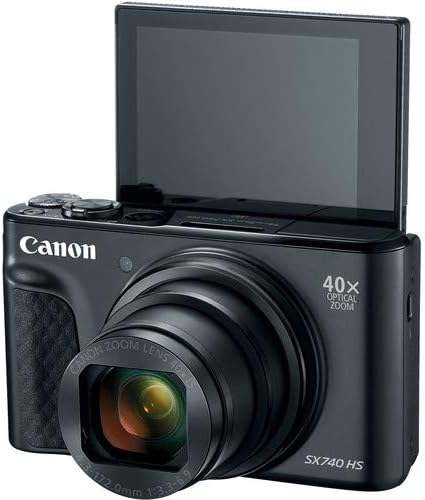
2 pav.: priekis view of the camera with the LCD screen tilted upwards, ready for use.
Fotoaparato valdymas
1. Maitinimo įjungimas/išjungimas
Paspauskite GALIA mygtuką, esantį fotoaparato viršuje, kad jį įjungtumėte arba išjungtumėte.
2. Fotografavimo režimai
The camera offers various shooting modes. Use the mode dial or menu options to select:
- Automatinis režimas: Paprastam valdymui „nukreipk ir fotografuok“, kai fotoaparatas automatiškai pakoreguoja nustatymus.
- Programos (P) režimas: Leidžia geriau valdyti nustatymus, kai fotoaparatas nustato ekspoziciją.
- Scenos režimai: Optimized settings for specific scenarios like portraits, landscapes, or night scenes.
- Feature Assistant: Provides on-screen explanations to help you understand and use various camera features.
3. Priartinimo valdymas
The camera features a 40x optical zoom lens. Use the zoom lever around the shutter button to zoom in (telephoto) or out (wide-angle). Digital zoom can extend the range further, but may reduce image quality.

3 pav.: priekis view of the camera with the lens extended for zooming.
4. Fokusavimas
The camera primarily uses autofocus. Point the camera at your subject and half-press the shutter button to focus. The focus frame will appear on the LCD screen. For specific situations, manual focus options may be available in the menu.
5. Vaizdo įrašymas
To record videos, switch to video mode (if available via a dedicated button or mode dial) or press the dedicated movie recording button. The camera supports 4K video capture. Press the button again to stop recording.
6. Using the Tilting LCD Screen
The 3.0-inch LCD screen can tilt 180 degrees, allowing for easy framing of selfies or shots from various angles. Adjust the screen to your desired position.

4 pav.: Nugara view of the camera, displaying the LCD screen and control layout.
7. „Wi-Fi“ ir „Bluetooth“ ryšys
The camera features built-in Wi-Fi and Bluetooth for connecting to compatible mobile devices. Download the Canon Camera Connect app to your smartphone or tablet to transfer images, remotely control the camera, and share photos.
- Enable Wi-Fi or Bluetooth in the camera's menu.
- Open the Canon Camera Connect app on your mobile device and follow the pairing instructions.
Priežiūra
1. Kameros valymas
- Objektyvas: Use a soft, lint-free cloth or a lens brush to gently remove dust. For smudges, use a specialized lens cleaning solution and cloth. Avoid touching the lens directly with your fingers.
- LCD ekranas: Wipe gently with a soft, dry cloth. Do not use harsh chemicals.
- Kameros korpusas: Use a soft, dry cloth to wipe away dust and dirt.
2. Akumuliatoriaus priežiūra
- Nenaudojamas baterijas laikykite vėsioje, sausoje vietoje.
- Kad pailgintumėte akumuliatoriaus tarnavimo laiką, venkite jo dažnai visiškai iškrauti.
- Išimkite bateriją iš fotoaparato, jei jis nebus naudojamas ilgesnį laiką.
3. Sandėliavimas
Jei fotoaparatą ilgai nenaudojate, įsitikinkite, kad jis švarus, sausas ir įdėtas į apsauginį dėklą, kad išvengtumėte dulkių ir pažeidimų. Išimkite bateriją ir atminties kortelę.
Trikčių šalinimas
Jei kyla problemų dėl fotoaparato, žr. šiuos dažniausiai pasitaikančius sprendimus:
- Kamera neįsijungia: Įsitikinkite, kad akumuliatorius yra visiškai įkrautas ir teisingai įdėtas. Jei įmanoma, išbandykite kitą įkrautą akumuliatorių.
- Atminties kortelės klaida: Check if the memory card is inserted correctly. Format the card (this will erase all data) if the error persists, or try a different compatible SDHC card.
- Vaizdai neryškūs: Ensure the lens is clean. Check your focus settings and make sure the camera has successfully focused on your subject before taking the shot. Use optical image stabilization for handheld shots.
- „Wi-Fi“ / „Bluetooth“ ryšio problemos: Ensure Wi-Fi/Bluetooth is enabled on both the camera and your mobile device. Restart both devices and try pairing again. Confirm the Canon Camera Connect app is up to date.
- Blykstė neveikia: Check the flash mode settings. Ensure the flash is popped up if it's a manual pop-up type.
For more complex issues or persistent problems, please consult the official Canon support websvetainėje arba susisiekite su klientų aptarnavimo tarnyba.
Specifikacijos
| Funkcija | Specifikacija |
|---|---|
| Modelio pavadinimas | PowerShot SX740 HS |
| Nuotraukų jutiklio skiriamoji geba | 20.3 megapikselio |
| Optinis priartinimas | 40x |
| Vaizdo įrašymo formatas | 4K |
| Vaizdo procesorius | „Canon DIGIC 8“ |
| Ryšys | „Bluetooth“, HDMI, USB, „Wi-Fi“ |
| Ekrano tipas | Tilting LCD |
| Vaizdo stabilizavimas | Optinis |
| Baterijos tipas | Ličio jonų (NB-13L) |
| Suderinama atmintis | SDHC (up to 64 GB) |
| Nepertraukiamas fotografavimas | 10 kadrų per sekundę |
| Palaikoma File Formatas | JPEG, RAW |
Garantija ir palaikymas
Your Canon PowerShot SX740 HS Digital Camera is covered by a manufacturer's warranty. Please refer to the warranty card included with your product for specific terms and conditions. For technical support, service, or additional information, please visit the official Canon websvetainėje arba susisiekite tiesiogiai su „Canon“ klientų aptarnavimo tarnyba. Išsaugokite pirkimo kvitą kaip pirkimo įrodymą garantijos pretenzijoms.
Internetiniai ištekliai: „Canon USA“ oficialus Websvetainę