
1. Įvadas
Šiame vadove pateikiama esminė informacija apie jūsų „Black“ įrenginio nustatymą, naudojimą ir priežiūrą.web BWC18SB001 2.0 Channel Google Assistant Smart Soundbar. Please read these instructions carefully before using the product to ensure proper functionality and to maximize your audio experience. This smart soundbar integrates speaker functionality with Google Assistant capabilities, enhancing your home entertainment system.
2. Kas yra dėžutėje
Išpakuodami patikrinkite, ar yra visi komponentai:
- Juodaweb BWC18SB001 2.0 Channel Google Assistant Smart Soundbar
- Nuotolinio valdymo pultas
- Maitinimo adapteris
- Relevant Audio Cables (e.g., Optical, Aux)
- Vartotojo vadovas (šis dokumentas)
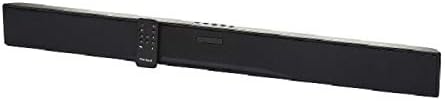
Paveikslėlis: Juodasisweb BWC18SB001 Smart Soundbar, shown with its included remote control. The soundbar is black and rectangular, designed to sit beneath a television.
3. Produkto ypatybės
- 2.0 kanalo garsas: Delivers clear stereo sound for an enhanced listening experience.
- Integrated Google Assistant: Control your soundbar and smart home devices using voice commands.
- Kelios ryšio parinktys: Supports HDMI, Optical, AUX, and Bluetooth for versatile audio input.
- Kontrolės metodai: Features on-device buttons and a dedicated remote control for easy operation.
- Kompaktiškas dizainas: Designed to fit seamlessly into your home theater setup.
4. Sąranka
4.1 Įdėjimas
Place the soundbar on a stable, flat surface directly in front of your television or mount it on a wall (mounting hardware not included). Ensure there is adequate ventilation around the unit.
4.2 Maitinimo jungtis
- Prijunkite maitinimo adapterį prie nuolatinės srovės įvesties (DC IN) prievado, esančio garso juostos gale.
- Kitą maitinimo adapterio galą įkiškite į sieninį lizdą.
4.3 Garso jungtis
Choose one of the following methods to connect your soundbar to your TV or other audio source:
- HDMI (rekomenduojama): Connect an HDMI cable (not included) from the HDMI ARC port on your TV to the HDMI ARC port on the soundbar. This allows for high-quality audio and control via your TV remote.
- Optinis: Connect an Optical cable (included) from the OPTICAL OUT port on your TV to the OPTICAL IN port on the soundbar.
- AUX: Connect a 3.5mm audio cable (included) from the AUX OUT port on your TV or audio device to the AUX IN port on the soundbar.
5. Naudojimo instrukcijos
5.1 Maitinimo įjungimas/išjungimas
- Paspauskite maitinimo mygtuką (U) on the soundbar or the remote control to turn the unit on or off.
- A green indicator light on the soundbar signifies that it is powered on.
5.2 Garsumo valdymas
- Naudokite garsumo didinimo (VOL+) ir garsumo mažinimas (VOL-) buttons on the soundbar or remote control to adjust the volume.
- Paspauskite nutildymo mygtuką (X) on the remote to mute or unmute the sound.
5.3 Įvesties pasirinkimas
Paspauskite įvesties mygtuką (M) on the soundbar or the corresponding input buttons (AUX, OPTICAL, HDMI, Bluetooth) on the remote control to switch between audio sources.
6. Google Assistant Integration
Tavo juodaweb soundbar features integrated Google Assistant. To activate, ensure the soundbar is connected to your home Wi-Fi network (refer to the separate Google Home app setup guide for detailed instructions). Once connected, you can use voice commands:
- Say "Hey Google" or "Ok Google" followed by your command.
- Examples: "Hey Google, play music," "Ok Google, what's the weather?" "Hey Google, turn up the volume."
You can also mute the Google Assistant microphone using the dedicated button on the soundbar or remote control if you prefer privacy.
7. Bluetooth ryšys
Norėdami prijungti Bluetooth įrenginį:
- Paspauskite „Bluetooth“ mygtuką (BT) on the remote control or cycle through inputs on the soundbar until "BT" is displayed or indicated. The soundbar will enter pairing mode.
- Mobiliajame įrenginyje (išmaniajame telefone, planšetiniame kompiuteryje, nešiojamajame kompiuteryje) įjunkite „Bluetooth“ ir ieškokite galimų įrenginių.
- Pasirinkite „Juodaweb BWC18SB001" from the list of devices.
- Susiejus garso juostą, bus rodomas sėkmingas ryšys ir galėsite leisti garsą iš savo įrenginio.
„Bluetooth“ veikimo atstumas yra maždaug 10 metrų (33 pėdos).
8. Priežiūra
Kad užtikrintumėte savo garso juostos ilgaamžiškumą ir optimalų veikimą:
- Valymas: Use a soft, dry cloth to wipe the exterior of the soundbar. Do not use liquid cleaners or abrasive materials.
- Vėdinimas: Įsitikinkite, kad ventiliacijos angos nėra užblokuotos.
- Aplinka: Saugokite garso juostą nuo ekstremalių temperatūrų, drėgmės ar tiesioginių saulės spindulių.
9. Problemų sprendimas
- Nėra galios: Ensure the power adapter is securely connected to both the soundbar and a working wall outlet.
- Nėra garso:
- Check that the soundbar is powered on and not muted.
- Patikrinkite, ar garso juostoje pasirinktas teisingas įvesties šaltinis.
- Ensure audio cables (HDMI, Optical, AUX) are securely connected to both the soundbar and your TV/audio source.
- Adjust the volume on both the soundbar and your TV/audio source.
- „Bluetooth“ neprisijungia:
- Įsitikinkite, kad garso juosta veikia „Bluetooth“ susiejimo režimu.
- Įsitikinkite, kad jūsų įrenginio „Bluetooth“ įjungtas ir yra diapazone.
- Pabandykite atjungti ir vėl susieti įrenginį.
- „Google“ asistentas neatsako:
- Patikrinkite „Wi-Fi“ ryšį.
- Ensure the Google Assistant microphone is not muted.
- Verify the soundbar is properly set up in the Google Home app.
10. Specifikacijos
| Funkcija | Specifikacija |
|---|---|
| Modelio pavadinimas | BWC18SB001 |
| Garsiakalbio tipas | Garso juosta |
| Erdvinio garso kanalo konfigūracija | 2.0 |
| Kontrolės metodas | Voice, Remote, On-device Buttons |
| Ryšio technologija | HDMI, Optical, AUX, Bluetooth |
| Bluetooth diapazonas | 10 metrai |
| Didžiausia garsiakalbio išėjimo galia | 150 vatų |
| Garso išvesties režimas | Stereo, erdvinis garsas |
| Maitinimo šaltinis | Su laidu elektra |
| Gaminio matmenys | 32 x 2.77 x 3.26 colio |
| Prekės svoris | 3.97 svaro |
| UPC | 681131237703 |
11. Garantija ir palaikymas
For warranty information and technical support, please refer to the documentation provided at the time of purchase or visit the official Blackweb websvetainėje. Išsaugokite pirkimo įrodymą garantiniams reikalavimams.