
1. Įvadas
This manual provides essential information for the proper installation, operation, and maintenance of your JFA J6 Hybrid 6-Way Digital Audio Processor with Limiter. Please read this manual thoroughly before using the device to ensure optimal performance and to prevent damage.
The JFA J6 is designed to offer precise control over your audio system, featuring digital signal processing capabilities combined with a hybrid architecture for superior sound management.
2. Svarbios saugos instrukcijos
- Elektros sauga: Always disconnect power before making any connections or disconnections. Ensure proper grounding to prevent electrical shock.
- Vėdinimas: Install the unit in a location with adequate ventilation to prevent overheating. Do not block ventilation openings.
- Drėgmė: Saugokite įrenginį nuo vandens, lietaus ar per didelės drėgmės.
- Temperatūra: Avoid installing the unit in direct sunlight or near heat sources. Operate within specified temperature ranges.
- Profesionalus montavimas: For complex installations, it is recommended to seek assistance from a qualified professional.
- Valymas: Valymui naudokite minkštą, sausą šluostę. Nenaudokite skystų ar aerozolinių valiklių.
3. Produktas baigtasview
The JFA J6 Hybrid Digital Audio Processor is a sophisticated device designed for advanced audio system management. It provides 6 independent output channels, allowing for precise control over crossovers, equalization, gain, and limiting functions.
3.1. Savybės
- 6-Way Digital Audio Processing
- Hybrid Architecture for enhanced performance
- Integrated Limiter for speaker protection
- Adjustable Crossovers
- Parametrinis išlyginimas
- Independent Gain Control for each channel
- User-friendly interface with LCD display
3.2. Pakuotės turinys
- JFA J6 Hybrid Digital Audio Processor
- Vartotojo vadovas
- Tvirtinimo detalės (varžtai, laikikliai)
- Maitinimo jungtis
3.3. Komponento identifikavimas

1 paveikslas: Priekinis skydelis View. This image displays the front panel of the JFA J6 Hybrid Digital Audio Processor. It features a central LCD screen for settings and monitoring, surrounded by a rotary encoder for navigation and adjustment. Below the screen are various buttons and indicators for input level, mute, limiter, and output level controls for each of the six channels. The 'LEVEL IN' and 'MAIN IN' indicators are visible on the left, while 'LEVEL OUT 5' and 'LEVEL OUT 6' are on the right, alongside the power terminal.
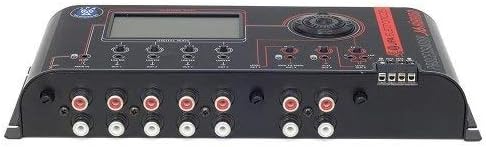
2 pav.: galinis skydelis View. This image shows the rear panel of the JFA J6 Hybrid Digital Audio Processor, highlighting the input and output connections. On the left, there are RCA input jacks labeled 'MAIN IN'. The center features multiple RCA output jacks for OUT 1 through OUT 6. On the right, a screw terminal block is visible for power connections (BAT, REM, GND).
4. Diegimas ir sąranka
4.1. Montavimas
Select a secure, dry, and well-ventilated location for mounting the JFA J6. Use the provided mounting hardware to firmly attach the unit, ensuring it is protected from vibrations and direct heat.
4.2. Laidų jungtys
Ensure all audio components are powered off before making any connections.
- Maitinimo jungtis: Connect the power cable to the screw terminal block on the unit's rear panel.
- BAT (+12V): Connect to a fused +12V constant power source.
- REM (nuotolinis): Prijunkite prie galvos įrenginio arba uždegimo jungiklio nuotolinio įjungimo išvesties.
- GND (žemė): Prijunkite prie tvirto važiuoklės įžeminimo taško.
- Garso įvestis: Connect the RCA output from your head unit or audio source to the 'MAIN IN' RCA jacks on the JFA J6.
- Garso išvestis: Connect the RCA output jacks (OUT 1 to OUT 6) of the JFA J6 to the corresponding input channels of your amplifiers. Ensure correct channel assignment for your speaker configuration (e.g., front, rear, subwoofer).
5. Naudojimo instrukcijos
5.1. Įjungimas/išjungimas
The JFA J6 will power on automatically when a remote signal is received at the REM terminal. It will power off when the remote signal is removed.
5.2. Pagrindinė navigacija
Use the rotary encoder and associated buttons on the front panel to navigate through the menus and adjust settings displayed on the LCD screen. Rotate the encoder to scroll through options and press it to select.
5.3. Input/Output Configuration
Access the input/output menu to configure the routing of audio signals and set individual channel parameters:
- Gain Control: Adjust the input and output gain levels for each channel to match the sensitivity of connected amplifiers and prevent clipping.
- Crossover nustatymai: Define high-pass, low-pass, and band-pass filters for each output channel. Set crossover frequencies and slopes to optimize speaker performance and protect drivers.
- Fazės reguliavimas: Adjust the phase (0° or 180°) for each output channel to ensure proper acoustic alignment with other speakers in the system.
5.4. Limiter Function
The integrated limiter protects your speakers from excessive power and distortion. Access the limiter settings to adjust the threshold and attack/release times for each channel. The 'LIMITER' indicators on the front panel will illuminate when the limiter is active.
5.5. Išlyginimas
The JFA J6 offers parametric equalization for precise tonal adjustments. Navigate to the EQ menu to select specific frequencies, adjust their gain (boost/cut), and set the Q-factor (bandwidth) for each band.
5.6. Išankstiniai nustatymai
You can save your customized audio settings as presets for quick recall. This is useful for different music genres or listening preferences. Refer to the on-screen menu for saving and loading presets.
6. Priežiūra
The JFA J6 requires minimal maintenance. Keep the unit clean and free from dust. Use a soft, dry cloth to wipe the exterior. Do not use harsh chemicals or abrasive materials. Ensure all connections remain secure over time.
7. Problemų sprendimas
| Problema | Galima priežastis | Sprendimas |
|---|---|---|
| Nėra galios | Incorrect power wiring; Blown fuse; No remote signal | Check BAT, REM, and GND connections. Verify fuse integrity. Ensure remote signal is present. |
| Nėra garso išvesties | Incorrect audio connections; Muted channels; Low gain settings | Verify RCA input/output connections. Check if any channels are muted. Increase gain levels. |
| Iškraipytas garsas | Input/output gain too high; Clipping; Incorrect EQ settings | Reduce input/output gain. Check for 'CLIP' indicator. Adjust EQ settings. |
| Įrenginio perkaitimas | Insufficient ventilation; Excessive load | Ensure adequate airflow around the unit. Check speaker impedance and ampgelbėjimo apkrova. |
8. Techninės specifikacijos
| Funkcija | Specifikacija |
|---|---|
| Įvesties kanalai | 2 (Stereo RCA) |
| Išvesties kanalai | 6 (RCA) |
| Apdorojimo tipas | Skaitmeninis signalo procesorius (DSP) |
| Kryžminiai filtrai | High-Pass, Low-Pass, Band-Pass (adjustable slopes) |
| Išlyginimas | Parametrinis EQ |
| Ribotojas | Integrated, adjustable threshold and timing |
| Maitinimo šaltinis | 12V DC (Automotive) |
| Matmenys (apytiksliai) | Nenurodyta |
| Svoris (apytiksliai) | Nenurodyta |
9. Garantija ir klientų aptarnavimas
JFA products are manufactured to high-quality standards. This product is covered by a limited warranty against defects in materials and workmanship. The duration and terms of the warranty may vary by region. Please retain your proof of purchase for warranty claims.
For technical assistance, troubleshooting, or warranty inquiries, please contact your authorized JFA dealer or visit the official JFA Electronicos websvetainę, kurioje pateikiama informacija apie palaikymą.