
1. Įvadas
Ačiū, kad pirkoteasing the DACOM GF7 TWS V4.2 Bluetooth Earbuds. This manual provides detailed instructions on how to set up, operate, and maintain your earbuds to ensure optimal performance and longevity. Please read this manual thoroughly before using the product and retain it for future reference.
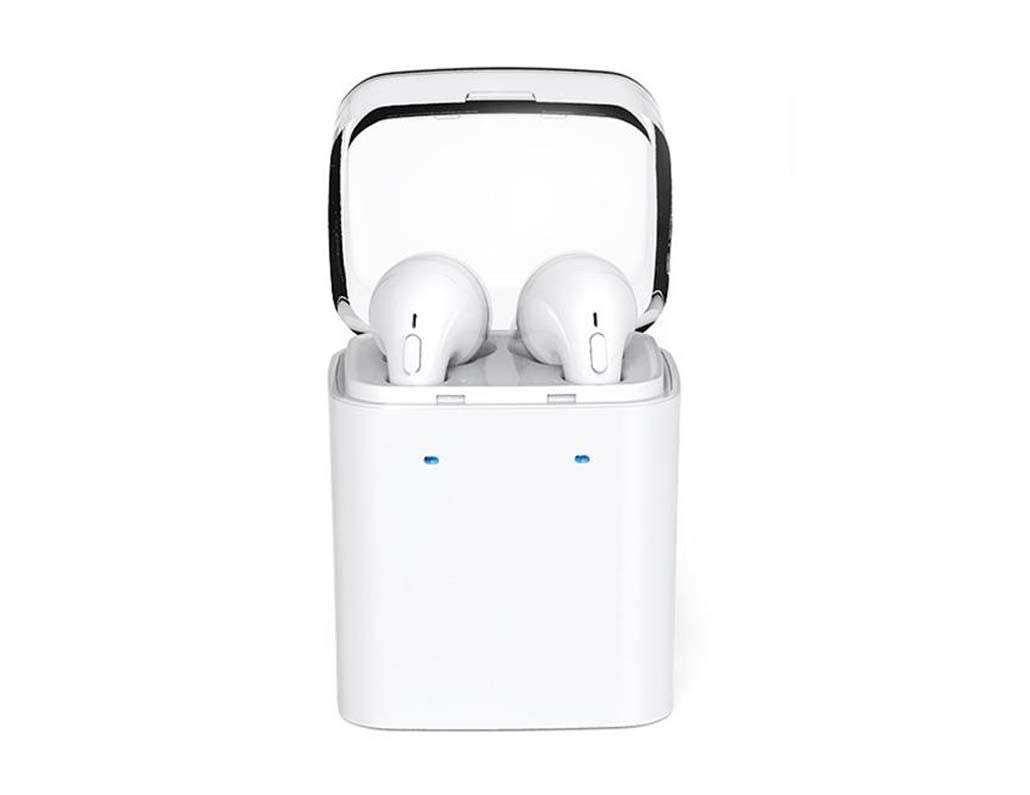
Image 1.1: DACOM GF7 TWS V4.2 Bluetooth Earbuds in their charging case.
2. Pakuotės turinys
Išpakuodami patikrinkite pakuotės turinį. Jei trūksta kokių nors daiktų arba jie pažeisti, susisiekite su pardavėju.
- DACOM GF7 TWS V4.2 Bluetooth Earbuds (Left and Right)
- Nešiojamas įkrovimo dėklas
- USB įkrovimo laidas
- Ausų pagalvėlės (įvairių dydžių)
- Vartotojo vadovas (šis dokumentas)
3. Produktas baigtasview
Familiarize yourself with the components of your DACOM GF7 TWS V4.2 Earbuds and charging case.

Image 3.1: Detailed diagram showing the Multifunction Button (MFB), Indicator Light, Microphone (Mic), Air Gate, DC5V Charge Jack Cover, Headphone Charging Indicator Light, USB Charging Input Port, and the Charging Indicator Light of the bottom on the DACOM GF7 TWS V4.2 Earbuds and Charging Case.
- Daugiafunkcis mygtukas (MFB): Used for power, playback, call management, and voice assistant activation.
- Indikatoriaus lemputė: Displays pairing status, charging status, and power status.
- Mikrofonas: Integruotas mikrofonas skambučiams ir balso komandoms.
- Oro vartai: Acoustic vent for sound performance.
- DC5V Charge Jack Cover: Protects the charging port on the earbuds.
- Headphone Charging Indicator Light: Shows charging status of individual earbuds within the case.
- USB Charging Input Port: For charging the portable charging case.
- Charging Indicator Light of the bottom: Rodo dėklo įkrovimo būseną.
4. Sąranka
4.1. Ausinių ir įkrovimo dėklo įkrovimas
- Dėklo įkrovimas: Connect the USB charging cable to the USB Charging Input Port on the charging case and the other end to a 5V USB power adapter (not included). The Charging Indicator Light at the bottom of the case will illuminate to indicate charging. Once fully charged, the indicator light may change color or turn off.
- Ausinių įkrovimas: Place the earbuds into their respective slots in the charging case. Ensure the earbuds are properly seated. The Headphone Charging Indicator Light on the case will show the charging status of the earbuds. The earbuds' indicator lights will also show charging status (e.g., red while charging, off when fully charged).
- For first-time use, fully charge both the earbuds and the charging case.
4.2. „Bluetooth“ poravimas
- Maitinimas: Take both earbuds out of the charging case. They will automatically power on and attempt to pair with each other. You will hear an audible prompt indicating they are connected to each other.
- Susiejimo režimas: Once the earbuds are paired with each other, one earbud's indicator light will flash red and blue alternately, indicating it is in pairing mode and ready to connect to your device.
- Prisijunkite prie įrenginio: On your smartphone or Bluetooth-enabled device, go to the Bluetooth settings and search for available devices. Select "DACOM GF7 TWS" (or similar name) from the list.
- Sėkmingas prisijungimas: Once connected, the earbud's indicator light will stop flashing, and you will hear a confirmation sound.
- Automatinis pakartotinis prisijungimas: Po pradinio susiejimo, išėmus iš įkrovimo dėklo, ausinės automatiškai prisijungs prie paskutinio susieto įrenginio, jei jūsų įrenginyje įjungtas „Bluetooth“.
5. Naudojimo instrukcijos
The DACOM GF7 TWS V4.2 Earbuds feature a Multifunction Button (MFB) for various controls.
5.1. Maitinimo įjungimas/išjungimas
- Maitinimas: Take the earbuds out of the charging case. They will power on automatically. Alternatively, press and hold the MFB on both earbuds for approximately 3 seconds until you hear a power-on prompt.
- Išjungti: Place the earbuds back into the charging case. They will power off automatically. Alternatively, press and hold the MFB on both earbuds for approximately 5 seconds until you hear a power-off prompt.
5.2. Muzikos atkūrimas
- Leisti / pristabdyti: Single press the MFB on either earbud.
- Kitas takelis: Double press the MFB on the right earbud.
- Ankstesnis takelis: Double press the MFB on the left earbud.
5.3. Skambučių valdymas
- Atsiliepti / Baigti skambutį: Single press the MFB on either earbud.
- Atmesti skambutį: Press and hold the MFB on either earbud for approximately 2 seconds.
5.4. Balso asistentas
- Suaktyvinti „Voice Assistant“: Triple press the MFB on either earbud to activate your device's voice assistant (e.g., Siri, Google Assistant).
5.5. Triukšmo slopinimas
- The DACOM GF7 TWS V4.2 features active noise cancellation. Specific activation methods may vary. Refer to the product's quick start guide or manufacturer's website for precise instructions if not detailed here. Typically, a long press or specific tap sequence on an MFB or dedicated button activates/deactivates ANC.
6. Priežiūra
Tinkama priežiūra užtikrina ausinių ilgaamžiškumą ir našumą.
- Valymas: Reguliariai valykite ausines ir įkrovimo dėklą minkštu, sausu, nepūkuotu skudurėliu. Nenaudokite stiprių cheminių medžiagų ar abrazyvinių medžiagų.
- Ausų patarimai: Periodiškai nuimkite ir valykite ausų antgalius naudodami reklamą.amp šluoste ir švelniu muilu, tada kruopščiai nuplaukite ir nusausinkite prieš vėl pritvirtindami.
- Saugykla: Kai nenaudojate, laikykite ausines įkrovimo dėkle, kad apsaugotumėte jas nuo dulkių ir pažeidimų.
- Venkite drėgmės: Keep the earbuds and charging case away from water, excessive humidity, and extreme temperatures.
7. Problemų sprendimas
If you encounter issues with your earbuds, refer to the following common problems and solutions.
| Problema | Sprendimas |
|---|---|
| Ausinės nesuporuojamos tarpusavyje. |
|
| Ausinės neprisijungia prie įrenginio. |
|
| Iš ausinių nesklinda garsas. |
|
| Charging case or earbuds not charging. |
|
8. Specifikacijos
| Prekės ženklo pavadinimas | DACOM |
| Modelio pavadinimas | GF7 TWS |
| Modelio numeris | 7TWS |
| Spalva | Baltas |
| Ausinių formos faktorius | Į ausis |
| Triukšmo valdymas | Aktyvus triukšmo slopinimas |
| Ryšio technologija | Belaidis ryšys („Bluetooth“) |
| Belaidžio ryšio technologija | Bluetooth V4.2 (inferred from title) |
| Įtraukti komponentai | Ausų pagalvėlės |
| Ypatingos savybės | Noise Cancellation, Microphone Included |
| Kontrolės metodas | Palieskite |
| Suderinami įrenginiai | Visi įrenginiai |
| Medžiaga | PU Metal Eraser (likely referring to ear tip material or casing finish) |
9. Saugos informacija
Kad išvengtumėte sužalojimų ar įrenginio sugadinimo, perskaitykite ir laikykitės šių saugos nurodymų.
- Neardykite, neremontuokite ir nemodifikuokite gaminio. Tai gali sukelti gaisrą, elektros smūgį arba visiškai sugadinti gaminį.
- Keep the product away from extreme temperatures (hot or cold), direct sunlight, and sources of heat.
- Stenkitės, kad gaminys nepatektų į vandenį ar kitus skysčius.
- Nenaudokite gaminio dideliu garsumu ilgą laiką, kad nepažeistumėte klausos.
- Naudokite tik pateiktus arba rekomenduojamus įkrovimo laidus ir adapterius.
- Laikyti vaikams ir naminiams gyvūnams nepasiekiamoje vietoje. Mažos dalys gali kelti užspringimo pavojų.
- Be aware of your surroundings when using the earbuds, especially in traffic or other potentially dangerous situations.
10. Garantija ir palaikymas
DACOM products are designed and manufactured to the highest quality standards. For detailed warranty information, please refer to the warranty card included with your purchase or visit the official DACOM websvetainę.
For technical support, troubleshooting assistance, or to inquire about replacement parts, please contact DACOM customer service through their official websvetainėje arba kontaktinę informaciją, pateiktą jūsų produkto pakuotėje.
- Palaikymas internetu: Visit the official DACOM webDUK, pagalbos straipsnių ir kontaktinių formų svetainė.
- Pagalba el. paštu: Refer to your product packaging for customer service email addresses.


