
Įvadas
Thank you for choosing the NEC NP-MC372X Portable Projector. This manual provides essential information for the safe and efficient use of your projector. Please read these instructions thoroughly before operating the device and retain them for future reference. The NEC NP-MC372X is an XGA LCD projector designed for clear and bright presentations, offering 3700 lumens of brightness and a native resolution of 1024x768.
Saugos informacija
Visada laikykitės šių saugos priemonių, kad išvengtumėte gaisro, elektros smūgio ar sužalojimų:
- Neužblokuokite ventiliacijos angų. Užtikrinkite pakankamai vietos aplink projektorių tinkamam oro cirkuliavimui.
- Nežiūrėkite tiesiai į projektoriaus objektyvą, kai lamp įjungtas, nes ryški šviesa gali pažeisti akis.
- Nestatykite projektoriaus ant nestabilaus vežimėlio, stovo ar stalo.
- Unplug the projector from the power outlet before cleaning. Use a dry cloth for cleaning.
- Visus techninės priežiūros darbus patikėkite kvalifikuotam techninės priežiūros personalui.
Pakuotės turinys
Patikrinkite, ar pakuotėje yra visi toliau išvardyti daiktai:
- NEC NP-MC372X Portable Projector
- Maitinimo kabelis
- HDMI kabelis
- Nuotolinio valdymo pultas
Produktas baigtasview
The NEC NP-MC372X is a versatile projector featuring an LCD display, 1024x768 native resolution, and 3700 lumens brightness. It includes a 1.2x zoom lens and offers a lamp life of up to 10,000 hours. Connectivity options include Dual HDMI, VGA, and USB.
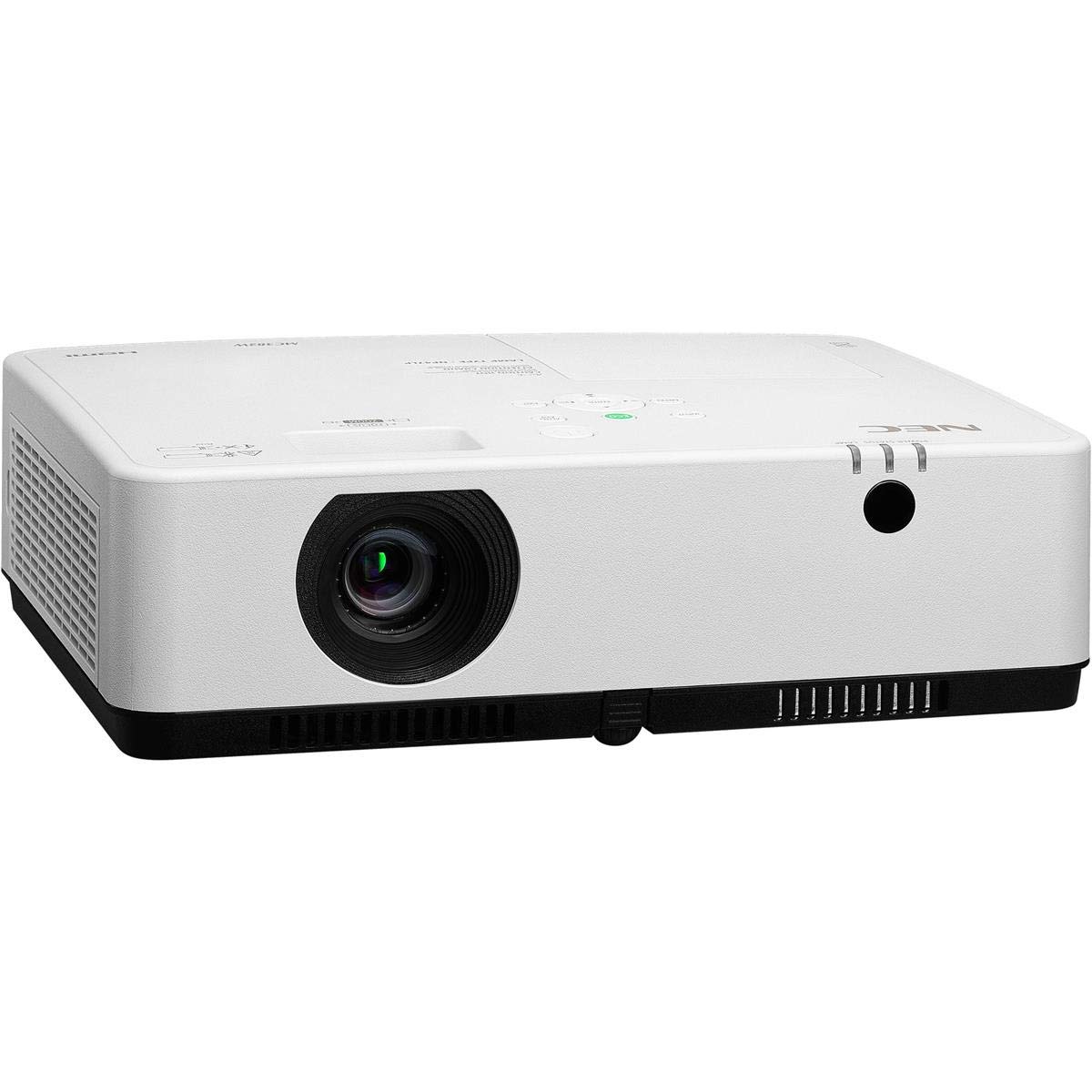
1 pav.: Priekinė ir viršutinė dalys view of the NEC NP-MC372X Portable Projector, showing the lens and control panel.

2 pav.: priekis view of the projector, highlighting the projection lens.

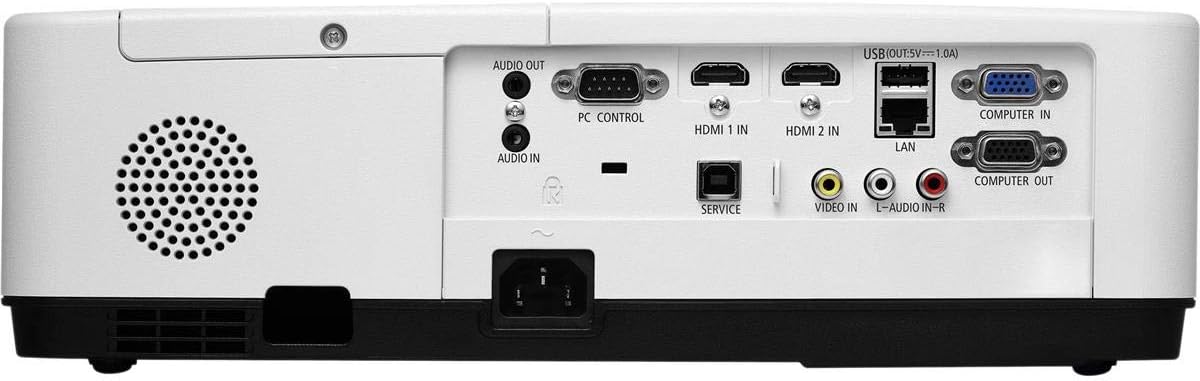
3 pav.: galinis view of the projector, displaying the various input and output ports including HDMI, VGA, USB, LAN, and audio connections.
4 pav.: šonas view of the projector, showing the ventilation grille for heat dissipation.
Sąranka
Fizinis išdėstymas
Place the projector on a stable, flat surface or mount it securely. Ensure the projector is positioned at an appropriate distance from the screen to achieve the desired image size. Maintain clear space around the projector for ventilation.
Įrenginių prijungimas
Refer to Figure 3 for port locations. Connect your source device (e.g., laptop, gaming console) to the projector using one of the following methods:
- HDMI: Use an HDMI cable to connect to either HDMI 1 IN or HDMI 2 IN.
- VGA: Use a VGA cable to connect to COMPUTER IN. For audio, connect a 3.5mm audio cable to AUDIO IN.
- USB: Connect a USB device to the USB port for direct media playback.
- LAN: Connect an Ethernet cable to the LAN port for network connectivity.
Maitinimo įjungimas/išjungimas
1. Connect the power cable to the projector and a power outlet.
2. Press the power button on the projector or the remote control to turn on the projector.
3. To turn off, press the power button again. Confirm shutdown when prompted.
Naudojimo instrukcijos
Basic Operation with Remote Control
Use the included remote control to navigate menus, select input sources, and adjust settings. Point the remote control towards the projector's remote sensor.
Įvesties šaltinio pasirinkimas
Press the 'Input' button on the remote control or projector control panel to cycle through available input sources (HDMI 1, HDMI 2, Computer In, USB).
Vaizdo koregavimas
- Fokusas: Sukite fokusavimo žiedą ant objektyvo, kol vaizdas taps ryškus.
- Mastelio keitimas: Use the zoom ring on the lens to adjust the image size without moving the projector. The projector features a 1.2x optical zoom.
- Keystone korekcija: If the image appears trapezoidal, use the keystone correction function in the projector menu to square the image.
Ypatingos savybės
- Multi Presenter: This feature allows multiple users to connect and display content wirelessly from their devices. Refer to the on-screen menu for setup instructions.
- USB Viewer Capability: Insert a USB drive into the USB port to directly view photos, videos, and documents without a connected computer.
- Subtitrai: Enable closed captioning for compatible video sources through the projector's menu settings.
Priežiūra
Lamp Pakeitimas
Projektorius lamp has an operating life of up to 10,000 hours. When the lamp reaches the end of its life, a warning message will appear. Consult a qualified service technician for lamp replacement to ensure proper installation and safety.
Valymas
- Išorė: Nuvalykite projektorių casinminkštu, sausu, nepūkuotu skudurėliu. Įsisenėjusias dėmes šiek tiek nuvalykiteamplt audinį supilkite vandeniu.
- Objektyvas: Use a professional lens cleaning kit or a soft, dry cloth specifically designed for optical lenses. Avoid harsh chemicals.
- Oro filtras: Regularly check and clean the air filter to prevent dust buildup, which can affect performance and lamp life. Refer to the projector's on-screen menu for filter usage time.
Trikčių šalinimas
Jei kyla problemų, prieš kreipdamiesi į palaikymo tarnybą, išbandykite šiuos sprendimus:
- Nėra paveiksliuko: Ensure all cables are securely connected. Verify the correct input source is selected. Check if the lens cap is removed.
- Nėra garso: Confirm audio cables are connected (if applicable). Adjust volume on both the projector and the source device.
- Nuotolinio valdymo pultas neveikia: Check the batteries in the remote. Ensure there are no obstructions between the remote and the projector's sensor.
- Vaizdas neryškus: Adjust the focus ring on the lens. Ensure the projection surface is flat.
- Įspėjimas apie perkaitimą: Ensure ventilation openings are not blocked. Clean the air filter if necessary.
Specifikacijos
| Funkcija | Specifikacija |
|---|---|
| Prekės ženklas | NEC |
| Modelio pavadinimas | MC372X |
| Modelio numeris | NP-MC372X |
| Ekrano tipas | LCD |
| Gimtoji raiška | 1024 x 768 (XGA) |
| Ryškumas | 3700 liumenų |
| Ryšio technologija | HDMI, USB, VGA, LAN |
| Padidinti | 1.2x optinis |
| Šviesos šaltinio veikimo laikas | 10,000 valandų |
| Vattage | 267 watts (typical 120V) |
| Valdiklio tipas | Nuotolinio valdymo pultas |
| Prekės svoris | 7.1 svaro |
| ttage | 120 voltų |
| UPC | 805736070248 |
Garantija ir palaikymas
The NEC NP-MC372X Portable Projector comes with a 3 metų ribota garantija. For warranty claims or technical support, please contact NEC customer service. You can find contact information on the official NEC websvetainėje arba per savo produkto pardavėją.