
1. Įvadas
This manual provides instructions for the installation, operation, and maintenance of the Cisco CP-68KEM-3PCC Expansion Module. This module is designed to enhance the functionality of your Cisco IP Phone 6851 by providing additional programmable keys.
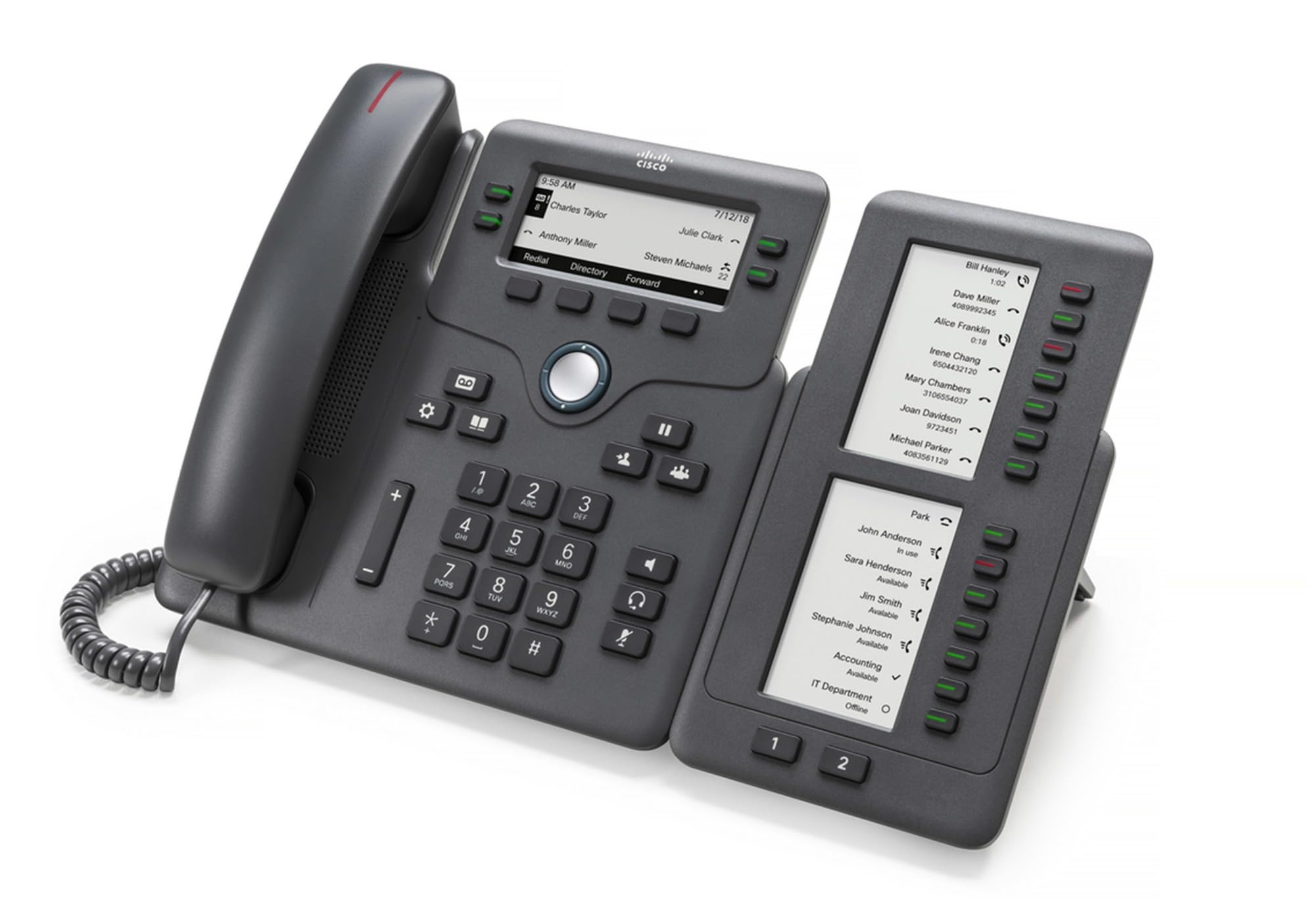
Figure 1: Cisco CP-68KEM-3PCC Expansion Module. This image shows the front view of the expansion module with its grayscale LCD screen and programmable keys.
The Cisco CP-68KEM-3PCC Expansion Module adds 14-line keys and 2-page keys, totaling 28 additional keys, with an easy-to-read grayscale LCD screen. It is ideal for monitoring and managing call status, directory numbers, and speed dial functions.
2. Kas yra dėžutėje
Atsargiai išpakuokite dėžę ir įsitikinkite, kad joje yra visi daiktai:
- Cisco CP-68KEM-3PCC Phone Expansion Module
- Connecting Cable (typically included for linking to the phone)
- Dokumentacija (šis naudotojo vadovas, saugos informacija)
If any items are missing or damaged, please contact your vendor or Cisco support immediately.
3. Sąrankos instrukcijos
Follow these steps to connect your Cisco CP-68KEM-3PCC Expansion Module to your Cisco IP Phone 6851.
- Prepare the IP Phone: Ensure your Cisco IP Phone 6851 is powered off and disconnected from the network.
- Connect the Expansion Module: Locate the expansion port on the back or side of your Cisco IP Phone 6851. Connect the provided connecting cable from the expansion module to this port.
- Užtikrinkite ryšį: Ensure the cable is securely fastened to prevent accidental disconnection.
- Maitinimas: Reconnect your Cisco IP Phone 6851 to the network and power it on. The expansion module should be detected automatically.
- Patikrinkite funkcionalumą: Once the phone has booted, check the expansion module's display and keys to ensure they are responsive.
For detailed visual instructions, refer to the official Cisco documentation or support websvetainę.
4. Operating the Expansion Module
The expansion module provides additional keys for various functions, enhancing your call management capabilities.
4.1 programuojami klavišai
The 28 programmable keys (14 keys across 2 pages) can be configured for:
- Directory Numbers (DNs): Assign specific phone lines or extensions.
- Greitasis rinkimas: Dažnai naudojamus numerius užprogramuokite greitam prisijungimui.
- Feature Keys: Assign functions like call transfer, conference, or call park.
- Call Status Monitoring: Monitor the status of other lines (e.g., busy, ringing).
4.2 Page Navigation
Use the dedicated page keys (usually located near the display) to switch between the two pages of programmable keys. The grayscale LCD screen will update to show the labels for the currently active page.
4.3 konfigūracija
Configuration of the programmable keys is typically managed through your organization's phone system administrator or via the web interface of the Cisco IP Phone 6851. Consult your IT department for specific configuration instructions.
5. Priežiūra
To ensure the longevity and optimal performance of your Cisco CP-68KEM-3PCC Expansion Module, follow these maintenance guidelines:
- Valymas: Use a soft, dry, lint-free cloth to clean the exterior surfaces. For stubborn marks, slightly dampen the cloth with water. Avoid using harsh chemicals, abrasive cleaners, or solvents, as these can damage the finish and electronic components.
- Aplinka: Modulį laikykite švarioje, sausoje vietoje, atokiau nuo tiesioginių saulės spindulių, per didelio karščio ir drėgmės.
- Tvarkymas: Su moduliu elkitės atsargiai. Venkite jo numesti ir stipriai sutrenkti.
- Kabelių valdymas: Ensure connecting cables are not kinked, pinched, or under strain.
There are no user-serviceable parts inside the expansion module. Do not attempt to open or repair the device yourself.
6. Problemų sprendimas
If you encounter issues with your expansion module, try the following troubleshooting steps:
| Problema | Galima priežastis | Sprendimas |
|---|---|---|
| Modulis neatpažįstamas telefono | Loose cable connection, phone not restarted, incompatible phone model. |
|
| Raktai nereaguoja | Software glitch, configuration issue. |
|
| Ekranas tuščias arba mirga | Maitinimo problema, vidinis gedimas. |
|
If these steps do not resolve the issue, please contact Cisco technical support or your authorized reseller.
7. Specifikacijos
| Funkcija | Detalė |
|---|---|
| Modelio numeris | CP-68KEM-3PCC |
| Prekės ženklas | Cisco |
| Suderinami įrenginiai | „Cisco“ IP telefonas 6851 |
| Spalva | Juoda |
| Medžiaga | Metalas |
| Prekės matmenys (IxPxH) | 5.1 x 10.2 x 20.3 cm |
| Maitinimo šaltinis | Corded (powered via host IP Phone) |
| Raktų skaičius | 28 (14 keys across 2 pages) |
| Ekranas | Grayscale LCD |
| GTIN / UPC | 889728068383 |
8. Informacija apie garantiją
The Cisco CP-68KEM-3PCC Expansion Module comes with a 2 metų gaminio garantija nuo įsigijimo datos. Ši garantija taikoma medžiagų ir gamybos defektams, atsiradusiems įprasto naudojimo sąlygomis. Ji netaikoma žalai, atsiradusiai dėl netinkamo naudojimo, nelaimingų atsitikimų, neleistinų modifikacijų ar išorinių priežasčių.
For warranty claims or detailed terms and conditions, please refer to the official Cisco warranty policy available on their websvetainėje arba susisiekite su pirkimo vieta.
9. Parama
For technical assistance, product information, or to report issues, please contact Cisco support:
- „Cisco“ palaikymas Websvetainė: Aplankykite pareigūną „Cisco“ palaikymas websvetainę for documentation, downloads, and contact options.
- Įgaliotasis platintojas: Contact the reseller from whom you purchased the product.
When contacting support, please have your product model (CP-68KEM-3PCC) and serial number ready.