
1. Įvadas
The USHINING F280 Senior Flip Phone is designed for simplicity and ease of use, making it ideal for seniors and individuals seeking a straightforward mobile communication device. It features large buttons, a clear display, and essential functions for reliable daily use. This manual will guide you through the phone's features, setup, and operation.

Figure 1.1: USHINING F280 Senior Flip Phone with Charging Cradle
This image shows the red USHINING F280 flip phone. On the left, the phone is closed and resting in its black charging cradle, displaying the external screen with time and date. On the right, the phone is open, revealing the large keypad and the internal 2.8-inch LCD screen.
2. Pagrindinės savybės
The USHINING F280 is equipped with features tailored for user convenience and safety:
- Large Keypad and Big Icons: Ensures easy dialing and navigation.
- Dvigubas ekranas: Features a 2.8-inch internal LCD and a 1.77-inch external color display.
- SOS mygtukas: For emergency calls to pre-set contacts.
- Speed Dial (M1/M2): Quick access to important contacts.
- High Volume Speaker: For clear audio during calls and alerts.
- Įkrovimo dėklas: Simplifies charging, eliminating the need to frequently plug in cables.
- Žibintuvėlis: Built-in LED torch for convenience.
- FM radijas: For entertainment.
- Dviejų SIM kortelių palaikymas: Allows for two different phone numbers or carriers.
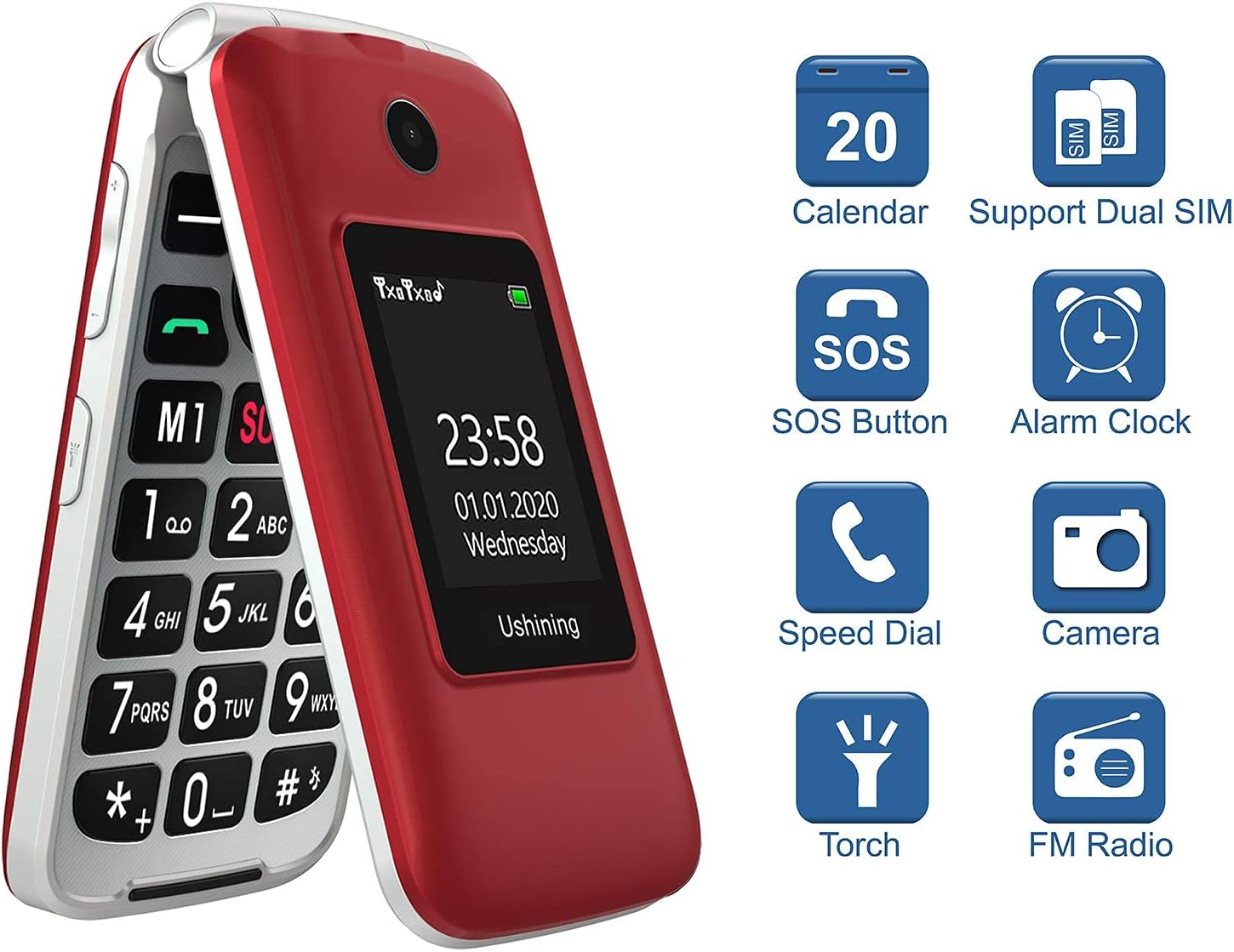
2.1 pav.: Pagrindinės funkcijosview
This image displays a visual summary of the phone's features, including icons for Calendar, Dual SIM support, SOS Button, Alarm Clock, Speed Dial, Camera, Torch (flashlight), and FM Radio.
3. Sąranka
3.1 Išpakavimas ir komponentai
Atidarius pakuotę, įsitikinkite, kad yra visi komponentai:
- USHINING F280 Flip Phone
- Įkrovimo lopšys
- Maitinimo adapteris
- USB įkrovimo laidas
- Įkraunama baterija
- Vartotojo vadovas
- SIM Card Adapters (if included)

3.1 pav. Pakuotės turinys
This image shows all items included in the product package: the red flip phone, its charging cradle, a power adapter, a USB cable, the battery, the user manual, and small SIM card adapters.
3.2 Baterijos ir SIM kortelės įdėjimas
To install the battery and SIM card(s):
- Nuimkite telefono galinį dangtelį, švelniai jį atlenkdami nuo įpjovos.
- Įdėkite bateriją į jos skyrių, užtikrindami, kad auksiniai kontaktai sutaptų su telefono gnybtais.
- Locate the SIM card slots. This phone supports Dual SIM Card Dual Standby (Normal SIM Card & Micro SIM Card). Carefully insert your SIM card(s) into the designated slots.
- If using a Micro SD card (up to 16GB, not included), insert it into the Micro SD card slot.
- Uždėkite galinį dangtelį, tvirtai spausdami, kol jis užsifiksuos vietoje.

Figure 3.2: SIM and Micro SD Card Installation
Šis paveikslėlis pateikia vidinį vaizdą view of the phone, highlighting the two SIM card slots (SIM 1 for Standard SIM, SIM 2 for Micro SIM) and the Micro SD card slot, along with visual instructions for inserting SIM cards.
3.3 Important SIM Card Activation Note
Since this is a 3G phone and most carriers have stopped activating new SIM cards for 3G devices, please do not activate a new SIM card directly on this phone, or provide the phone's IMEI number when purchasing a new SIM card. If you are activating a new SIM card, please provide the IMEI number of your old phone or any other phone to get the SIM card activated. Then put the SIM card back into our phone. It will automatically pick up the carrier's network after turning on.

Figure 3.3: SIM Card Activation Advisory
This image displays a crucial warning about activating new SIM cards for 3G devices, advising users to activate the SIM with another phone's IMEI before inserting it into the USHINING F280.
3.4 Telefono įkrovimas
To charge the phone, place it into the charging cradle or connect the USB cable directly to the phone's charging port. The external display will indicate charging status.
Video 3.1: Charging the USHINING F280
This video demonstrates placing the USHINING F280 flip phone into its charging dock, showing the external screen illuminating to indicate that charging has begun. (Relevant segment: 0:27-0:32)
4. Naudojimo instrukcijos
4.1 Maitinimo įjungimas/išjungimas
To power on the phone, press and hold the red 'End Call' button until the screen lights up. To power off, press and hold the same button until the power-off options appear, then confirm.
4.2 Making Calls and Speed Dial
Dial numbers using the large, easy-to-read keypad. The phone supports speed dial functions for quick access to important contacts using the M1 and M2 buttons.

Figure 4.1: Large Keypad and Big Icons
This image shows a hand holding the open USHINING F280 phone, emphasizing the large, clearly labeled buttons on the keypad and the big icons on the internal display, designed for easy viewveikimas.
Video 4.1: Speed Dial M1 & M2
This video demonstrates the use of the M1 and M2 speed dial buttons on the USHINING F280, showing how to quickly initiate a call to a pre-assigned contact. (Relevant segment: 0:13-0:20)
4.3 SOS Emergency Calls
The SOS button allows you to quickly contact up to 5 pre-set family numbers in case of an emergency. Press and hold the SOS button to activate the emergency call sequence.

Figure 4.2: SOS Emergency Calls
This image illustrates the SOS emergency call feature, showing the SOS button on the phone and a diagram indicating that it supports calling up to 5 family numbers to guarantee the safety of the elderly.
5. Advanced Settings and Features
5.1 Šrifto dydžio reguliavimas
The phone allows you to adjust the font size for easier viewing. Navigate to 'Settings' > 'Phone settings' > 'Font size' and select your preferred size (Large, Medium, Small).
Video 5.1: Adjustable Font Size
This video demonstrates how to navigate the phone's settings to adjust the font size, showing options for Large, Medium, and Small, and confirming the change. (Relevant segment: 0:20-0:27)
5.2 High Volume Speaker
The phone is equipped with a Φ20 Box Speaker for high volume output, ensuring clear audio for calls and ringtones.
Video 5.2: High Volume Speaker
This video showcases the phone's high volume speaker, demonstrating the sound output and the volume adjustment interface. (Relevant segment: 0:36-0:43)
5.3 Žibintuvėlis
Activate the built-in LED torch by pressing the dedicated flashlight button on the side of the phone. Press again to turn it off.

Figure 5.1: LED Torch
This image shows a hand holding the red USHINING F280 phone with its top-mounted LED torch illuminated, indicating its functionality as a convenient light source.
Video 5.3: Quickly Turn On/Off Flashlight
This video demonstrates the quick activation and deactivation of the phone's flashlight feature using a dedicated side button. (Relevant segment: 0:43-0:50)
5.4 Kalbos nustatymai
The phone supports multiple languages. To change the language, go to 'Settings' > 'Phone settings' > 'Language' and select your desired language.
Video 5.4: Five Language Options
This video illustrates how to access and change the language settings on the phone, showing options for English, Deutsch, Italiano, Français, and Español. (Relevant segment: 0:50-0:57)
6. Priežiūra
6.1 Akumuliatoriaus priežiūra
- Saugokite, kad akumuliatorius nepatektų į ekstremalias temperatūras.
- Nepradurkite, neišardykite ir nesukurkite trumpojo jungimo akumuliatoriaus.
- Jei telefonas nebus naudojamas ilgesnį laiką, prieš padėdami jį į savo vietą, įkraukite bateriją iki maždaug 50 %.
6.2 Valymas
Use a soft, dry cloth to clean the phone's exterior. Avoid using harsh chemicals or abrasive materials, which can damage the surface.
7. Problemų sprendimas
- Telefonas neįsijungia: Įsitikinkite, kad akumuliatorius yra tinkamai įdėtas ir įkrautas.
- Nėra tinklo signalo: Verify SIM card installation and refer to the 'Important SIM Card Activation Note' in Section 3.3. Ensure you are within network coverage.
- Prasta skambučio kokybė: Patikrinkite garsumo nustatymus. Įsitikinkite, kad garsiakalbis nėra uždengtas.
- Telefonas neįkraunamas: Verify the charging cable and adapter are securely connected and functional. Ensure the charging cradle is properly connected to power.
8. Specifikacijos
| Funkcija | Specifikacija |
|---|---|
| Gaminio matmenys | 4.33 x 2.23 x 0.78 colio |
| Prekės svoris | 0.106 uncijos |
| Prekės modelio numeris | F280 |
| RAM | 64 MB |
| Belaidžio ryšio technologijos | Bluetooth, UMTS |
| Ypatingos savybės | SOS mygtukas |
| Ekrano technologija | LCD |
| Žmogaus sąsajos įvestis | Klaviatūra |
| Skaitytuvo raiška | 240 x 320 |
| Kitos kameros funkcijos | Priekyje, gale |
| Garso lizdas | 3.5 mm |
| Formos faktorius | Apversti |
| Spalva | Raudona |
| Akumuliatoriaus galios įvertinimas | 1200 mAh |
| Telefoninių pokalbių laikas | 5 valandų |
| Gamintojas | USHINING |
| Pasiekiama pirmoji data | 13 m. vasario 2019 d |
| Atminties talpa | 64 GB (Micro SD support up to 16GB) |
| Stovinčio ekrano dydis | 2.8 colių |
| Belaidis nešiklis | AT&T (Compatible with AT&T and T-Mobile MVNOs) |
| Korinio ryšio technologija | 3G |
9. Garantija ir palaikymas
For warranty information and technical support, please refer to the documentation included with your product or contact USHINING customer service directly. Keep your purchase receipt as proof of purchase for warranty claims.