
Įvadas
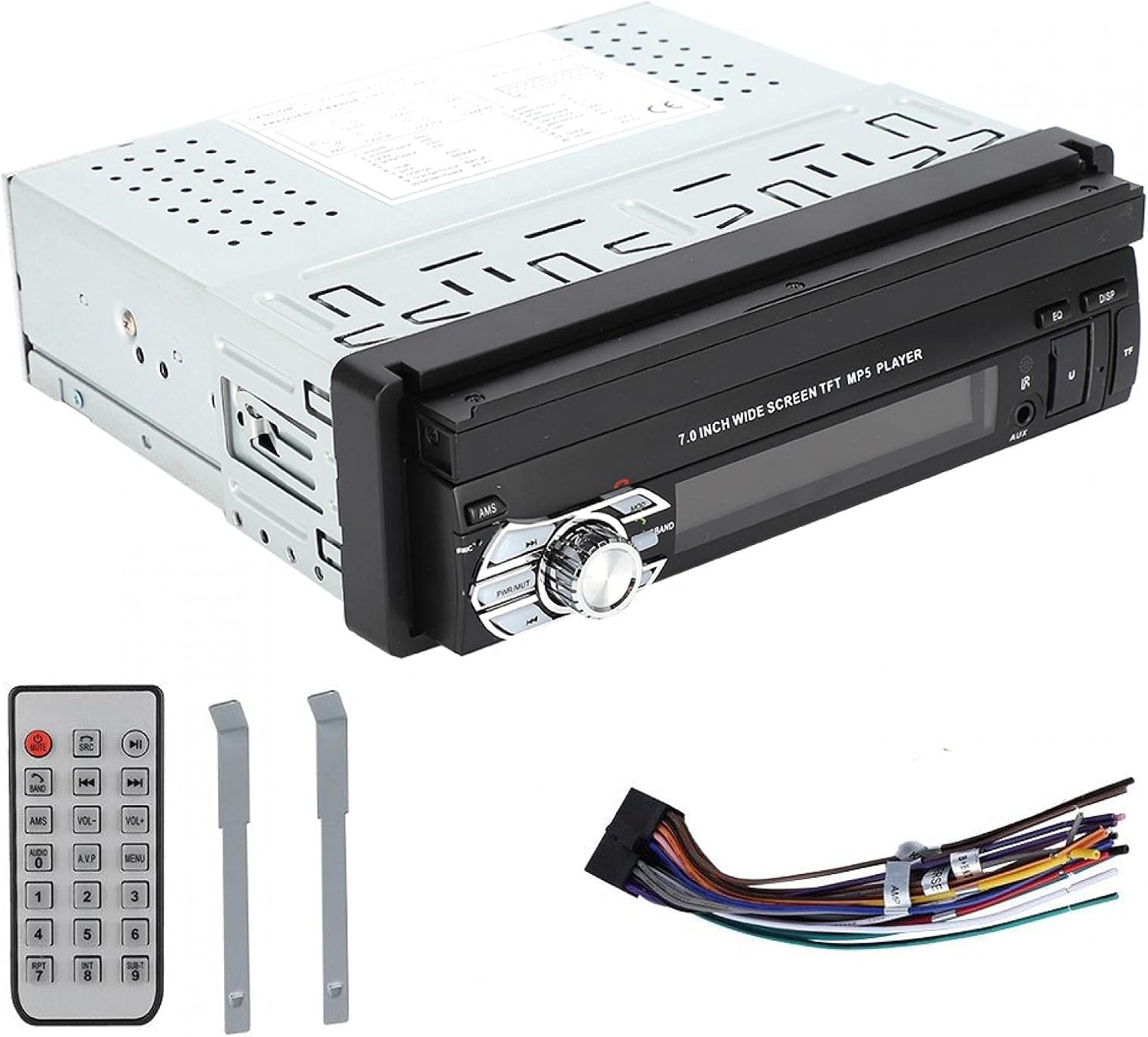
This manual provides detailed instructions for the installation, operation, and maintenance of your ASHATA MP5-SWM9601 Car Stereo. This single-DIN multimedia player features a 7-inch retractable touchscreen, Bluetooth connectivity for calls and music streaming, and supports various audio and video formats via USB, TF card, and AUX input. Please read this manual thoroughly before using the product to ensure proper function and safety.
Produkto savybės
- 7-inch high-definition retractable touchscreen display.
- „Bluetooth“ skambinimui laisvų rankų įranga ir garso transliacijai.
- Supports various audio formats including APE, FLAC, WAV, DIS, MP3, WMA, ACC, OGG, RA, AC3, MP2, AMR.
- Supports various video formats including AVI, MP4, FLV, PMP, RM, RMVB, MPG.
- USB 2.0 and TF card slot for media playback.
- AUX audio input for external devices.
- Atramos gale view camera input for parking assistance.
- Electronic sound processing (EQ) with adjustable treble, bass, balance, and sound field.
- Memory playback function for songs.
- Remote control included for convenient operation.
Sąranka ir diegimas
Proper installation is crucial for the performance and safety of your car stereo. It is recommended to have this unit installed by a professional technician. Ensure the vehicle's battery is disconnected before starting installation.
Matmenys
Before installation, verify that the unit's dimensions are compatible with your car's dashboard opening. The unit is a standard single-DIN size.

1 paveikslas: Dimensions of the ASHATA MP5-SWM9601 car stereo. The unit measures approximately 18.4 cm (7.2 inches) in width, 6.2 cm (2.4 inches) in height, and 17.8 cm (7.0 inches) in depth.
Laidų schema
Refer to the following diagram for correct wiring connections. Incorrect wiring can cause damage to the unit or your vehicle's electrical system.
2 paveikslas: Galinis view of the ASHATA MP5-SWM9601 showing the wiring harness connector and RCA outputs for audio and video. The wiring harness typically includes connections for power (ACC, B+, Ground), speakers, antenna, and steering wheel controls (if applicable).
- Maitinimo jungtys: Connect the yellow wire to the constant 12V power supply (B+), the red wire to the accessory 12V power supply (ACC), and the black wire to ground.
- Garsiakalbių jungtys: Connect the speaker wires to the corresponding positive and negative terminals for each speaker (e.g., front left +, front left -).
- Antena: Connect the car's radio antenna to the antenna input.
- Galinis View Kamera: Connect the video input from your rear view camera to the designated video input on the unit. Ensure the reverse trigger wire is connected to activate the camera display when reversing.
- RCA išėjimai: Use the RCA outputs for connecting external ampliftai arba papildomi ekranai.
Naudojimo instrukcijos
Maitinimo įjungimas / išjungimas ir pagrindiniai valdikliai

3 paveikslas: Front panel of the ASHATA MP5-SWM9601 showing the main controls, including the power/volume knob, mode button, band button, and USB/AUX/TF card slots.
- Maitinimo įjungimas/išjungimas: Paspauskite PWR/MUT button to turn the unit on. Press and hold to turn off. A short press will mute/unmute the audio.
- Garsumo valdymas: Norėdami reguliuoti garsumą, pasukite centrinę rankenėlę.
- Režimo pasirinkimas: Paspauskite REŽIMAS button to cycle through available sources (Radio, USB, TF, AUX, Bluetooth).
- Retract/Extend Screen: The screen can be manually or automatically retracted/extended. Refer to the on-screen menu for specific settings.
Bluetooth ryšys
Pair your mobile phone with the car stereo to enjoy hands-free calling and wireless audio streaming.
- Turn on the unit and select Bluetooth mode using the REŽIMAS mygtuką.
- Mobiliajame telefone įjunkite „Bluetooth“ ir ieškokite galimų įrenginių.
- Select "ASHATA" or a similar device name from the list. If prompted for a password, enter "0000" or "1234".
- Once paired, you can make/receive calls and play music through the car stereo.
Media Playback (USB/TF/AUX)
- USB atkūrimas: Insert a USB drive into the USB port. The unit will automatically switch to USB mode and begin playing compatible media files.
- TF kortelės atkūrimas: Insert a TF (MicroSD) card into the TF card slot. The unit will automatically switch to TF mode and begin playing compatible media files.
- AUX įvestis: Connect an external audio device (e.g., MP3 player, phone) to the AUX input using a 3.5mm audio cable. Select AUX mode using the REŽIMAS mygtuką.
- Palaikomi formatai:
- Audio: DIS, MP3, WMA, ACC, OGG, WAV, RA, AC3, MP2, AMR, APE, FLAC.
- Video: AVI, MP4, FLV, PMP, RM, RMVB, MPG.
- Image: JPEG.
Garso nustatymai
Adjust the audio output to your preference using the electronic sound processing (EQ) features.
- Paspauskite EQ button to access equalizer presets or custom settings.
- Navigate through the menu to adjust electronic volume, treble, bass, left/right balance, and front/rear sound field.

4 paveikslas: The display showing sound adjustment options, including electronic volume, treble, bass, left and right balance, and front and rear sound field settings.
Galinis View Kameros funkcija
Kai galinis view camera is connected and the vehicle is in reverse gear, the unit will automatically display the camera feed on the screen, providing assistance for parking and maneuvering.
Priežiūra
- Ekrano valymas: Use a soft, dry, lint-free cloth to gently wipe the touchscreen. Do not use abrasive cleaners or solvents.
- Įrenginio valymas: Wipe the exterior of the unit with a soft, dry cloth. Avoid getting liquids inside the unit.
- Temperatūra: Venkite ilgą laiką laikyti įrenginį tiesioginiuose saulės spinduliuose arba itin aukštose temperatūrose.
Trikčių šalinimas
| Problema | Galima priežastis | Sprendimas |
|---|---|---|
| Nėra galios | Neteisingas laidų prijungimas; Perdegęs saugiklis; Išsikrovęs automobilio akumuliatorius. | Check power connections (B+, ACC, Ground). Inspect and replace fuse if necessary. Check vehicle battery. |
| Nėra garso | Volume too low; Mute function active; Incorrect speaker wiring; Faulty speakers. | Increase volume. Press PWR/MUT to unmute. Check speaker connections. Test with different speakers if possible. |
| Bluetooth neprisijungia | Bluetooth not enabled on phone/unit; Incorrect pairing procedure; Device out of range. | Ensure Bluetooth is active on both devices. Repeat pairing steps. Move phone closer to the unit. |
| USB/TF kortelė neveikia | Nesuderinamas file format; Corrupted media; Card/drive not inserted correctly. | Užtikrinti files are in supported formats. Try a different USB drive/TF card. Reinsert the media. |
| Ekranas neįsitraukia/neišsiskleidžia | Mechanical obstruction; Software glitch. | Check for any physical obstructions. Try resetting the unit (if a reset button is available, or disconnect power briefly). |
Jei problema išlieka ir išbandžius šiuos sprendimus, susisiekite su klientų aptarnavimo tarnyba.
Specifikacijos
| Funkcija | Detalė |
|---|---|
| Prekės ženklas | ASHATA |
| Modelio numeris | MP5-SWM9601 (9601G) |
| Ryšio technologija | Bluetooth |
| Valdiklio tipas | Nuotolinio valdymo pultas |
| Ypatinga funkcija | Multimedijos grotuvas |
| Suderinami įrenginiai | MP3 Player, Mobile Phone |
| Jungties tipas | USB |
| Garso išvesties režimas | Stereo |
| Erdvinio garso kanalo konfigūracija | 2.0 |
| Kanalų skaičius | 2 |
| Kontrolės metodas | Nuotolinio valdymo pultas |
| Garso išvesties tipas | AUX, Speaker, USB |
| Išmaniųjų namų suderinamumas | Not Smart Home Compatible |
| Skaitmeninės medijos formatas | AVI, WAV, WMA (also supports DIS, MP3, ACC, OGG, RA, AC3, MP2, AMR, APE, FLAC, MP4, FLV, PMP, RM, RMVB, MPG, JPEG) |
| UPC | 783335388899 |
| Kilmės šalis | Kinija |
Garantija ir palaikymas
Dėl garantijos informacijos ar techninės pagalbos žr. kartu su pirkiniu pateiktus dokumentus arba susisiekite tiesiogiai su pardavėju / gamintoju. Išsaugokite pirkimo įrodymą, jei prireiktų pateikti garantijos pretenziją.