
1. Įvadas
This manual provides instructions for the Zerone Universal Remote Control, designed as a replacement for various Haier TV models. It is compatible with Haier HTR-A18M, 55D3550, 40D3500M, and 48D3500 series televisions. This remote control offers direct access to digital TV functions without complex programming.

Image 1.1: The Zerone Universal Remote Control in use, demonstrating its compatibility with Haier HTR-A18M, 55D3550, 40D3500M, and 48D3500 TV models.
2. Sąranka
2.1 Akumuliatoriaus įdėjimas
The remote control requires two (2) AAA batteries (not included) for operation. Follow these steps to install the batteries:
- Nuotolinio valdymo pulto gale raskite baterijų skyrių.
- Paspauskite fiksatorių žemyn ir nuimkite akumuliatoriaus dangtelį.
- Įdėkite dvi AAA tipo baterijas, užtikrindami, kad teigiamas (+) ir neigiamas (-) poliai teisingai sutaptų su žymėjimais baterijų skyriuje.
- Stumkite akumuliatoriaus dangtelį atgal į vietą, kol jis patikimai užsifiksuos.
The remote is ready for use immediately after battery installation; no additional programming is required for compatible Haier TV models.

2.1 pav.: Išsamus view of the remote control, highlighting the battery compartment for AAA battery installation.
3. Naudojimo instrukcijos
3.1 Pagrindinės funkcijos
This remote control provides standard functions for your Haier TV. Point the remote directly at your television's infrared receiver for optimal performance.
- Įjungimo mygtukas (U): Įjungia arba išjungia televizorių.
- Įvestis: Selects video input sources (HDMI, AV, etc.).
- Skaičių mygtukai (0–9): Tiesioginis kanalų pasirinkimas.
- VOL +/-: Reguliuoja garsumą aukštyn arba žemyn.
- CH +/-: Perjungia kanalus aukštyn arba žemyn.
- Nutildyti: Nutildo arba įjungia televizoriaus garsą.
- MENIU: atidaro pagrindinį televizoriaus meniu.
- Naršymo mygtukai (aukštyn, žemyn, kairėn, dešinėn, gerai): Naršo meniu ir patvirtina pasirinkimus.
- ATGAL / IŠĖJIMAS: Grįžta į ankstesnį ekraną arba išeina iš dabartinio meniu.
- EKRANAS: Rodo dabartinio kanalo informaciją.
- SAP / AUDIO: Pasirenka garso kalbą arba režimą.
- MIEGAS: Nustato miego laikmatį.
- PICTURE / WIDE: Adjusts picture mode or aspect ratio.
- CH.LIST / FAVORITE: Accesses channel list or favorite channels.
- Media Control Buttons (Play, Pause, Fast Forward, Rewind): Valdo medijos atkūrimą.
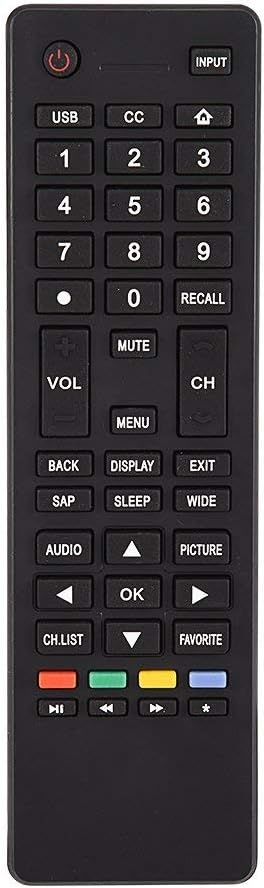
3.1 vaizdas: Baigtaview of the remote control's button layout for easy identification of functions.
3.2 Veikimo diapazonas
The remote control has a stable signal transmission distance of up to 10 meters (33 feet). Actual remote distance may vary depending on environmental factors and the specific model of your TV.
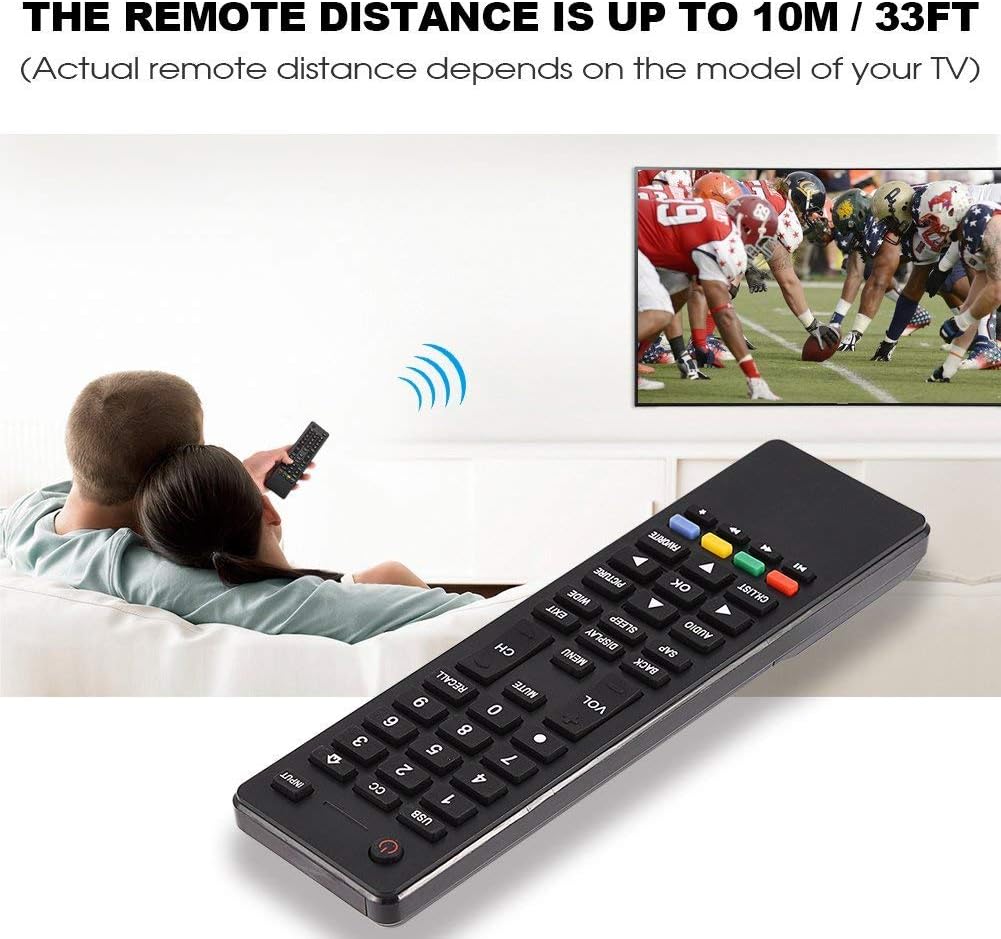
Image 3.2: Visual representation of the remote control's effective operating distance to the television.
4. Priežiūra
4.1 Valymas
Nuotolinio valdymo pultą valykite minkšta, sausa šluoste. Jei nešvarumai sunkiai įveikiami, lengvai nuvalykite.ampen the cloth with water or a mild cleaning solution. Avoid using harsh chemicals or abrasive cleaners, as these can damage the remote's surface or internal components.
4.2 Akumuliatoriaus priežiūra
- Pakeiskite baterijas, kai nuotolinio valdymo pultas sulėtėja arba nustoja veikti.
- Nemaišykite senų ir naujų baterijų arba skirtingų tipų baterijų.
- Jei nuotolinio valdymo pultas nebus naudojamas ilgesnį laiką, išimkite baterijas, kad išvengtumėte elektrolito pratekėjimo.
- Naudotas baterijas išmeskite atsakingai pagal vietines taisykles.
5. Problemų sprendimas
5.1 Nuotolinio valdymo pultas nereaguoja
- Patikrinkite baterijas: Ensure batteries are inserted correctly with the correct polarity (+/-) and are not depleted. Replace with fresh AAA batteries if necessary.
- Matymo linija: Make sure there are no obstructions between the remote control and the TV's infrared sensor.
- Atstumas: Confirm you are within the effective operating range (up to 10 meters / 33 feet).
- Suderinamumas su televizoriumi: Verify that your TV model is listed as compatible (Haier HTR-A18M, 55D3550, 40D3500M, 48D3500).
5.2 Buttons Not Working Correctly
- Švarus nuotolinio valdymo pultas: Dust or debris under buttons can cause malfunction. Refer to the Maintenance section for cleaning instructions.
- Baterijos patikrinimas: Weak batteries can lead to inconsistent button responses. Replace batteries.
6. Specifikacijos
| Funkcija | Detalė |
|---|---|
| Prekės ženklas | Zerone |
| Suderinami įrenginiai | Haier HTR-A18M, 55D3550, 40D3500M, 48D3500 TVs |
| Ryšio technologija | Infraraudonųjų spindulių |
| Didžiausias diapazonas | 10 metrų (33 pėdos) |
| Baterijos tipas | 2 x AAA (neįtraukta) |
| Valdiklio tipas | Mygtukų valdymas |
| Medžiaga | ABS |
| Modelio numeris | Zerone9rnag3b5y4-cr |
| UPC | 647213811490 |

Image 6.1: Physical dimensions of the Zerone Universal Remote Control.
7. Informacija apie garantiją
This product is offered as an Amazon Renewed item. Amazon Renewed products are professionally inspected and tested to work and look like new. If you are not satisfied with your purchase, renewed products are eligible for replacement or refund under the Amazon Renewed Guarantee.
Additionally, the manufacturer provides a 90 dienų ribota garantija. For specific details regarding the terms and conditions of this warranty, please refer to the documentation provided at the time of purchase or contact customer support.
8. Pagalba klientams
If you encounter any issues or have questions regarding your Zerone Universal Remote Control that are not addressed in this manual, please contact the seller or Amazon Renewed customer service for assistance.
For Amazon Renewed Guarantee claims, please visit the Amazon Renewed program page or contact Amazon customer support directly.