
Įvadas
The Xiaomi Mi Home Cam MJSXJ05CM is an indoor wireless surveillance camera designed for home security and monitoring. It features intelligent detection, Full HD 1080p resolution, a 130° ultra-wide-angle lens, and 10m infrared night vision. The camera supports two-way voice communication and offers zoning classification for smart detection. This manual provides essential information for setting up, operating, maintaining, and troubleshooting your device.
Pakuotės turinys
Prašome patikrinti, ar pakuotėje yra visi reikalingi daiktai:
- Xiaomi MI Home Camera
- Įkrovimo kabelis
- Maitinimo adapteris
- Vartotojo vadovas
- Montavimo įranga
Produktas baigtasview
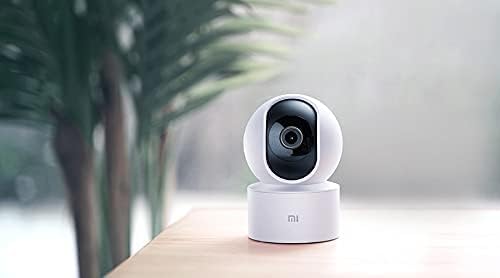
The Xiaomi Mi Home Cam MJSXJ05CM offers a comprehensive view of your indoor space with its 360-degree panoramic rotation and 1080p resolution. It includes an integrated microphone and speaker for two-way dialogue, allowing remote communication. The camera is equipped with advanced person detection and instant alerts.

1 paveikslas: Priekyje view of the Xiaomi Mi Home Cam MJSXJ05CM, showing the camera lens and status indicator light.

2 paveikslas: Atgal view of the Xiaomi Mi Home Cam MJSXJ05CM, highlighting the speaker grille and micro-USB power port.
Sąranka
- Maitinimas: Connect the camera to a power outlet using the provided charging cable and power adapter. The camera will power on automatically.
- Atsisiųskite „Mi Home“ programėlę: Download the Mi Home app from your device's app store. The app is compatible with Android 4.0 and above, and iOS 7.0 and above.
- Sukurti / Prisijungti paskyrą: Open the Mi Home app and create a new account or log in with an existing one.
- Pridėti įrenginį: In the app, tap the '+' icon to add a new device. Select the Xiaomi Mi Home Cam from the list of available devices.
- Prisijunkite prie „Wi-Fi“: Follow the on-screen instructions in the app to connect the camera to your home Wi-Fi network. Ensure your Wi-Fi signal is strong in the camera's intended location.
- Poravimas: The app will guide you through the pairing process, which may involve scanning a QR code displayed on your phone with the camera.
- Vieta: Place the camera on a flat surface or mount it using the provided hardware. Ensure it has a clear field of view.
3 paveikslas: A smartphone displaying the live video feed from the Mi Home Cam, demonstrating remote monitoring capabilities.
Naudojimo instrukcijos
- Tiesiogiai View: Atidarykite programėlę „Mi Home“ ir pasirinkite savo kamerą. view gyvas pašaras.
- Pakreipimo / pasukimo valdymas: Use the controls within the app to remotely rotate the camera horizontally (pan) and vertically (tilt) to achieve a 360-degree panoramic view.
- Dvipusis garsas: Tap the microphone icon in the app to speak through the camera's speaker, and listen to audio from the camera's microphone.
- Naktinis matymas: The camera automatically switches to infrared night vision in low-light conditions, providing clear black and white images up to 10 meters.
- Judesio aptikimas ir įspėjimai: Enable motion detection in the app settings. You will receive instant alerts on your smartphone when motion is detected. You can configure detection zones and sensitivity.
- Įrašymas ir saugojimas: The camera supports local storage via a microSD card (up to 128GB, not included). Recordings can also be accessed and managed through the Mi Home app.

4 paveikslas: A smartphone displaying a list of motion detection alerts and recorded events from the Mi Home Cam.
Priežiūra
- Valymas: Švelniai nuvalykite fotoaparato objektyvą ir korpusą minkštu, sausu skudurėliu. Nenaudokite skystų valiklių ar abrazyvinių medžiagų.
- Programinės įrangos atnaujinimai: Regularly check the Mi Home app for firmware updates. Keeping your camera's software up-to-date ensures optimal performance and security.
- Maitinimo ciklas: Jei kyla problemų dėl fotoaparato veikimo, pabandykite jį kelioms sekundėms atjungti nuo maitinimo šaltinio ir vėl prijungti.
Trikčių šalinimas
- Kamera neprisijungia prie „Wi-Fi“:
- Ensure your Wi-Fi network is 2.4GHz (5GHz is not supported by all models). Check that the Wi-Fi signal strength is adequate at the camera's location. Try restarting your router. Some users have reported success by temporarily disabling 'Dark Mode' on their smartphone during the setup process if encountering network issues.
- Camera frequently disconnects:
- This often indicates a weak Wi-Fi signal. Try moving the camera closer to your Wi-Fi router or using a Wi-Fi extender. Ensure there are no major obstructions between the camera and the router.
- No image or black screen:
- Check the power connection. Restart the camera by unplugging and replugging it. Ensure the lens is clean and unobstructed.
- Kameros nustatymas iš naujo:
- Locate the reset button (often a small pinhole on the back or bottom of the camera, visible in Figure 2). Use a pin or paperclip to press and hold the reset button for approximately 5-10 seconds until the indicator light changes or you hear a voice prompt. This will restore factory settings.
Specifikacijos
| Prekės ženklas | XIAOMI |
| Modelio pavadinimas | MJSXJ05CM |
| Ryšio technologija | Bevielis |
| Ypatinga funkcija | HD raiška, naktinis matymas |
| Naudojimas viduje / lauke | Vidinis |
| Suderinami įrenginiai | Kompiuteris, išmanusis telefonas, planšetė |
| Maitinimo šaltinis | AC maitinimas |
| Kontrolės metodas | Nuotolinis valdymas (per programėlę) |
| Efektyvi vaizdo raiška | 1080p |
| Viewing kampas | 360 laipsnių |
| Optinis priartinimas | 3x |
| Installed Flash Memory Size | 128 GB (MicroSD card slot) |
| Prekės matmenys (I x P x A) | 25.4 x 25.4 x 25.4 cm |
| Prekės svoris | 99.99 gramai (3.53 uncijos) |
| Naktinis matymas | Color Night Vision (Infrared) |
| Įspėjimo tipas | Tik judėjimas |
| Spalva | Baltas |
Informacija apie garantiją
The Xiaomi Mi Home Cam MJSXJ05CM comes with a manufacturer's warranty of 1 year. Please retain your proof of purchase for warranty claims. For specific terms and conditions, refer to the warranty card included in your product packaging or visit the official Xiaomi websvetainę.
Palaikymas
For further assistance, technical support, or to report issues not covered in this manual, please visit the official Xiaomi support website or contact their customer service. You can usually find contact information on the Xiaomi website or in the Mi Home app's 'Help & Feedback' section.


