
1. Įvadas
The myTouchSmart In-Wall Push-Button Countdown Timer Switch (Model 40953) is designed to simplify your routine by providing convenient automation for indoor or outdoor lighting and various appliances. This timer replaces any standard single-pole light switch and offers preset countdown times to automatically turn off connected devices. It is compatible with LED, CFL, incandescent, and halogen bulbs.

The product packaging displays the in-wall digital countdown timer switch, highlighting its key features such as preset countdown times and compatibility with various bulb types.
2. Saugos informacija
Before beginning installation, read all instructions carefully. Improper installation can result in electrical shock or fire. Always consult a qualified electrician if you are unsure about any part of the installation process.
- IŠJUNKITE MAITINĄ at the circuit breaker or fuse box before wiring.
- Šis prietaisas skirtas montuoti laikantis Nacionalinio elektros kodekso ir vietinių taisyklių.
- Naudokite tik varinę vielą.
- NEUTRAL WIRE REQUIRED operacijai.
3. Montavimas
3.1 Reikalingi įrankiai
- Atsuktuvas (Phillips ir Flathead)
- Vielos nuėmikliai
- Elektrinė juosta
- ttage testeris (rekomenduojama)
3.2 Laidų prijungimo instrukcijos
- Išjunkite maitinimą to the switch location at the circuit breaker or fuse box. Verify power is off using a voltage testeris.
- Nuimkite esamą sieninę plokštę ir jungiklį nuo sieninės dėžutės.
- Carefully disconnect the wires from the old switch. Identify and label the LINE (hot), LOAD, NEUTRAL, and GROUND wires. The timer requires a neutral wire for proper operation.
- Connect the wires to the myTouchSmart timer using the screw terminals:
- Prijunkite LINIJA (hot) wire to the terminal labeled 'LINE'.
- Prijunkite Įkelti wire (to the light/appliance) to the terminal labeled 'LOAD'.
- Prijunkite NEUTRALUS wire (typically white) to the terminal labeled 'NEUTRAL'.
- Prijunkite ŽEMĖ wire (typically bare copper or green) to the terminal labeled 'GROUND'.
- Įsitikinkite, kad visos laidų jungtys yra saugios.
- Atsargiai įstumkite laidinį laikmatį į sieninę dėžutę.
- Mount the timer to the wall box using the provided screws.
- Attach the desired color faceplate (White or Light Almond included, wallplate not included).
- Atkurkite maitinimą prie grandinės pertraukiklio.

Galinė view of the timer, displaying the screw terminals for Line, Load, Neutral, and Ground connections, essential for proper installation.

Papildomas profesionalasfile of the timer, showing its depth and how it fits into a standard electrical wall box, with wiring connections visible.
4. Naudojimo instrukcijos
The myTouchSmart timer features an ON/OFF door panel that conceals preset buttons and LEDs when closed. Opening the door provides access to all countdown options.
4.1 Activating a Countdown
- Open the front door panel to reveal the preset buttons.
- Press the desired countdown button: 5 Min, 10 Min, 30 Min, 60 Min, 2 Hour, or 4 valanda.
- A blue LED indicator light next to the selected button will illuminate, confirming the countdown is active. The connected device will turn on and remain on for the selected duration, then automatically turn off.
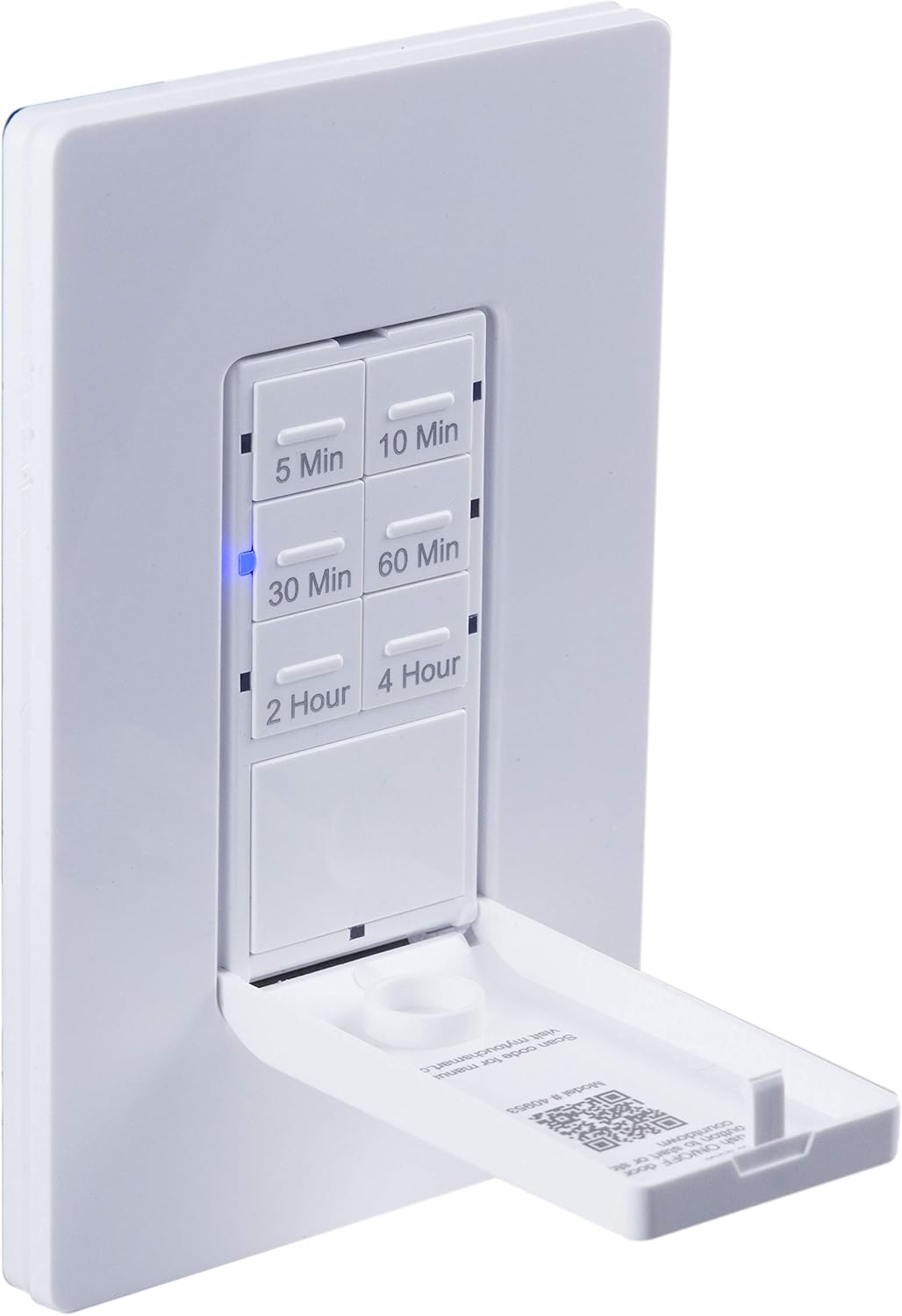
Iš arti view of the timer with its front door panel open, exposing the six preset countdown buttons (5, 10, 30, 60 minutes, 2, and 4 hours) and the manual ON/OFF button.

The in-wall timer with its door open, showing the preset buttons and a blue LED illuminated next to the '30 Min' button, indicating an active countdown.

A hand pressing one of the preset countdown buttons on the timer, demonstrating user interaction.
4.2 Rankinis įjungimo/išjungimo perrašymas
- To manually turn the connected device ON or OFF at any time, press the large ON/OFF button located at the bottom of the timer (this button is also the door panel when closed).
- Pressing this button will override any active countdown. If no countdown is active, it functions as a standard ON/OFF switch.
4.3 Programos
This timer is suitable for a variety of applications, including:
- Vidaus ir lauko apšvietimas
- Išmetimo ventiliatoriai
- Šildytuvai
- Other compatible appliances

An image illustrating various applications for the timer, including controlling indoor/outdoor lights, ceiling fans, and exhaust fans.
5. Priežiūra
The myTouchSmart timer requires minimal maintenance. Follow these guidelines:
- Valymas: Disconnect power at the circuit breaker before cleaning. Wipe the surface with a soft, damp audinys. Nenaudokite stiprių cheminių medžiagų ar abrazyvinių valiklių.
- Patikra: Periodically check for any loose connections or damage to the switch. If any damage is observed, discontinue use and consult a qualified electrician.
6. Problemų sprendimas
If you experience issues with your myTouchSmart timer, refer to the following common problems and solutions:
| Problema | Galima priežastis | Sprendimas |
|---|---|---|
| Laikmatis neįsijungia / neišsijungia. | No power to the switch; Incorrect wiring (Line/Load reversed); Loose connections. | Check circuit breaker. Verify wiring connections (Line to Line, Load to Load, Neutral, Ground). Ensure all wires are securely fastened. |
| Countdown does not activate. | Button not fully pressed; Faulty unit. | Ensure the desired countdown button is pressed firmly until the blue LED illuminates. If issue persists, contact customer support. |
| Neveikia LED indikatoriai. | No power; Unit malfunction. | Check power supply. If the timer functions but LEDs do not, contact customer support. |
| Pertraukiamas veikimas. | Loose wiring; Overload. | Check all wiring connections for tightness. Ensure the connected load does not exceed the timer's electrical ratings. |
Jei trikčių šalinimo veiksmai neišsprendžia problemos, susisiekite su klientų aptarnavimo tarnyba.
7. Specifikacijos
| Funkcija | Specifikacija |
|---|---|
| Modelio numeris | 40953 |
| Veikimo režimas | Automatically, Off, Push Button |
| Dabartinis reitingas | 15 Amps |
| Veiklos ttage | 120 VAC, 60 Hz |
| Varžinė apkrova | 15A |
| Volframo apkrova | 1200W |
| Variklio įvertinimas | 1 / 2 HP |
| Suderinamos lemputės | LED, CFL, kaitrinė, halogeninė |
| Montavimo tipas | Sieninis laikiklis |
| Matmenys (I x P x A) | 2.75 x 4.85 x 6.85 colio |
| Prekės svoris | 5.9 uncijos |
| Neutralus laidas | Privaloma |
| Įtraukti komponentai | In-Wall Timer, White/Light Almond Door Panels |
8. Garantija ir palaikymas
Dėl garantijos informacijos ir techninės pagalbos kreipkitės į oficialią gamintojo svetainę. websvetainėje arba susisiekite su jų klientų aptarnavimo skyriumi. Išsaugokite pirkimo kvitą kaip pirkimo įrodymą.
Gamintojas: myTouchSmart
UPC: 030878409537
Websvetainė: www.mytouchsmart.com (Prašome patikrinti oficialų websvetainėje, kurioje pateikiama naujausia pagalbos informacija.)