
Įvadas
This manual provides instructions for the Calvas USARMT LTV-914 Universal Remote Control, designed for use with various LG TV models, including AKB73715634, AKB73715679, and 3D Smart TV LN577S. This remote operates via infrared (IR) technology and is intended as a direct replacement, requiring no programming for most compatible LG televisions.
Pakuotės turinys
- 1 x USARMT LTV-914 Universal Remote Control
Specifikacijos
- Modelio numeris: LTV-914
- Prekinis ženklas: plikos dėmės
- Tipas: TV nuotolinio valdymo pultas
- Bendravimas: Infraraudonųjų spindulių (IR)
- Dažnis: 433 MHz
- Kanalai: 1
- Maitinimo šaltinis: 2 x AAA šarminės baterijos (nepridedamos)
- Medžiaga: ABS
- Suderinami įrenginiai: LG Televisions (e.g., AKB73715634, AKB73715679, 3D Smart TV LN577S)
- Ypatinga funkcija: Universalus suderinamumas
Sąranka
Baterijų montavimas
- Nuotolinio valdymo pulto gale raskite baterijų skyrių.
- Baterijų skyriaus dangtelį stumkite žemyn arba paspauskite skląstį ir pakelkite, kad atidarytumėte.
- Įdėkite dvi (2) AAA šarmines baterijas, užtikrindami, kad teigiamas (+) ir neigiamas (-) poliai teisingai sutaptų su žymėjimais skyriaus viduje.
- Uždėkite baterijų skyriaus dangtelį, stumdami jį atgal į vietą, kol jis tvirtai užsifiksuos.

Paveikslėlis: Nuotolinio valdymo pulto galinė pusė su atidarytu baterijų skyriumi, iliustruojanti baterijų įdėjimą.
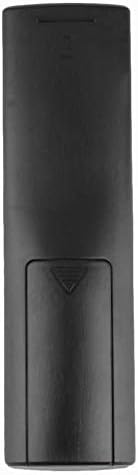
Vaizdas: Galinis view nuotolinio valdymo pulto, kai baterijų dangtelis uždarytas.
Naudojimo instrukcijos
Pradinis naudojimas
The Calvas USARMT LTV-914 remote control is designed to work directly with most compatible LG TV models without requiring any programming. Simply insert the batteries and point the remote towards your television.
Direct Use and Basic Functions
Most functions, such as power on/off, volume control, channel selection, and navigation, should operate immediately upon pointing the remote at your LG TV.

Vaizdas: priekis view of the remote control, displaying the button layout.
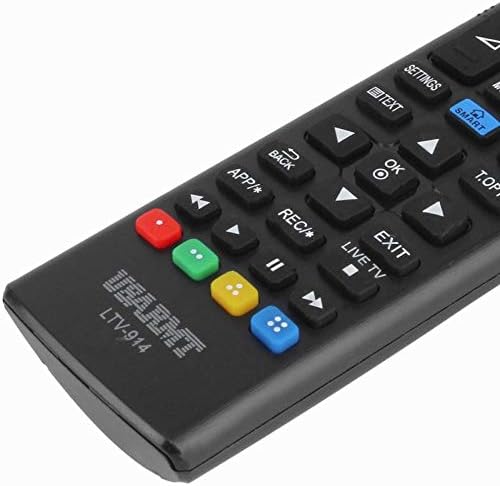
Image: Close-up of the remote's buttons, showing details of the control interface.
Factory Reset / Reconfiguration (If direct use fails)
In rare cases, if the remote does not operate your TV directly, you may need to perform a factory reset or attempt a reconfiguration.
- To reset to factory settings: Press and hold the GALIA button and the number 0 vienu metu paspauskite mygtuką kelias sekundes.
- To attempt re-pairing (if applicable, though typically not required for this universal remote): Press and hold the GALIA button and the number 1 vienu metu paspauskite mygtuką kelias sekundes.
After performing either of these steps, release the buttons and test the remote's functionality with your TV.
Trikčių šalinimas
- Nuotolinis nereaguoja:
- Patikrinkite, ar baterijos įdėtos teisingai, tinkamu poliškumu.
- Senas arba išsikrovusias baterijas pakeiskite naujomis AAA šarminėmis baterijomis.
- Įsitikinkite, kad tarp nuotolinio valdymo pulto ir televizoriaus IR imtuvo nėra jokių kliūčių.
- Įsitikinkite, kad esate televizoriaus IR imtuvo veikimo diapazone.
- Kai kurios funkcijos neveikia:
- While this is a universal remote, some advanced or specific smart TV functions might not be fully supported on all LG models.
- Try the factory reset/reconfiguration steps mentioned in the "Operating Instructions" section.
- Remote LED indicator not lighting up:
- This usually indicates dead batteries or incorrect battery insertion. Replace batteries.
Priežiūra
- Laikykite nuotolinio valdymo pultą sausą. Venkite sąlyčio su skysčiais.
- Nenumeskite nuotolinio valdymo pulto ir nedarykite jam stiprių smūgių.
- Nuotolinio valdymo pultą valykite minkštu, sausu skudurėliu. Nenaudokite abrazyvinių valiklių ar tirpiklių.
- Jei nuotolinio valdymo pultas nebus naudojamas ilgesnį laiką, išimkite baterijas, kad išvengtumėte elektrolito pratekėjimo.
Garantija ir palaikymas
Specific warranty information for this product is not provided in the available data. For support or warranty inquiries, please contact your retailer or the manufacturer, Calvas.