
1. Įvadas
The Safire SF-TESTER-ARM-5N1-4K is a versatile 4-in-1 multifunctional wrist CCTV tester designed for professional surveillance system installation and maintenance. This device supports a wide range of video formats including HDTVI, HDCVI, AHD, CVBS, and IP 4K resolutions, making it an essential tool for technicians working with various camera technologies. Its compact design, integrated features, and user-friendly interface ensure efficient and accurate testing in the field.
2. Produkto ypatybės
- Kelių formatų palaikymas: Compatible with HDTVI, HDCVI, AHD, Analog CVBS, and IP 4K video formats.
- Didelės raiškos ekranas: Features a 4-inch TFT-LCD touchscreen with 800x480 resolution for clear image viewing.
- PTZ valdymas: Supports PTZ camera control via RS485 for pan, tilt, and zoom adjustments.
- Integrated Power Output: Provides DC 12V power output and Power over Ethernet (PoE) for camera testing.
- Cable Testing: Includes an independent cable tester for RJ45 cables, along with tools for cable information and TDR testing.
- Tinklo ryšys: Equipped with WiFi and RJ45 10/100/1000M communication capabilities.
- Reguliuojami ekrano nustatymai: Allows adjustment of brightness, contrast, and saturation for optimal viewing.
- Ilgai veikianti baterija: Built-in 7.4V 2400mAh Lithium battery for extended field use.
- Daugiakalbė sąsaja: Supports multiple languages for user convenience.
3. Pakuotės turinys
Patikrinkite, ar jūsų siuntinyje yra visi toliau išvardyti daiktai:
- Safire SF-TESTER-ARM-5N1-4K Multifunction Tester
- CCTV Adapter
- AC/DC 12V 3.0A Power Adapter
- Test Cables and Connectors
- Kietas apsauginis dėklas
- Riešo dirželis
- Vartotojo vadovas
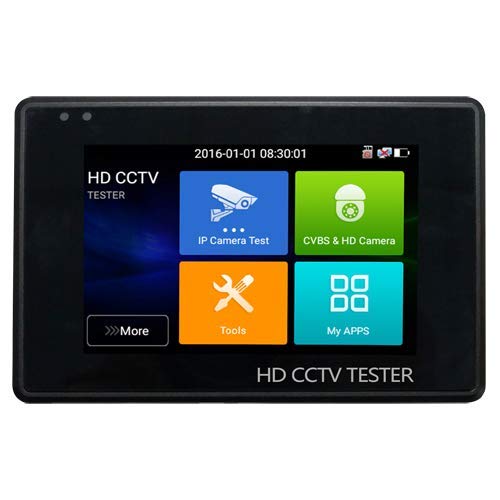
Figure 1: Safire SF-TESTER-ARM-5N1-4K Wrist CCTV Tester. This image shows the compact design of the tester, suitable for wrist-mounted operation, with its screen and control buttons visible.
4. Sąranka
4.1 Pradinis įkrovimas
Before first use, fully charge the device. Connect the provided AC/DC 12V 3.0A power adapter to the tester's charging port and plug it into a power outlet. The charging indicator will illuminate. A full charge typically takes several hours.
4.2 Riešo dirželio pritvirtinimas
Securely attach the wrist strap to the designated points on the tester. Ensure it is fastened correctly to prevent accidental drops during use.
4.3 Įjungimas / išjungimas
Norėdami įjungti įrenginį, paspauskite ir palaikykite maitinimo mygtuką, kol ekranas įsijungs. Norėdami išjungti, dar kartą paspauskite ir palaikykite maitinimo mygtuką, kol pasirodys išjungimo raginimas, tada patvirtinkite.
5. Naudojimo instrukcijos
5.1 Sąsajos naršymas
The tester features a touchscreen interface. Use your finger to tap icons and navigate through menus. Swipe gestures may be used for scrolling in certain lists.
5.2 Video Input Selection
From the main menu, select the appropriate video input mode (HDTVI, HDCVI, AHD, CVBS, or IP) corresponding to the camera system you are testing. Connect the camera's video output to the tester's input port using the provided cables.
5.3 PTZ valdymas
For cameras supporting PTZ (Pan-Tilt-Zoom) functionality, select the PTZ control option. Connect the RS485 control lines from the camera to the tester. Use the on-screen controls to adjust camera direction and zoom.
5.4 Kabelių bandymai
To test RJ45 network cables, select the 'Cable Test' function. Connect one end of the RJ45 cable to the tester and the other end to the independent cable tester accessory. The screen will display the wiring status and identify any faults.
5.5 Galia
The tester can supply power to cameras. Select the 'Power Output' function and choose either DC 12V or PoE (if supported by the camera and tester). Connect the power output cable to the camera's power input.
6. Priežiūra
6.1 Valymas
Wipe the device with a soft, dry cloth. For stubborn dirt, a slightly damp cloth can be used. Avoid using harsh chemicals or abrasive cleaners, as they may damage the screen or casing.
6.2 Akumuliatoriaus priežiūra
To prolong battery life, avoid fully discharging the battery frequently. Recharge the device regularly, even if not in active use, to maintain battery health. Store the device in a cool, dry place when not in use for extended periods.
6.3 Saugykla
When not in use, store the tester in its protective hard case to prevent damage from impacts or dust. Keep it away from extreme temperatures and direct sunlight.
7. Problemų sprendimas
- Įrenginys neįsijungia: Įsitikinkite, kad akumuliatorius įkrautas. Prijunkite maitinimo adapterį ir bandykite dar kartą. Jei problema išlieka, susisiekite su palaikymo tarnyba.
- Nėra vaizdo signalo: Verify that the camera is powered on and functioning correctly. Check all cable connections for proper seating. Ensure the correct video input mode is selected on the tester.
- PTZ control not working: Confirm that the camera supports PTZ and that the RS485 connections are correct. Check the camera's PTZ protocol settings.
- Netikslūs kabelio bandymo rezultatai: Ensure both ends of the RJ45 cable are securely connected to the tester and the accessory. Check for any visible damage to the cable.
8. Specifikacijos
| Prekės ženklas | Safire |
| Modelis | SF-TESTER-ARM-5N1-4K |
| Maitinimo šaltinis | Baterija |
| Ekranas | 4-inch TFT-LCD, 800x480 resolution |
| Palaikomi vaizdo formatai | HDTVI, HDCVI, AHD, Analog CVBS, IP 4K |
| Baterija | 7.4V 2400mAh ličio |
| Įkroviklis | DC 12V 3A |
| Darbinė temperatūra | -10°C iki 50°C |
| Matmenys (I x P x A) | 126 mm x 83 mm x 33 mm (4.96 x 3.27 x 1.3 colio) |
| Svoris | 320 g (0.71 svaro) |
9. Garantija ir palaikymas
This Safire product is covered by a standard manufacturer's warranty. For specific warranty terms and conditions, please refer to the warranty card included in your package or contact your local Safire distributor. For technical support, troubleshooting assistance, or service inquiries, please visit the official Safire websvetainėje arba susisiekite su klientų aptarnavimo skyriumi.