
Įvadas
This manual provides instructions for the proper setup, operation, and maintenance of your Calvas 2020B0-B1 remote control. This remote is designed to be compatible with Shaw LCD LED televisions, offering a convenient replacement or secondary control unit. Please read this manual thoroughly before using the device.

Vaizdas: priekis view of the Calvas 2020B0-B1 remote control.
Sąranka
1. Akumuliatoriaus įdėjimas
- Nuotolinio valdymo pulto gale raskite baterijų skyrių.
- Paspauskite fiksatorių žemyn ir nuimkite akumuliatoriaus dangtelį.
- Įdėkite dvi AAA tipo baterijas (nepridedamos), užtikrindami, kad teigiamas (+) ir neigiamas (-) poliai teisingai sutaptų su žymėjimais skyriaus viduje.
- Stumkite akumuliatoriaus dangtelį atgal į vietą, kol jis patikimai užsifiksuos.

Paveikslėlis: Nugara view nuotolinio valdymo pulto su atidarytu baterijų skyriumi.
2. Quick Setup for TV Control
The remote features a quick setup function for initial pairing with your television. Follow these steps:
- Paspauskite ir palaikykite NUSTATYMAS button until the LED light blinks twice.
- Paspauskite TV MAITINIMAS mygtuką.
- Paspauskite ir palaikykite OK mygtuką.
- Atleiskite OK key when your TV turns off. This indicates successful pairing.
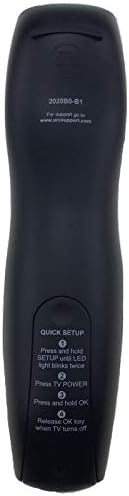
Image: Back of the remote control displaying quick setup instructions.
Note: If the TV does not turn off, repeat the steps or consult the TV's manual for specific remote programming codes if available.
Naudojimo instrukcijos
The Calvas 2020B0-B1 remote control utilizes infrared (IR) technology. Ensure a clear line of sight between the remote's IR emitter and your TV's IR receiver for optimal performance.
Mygtukų funkcijos:
- GALIA: Įjungia arba išjungia televizorių.
- VOL +/-: Padidina arba sumažina garsumą.
- CH +/-: Keičia kanalą aukštyn arba žemyn.
- Nutildyti: Nutildo arba įjungia televizoriaus garsą.
- SKAITMENŲ KLAVIATŪRA (0–9): Tiesiogiai įvedami kanalų numeriai.
- VADOVAS: Rodo programų vadovą.
- MENIU: Įjungia pagrindinį televizoriaus meniu.
- INFORMACIJA: Rodo informaciją apie dabartinę programą.
- Gerai / Naršymo rodyklės: Patvirtina pasirinkimus ir naršo meniu.
- UŽDARYTI: Išeina iš esamo meniu arba ekrano.
- PASKUTINĖ: Grįžta prie ankstesnio viewed kanalas.
- DAY +/-: Navigates through days in the program guide.
- MUSIC / FAV: Accesses music channels or favorite channels (functionality may vary by TV model).
Priežiūra
Valymas:
- Nuotolinio valdymo pultą nuvalykite minkšta, sausa šluoste.
- Įsisenėjusiam purvui šiek tiek pamirkykiteamplt šluostę nuvalykite vandeniu arba švelniu, neabrazyviniu valikliu.
- Nenaudokite stiprių cheminių medžiagų, tirpiklių ar abrazyvinių valymo kempinių, nes jos gali pažeisti nuotolinio valdymo pulto paviršių ar vidinius komponentus.
Baterijos keitimas:
- Replace batteries when the remote's response becomes sluggish or the LED indicator fails to light up.
- Always replace both batteries at the same time with new AAA batteries.
- Nemaišykite senų ir naujų baterijų arba skirtingų tipų baterijų.
- Jei nuotolinio valdymo pultas nebus naudojamas ilgesnį laiką, išimkite baterijas, kad išvengtumėte pratekėjimo.
Saugykla:
- Nuotolinio valdymo pultą laikykite vėsioje, sausoje vietoje, apsaugotoje nuo tiesioginių saulės spindulių ir ekstremalių temperatūrų.
- Saugokite nuotolinio valdymo pultą nuo kritimo ir neleiskite jam patekti per didelei drėgmei.
Trikčių šalinimas
- Nuotolinis nereaguoja:
- Patikrinkite, ar baterijos įdėtos teisingai ir nėra išsikrovusios. Jei reikia, pakeiskite.
- Ensure there is a clear line of sight between the remote and the TV's IR receiver. Remove any obstructions.
- Try re-pairing the remote with the TV using the "Quick Setup" steps.
- Veikia tik kai kurie mygtukai:
- This might indicate a partial pairing issue or a specific button malfunction. Try re-pairing the remote.
- Nuvalykite nuotolinio valdymo pulto paviršių, ypač aplink nereaguojančius mygtukus, kad įsitikintumėte, jog nėra jokių trukdžių.
- Trumpas veikimo diapazonas:
- Pakeiskite baterijas naujomis.
- Įsitikinkite, kad IR signalo netrukdo jokie stiprūs šviesos šaltiniai (pvz., tiesioginiai saulės spinduliai ar ryškios fluorescencinės lempos).
Specifikacijos
| Prekės ženklas | plikos dėmės |
| Modelio numeris | 2020B0-B1 (Mfr Part Number: CLS-D41D8CD98F00B204E9800998ECF8427E) |
| Suderinami įrenginiai | Television (Shaw LCD LED TVs) |
| Ryšio technologija | Infraraudonųjų spindulių (IR) |
| Valdiklio tipas | Mygtukų valdymas |
| Maximum Number of Supported Devices | 1 |
| Didžiausias diapazonas | 10 metrai |
| Ypatinga funkcija | Ergonomiškas dizainas |
Informacija apie garantiją
This product is typically covered by a limited warranty provided by the seller or manufacturer. Please refer to your purchase documentation or contact the retailer directly for specific warranty terms and conditions. Keep your proof of purchase for any warranty claims.
Palaikymas
For further assistance, technical support, or inquiries regarding your Calvas 2020B0-B1 remote control, please contact the seller or manufacturer through the platform where the product was purchased. Provide your model number (2020B0-B1) and any relevant purchase details when seeking support.