
Homtime C1
Homtime C1 Digital Alarm Clock User Manual
Modelis: C1
1. Įvadas
Ačiū, kad pirkoteasing the Homtime C1 Digital Alarm Clock. This device combines a digital alarm clock with dual USB charging ports, offering convenience and functionality for your bedside or office. Its user-friendly design, featuring a rotary button and dimmable LCD screen, ensures ease of use for all ages. Please read this manual thoroughly before operation to ensure proper use and maintenance.

Image: The Homtime C1 Digital Alarm Clock, turquoise in color, displayed on a wooden surface with a succulent plant in the background. The clock shows the time 20:08 and an alarm set for 15:00.
2. Saugos informacija
Norėdami užtikrinti saugų darbą ir išvengti žalos, laikykitės šių atsargumo priemonių:
- Saugokite prietaisą nuo vandens ar per didelės drėgmės.
- Nelaikykite įrenginio šalia šilumos šaltinių, tokių kaip radiatoriai, šildytuvai, viryklės ar kiti prietaisai (įskaitant ampkeltuvai), kurie gamina šilumą.
- Use only the power adapter and charging cable provided or recommended by Homtime.
- Nebandykite patys ardyti, taisyti ar modifikuoti įrenginio. Visus techninės priežiūros darbus patikėkite kvalifikuotiems techninės priežiūros darbuotojams.
- Saugokite įrenginį nuo stiprių magnetinių laukų.
- Valykite tik sausa šluoste.
3. Pakuotės turinys
Patikrinkite pakuotę, ar joje yra šie daiktai:
- Homtime C1 Digital Alarm Clock
- Maitinimo adapteris
- Charging Cable (Multi-connector for various mobile phones)
- Vartotojo vadovas

Image: A gold-colored multi-connector charging cable with USB-A, Micro USB, Lightning, and USB-C connectors, indicating its versatility for various mobile devices.
4. Produktas baigtasview
Familiarize yourself with the different parts of your Homtime C1 alarm clock:
- Priekyje: Large LCD display for time and alarm.
- Į viršų: Rotary button for setting time/alarm, snooze/dimmer button, alarm ON/OFF button.
- Atgal: Maitinimo įvesties prievadas.
- Šoninė (dešinė): Dvi USB įkrovimo prievadai.

Image: A composite image showing various angles of the Homtime C1 Digital Alarm Clock, including front, top, side, and bottom views, highlighting its compact design and port locations.
5. Sąranka
- Prijunkite maitinimą: Plug the provided power adapter into the DC input port on the back of the alarm clock, then plug the adapter into a standard wall outlet. The display will light up.
- Pradinis laiko nustatymas: The clock will typically display a default time. To set the correct time, proceed to the 'Setting Time' section under Operating Instructions.
6. Naudojimo instrukcijos
6.1 Laiko nustatymas
- Press and hold the rotary button on top of the clock until the hour digits start blinking.
- Rotate the button clockwise or counter-clockwise to adjust the hour.
- Press the rotary button once to switch to minute adjustment.
- Rotate the button to adjust the minutes.
- Press the rotary button again to confirm the time and exit time setting mode.
6.2 Setting Alarm
- Press and hold the alarm setting button (bell icon) on top of the clock until the alarm hour digits start blinking.
- Rotate the rotary button to adjust the alarm hour.
- Press the alarm setting button once to switch to alarm minute adjustment.
- Rotate the rotary button to adjust the alarm minutes.
- Press the alarm setting button again to confirm the alarm time.
- To activate or deactivate the alarm, press the alarm ON/OFF button (next to the rotary button). An alarm icon will appear on the display when activated.

Image: A person's hand with green nail polish is shown pressing the large circular button on top of a white Homtime C1 alarm clock, demonstrating the interaction for setting time or alarm.
6.3 Snausti funkcija
When the alarm sounds, press the large rotary button on top of the clock to activate the snooze function. The alarm will pause for a few minutes (default snooze time is typically 9 minutes) and then sound again. To turn off the alarm completely, press the alarm ON/OFF button.
6.4 Display Brightness (Dimmable)
The Homtime C1 features an auto-dimmable display. The brightness adjusts automatically based on ambient light conditions. You can also manually adjust the brightness by briefly pressing the snooze/dimmer button (usually the large rotary button or a dedicated button next to it) to cycle through different brightness levels.
6.5 USB įkrovimo prievadai
The Homtime C1 is equipped with dual USB charging ports (5V/2.1A) on its side, allowing you to charge your mobile devices directly from the clock. Simply connect your device's USB charging cable to one of the ports. These ports are compatible with most smartphones and tablets, including iPhone and Android devices.
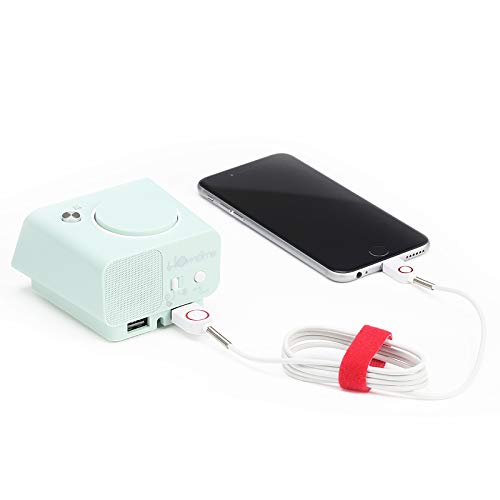
Image: The Homtime C1 alarm clock, turquoise in color, with a white charging cable connected to its side USB port, actively charging a black smartphone. This illustrates the dual USB charging capability.
7. Priežiūra
- Valymas: Use a soft, dry cloth to clean the surface of the clock. Do not use liquid cleaners or aerosol sprays.
- Saugykla: If storing the device for an extended period, unplug it from the power outlet and store it in a cool, dry place.
- Venkite poveikio: Do not drop or subject the clock to strong impacts, as this may damage internal components.
8. Problemų sprendimas
| Problema | Galima priežastis | Sprendimas |
|---|---|---|
| Laikrodžio ekranas išjungtas. | Nėra maitinimo jungties. | Įsitikinkite, kad maitinimo adapteris yra tvirtai prijungtas prie laikrodžio ir sieninio lizdo. |
| Signalizacija neskamba. | Signalizacija neįjungta arba nustatyta neteisingai. | Patikrinkite, ar rodoma žadintuvo piktograma. Iš naujo nustatykite žadintuvo laiką. |
| USB įkrovimas neveikia. | Laido problema arba įrenginio nesuderinamumas. | Išbandykite kitą USB laidą. Įsitikinkite, kad jūsų įrenginys suderinamas su 5 V / 2.1 A įkrovimu. |
| Display too dim/bright. | Auto-dimming or manual setting. | Briefly press the snooze/dimmer button to cycle through brightness levels. |
9. Specifikacijos
- Prekinis ženklas: Homtime
- Modelis: C1
- Spalva: Turquoise (Green)
- Ekrano tipas: Skaitmeninis LCD
- Ypatingos savybės: Alarm, Auto Dimmable, Snooze, Dual USB Charging Ports
- Maitinimo šaltinis: Su laidu elektra
- Medžiaga: Akrilnitrilo butadieno stirenas, plastikas
- Montavimo tipas: Stalviršis
- USB išvestis: 5V/2.1A (Total for both ports)
- Matmenys: (Tikslius matmenis rasite ant gaminio pakuotės)
- Kilmės šalis: Kinija
10. Garantija ir palaikymas
Homtime products are designed and manufactured to the highest quality standards. For information regarding warranty coverage, please refer to the warranty card included with your product or visit the official Homtime website. For technical support or service inquiries, please contact Homtime customer service through the contact information provided on the product packaging or websvetainę.
Prašome išsaugoti pirkimo kvitą kaip pirkimo įrodymą garantijos tikslais.
Ask a question about this manual
Ask about setup, troubleshooting, compatibility, parts, safety, or missing instructions. Manuals+ will review the question and use this page’s manual context to help answer it.