
Įvadas
This manual provides instructions for the VINABTY MKJ36998126 Replacement Remote Control. This remote is designed as a direct replacement for various LG TV models, including the 32LV2400, 42LV4400, 47LV4400, and 55LV4400 series. It is pre-programmed and requires no additional setup beyond battery installation.
The remote control offers a comfortable, ergonomic design and provides full functionality for your compatible LG television, allowing you to control power, volume, channels, input, and other essential TV functions.
Sąranka
1. Akumuliatoriaus įdėjimas
The VINABTY MKJ36998126 remote control requires two (2) AAA batteries (not included) for operation. Follow these steps to install the batteries:
- Nuotolinio valdymo pulto gale raskite baterijų skyrių.
- Paspauskite fiksatorių žemyn ir pastumkite akumuliatoriaus dangtelį žemyn, kad jį atidarytumėte.
- Įdėkite dvi AAA tipo baterijas, užtikrindami, kad teigiamas (+) ir neigiamas (-) poliai teisingai sutaptų su žymėjimais baterijų skyriuje.
- Stumkite akumuliatoriaus dangtelį atgal į vietą, kol jis patikimai užsifiksuos.
Pastaba: Visada keiskite abi baterijas vienu metu naujomis. Nemaišykite senų ir naujų baterijų arba skirtingų tipų baterijų.
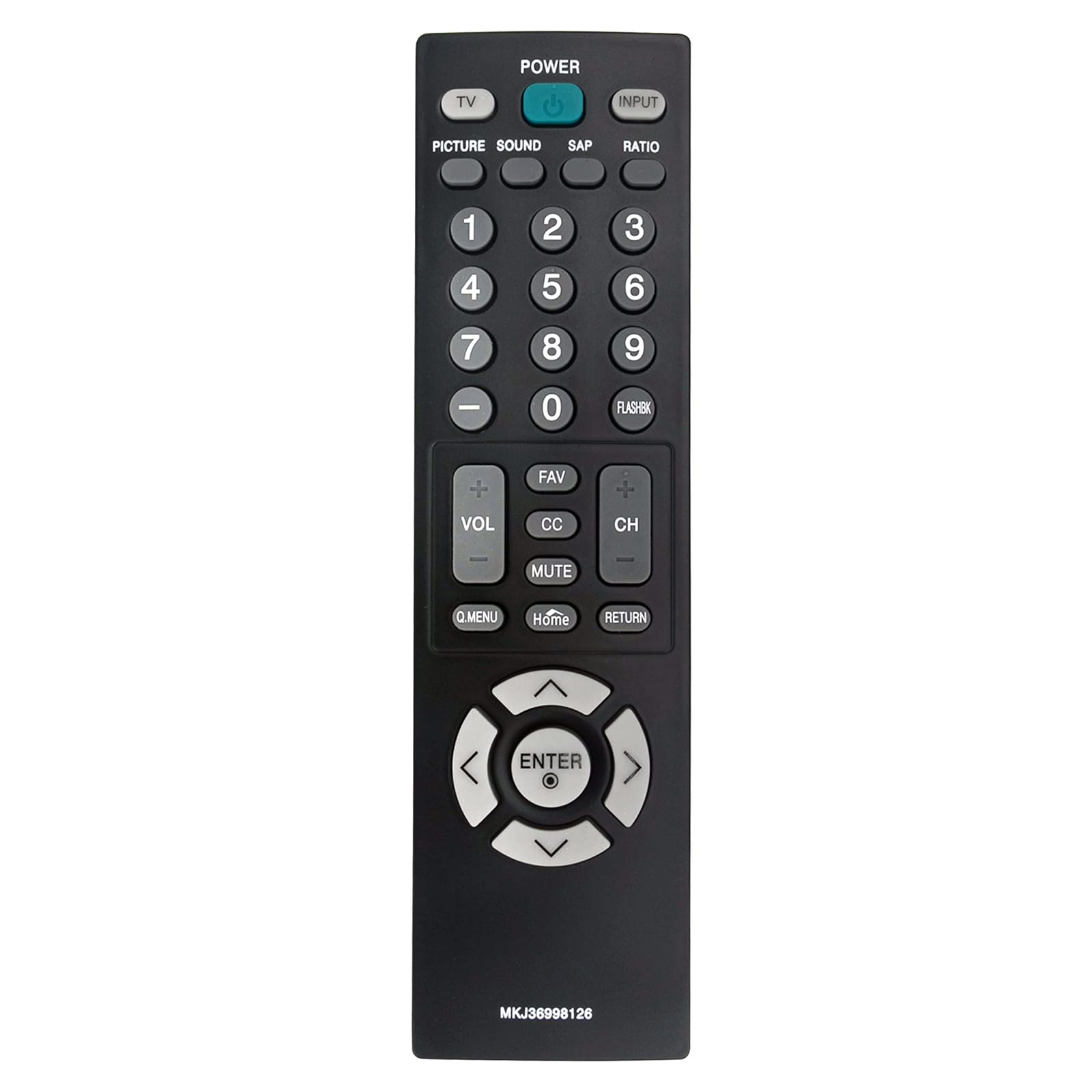
Vaizdas: priekis view of the VINJABTY MKJ36998126 remote control, showing the button layout. The battery compartment is on the reverse side.
2. Pradinis naudojimas
This remote control is pre-programmed for compatible LG TV models. Once batteries are installed, it is ready for immediate use. No additional programming or pairing is required.
Naudojimo instrukcijos
The VINABTY MKJ36998126 remote control provides intuitive access to your LG TV's functions. Below is a general overview of the main buttons and their functions:

Paveikslėlis: Detalus priekis view of the VINABTY MKJ36998126 remote control, highlighting the various buttons and their labels for easy identification.
- GALIA: Įjungia arba išjungia televizorių.
- TV: Persijungia į televizoriaus režimą.
- INPUT: Pasirenka įvesties šaltinį (HDMI, AV, komponentinis ir kt.).
- NUOTRAUKA: Reguliuoja vaizdo nustatymus.
- GARSU: Reguliuoja garso nustatymus.
- SAP: Pasirenkama antrinė garso programa (jei yra).
- SANTYKIS: Keičia ekrano kraštinių santykį.
- Skaičių mygtukai (0–9): Directly selects channels or enters numerical values.
- BLYKSTYVĖ: Primena anksčiau buvusį viewed kanalas.
- VOL (+/-): Padidina arba sumažina garsumą.
- CH (+/-): Keičia kanalą aukštyn arba žemyn.
- FAV: Prieina prie mėgstamų kanalų.
- CC: Įjungia arba išjungia uždaruosius subtitrus.
- Nutildyti: Išjungia arba įjungia televizoriaus garsą.
- Q.MENU: Accesses the Quick Menu for common settings.
- Pagrindinis puslapis: Grąžina į televizoriaus pradinį ekraną arba pagrindinį meniu.
- GRĄŽINIMAS: Grįžta į ankstesnį ekraną arba meniu.
- Navigacijos skydelis (aukštyn, žemyn, kairėn, dešinėn, ENTER): Naršo meniu ir patvirtina pasirinkimus.

Image: The VINABTY MKJ36998126 remote control shown next to a compatible LG television, illustrating its intended use.
Priežiūra
Baterijos keitimas
When the remote control's performance degrades or it stops responding, it is likely time to replace the batteries. Follow the battery installation steps outlined in the 'Setup' section.
Valymas
Nuotolinio valdymo pultą valykite minkšta, sausa šluoste. Jei nešvarumai sunkiai įveikiami, šiek tiek nuvalykite.ampNuvalykite šluostę vandeniu arba švelniu, neabrazyviniu valikliu. Nenaudokite stiprių cheminių medžiagų ir nemerkite nuotolinio valdymo pulto į vandenį.
Sandėliavimas
Store the remote control in a dry place, away from direct sunlight and extreme temperatures. If the remote will not be used for an extended period, it is recommended to remove the batteries to prevent leakage.
Trikčių šalinimas
- Nuotolinis nereaguoja:
- Įsitikinkite, kad baterijos yra tinkamai įdėtos tinkamu poliškumu.
- Pakeiskite senas baterijas naujomis AAA baterijomis.
- Patikrinkite, ar nėra kliūčių tarp nuotolinio valdymo pulto ir televizoriaus infraraudonųjų spindulių jutiklio.
- Ensure you are within the maximum operating range (approximately 33 feet) and pointing the remote directly at the TV.
- Neveikia tam tikri mygtukai:
- Clean the remote control, especially around the affected buttons, to remove any debris that might be causing sticking.
- If cleaning does not resolve the issue, the button may be worn or damaged.
- Televizorius nėra suderinamas su šiais:
- This remote is specifically designed for the listed LG TV models. If your TV model is not listed, full compatibility cannot be guaranteed.
Specifikacijos
| Funkcija | Detalė |
|---|---|
| Prekės ženklas | VINABTY |
| Modelio pavadinimas | MKJ36998126 |
| Suderinami įrenginiai | LG Television (32LV2400, 42LV4400, 47LV4400, 55LV4400 series) |
| Ryšio technologija | Infraraudonųjų spindulių |
| Reikalingas baterijų skaičius | 2 |
| Baterijos tipas | AAA (Alkaline recommended) |
| Didžiausias diapazonas | 33 pėdų |
| Mygtukų kiekis | 30 |
| Prekės matmenys (I x P x A) | 5 colio ilgio x 1.9 colių pločio x 0.5 colio aukščio |
| Ypatinga funkcija | Ergonomiškas |

Image: The VINABTY MKJ36998126 remote control with its length (7.28 inches) and width (1.97 inches) clearly marked.
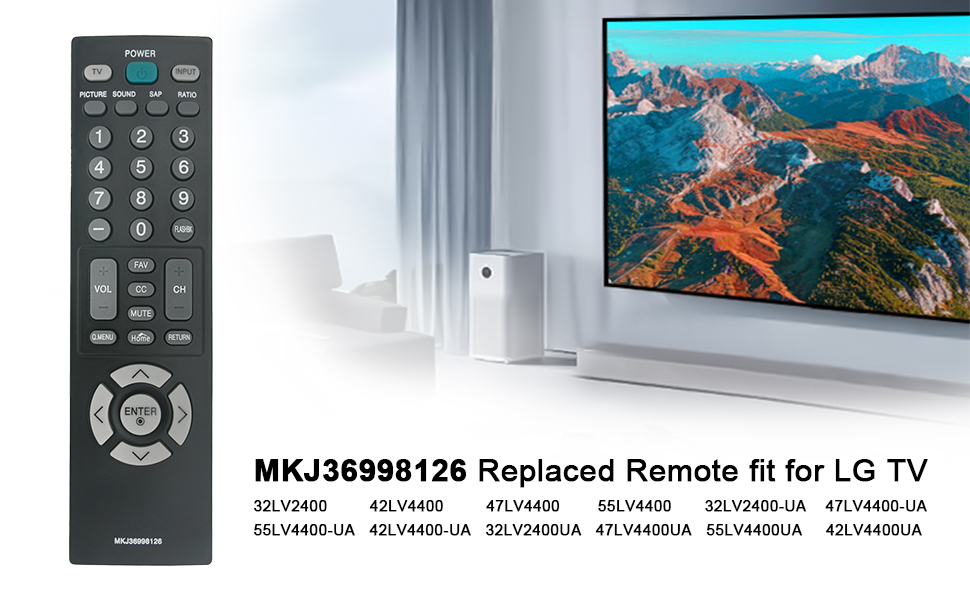
Image: The VINABTY MKJ36998126 remote control displayed alongside a list of compatible LG TV models, including 32LV2400, 42LV4400, 47LV4400, and 55LV4400 series.
Informacija apie garantiją
Specific warranty details for the VINABTY MKJ36998126 remote control may vary. Please refer to the retailer's return policy or contact the manufacturer directly for comprehensive warranty information.
Palaikymas
For further assistance, troubleshooting, or inquiries regarding your VINABTY MKJ36998126 remote control, please contact your point of purchase or the product manufacturer. Ensure you have your product model number (MKJ36998126) available when seeking support.