
1. Produktas baigtasview
The Symcode 2D Bluetooth Ring Barcode Scanner is a wearable, wireless, and compact device designed for efficient barcode reading. Its ring design allows for comfortable wear on the finger, enhancing user satisfaction and productivity. This scanner supports a wide range of 1D and 2D barcodes and offers versatile connectivity options for various operating systems and devices.

Figure 1: Symcode 2D Bluetooth Ring Barcode Scanner
2. Pakuotės turinys
Atidarę pakuotę, patikrinkite, ar yra visi toliau išvardyti daiktai ir ar jie yra geros būklės:
- 1 x Mini Barcode Scanner
- 1 x English Version User Manual
- 1x USB laidas
- 1 x Charger Head
- 1 x Mobile Phone 4.0 Receiver (Bluetooth Dongle)

2 pav. Pakuotės turinys
3. Savybės
- Nešiojamo žiedo dizainas: Allows for comfortable use on the finger, left or right, increasing satisfaction and comfort during extended use.
- Dvigubas belaidis ryšys: Supports both 2.4G Wireless (via dongle) and Bluetooth 4.0 for flexible connection to various devices.
- Platus suderinamumas: Compatible with Microsoft Windows XP/7.0/8.0/10, Android, and iOS devices.
- Platus brūkšninių kodų palaikymas: Scans 1D codes (UPC, EAN, Code128, Code39, Code11, Interleaved 2 of 5, Codabar, etc.) and 2D codes (PDF417, Data Matrix, QR Code, etc.).
- Ilgas perdavimo atstumas: Up to 30 feet (10m) for Bluetooth and up to 492ft (150m) in barrier-free environments for 2.4G wireless.
- Du įkėlimo režimai: Supports Instant Upload Mode (synchronous data upload) and Storage Mode (stores up to 50,000 barcodes in 512KB memory for later upload).
- Ilgai veikianti baterija: Provides up to 6 hours of continuous scanning and a standby time of up to 720 hours. Fully recharges in approximately 1.5 hours.
4. Sąranka
4.1 Skaitytuvo įkrovimas
Before initial use, fully charge the scanner using the provided USB cable and charger head. Connect the USB cable to the scanner's charging port and the other end to a power source. The charging indicator light will show the charging status.

Figure 3: Battery Information
4.2 Prisijungimas prie įrenginio
The scanner offers two primary connection methods: 2.4G Wireless via dongle and Bluetooth 4.0.
4.2.1 2.4G belaidis ryšys (per adapterio adapterį)
- Plug the 2.4G wireless receiver (dongle) into an available USB port on your laptop, PC, or POS system.
- Įjunkite brūkšninių kodų skaitytuvą. Jis turėtų automatiškai susijungti su adapteriu.
- A successful connection will be indicated by a specific sound or light on the scanner.
4.2.2 „Bluetooth 4.0“ ryšys
- Ensure Bluetooth is enabled on your mobile phone, tablet, or computer.
- Įjunkite brūkšninių kodų skaitytuvą.
- On your device, search for available Bluetooth devices. The scanner should appear as "Barcode Scanner HID" or similar.
- Select the scanner to pair. A successful connection will be indicated by a specific sound or light on the scanner.

Figure 4: Wireless Connection Options

Figure 5: Transmission Distance
Video 1: Demonstrates unboxing, product rotation, and connecting the scanner to a laptop and mobile device via Bluetooth for scanning.
5. Naudojimo instrukcijos
5.1 Skenerio nešiojimas
The ring scanner is designed to be worn on your finger. Adjust the strap for a comfortable and secure fit. The scanner head can be rotated 180 degrees to accommodate different scanning angles and user preferences.

Figure 6: 180 Degree Rotation
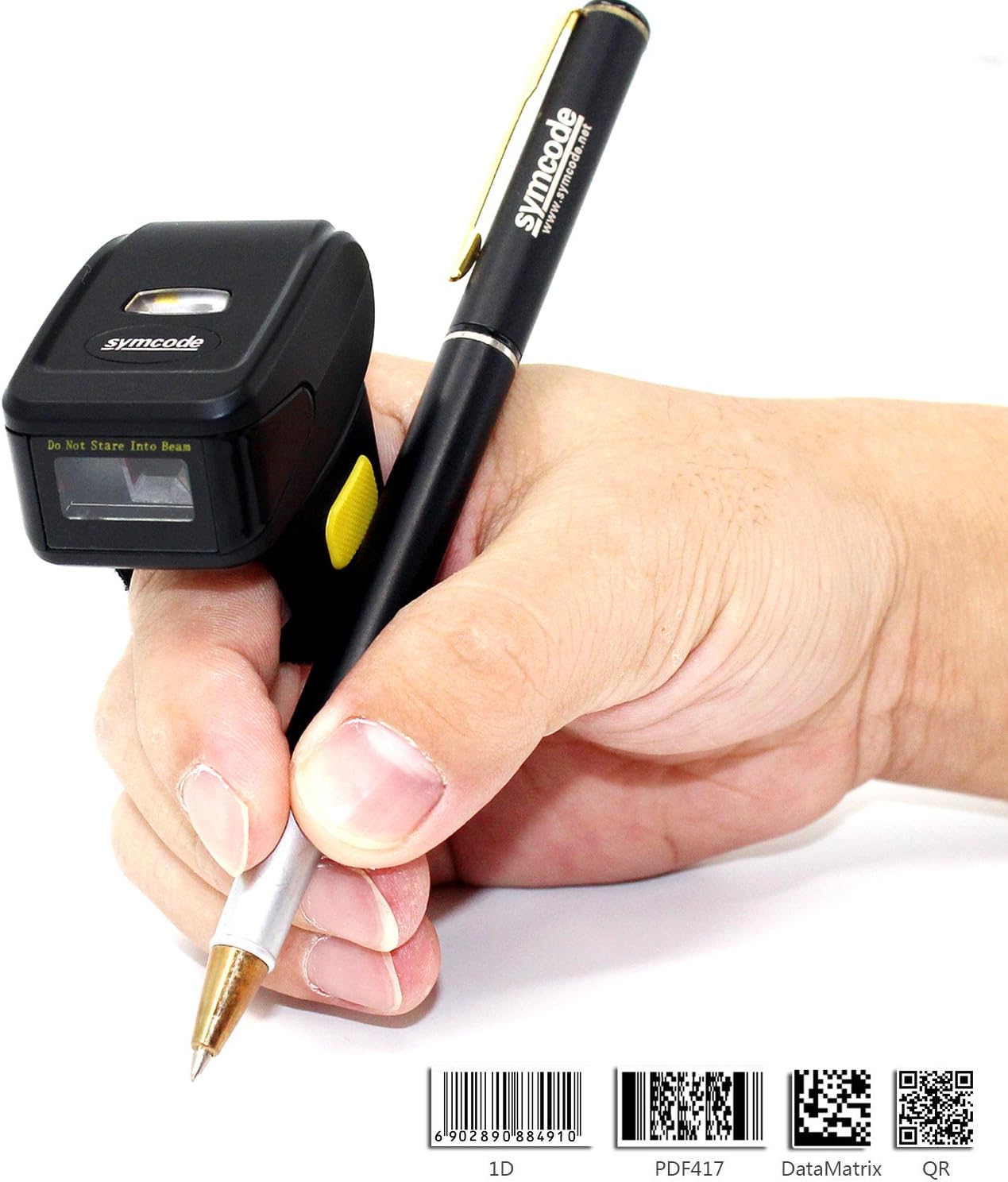
Figure 7: Ergonomic Use
5.2 Brūkšninių kodų nuskaitymas
Once connected, point the scanner's laser at the barcode you wish to scan and press the trigger button. The scanner will emit a beep and/or flash to indicate a successful scan. The scanned data will appear on your connected device.
5.3 Įkėlimo režimai
Skaitytuvas palaiko du duomenų įkėlimo režimus:
- Momentinio įkėlimo režimas: Data is synchronously uploaded to your device as soon as a barcode is scanned. This is ideal for real-time inventory management or POS systems.
- Saugojimo režimas: Barcode data is stored in the scanner's internal memory (up to 512KB, capable of holding over 50,000 barcodes). This mode is useful when working out of range of your device. Data can be uploaded later when a connection is re-established. Refer to the included user manual for specific instructions on switching between modes and uploading stored data.

8 pav.: Du įkėlimo režimai
6. Specifikacijos
| Funkcija | Detalė |
|---|---|
| Modelio numeris | MJ-R30CB-2D |
| Šviesos šaltinis | 650nm visible laser |
| Nuskaitymo greitis | 100 ± 10 scans/second |
| Reading Preciseness | 0.10 mm (4 mil) |
| Sąsaja | Mobile phone wireless 4.0 (Bluetooth) |
| Baterija | DC 3.7V, 360mA Li-ion battery (1 Lithium Ion battery included) |
| Atmintis | 512KB |
| Palaikoma OS | Microsoft Windows XP/7.0/8.0/10, Android, iOS |
| Skaitymo atstumas | 2.5-600mm (100% UPC/EAN) |
| Palaikomi brūkšninių kodų tipai | Codabar, Code 11, Code 93, MSI, Code 128, UCC/EAN-128, Code 39, EAN-8, EAN-13, UPC-A, ISBN, Industrial 25, Interleaved 25, Standard 25, 2/5 Matrix, GS1 DataBar (formerly RSS) variants, PDF417, Data Matrix (ECC200, ECC000, 050, 080, 100, 140), QR Code |
| Scan Scope | 10–250 mm |
| Skenavimo kampas | Roll: ±35 degree / Pitch: ±65 degree / Yaw: ±50 degree |
| Bitų klaidų dažnis | 1/5 milijono |
| Galia ttage | 5V |
| Saugumas | CE ir Rohs |
| Matmenys | 150mm x 50mm x 65mm (Product: 1.81 x 1.97 x 1.38 inches) |
| Svoris | 95 g (4.4 uncijos) |
7. Priežiūra
To ensure the longevity and optimal performance of your Symcode barcode scanner, follow these maintenance guidelines:
- Valymas: Skaitytuvo išorę valykite minkšta, sausa šluoste. Skenavimo langeliui valyti naudokite lęšio valymo šluostę, kad išvengtumėte įbrėžimų. Nenaudokite abrazyvinių valiklių ar tirpiklių.
- Saugykla: Skaitytuvą laikykite vėsioje, sausoje vietoje, toliau nuo tiesioginių saulės spindulių ir ekstremalių temperatūrų.
- Akumuliatoriaus priežiūra: Avoid fully discharging the battery frequently. Recharge the scanner when the battery low indicator appears. If storing for an extended period, charge the battery to about 50% and recharge every few months.
- Tvarkymas: Su skaitytuvu elkitės atsargiai. Venkite jo numesti ir stipriai smūgiuoti, nes tai gali pažeisti vidinius komponentus.
8. Problemų sprendimas
If you encounter issues with your scanner, please refer to the following common troubleshooting steps:
- Skaitytuvas neįsijungia: Ensure the battery is charged. Connect the scanner to the charger and try again.
- Po nuskaitymo duomenys neperduodami: Verify that the scanner is properly connected to your device (Bluetooth or 2.4G wireless). Check the device's input settings to ensure it's ready to receive data.
- Nepavyksta susieti per „Bluetooth“: Ensure the scanner is in pairing mode. On your device, try forgetting the scanner and re-pairing. Make sure no other Bluetooth devices are interfering.
- Prastas nuskaitymo našumas: Įsitikinkite, kad brūkšninis kodas yra švarus ir nepažeistas. Sureguliuokite skaitytuvo atstumą ir kampą iki brūkšninio kodo. Patikrinkite, ar pakankamas apšvietimas.
- Neteisinga duomenų išvestis: Verify the scanner's configuration settings. You may need to scan specific configuration barcodes from the full user manual to adjust settings like prefix/suffix or data format.
For more detailed troubleshooting or issues not covered here, please consult the comprehensive user manual included in your package or contact Symcode customer support.
9. Garantija ir palaikymas
Symcode products are designed for reliability and performance. For information regarding product warranty, please refer to the warranty card included with your purchase or visit the official Symcode website. For technical support, product inquiries, or service requests, please contact Symcode customer service through the channels provided on their official websvetainėje arba produkto pakuotėje.
Visit the official Symcode Store for more products and support: Symcode Amazon Store
Additional resources may be available on the manufacturer's websvetainė: www.cnlhwood.com