
1. Produktas baigtasview
The COOAU 4MP 5G Wi-Fi Network Camera is designed for indoor monitoring, offering high-resolution video and a wide range of features to keep your home or office secure. It supports both 2.4GHz and 5GHz Wi-Fi networks for stable connectivity.
Pakuotės turinys
- COOAU 4MP 5G Wi-Fi Network Camera
- Maitinimo adapteris
- USB kabelis
- Tvirtinimo priedai (varžtai, sieniniai kištukai)
- Vartotojo vadovas

Image: The COOAU 4MP 5G Wi-Fi Network Camera, power adapter, USB cable, and mounting hardware.
Fotoaparato komponentai
- Objektyvas: Įrašo vaizdo įrašus ir vaizdus.
- Indikatoriaus lemputė: Shows camera status (e.g., red for power on, blue for connected).
- Atkūrimo mygtukas: Naudojamas norint atkurti gamyklinius fotoaparato nustatymus.
- SD kortelės lizdas: Vietiniam įrašų saugojimui (palaiko iki 128 GB).
- Mikrofonas: Garso įvesčiai dvipusio ryšio metu.
- Pranešėjas: For audio output during two-way communication and alerts.
- Maitinimo prievadas: Jungiamas prie maitinimo adapterio.
Video: An ANRAN camera, similar to the COOAU 827, highlighting its lens, indicator light, reset button, and SD card slot. This video demonstrates the physical components of the camera.
2. Sąrankos vadovas
2.1 Pradinė sąranka ir programėlės diegimas
- Maitinimas: Connect the camera to a power source using the provided USB cable and power adapter. The indicator light will turn red.
- Atstatyti kamerą: Press and hold the reset button for approximately 10 seconds until you hear a 'beep' sound and the red indicator light starts blinking slowly. This indicates the camera is ready for pairing.
- Atsisiųsti programą: Download the dedicated COOAU app (or compatible app like ANRAN) from the App Store (iOS) or Google Play Store (Android).
- Įgalinti leidimus: Ensure Bluetooth and Location Services are enabled on your smartphone for the app to detect the camera.
- Pridėti įrenginį: Open the app, tap 'Add Device' or the '+' icon. The app should automatically detect the camera ID. Tap on the detected camera ID.
- Prisijunkite prie „Wi-Fi“: Enter your Wi-Fi network password. The camera supports both 2.4GHz and 5GHz Wi-Fi. Confirm the password and proceed.
- Patvirtinimas: Wait for the camera to connect to Wi-Fi. Once successfully connected, the indicator light will turn blue.
Video: Step-by-step guide on connecting the camera to your smartphone via Bluetooth, including powering on, resetting, enabling Bluetooth/location, adding the device, and entering Wi-Fi credentials.
2.2 Alternative Setup: QR Code Scan
- Įjungimas ir atstatymas: Follow steps 1 and 2 from Section 2.1.
- Add Device (QR Code): In the app, select 'Add Device' and choose the option to scan a QR code.
- Generate QR Code: The app will generate a QR code containing your Wi-Fi information.
- Nuskaityti QR kodą: Hold your smartphone with the QR code approximately 15-25 cm (6-10 inches) in front of the camera lens. The camera will scan the code.
- Patvirtinimas: You will hear a 'beep' sound from the camera, indicating successful scanning. The camera will then connect to Wi-Fi, and the indicator light will turn blue upon successful connection.

Image: Illustrates three connection methods: LAN cable, QR code scanning, and voice connection, emphasizing ease of setup.
3. Naudojimo instrukcijos
3.1 Nuotolinis Viewing and Pan/Tilt/Zoom
Prisijungę galite view gyvas kvailystage from your camera anytime, anywhere via the app on your smartphone, iPad, or PC. The camera features a 134-degree wide-angle lens and can rotate horizontally 350 degrees and vertically 100 degrees, providing comprehensive coverage. Use the app to control the camera's movement and utilize the 8x digital zoom.

Vaizdas: panoraminis vaizdas view from the COOAU 4MP camera, demonstrating its wide coverage and remote pan/tilt control via a smartphone.

Paveikslėlis: Žmogus viewing the live camera feed on their smartphone, illustrating remote monitoring capabilities.
3.2 Judesio aptikimas ir automatinis sekimas
The camera is equipped with advanced detection features, including face, sound, and motion detection. You can adjust the detection sensitivity in the app. When unusual movement or sound is detected, the camera will automatically record the event and send an alert notification to your smartphone. The AI human detection lens also features auto-tracking, allowing the camera to automatically adjust its angle to follow detected movement.
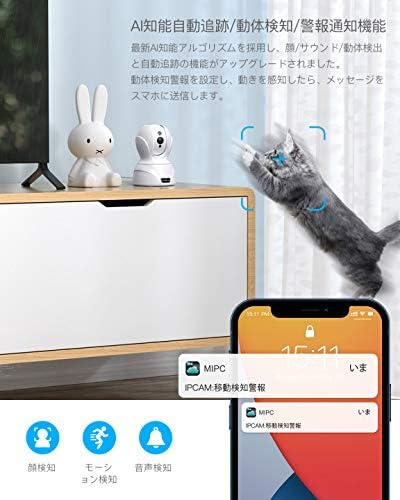
Image: The camera detecting a cat's movement and sending a notification to a smartphone, demonstrating motion detection and alert features.

Image: A smartphone screen showing a notification from the camera, indicating a motion detection alert.
Video: An aosu camera (similar to COOAU 827) demonstrating motion detection, auto-tracking, and alert notifications. It also shows app playback of recorded events.
3.3 Dvipusis garsas
The camera features a built-in microphone and speaker with noise filter technology, enabling clear two-way communication. You can speak to family members, pets, or visitors through the camera using the app, even when you are away from home.
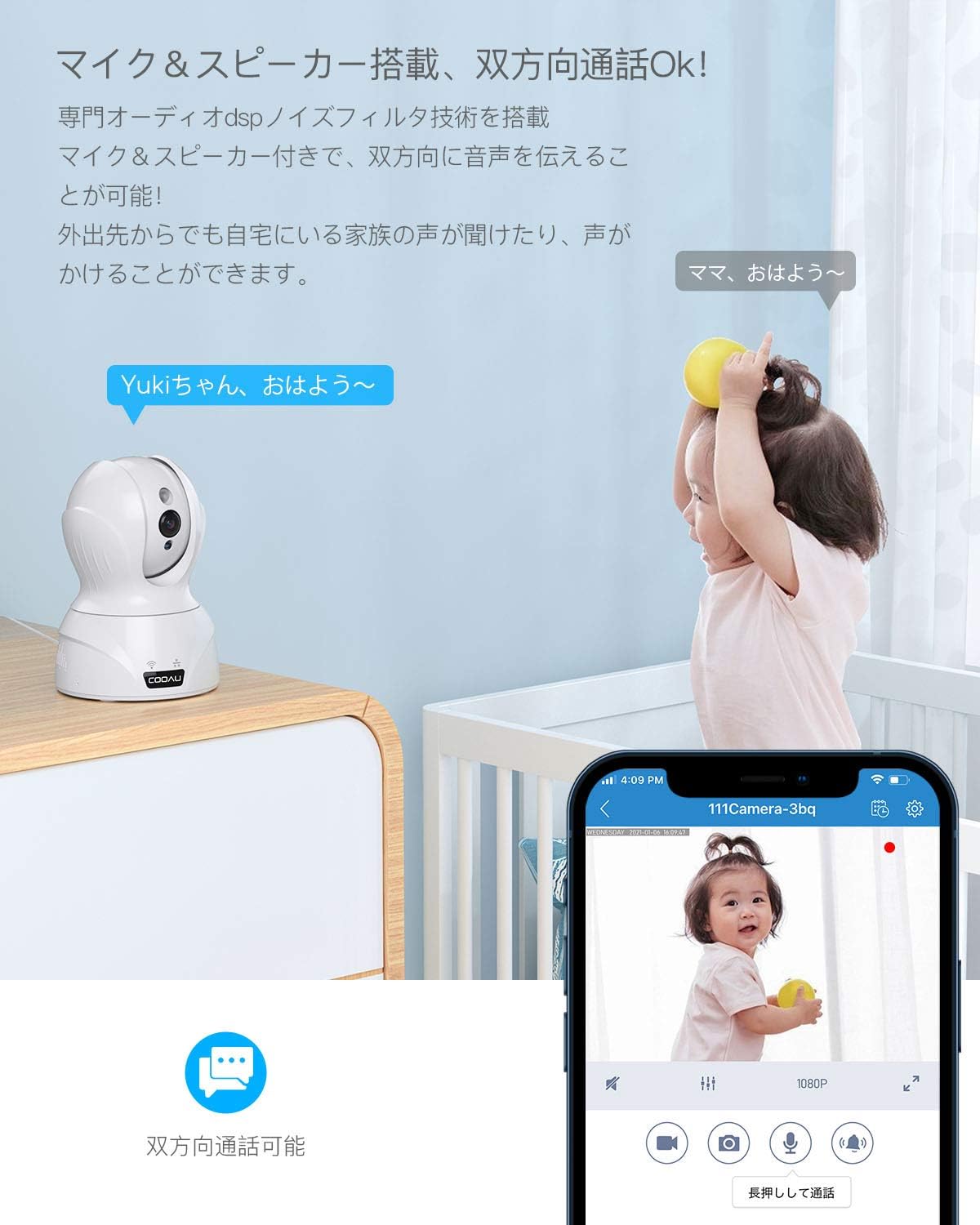
Image: A COOAU camera facilitating two-way communication between an adult on a smartphone and a child in the room.

Image: Children interacting with the camera, illustrating the two-way audio function for communication.
3.4 Naktinis matymas
With smart IR-CUT technology and 850nm infrared LEDs, the camera automatically switches between day and night modes based on ambient light. It provides clear black-and-white images in complete darkness, with a night vision range of approximately 12 meters (39 feet).

Image: Demonstrates the camera's enhanced night vision capability, showing a clear image of a sleeping baby in a dark room.
3.5 Recording Options and Storage
The camera supports continuous recording, event-triggered recording (motion/sound detection), and scheduled recording. Recordings can be stored on a local SD card (up to 128GB) or via cloud storage (subscription may be required). The camera uses H.265 video compression for efficient storage.

Image: Illustrates the three main recording options available: continuous recording, event-triggered recording, and scheduled recording.

Image: A visual comparison demonstrating the efficiency of H.265 video compression over H.264, resulting in clearer images with less data.
3.6 Multi-Device and Family Sharing
The camera supports remote viewing and control from multiple devices (smartphones, PCs, tablets) running iOS, Android, or Mac operating systems. You can manage multiple cameras simultaneously within the app. The app also allows for secure sharing of camera access with family members by logging into the same account.

Image: A woman using a laptop with a camera feed, illustrating the camera's compatibility with various operating systems (iOS, Android, Mac, Windows).

Image: A smartphone app showing multiple camera feeds, demonstrating the ability to manage several cameras simultaneously.
4. Diegimo parinktys
The COOAU 4MP camera offers flexible installation options to suit various indoor environments. It can be placed on a table, mounted on a wall, or installed on the ceiling.

Image: Illustrates various applications for the camera, including baby monitoring, pet care, elderly supervision, home security, store surveillance, and office security.

Image: Shows the camera installed in different indoor settings, demonstrating its versatility for table placement, wall mounting, and ceiling installation.
5. Priežiūra
- Valymas: Kameros objektyvą ir korpusą valykite minkštu, sausu audiniu. Venkite naudoti stiprias chemines medžiagas ar abrazyvines medžiagas.
- Firmware atnaujinimai: Reguliariai tikrinkite programėlę, ar nėra galimų programinės įrangos atnaujinimų, kad užtikrintumėte optimalų našumą ir saugumą.
- SD kortelės tvarkymas: Jei saugojimui naudojate SD kortelę, periodiškai ją peržiūrėkiteview ir ištrinkite seną „foo“tage to free up space. Consider formatting the SD card every few months.
- Maitinimas: Įsitikinkite, kad kamera prijungta prie stabilaus maitinimo šaltinio. Venkite dažnų elektros energijos tiekimo sutrikimų.
6. Problemų sprendimas
| Problema | Galima priežastis | Sprendimas |
|---|---|---|
| Kamerai nepavyksta prisijungti prie „Wi-Fi“. | Incorrect Wi-Fi password, weak signal, or incorrect Wi-Fi band. | Verify Wi-Fi password. Ensure camera is within router range. Confirm your router supports 2.4GHz or 5GHz (if using 5G Wi-Fi). Reset the camera and try again. |
| Offline status in app. | No power, Wi-Fi disconnected, or network issues. | Check power connection. Verify Wi-Fi router is working. Restart the camera and router. |
| Judesio aptikimo įspėjimai negaunami. | Detection sensitivity too low, app notifications disabled, or incorrect detection zone settings. | Adjust detection sensitivity in app. Enable notifications for the app in your phone settings. Configure detection zones correctly. |
| Prasta vaizdo kokybė. | Nešvarus objektyvas, prastas apšvietimas arba tinklo pralaidumo problemos. | Nuvalykite kameros objektyvą. Įsitikinkite, kad apšvietimas yra tinkamas, arba patikrinkite naktinio matymo nustatymus. Patikrinkite stabilų interneto ryšį. |
| Dvipusis garsas neveikia. | Microphone/speaker muted in app, volume too low, or network delay. | Patikrinkite nutildymo nustatymus ir garsumo lygius programėlėje. Įsitikinkite, kad tinklo ryšys stabilus. |
If you encounter persistent issues, please refer to the support section for contact information.
7. Specifikacijos
| Funkcija | Specifikacija |
|---|---|
| Prekės ženklas | COOAU |
| Modelio numeris | 827 |
| Vaizdo jutiklio skiriamoji geba | 4 MP (2602*1472P) |
| Ryšio technologija | Wired & Wireless (2.4G WiFi / 5G WiFi) |
| Naudojimas viduje / lauke | Vidinis |
| Suderinami įrenginiai | Smartphone, PC, Tablet (iOS, Android, Mac) |
| Maitinimo šaltinis | Laidinis elektrinis (5 V) |
| Valdiklio tipas | Amazon Alexa |
| Montavimo tipas | Table, Wall, Ceiling |
| Įspėjimo tipas | Face Recognition, Motion Detection, Sound Detection, Alarm Notification, Auto Tracking |
| Naktinio matymo diapazonas | Maždaug 12 metrų (39 pėdų) |
| Skaitmeninis priartinimas | 8x |
| Laukas View | 134 laipsniai (horizontaliai) |
| Pasukimas / pakreipimas | Horizontaliai 350°, vertikaliai 100° |
| Sandėliavimas | Micro SD Card (Max 128GB), Cloud Storage |
| Vaizdo įrašų suspaudimas | MPEG-4 (H.265) |
8. Garantija ir palaikymas
Šis produktas tiekiamas su a 24 mėnesių kokybės garantija. We are committed to providing excellent customer support.
Susisiekite su palaikymo tarnyba
If you have any questions or require assistance, please contact us through one of the following methods:
- Oficialus el. pašto adresas: (Please refer to your product packaging or official COOAU website for the latest email address.)
- Amazon Order History: Contact us directly through your Amazon order history for prompt assistance.
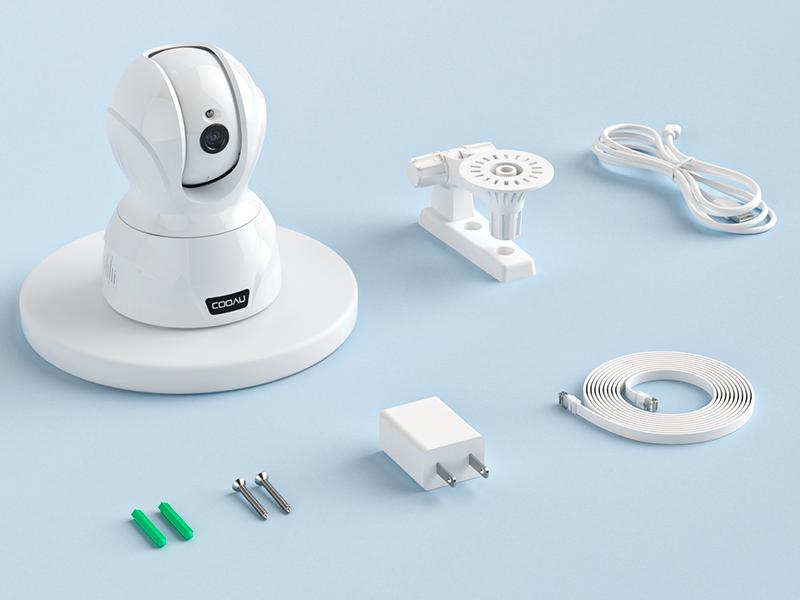
Image: Highlights COOAU's commitment to customer satisfaction with a 24-month warranty and dedicated support.