
1. Įvadas
This manual provides detailed instructions for the installation, operation, and maintenance of your Sanpyl Bluetooth MP3 Decoder Board. Please read this manual thoroughly before using the product to ensure proper function and to prevent damage.
2. Saugos informacija
- Užtikrinkite maitinimo šaltinio ttage matches the product's specifications (DC 7V-12V or Micro USB 5V). Incorrect voltage gali sukelti žalą.
- Saugokite įrenginį nuo drėgmės, lietaus ar ekstremalių temperatūrų.
- Venkite įrenginio ardymo ar modifikavimo, nes tai gali panaikinti garantiją ir kelti pavojų saugumui.
- Laikyti vaikams nepasiekiamoje vietoje.
- Prieš atlikdami bet kokius prijungimus ar atjungimus, atjunkite maitinimą.
3. Pakuotės turinys
Patikrinkite, ar pakuotėje yra visi reikalingi daiktai:
- 1 x Sanpyl Bluetooth MP3 Decoder Board
- 1x nuotolinio valdymo pultas
- 1 x 2-pin Power Cable
- 2 x 3-pin Audio Cables
4. Produktas baigtasview
The Sanpyl Bluetooth MP3 Decoder Board is a versatile audio module designed for integrating music playback and FM radio capabilities into various projects. It supports multiple audio sources including USB drives, SD/MMC cards, Bluetooth, and external line-in. It also features hands-free calling and comes with a remote control for convenient operation.
4.1 Priekinio skydelio išdėstymas

4.1 paveikslas: Front panel of the decoder board. This view shows the digital display, USB port, SD/MMC card slot, and control buttons for playback, volume, and mode selection.
- Skaitmeninis ekranas: Rodo dabartinį režimą, takelio numerį, dažnį ir kt.
- USB prievadas: Skirta USB atmintinėms prijungti.
- SD/MMC kortelės lizdas: For inserting Secure Digital or MultiMediaCards.
- Valdymo mygtukai: Play/Pause, Volume Up/Next Track, Volume Down/Previous Track, Mode.
4.2 Galinės jungtys

4.2 paveikslas: Rear connections of the decoder board. This image highlights the various input and output terminals for power, audio, and the FM antenna.
- DC 12V+ / GND: Main power input (7V-12V DC).
- Micro USB 5V Input: Alternative 5V power input.
- L IN / R IN / GND: Stereo audio line input.
- L Output / R Output / GND: Stereo audio line output.
- FM antena: Connection point for an external FM antenna.
4.3 Matmenys
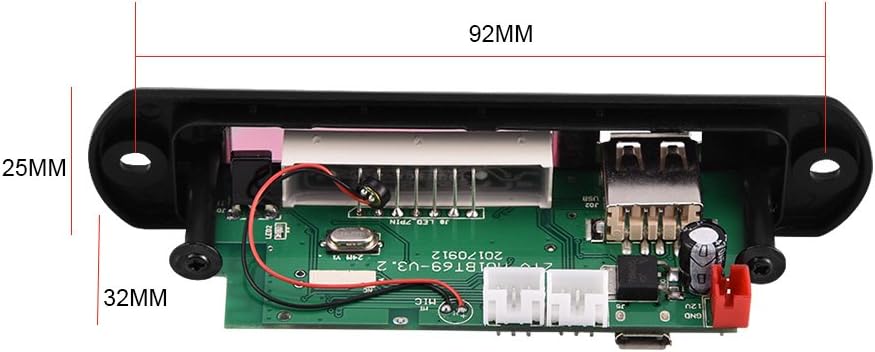
4.3 paveikslas: Physical dimensions of the decoder board. The panel length is 107mm, height is 25mm, and depth is 32mm. The mounting hole spacing is 92mm.
5. Specifikacijos
| Modelio numeris | Sanpylcw78yrodhs |
| Veiklos ttage | DC 7V to 12V (main), Micro USB 5V (alternative) |
| Veikimo srovė | Nuo 800mA iki 1A |
| Panel Dimensions (L x H x D) | 107 mm x 25 mm x 32 mm |
| Montavimo angų atstumas | 92 mm |
| Ekrano dydis | 45 mm x 8 mm |
| Palaikoma laikmena | USB Disk, SD Card, MMC Card |
| Ryšys | Bluetooth, FM Radio, Line-in (AUX) |
| Savybės | Hands-free calls, Multiple EQ modes, Mute function, Digital display |
| Prekės svoris | 2.08 uncijos (apie 59 g) |
6. Sąranka
6.1 Maitinimo jungtis
The decoder board can be powered in two ways:
- DC 7V–12V: Connect the provided 2-pin power cable to the "DC 12V+" and "GND" terminals on the rear of the board (refer to Figure 4.2). Ensure correct polarity.
- Micro USB 5V: Alternatively, connect a standard Micro USB cable to the "Micro USB 5V Input" port. This is suitable for 5V power sources.
Atsargiai: Do not connect both 12V DC and Micro USB 5V power simultaneously. Choose one power source.
6.2 Garso jungtys
- Garso išvestis: Use the provided 3-pin audio cables to connect the "L Output", "R Output", and "GND" terminals to your ampkeltuvai arba aktyvūs garsiakalbiai.
- Garso įvestis (AUX): If you wish to use an external audio source (e.g., phone, computer), connect it to the "L IN", "R IN", and "GND" terminals. You will need to switch the mode to "LIN" for this input.
6.3 FM antenos prijungimas
Connect a suitable FM antenna to the "FM Antenna" terminal for optimal radio reception (refer to Figure 4.2).
7. Naudojimo instrukcijos
7.1 Power On / Automatic Playback
Once powered on, the decoder board will automatically start playing music if a USB disk, SD card, or MMC card is inserted. If no media is present, it will default to the last used mode.
7.2 Režimo pasirinkimas
Paspauskite REŽIMAS button on the front panel or remote control to cycle through available modes: USB, SD, Bluetooth, FM, and LIN (Line Input).
7.3 Bluetooth poravimas
- Switch the decoder board to Bluetooth mode. The display will show "BT".
- On your mobile device, search for Bluetooth devices.
- Select the device named M01BT.
- Jei prašoma slaptažodžio, įveskite 0000.
- Once paired, you can play audio from your device through the decoder board.
7.4 USB / SD / MMC kortelių atkūrimas
- Insert a USB flash drive into the USB port or an SD/MMC card into the card slot.
- The board will automatically switch to the corresponding mode (USB or SD) and begin playback.
- Naudokite Leisti / pristabdyti, VOL- / Previous, ir VOL+ / Kitas mygtukai, skirti valdyti atkūrimą.
7.5 FM radijo veikimas
- Switch the decoder board to FM režimu.
- Paspauskite ir palaikykite Leisti / pristabdyti button to initiate an automatic scan for FM stations. The board will save found stations.
- Naudokite VOL- / Previous ir VOL+ / Kitas mygtukai, skirti naršyti tarp išsaugotų stočių.
7.6 Skambinimas be rankų
When in Bluetooth mode and paired with a phone, the decoder board supports hands-free calling. Incoming calls can be answered or ended using the remote control or specific buttons on the board (refer to remote control diagram if available, or typically the Play/Pause button).
7.7 Nuotolinio valdymo pulto funkcijos
Pridedamas nuotolinio valdymo pultas suteikia patogią prieigą prie įvairių funkcijų:
- Galia: Įjunkite / išjunkite įrenginį.
- Režimas: Switch between USB, SD, Bluetooth, FM, LIN.
- Leisti / pristabdyti: Start or pause playback. Answer/End calls.
- Ankstesnis Kitas: Skip tracks or navigate FM stations.
- Garsumo didinimas / sumažinimas: Reguliuokite garso garsumą.
- EQ: Cycle through various equalizer sound modes.
- Nutildyti: Nutildyti arba įjungti garsą.
- Skaičių mygtukai: Direct track selection (in USB/SD mode) or FM frequency input.
8. Priežiūra
- Prietaisą valykite minkštu, sausu skudurėliu. Nenaudokite skystų valiklių ar tirpiklių.
- Keep the USB port and SD card slot free from dust and debris.
- Laikykite prietaisą vėsioje, sausoje vietoje, kai jo ilgesnį laiką nenaudojate.
9. Problemų sprendimas
| Problema | Galima priežastis | Sprendimas |
|---|---|---|
| Nėra maitinimo / Įrenginys neįsijungia. | Incorrect power connection; Insufficient voltage; Faulty power supply. | Check power cable connections and polarity. Ensure power supply is within 7V-12V DC or 5V Micro USB. Test with a different power source. |
| Nėra garso išvesties. | Volume too low; Mute function active; Incorrect audio output connection; Ampkeltuvo problema. | Increase volume. Press Mute button on remote. Verify audio output cables are correctly connected to amplifier/speakers. Test ampgelbėtojas su kitu šaltiniu. |
| „Bluetooth“ nesusijungia. | Device not in Bluetooth mode; Incorrect pairing password; Distance too far; Interference. | Ensure decoder is in Bluetooth mode ("BT" on display). Re-enter password "0000". Move device closer. Reduce interference from other wireless devices. |
| USB / SD kortelė neveikia. | Card/drive not inserted correctly; Unsupported file formatas; Sugadinta laikmena. | Re-insert media. Ensure media contains supported audio files (e.g., MP3). Try a different USB drive or SD card. |
| Prastas FM radijo priėmimas. | No antenna connected; Weak signal; Interference. | Connect an external FM antenna. Reposition the antenna for better signal. Perform an auto-scan again. |
10. Garantija ir palaikymas
Sanpyl products are designed for reliability and performance. For any issues or questions regarding your Bluetooth MP3 Decoder Board, please contact your retailer or Sanpyl customer support. Please retain your proof of purchase for warranty claims.
Norėdami gauti daugiau pagalbos, apsilankykite Sanpyl Store on Amazon.