
2BOOM BX390
„2BOOM BX390 Bass King“ belaidės „Bluetooth Boombox“ stereo kolonėlės naudotojo vadovas
Modelis: BX390
1. Įvadas
Ačiū, kad pirkoteasing the 2BOOM BX390 Bass King Wireless Bluetooth Boombox Stereo Speaker. This manual provides essential information for setting up, operating, and maintaining your speaker to ensure optimal performance and longevity. Please read this manual thoroughly before using the product.

Image 1.1: The 2BOOM BX390 Bass King Wireless Bluetooth Boombox Stereo Speaker.
This image shows the 2BOOM BX390 Bass King speaker in blue, featuring a cylindrical design with a handle/strap attached. The front panel displays the control interface and speaker grille.
2. Pakuotės turinys
Patikrinkite pakuotę, ar joje yra šie daiktai:
- 1 x 2BOOM BX390 Bass King Speaker
- 1 x 3.5 mm papildomas kabelis
- 1x USB įkrovimo laidas
- 1 x Naudotojo vadovas (šis dokumentas)
- 1 x Attachable Shoulder Strap

Image 2.1: The 2BOOM BX390 speaker shown with its detachable shoulder strap, 3.5mm Aux cable, and USB charging cable.
This image displays the blue 2BOOM BX390 speaker from an angled perspective, highlighting the included shoulder strap attached to its side rings. The USB charging cable and 3.5mm Aux cable are visible in the foreground.
3. Produkto ypatybės
- Powerful Bass Sound: Equipped with 4-inch subwoofers and vibrating disks for crisp, clear, loud sound, booming low tones, and dynamic sound effects.
- Bluetooth ryšys: Connects wirelessly to smartphones, tablets, and other Bluetooth-enabled devices up to 33 ft.
- Integruotas mikrofonas: Supports hands-free calls.
- Patvarus ir nešiojamas dizainas: Features a rugged, rubberized exterior and an attachable strap for easy carrying.
- Kelios įvesties parinktys: Includes FM Radio, Aux-in Line, USB port, and SD Card slot.
- Integruotas valdymo skydelis: Direct control over volume, bass, and sound equalizer.

Image 3.1: The 2BOOM BX390 speaker with visual callouts for Deep Digital Bass, FM Radio, Long-Lasting Battery, and Straps Included.
This image shows the blue 2BOOM BX390 speaker from the front, with graphic overlays pointing out its key features: deep digital bass, FM radio capability, long-lasting battery, and the inclusion of straps for portability.
4. Valdikliai ir prievadai
Familiarize yourself with the control panel and input ports of your BX390 speaker:

Image 4.1: Detailed diagram of the 2BOOM BX390 control panel and input ports.
Šis paveikslėlis pateikia stambų planą view of the speaker's front panel, clearly labeling each button, port, and indicator. Labels include USB, DC 5V (charging), AUX, Previous, Play/Pause, Next, Mode, EQ, SD card slot, LED display, Power ON/OFF switch, Volume controls, and Bass controls.
- USB prievadas: USB atmintinės atkūrimui.
- DC 5V (Charging Port): Prijunkite USB įkrovimo laidą čia, kad įkrautumėte garsiakalbį.
- AUX įvestis: 3.5mm jack for connecting external audio devices via an Aux cable.
- Previous / Volume -: Trumpas paspaudimas – ankstesnis takelis; ilgas paspaudimas – garsumui sumažinti.
- Leisti / pristabdyti: Press to play or pause audio. In FM mode, short press to auto-scan.
- Next / Volume +: Trumpas paspaudimas, norint pereiti į kitą takelį; ilgas paspaudimas, norint padidinti garsumą.
- Režimas: Press to switch between Bluetooth, FM Radio, USB, SD Card, and AUX modes.
- EQ (ekvalaizeris): Press to cycle through different equalizer presets.
- SD kortelės lizdas: Insert an SD card for audio playback.
- Skystųjų kristalų ekranas: Rodo dabartinį režimą, takelio numerį arba FM dažnį.
- Įjungimo/išjungimo jungiklis: Slide to turn the speaker on or off.
- Tūris +/-: Mygtukai, skirti padidinti arba sumažinti bendrą garsumą.
- Bosas +/-: Buttons to increase or decrease the bass level.
5. Sąranka
5.1 Garsiakalbio įkrovimas
Before first use, fully charge the speaker. Connect the supplied USB charging cable to the DC 5V port on the speaker and the other end to a USB power adapter (not included) or a computer's USB port. The LED display may indicate charging status.
- Įkrovimo laikas gali skirtis.
- Disconnect the charger once fully charged to preserve battery life.
5.2 Įjungimas / išjungimas
Norėdami įjungti garsiakalbį ON, slide the Power ON/OFF switch to the 'ON' position. You will hear an audible prompt, and the LED display will light up.
Norėdami įjungti garsiakalbį IŠJUNGTA, slide the Power ON/OFF switch to the 'OFF' position.
6. Naudojimo instrukcijos
6.1 „Bluetooth“ režimas
The speaker automatically enters Bluetooth pairing mode when powered on if no other input source is connected, or after pressing the REŽIMAS button until "Bluetooth" is indicated.
- Įsitikinkite, kad garsiakalbis įjungtas.
- Įrenginyje su „Bluetooth“ funkcija (išmaniajame telefone, planšetiniame kompiuteryje ir kt.) įjunkite „Bluetooth“ ir ieškokite galimų įrenginių.
- Pasirinkite „2BOOM BX390" or similar from the list.
- Once paired, the speaker will confirm with an audible prompt.
- Dabar galite leisti garsą iš savo įrenginio per garsiakalbį.
Pastaba: Garsiakalbis automatiškai prisijungs prie paskutinio susieto įrenginio, jei jis bus diapazone ir įjungtas „Bluetooth“ ryšys.

Image 6.1: The 2BOOM BX390 speaker highlighting its Bluetooth connectivity.
This image shows the blue 2BOOM BX390 speaker with a prominent "Bluetooth" logo and "PORTABLE WIRELESS BASS KING SPEAKER" text, emphasizing its wireless audio capabilities.
6.2 FM radijo režimas
To switch to FM Radio mode, press the REŽIMAS button until "FM" or the radio frequency is displayed.
- FM režime trumpai paspauskite Leisti / pristabdyti button to automatically scan and save available FM stations. The speaker will cycle through frequencies and store them.
- Naudokite Ankstesnis ir Kitas mygtukai, skirti naršyti tarp išsaugotų stočių.
- For better reception, extend the antenna (if applicable, or reposition the speaker).
6.3 USB / SD kortelės režimas
The speaker supports audio playback from USB flash drives and SD cards.
- Įdėkite USB atmintinę į USB prievadas arba SD kortelę į SD kortelės lizdas.
- Garsiakalbis automatiškai persijungs į atitinkamą režimą (USB arba SD) ir pradės groti garsą. files. Jei ne, paspauskite REŽIMAS mygtuką, kad pasirinktumėte.
- Naudokite Ankstesnis, Leisti / pristabdyti, ir Kitas mygtukai, skirti valdyti atkūrimą.
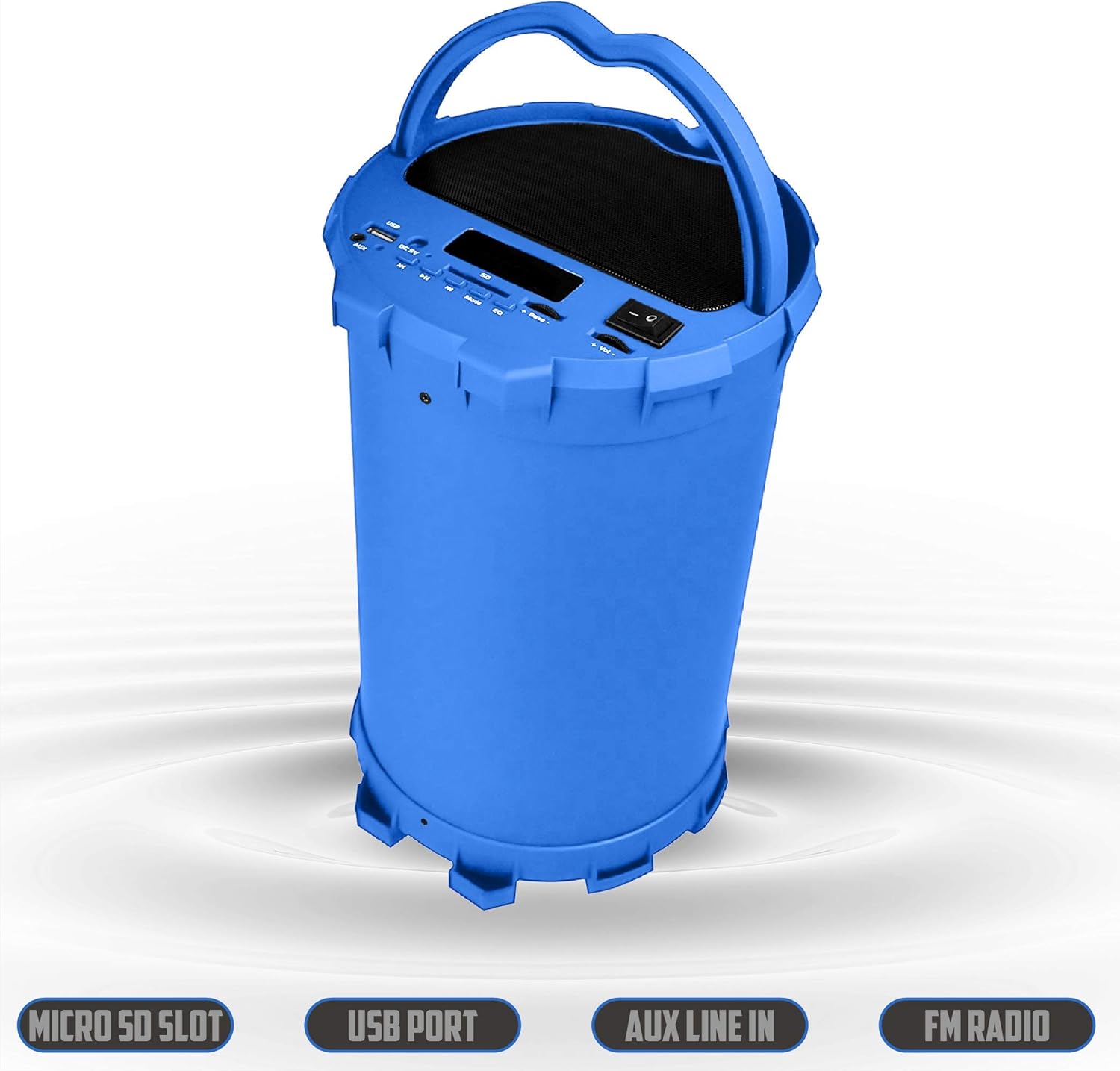
Image 6.2: The 2BOOM BX390 speaker shown upright, emphasizing the Micro SD Slot, USB Port, Aux Line In, and FM Radio capabilities.
This image displays the blue 2BOOM BX390 speaker in an upright position, with graphic overlays highlighting the Micro SD Slot, USB Port, Aux Line In, and FM Radio features on its control panel.
6.4 AUX įvesties režimas
Connect external audio devices (e.g., MP3 players, computers) using the supplied 3.5mm Aux cable.
- Connect one end of the 3.5mm Aux cable to the AUX įvestis prievadas ant garsiakalbio.
- Kitą galą prijunkite prie išorinio įrenginio garso išvesties lizdo.
- Garsiakalbis automatiškai persijungs į AUX režimą. Jei ne, paspauskite REŽIMAS mygtuką, kad pasirinktumėte.
- Valdykite atkūrimą iš išorinio įrenginio.
6.5 Adjusting Volume, Bass, and Equalizer
- Apimtis: Naudokite Tūris +/- buttons (long press Previous/Next) to increase or decrease the overall volume.
- Bosas: Naudokite Bosas +/- buttons to adjust the bass level to your preference.
- Ekvalaizeris (EQ): Paspauskite EQ button to cycle through various preset equalizer modes (e.g., Pop, Rock, Jazz, Classical, Normal) to optimize sound for different music genres.
7. Priežiūra
- Valymas: Garsiakalbio išorę valykite minkšta, sausa šluoste. Nenaudokite abrazyvinių valiklių ar tirpiklių.
- Saugykla: Kai garsiakalbio nenaudojate ilgesnį laiką, laikykite jį vėsioje, sausoje vietoje, toliau nuo tiesioginių saulės spindulių ir ekstremalių temperatūrų.
- Akumuliatoriaus priežiūra: Norėdami pailginti baterijos veikimo laiką, venkite dažnai visiškai ją iškrauti. Reguliariai įkraukite garsiakalbį, net jei jo nenaudojate.
- Atsparumas vandeniui: Šis garsiakalbis nėra atsparus vandeniui. Venkite vandens ar per didelės drėgmės.
8. Problemų sprendimas
| Problema | Galima priežastis | Sprendimas |
|---|---|---|
| Nėra galios | Baterija išsikrovusi arba išsikrovusi. | Visiškai įkraukite garsiakalbį naudodami pridedamą USB laidą. |
| Nėra garso | Garsumas per mažas; pasirinktas neteisingas režimas; įrenginys netinkamai prijungtas. | Increase volume on speaker and connected device. Press REŽIMAS to select correct input. Reconnect Bluetooth or Aux cable. |
| „Bluetooth“ susiejimas nepavyko | Garsiakalbis neįjungtas susiejimo režimu; įrenginys per toli; trukdžiai. | Ensure speaker is in Bluetooth mode. Move device closer to speaker. Turn off other Bluetooth devices. Forget "2BOOM BX390" on your device and re-pair. |
| Prastas FM priėmimas | Weak signal; speaker position. | Reposition the speaker. Try auto-scanning again. |
| USB / SD kortelė neveikia | Nepalaikoma file formatavimas; kortelė / diskas netinkamai įdėtas; sugadintas files. | Užtikrinti files are in a supported format (e.g., MP3). Reinsert the USB drive/SD card. Try a different drive/card. |
9. Specifikacijos
| Funkcija | Detalė |
|---|---|
| Prekės ženklas | 2BOOM |
| Modelis | BX390 Bass King |
| Ryšio technologija | Pagalbinis, „Bluetooth“, USB |
| Garsiakalbio tipas | Stereo |
| Suderinami įrenginiai | Nešiojamasis kompiuteris, išmanusis telefonas, planšetinis kompiuteris |
| Žemųjų dažnių garsiakalbiai | 4-inch (Quantity not specified, but implied by "subwoofers" and "dual subwoofers" in image) |
| Bluetooth diapazonas | Iki 33 pėdų (10 metrų) |
| Įvesties prievadai | USB, SD Card, 3.5mm AUX |
| Radijas | FM radijas |
10. Garantija ir palaikymas
The 2BOOM BX390 Bass King speaker comes with an UNLIMITED 2BOOM WARRANTY.
For warranty claims or technical support, please contact 2BOOM customer service. Refer to the product packaging or 2BOOM's official websvetainė kontaktinei informacijai.
Prašome išsaugoti pirkimo įrodymą garantijos tikslais.
Ask a question about this manual
Ask about setup, troubleshooting, compatibility, parts, safety, or missing instructions. Manuals+ will review the question and use this page’s manual context to help answer it.