
1. Įvadas
The Xiaomi Mi Router 4A Gigabit Edition (Model: R4AC) is a high-performance dual-band wireless router designed for home and small office environments. It features Gigabit Ethernet ports and supports both 2.4GHz and 5GHz Wi-Fi bands, providing fast and stable internet connectivity for multiple devices. This manual provides detailed instructions for the proper setup, operation, and maintenance of your router.
2. Pakuotės turinys
Prieš tęsdami sąranką, patikrinkite, ar pakuotėje yra visi šie elementai:
- Xiaomi Mi Router 4A Gigabit Edition (Host)
- Maitinimo adapteris
- Vartotojo vadovas (šis dokumentas)

Image: Visual representation of the router, power cable, and instruction manual included in the package.
3. Produktas baigtasview
The Xiaomi Mi Router 4A Gigabit Edition features a minimalist design with four external antennas for enhanced signal coverage. It includes multiple ports for wired connections and LED indicators for status monitoring.
3.1 Priekis View

Vaizdas: priekis view of the Xiaomi Mi Router 4A Gigabit Edition, showing its sleek white casing and four antennas.
3.2 Kampinis View with Antennas

Vaizdas: kampuotas view of the Xiaomi Mi Router 4A, highlighting its four external antennas in an upright position.
3.3 Matmenys
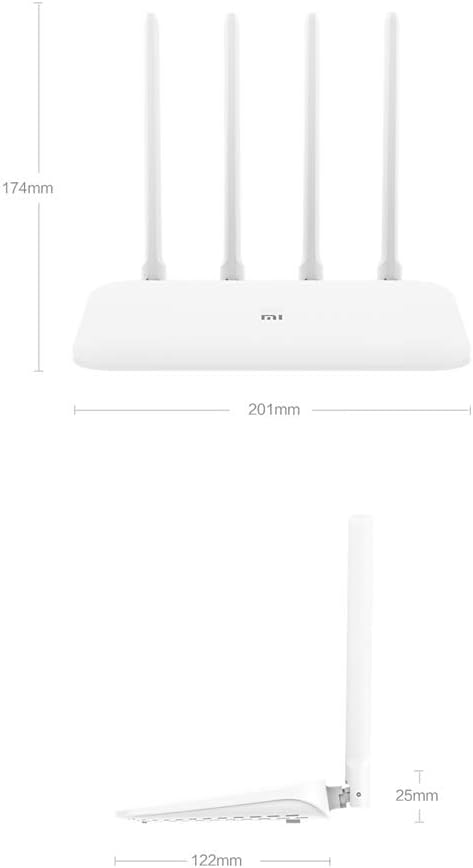
Image: Technical drawing displaying the dimensions of the Xiaomi Mi Router 4A, with measurements in millimeters.
3.4 Prievadai ir indikatoriai
The router features:
- WAN prievadas: 1x 10/100/1000M adaptive port for connecting to your modem or internet service provider.
- LAN prievadai: 2x 10/100/1000M adaptive ports for connecting wired devices like computers or gaming consoles.
- Maitinimo įvestis: Maitinimo adapterio prijungimui.
- Sistemos atstatymo mygtukas: Naudojamas gamykliniams nustatymams atkurti.
- LED indikatoriai: Two indicators for system status and network activity.
4. Sąranka
4.1 Techninės įrangos prijungimas
- Prijunkite maitinimo adapterį: Prijunkite maitinimo adapterį prie maršrutizatoriaus maitinimo įvesties, o tada – prie maitinimo lizdo.
- Prisijunkite prie interneto: Prijunkite Ethernet kabelį nuo modemo LAN prievado prie maršrutizatoriaus WAN prievado.
- Prijunkite laidinius įrenginius (nebūtina): For wired connections, connect Ethernet cables from your devices to the router's LAN ports.
4.2 Pradinė konfigūracija
Maršrutizatorių galite konfigūruoti naudodami web browser or the Mi Wi-Fi mobile application.
- Prisijunkite prie maršrutizatoriaus „Wi-Fi“: On your computer or smartphone, connect to the default Wi-Fi network broadcast by the router. The network name (SSID) and password are usually found on a label on the bottom of the router.
- Access the Configuration Interface:
- Web Naršyklė: Atidarykite a web naršyklę ir įveskite numatytąjį IP adresą (pvz.
192.168.31.1ormiwifi.com) into the address bar. Follow the on-screen instructions to set up your internet connection and Wi-Fi network. - Mi Wi-Fi App: Download and install the Mi Wi-Fi app on your smartphone. Open the app and follow the prompts to detect and configure your new router.
- Web Naršyklė: Atidarykite a web naršyklę ir įveskite numatytąjį IP adresą (pvz.
- Set Up Wi-Fi Name and Password: During the initial setup, you will be prompted to create a new Wi-Fi network name (SSID) and a strong password for both the 2.4GHz and 5GHz bands. The router supports a unified Wi-Fi name for both frequencies, allowing devices to automatically switch to the optimal band.

Image: Diagram illustrating the unified Wi-Fi name feature, where both 2.4GHz and 5GHz bands share a single SSID for seamless connectivity.
5. Naudojimo instrukcijos
5.1 Įrenginių prijungimas
- „Wi-Fi“ ryšys: On your wireless devices (smartphones, tablets, laptops), search for your Wi-Fi network name (SSID) and enter the password you set during configuration.
- Ethernet jungtis: For devices requiring a wired connection, plug an Ethernet cable from the device into one of the router's LAN ports.
5.2 Tinklo valdymo funkcijos
The router offers several features to manage and optimize your home network:
- Įrangos valdymas: Control internet access times and accessible websvetainės konkretiems įrenginiams.
- Intelligent Speed Limit: Allocate bandwidth on demand to ensure a smooth online experience for critical applications.
- „Wi-Fi“ optimizavimas: Perform a one-click detection to improve network performance and resolve common Wi-Fi issues.
- Tinklo sauga: Active interception features help eliminate the risk of unauthorized access or network attacks.

Image: Icons representing various router features, including network management, speed measurement, bandwidth control, Wi-Fi optimization, and network security.
5.3 Įrenginio talpa
The Xiaomi Mi Router 4A Gigabit Edition is equipped with 128MB of DDR3 memory, supporting stable data transmission for up to 128 connected devices simultaneously. This makes it suitable for smart homes with numerous connected gadgets.

Image: Illustration showing the router's 128MB memory capacity, capable of supporting up to 128 connected devices, surrounded by various smart home devices.
6. Priežiūra
6.1 Firmware atnaujinimai
Reguliariai tikrinkite, ar yra programinės įrangos atnaujinimų, ir juos įdiekite, kad užtikrintumėte optimalų našumą, saugumą ir prieigą prie naujų funkcijų. Programinės įrangos atnaujinimus paprastai galima atlikti per maršrutizatoriaus web interface or the Mi Wi-Fi app.
6.2 Maršrutizatoriaus nustatymas iš naujo
If you encounter persistent issues or wish to clear all configurations, you can perform a factory reset:
- With the router powered on, locate the System Reset Button (usually a small pinhole button).
- Use a paperclip or a similar pointed object to press and hold the reset button for approximately 5-10 seconds until the LED indicators change behavior.
- Release the button. The router will restart with factory default settings. You will need to reconfigure it.
6.3 Aplinkosaugos aspektai
To ensure the longevity and stable operation of your router, adhere to the following environmental guidelines:
- Darbinė temperatūra: nuo 0°C iki 40°C (32°F iki 104°F)
- Darbinė drėgmė: Nuo 10% iki 90% RH (nekondensuojantis)
- Laikymo temperatūra: -40°C iki 70°C (nuo -40°F iki 158°F)
- Laikymo drėgmė: Nuo 5% iki 90% RH (nekondensuojantis)
Avoid placing the router in direct sunlight, near heat sources, or in areas with high humidity.
Image: Details on recommended operating and storage temperature and humidity ranges for the router.
7. Problemų sprendimas
This section addresses common issues you might encounter with your Xiaomi Mi Router 4A Gigabit Edition.
- Nėra interneto prieigos:
- Patikrinkite, ar WAN prievado kabelis yra tvirtai prijungtas prie modemo.
- Patikrinkite, ar jūsų modemas veikia tinkamai ir ar jis turi aktyvų interneto ryšį.
- Iš naujo paleiskite ir modemą, ir maršrutizatorių.
- Ensure the router's internet settings (e.g., PPPoE, DHCP, Static IP) are correctly configured according to your ISP.
- Silpnas arba nestabilus „Wi-Fi“ signalas:
- Perkelkite maršrutizatorių į centrinę vietą, atokiau nuo kliūčių ir trukdžių šaltinių (pvz., mikrobangų krosnelių, belaidžių telefonų).
- Sureguliuokite maršrutizatoriaus antenas, kad signalas būtų optimaliai nukreiptas.
- Use the Wi-Fi Optimization feature in the router's interface or app.
- Ensure your devices are connecting to the appropriate 2.4GHz or 5GHz band.
- Nepavyksta pasiekti maršrutizatoriaus konfigūracijos puslapio:
- Įsitikinkite, kad jūsų įrenginys prijungtas prie maršrutizatoriaus tinklo (per „Wi-Fi“ arba eterneto ryšį).
- Verify that you are entering the correct IP address (e.g.,
192.168.31.1) arba domenas (miwifi.com). - Išvalykite naršyklės talpyklą arba išbandykite kitą naršyklę.
- Laikinai išjunkite visus VPN arba tarpinio serverio nustatymus savo įrenginyje.
- Lėtas interneto greitis:
- Patikrinkite savo interneto paslaugų teikėjo greitį.
- Ensure no other devices are consuming excessive bandwidth. Use the Intelligent Speed Limit feature if necessary.
- Perform a Wi-Fi Optimization scan.
- If using Wi-Fi, try connecting via Ethernet to determine if the issue is wireless-related.
8. Specifikacijos
Detailed technical specifications for the Xiaomi Mi Router 4A Gigabit Edition:

Image: Table detailing the router's internal specifications, including processor, memory, Wi-Fi standards, and port configuration.
| Funkcija | Aprašymas |
|---|---|
| Modelio numeris | R4AC |
| Procesorius | MT7621A MPIS Dual Core 880MHz |
| ROM | 16 MB |
| Product Memory (RAM) | 128MB DDR3 |
| „2.4G Wi-Fi“ | 2x2 (supports IEEE 802.11n protocol, up to 300Mbps) |
| „5G Wi-Fi“ | 2x2 (supports IEEE 802.11ac protocol, up to 867Mbps) |
| Produkto antena | 2x 2.4G (max gain 5dBi), 2x 5G (max gain 6dBi) |
| Mašinos sąsaja | 1x 10/100/1000M adaptive WAN port (Auto MDI/MDIX), 2x 10/100/1000M adaptive LAN ports (Auto MDI/MDIX) |
| LED indikatorius | 2 |
| Sistemos atkūrimo mygtukas | 1 |
| Maitinimo įvesties sąsaja | 1 |
| Protokolo standartas | IEEE 802.11a/b/g/n/ac, IEEE 802.3/3u |
| Dvigubas dažnis | 2.4 GHz ir 5 GHz |
| Belaidžiai kanalai (2.4 GHz) | 1, 2, 3, 4, 5, 6, 7, 8, 9, 10, 11, 12, 13 |
| Belaidžiai kanalai (5 GHz) | 36, 40, 44, 48, 149, 153, 157, 161, 165 |
| Operacinė sistema | RouterOS (Custom Xiaomi firmware) |
| Spalva | Baltas |
| Matmenys (I x P x A) | 201mm x 122mm x 174mm (with antennas up) |
| Suderinami įrenginiai | Asmeninis kompiuteris, nešiojamas kompiuteris, planšetinis kompiuteris, išmanusis telefonas, žaidimų konsolė |
| Rekomenduojamas naudojimas | Pradžia |

Image: Diagram illustrating the router's dual-core CPU with an 880MHz main frequency, emphasizing its processing capabilities.
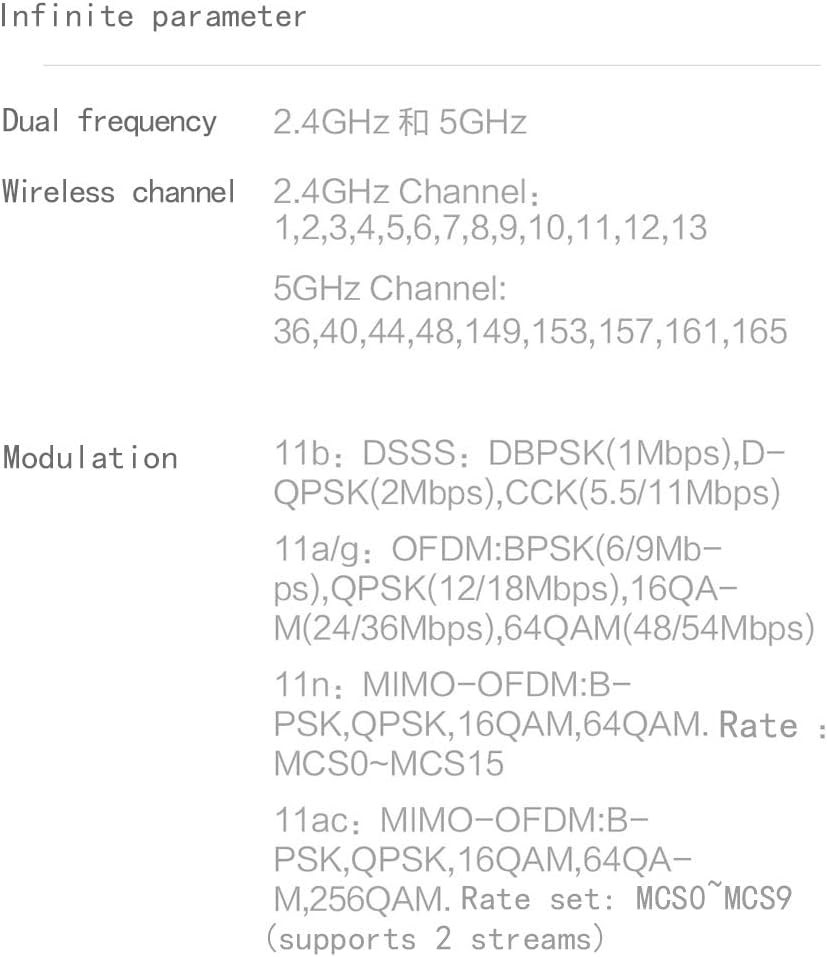
Image: Information on the specific wireless channels available for 2.4GHz and 5GHz bands, along with supported modulation types.
9. Garantija ir palaikymas
Informacijos apie garantiją ieškokite prie gaminio pridėtoje garantijos kortelėje arba apsilankykite oficialioje „Xiaomi“ svetainėje. website for your region. Support resources, including FAQs and contact information, can also be found on the official Xiaomi support pages. Please retain your proof of purchase for warranty claims.