
1. Įvadas
Thank you for choosing the Greadio Retro Bluetooth Speaker and Vintage FM Radio. This manual provides essential information for the safe and efficient operation of your device. Please read it thoroughly before use and retain it for future reference.
2. Saugos informacija
- Saugokite įrenginį nuo vandens, drėgmės ar ekstremalių temperatūrų.
- Stenkitės, kad prietaisas nenumestų ar nepatirtų stipraus smūgio.
- Nebandykite patys ardyti ar taisyti įrenginio. Kreipkitės į kvalifikuotus techninės priežiūros darbuotojus.
- Laikyti vaikams nepasiekiamoje vietoje.
- Naudokite tik pateiktą įkrovimo laidą.
3. Pakuotės turinys
Patikrinkite, ar pakuotėje yra visi reikalingi daiktai:
- Greadio Retro Bluetooth Speaker (Model GR919P)
- USB įkrovimo laidas
- AUX laidas
- Vartotojo vadovas

Image: Greadio Retro Bluetooth Speaker (Pink) with its charging cable, AUX cable, and user manual.
4. Produktas baigtasview
Familiarize yourself with the main components and controls of your Greadio Retro Bluetooth Speaker.

Image: Front panel of the speaker, showing the speaker, frequency scale, tuning knob, volume knob, and ON/OFF & Function knob.

Image: Rear panel of the speaker, showing the Micro USB port, TF card socket, Play/Pause button, and Previous/Next buttons.
Pagrindinės funkcijos:
- Kompaktiškas dydis: Measures 4.4 x 2.7 x 2 inches, making it highly portable.
- Garsus garsumas: Equipped with a five-watt amplifier for rich and clear audio.
- "Bluetooth 5.0": Advanced wireless connectivity for quick pairing.
- Kelių režimų atkūrimas: Supports FM Radio, Bluetooth, TF Card, and AUX input.
- Integruota įkraunama baterija: Provides up to 9 hours of playtime.
5. Sąranka
5.1 Pradinis įkrovimas
Before first use, fully charge the speaker. Connect the provided USB charging cable to the Micro USB port on the back of the speaker and plug the other end into a USB power adapter (not included) or a computer's USB port. The charging indicator light will illuminate during charging and turn off when fully charged.
5.2 Maitinimo įjungimas/išjungimas
To power on the speaker, rotate the ON/OFF & Function knob clockwise until you hear a click and the display lights up. To power off, rotate the knob counter-clockwise until it clicks off.
6. Veikimo režimai
The Greadio Retro Bluetooth Speaker supports multiple playback modes. Rotate the ON/OFF & Function knob to switch between modes.
6.1 „Bluetooth“ režimas
In Bluetooth mode, the speaker can connect wirelessly to your smartphone, tablet, or other Bluetooth-enabled devices.
- Turn on the speaker and switch to Bluetooth mode. The display will show a blue light, indicating it's ready for pairing.
- On your device, enable Bluetooth and search for "Greadio" or "R919".
- Pasirinkite garsiakalbį iš sąrašo, kad jį suporuotumėte. Patvirtinimo garsas praneš apie sėkmingą suporavimą.
- Dabar galite leisti garsą iš savo įrenginio per garsiakalbį.

Image: The speaker's dial illuminated in blue, signifying Bluetooth mode is active.
Video: Demonstrates how to connect the Greadio Bluetooth Speaker to a smartphone via Bluetooth, showing the pairing process and audio playback.
6.2 FM radijo režimas
Enjoy your favorite FM radio stations with the vintage-style tuner.
- Turn on the speaker and switch to FM Radio mode. The display will show an orange light.
- Rotate the Tuning Knob (large central knob) to scan for available FM stations.
- Adjust the Volume Knob (smaller knob) to your desired listening level.

Image: The speaker's dial illuminated in orange, signifying FM radio mode is active.
6.3 TF kortelės režimas
Leiskite muziką tiesiai iš TF (MicroSD) kortelės.
- Įdėkite TF kortelę (iki 32 GB, nepridedama) su MP3 garso įrašu files into the TF card socket on the back of the speaker.
- The speaker will automatically switch to TF Card mode and begin playback.
- Use the Play/Pause button and Previous/Next buttons on the back to control playback.

Image: The TF card slot located on the rear of the speaker for direct music playback.
6.4 AUX režimas
Prijunkite išorinius garso įrenginius naudodami AUX kabelį.
- Connect one end of the provided AUX cable to the AUX port on the back of the speaker.
- Kitą galą prijunkite prie išorinio įrenginio (pvz., MP3 grotuvo, kompiuterio) garso išvesties.
- The speaker will automatically switch to AUX mode. Play audio from your external device.

Image: The AUX port on the rear of the speaker for wired audio connections.
7. Įkrovimas
The speaker features a built-in 1100mAh rechargeable Lithium Ion battery. When the battery is low, the speaker will indicate this (e.g., voice prompt). Connect the Micro USB charging cable to a 5V/1A USB power source to recharge. A full charge typically takes 3-4 hours and provides up to 9 hours of playback time, depending on volume and mode.
8. Priežiūra
- Garsiakalbį valykite minkšta, sausa šluoste. Nenaudokite abrazyvinių valiklių ar tirpiklių.
- Garsiakalbį laikykite vėsioje, sausoje vietoje, toliau nuo tiesioginių saulės spindulių ir ekstremalių temperatūrų.
- Jei akumuliatorius ilgą laiką nenaudojamas, įkraukite jį bent kartą per tris mėnesius, kad pailgintumėte jo tarnavimo laiką.
9. Problemų sprendimas
| Problema | Galima priežastis | Sprendimas |
|---|---|---|
| Garsiakalbis neįsijungia. | Senka baterija. | Visiškai įkraukite garsiakalbį. |
| Nėra garso Bluetooth režimu. | Not paired or volume too low. | Ensure device is paired and volume is up on both speaker and source device. |
| Prastas FM radijo priėmimas. | Silpnas signalas arba trukdžiai. | Adjust the speaker's position or rotate for better reception. The charging cable can act as an antenna. |
| TF kortelė nežaidžia. | Card not inserted correctly or unsupported file formatu. | Įdėkite TF kortelę iš naujo. Įsitikinkite, kad fileyra MP3 formatu. |
10. Specifikacijos
- Modelio numeris: GR919P
- Gaminio matmenys: 4.4 x 2.7 x 2 colio
- Prekės svoris: 7.7 uncijos
- Ryšio technologija: Bluetooth 5.0
- Tuner technologija: FM
- Maitinimo šaltinis: Maitinamas su baterijomis (pridedama 1 ličio jonų baterija)
- Ypatinga funkcija: Įkraunamas
- Gamintojas: Greadio
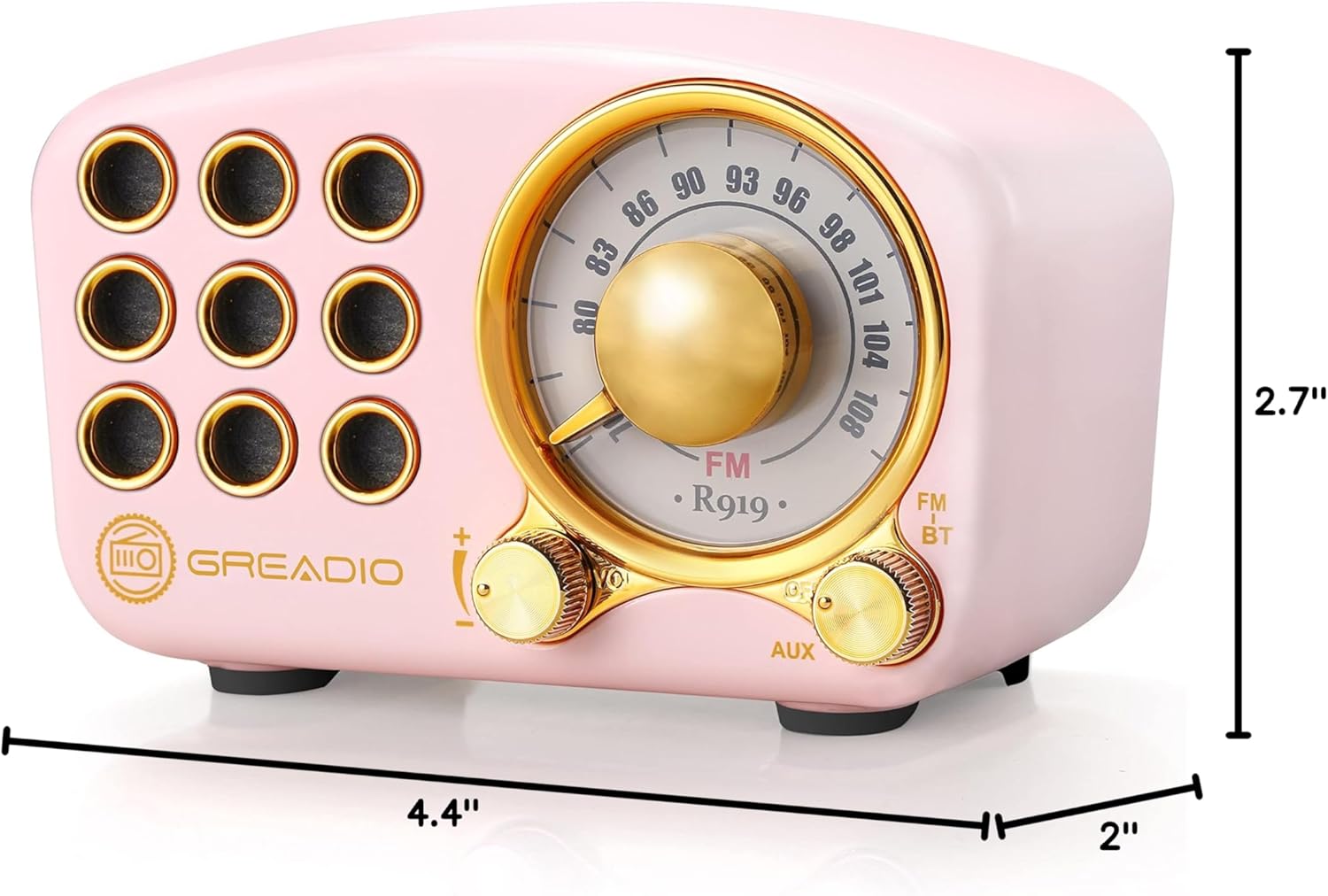
Image: Dimensions of the Greadio Retro Bluetooth Speaker.
11. Garantija ir palaikymas
Greadio products are designed for reliability and performance. For warranty information or technical support, please refer to the contact details provided on the product packaging or visit the official Greadio websvetainėje. Išsaugokite pirkimo kvitą kaip pirkimo įrodymą.