
1. Įvadas
This manual provides detailed instructions for the installation, operation, and maintenance of your ESX VN715-E39-DAB In-Car Navigation and Multimedia System. Please read this manual thoroughly before using the device to ensure proper functionality and to prevent damage. Keep this manual for future reference.
2. Produktas baigtasview ir Savybės
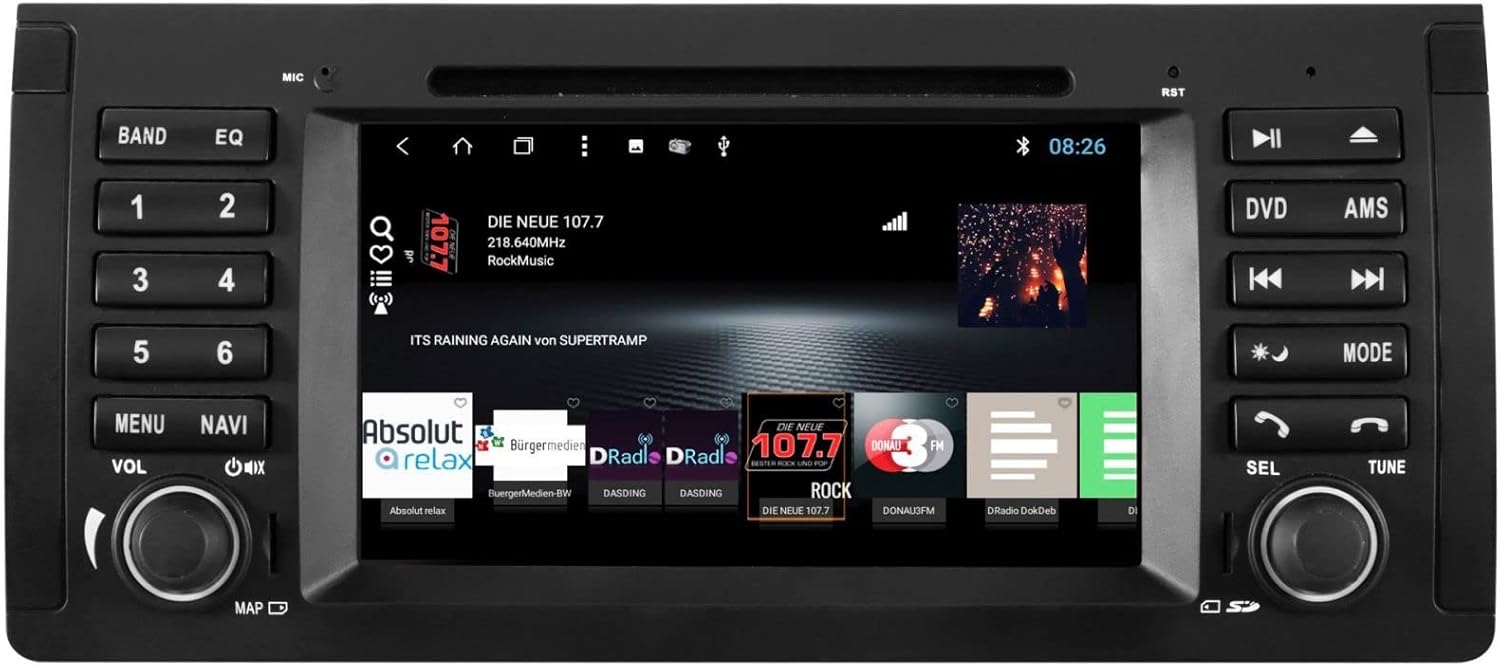
The ESX VN715-E39-DAB is an advanced in-car multimedia system designed to enhance your driving experience with navigation, entertainment, and connectivity features. It integrates seamlessly into compatible BMW vehicles.
Pagrindinės funkcijos:
- High-Resolution 8-inch Touchscreen: Provides clear visuals and intuitive control.
- Advanced Android i15 Operating System: Offers a familiar and customizable user interface.
- Google Maps Navigation: Supports both online and offline navigation for reliable route guidance.
- Mobile Internet Connectivity: Connects via Wi-Fi hotspot for online services.
- DAB+ skaitmeninis radijas: Includes a DAB antenna for high-quality digital radio reception with station logos.
- AM/FM Radio with RDS: Standard analog radio reception with Radio Data System functionality.
- Multi-format DVD Player: Supports DVD, DVD-R/RW, DVD+R/RW, VCD, CD, CD Text, CD-R/RW, and MP3 formats.
- Bluetooth Hands-Free Kit: Enables safe phone calls and audio streaming with an internal microphone and optional external microphone connection.
- Išmaniojo telefono integracija: Connect iPhone or Android smartphones via USB for various functions.
- Valdymas balsu: Utilize voice commands through a connected smartphone.
- Garso išėjimai: iš ankstoamplifier outputs for front, rear, subwoofer, and center channels.
- Kameros įvestis: One adjustable camera input for reverse cameras.
- Pagalbiniai įėjimai / išėjimai: One AUX video input, two audio/video outputs, and one AUX audio input.
- USB prievadai: Two USB ports for media and connectivity.
- „Micro SD“ kortelės lizdas: Dedicated slot for navigation data and media files.
- Tinkinimas: Personalize with customizable logos and wallpapers.
- Authenticity Certificate: Included with the product.
3. Sąranka ir diegimas
Installation of the ESX VN715-E39-DAB system requires technical knowledge and should ideally be performed by a qualified professional. Incorrect installation can lead to damage to the device or vehicle electrical system.
Suderinamumas:
This unit is compatible with specific BMW models and connector types:
- BMW 5 Series E39 (1996-2001) with 17-pin system connector.
- BMW 5 Series E39 (2002-2003) with 40-pin system connector.
- BMW X5 E53 (2000-2001) with 17-pin system connector.
- BMW X5 E53 (2002-2007) with 40-pin system connector.
- BMW M5 (1996-2003) with 17/40-pin system connector.
Bendrieji diegimo veiksmai (rekomenduojama atlikti profesionalų montavimą):
- Atjunkite akumuliatorių: Prieš pradėdami bet kokius elektros darbus, visada atjunkite automobilio akumuliatorių.
- Pašalinti esamą įrenginį: Carefully remove the factory radio or navigation system from the dashboard.
- Prijunkite laidus: Connect the appropriate wiring harness (17-pin or 40-pin) to the vehicle's electrical system and the ESX unit. Ensure all connections are secure.
- Prijunkite antenas: Connect the GPS antenna, DAB antenna, and radio antenna to their respective ports on the unit. Position the antennas for optimal reception.
- Prijunkite išorinius įrenginius: Connect any optional accessories such as a reverse camera, external microphone, USB devices, or auxiliary inputs/outputs.
- Sumontuokite įrenginį: Securely mount the ESX unit into the dashboard opening.
- Iš naujo prijunkite akumuliatorių: Prijunkite automobilio akumuliatorių ir patikrinkite sistemą.

4. Naudojimo instrukcijos
Familiarize yourself with the touchscreen interface and physical buttons for optimal use.
4.1 Pagrindinės operacijos
- Maitinimo įjungimas/išjungimas: Press and hold the power button (usually the VOL knob) to turn the unit on or off. A short press typically mutes or unmutes the audio.
- Garsumo valdymas: Rotate the VOL knob to adjust the audio volume.
- Jutiklinio ekrano sąsaja: Navigate through menus and applications by tapping, swiping, and pinching on the 8-inch touchscreen.

4.2 Navigacija
Access the navigation application (e.g., Google Maps) from the home screen. Input your destination, and the system will provide turn-by-turn directions. Ensure GPS antenna is properly connected for accurate positioning.

4.3 Radio (DAB+/AM/FM)
- Pasirinkite režimą: Tap the 'Radio' or 'DAB+' icon on the home screen or press the 'BAND' button.
- Skenavimo stotys: Use the 'AMS' (Auto Memory Store) button or on-screen controls to scan and save available stations.
- Melodija: Manually tune using the 'TUNE' knob or on-screen frequency controls.
- Išankstiniai nustatymai: Save your favorite stations to preset buttons (1-6) for quick access.

4.4 „Bluetooth“ ryšys
- Poravimas: Go to the Bluetooth settings on the unit and your smartphone. Ieškokite available devices and select 'ESX VN715-E39-DAB'. Enter the PIN if prompted (usually '0000' or '1234').
- Skambinimas laisvų rankų įranga: Susiejus, galite skambinti ir priimti skambučius tiesiogiai per įrenginį.
- Garso transliacija: Play music from your smartphone via Bluetooth A2DP.
4.5 Media Playback (DVD/USB/SD)
- DVD: Insert a DVD into the disc slot. The system will automatically switch to DVD mode or prompt you to select it.
- USB / SD: Insert a USB drive into a USB port or an SD card into the Micro SD slot. Access media files through the 'Media' or 'File Explorer' application.
5. Priežiūra
Regular maintenance ensures the longevity and optimal performance of your ESX VN715-E39-DAB system.
- Ekrano valymas: Jutiklinį ekraną švelniai nuvalykite minkšta, nepūkuota šluoste. Įsisenėjusias dėmes šiek tiek nuvalykiteampNuvalykite šluostę vandeniu arba ekranui saugiu valikliu. Venkite stiprių cheminių medžiagų.
- Programinės įrangos atnaujinimai: Reguliariai tikrinkite, ar nėra programinės įrangos atnaujinimų iš oficialių gamintojo svetainių. website or through the unit's system settings (if available) to ensure you have the latest features and bug fixes.
- Disc Drive Care: Keep the DVD slot free of dust and debris. Avoid inserting damaged or non-standard discs.
6. Problemų sprendimas
Jei kyla problemų dėl įrenginio, vadovaukitės toliau pateiktais įprastais trikčių šalinimo veiksmais.
| Problema | Galima priežastis | Sprendimas |
|---|---|---|
| Nėra galios | Atsilaisvinęs maitinimo laidas, perdegęs saugiklis, automobilio akumuliatoriaus problema. | Patikrinkite maitinimo laidus ir saugiklį. Įsitikinkite, kad automobilio akumuliatorius įkrautas. Jei problemos išlieka, kreipkitės į specialistą. |
| Nėra garso | Volume muted, speaker wires disconnected, incorrect audio source. | Check volume level and mute status. Verify speaker connections. Select the correct audio source. |
| GPS signalas prarastas | GPS antenna improperly connected or obstructed, unit in an area with poor satellite reception. | Įsitikinkite, kad GPS antena yra tvirtai prijungta ir turi aiškų view dangaus. Pereikite į atvirą vietą. |
| „Bluetooth“ susiejimo klaida | Bluetooth not enabled on device, incorrect PIN, device out of range. | Ensure Bluetooth is active on both devices. Re-enter PIN. Bring devices closer. Restart both devices. |
| Jutiklinis ekranas nereaguoja | Sistema užstringa, ekrane yra nešvarumų. | Perform a soft reset (refer to device settings or power cycle). Clean the screen. |
Jei šie veiksmai neišsprendžia problemos, kreipkitės į klientų aptarnavimo tarnybą arba kvalifikuotą techninės priežiūros specialistą.
7. Specifikacijos
Detailed technical specifications for the ESX VN715-E39-DAB unit:
- Prekinis ženklas: ESX plėtinys
- Modelis: VN715-E39-DAB
- Ekrano dydis: 8 colių
- Ekrano tipas: LCD
- Operacinė sistema: Android i15
- Ryšio technologija: Bluetooth, USB, Wi-Fi (via hotspot)
- Medijos tipas: DVD, DVD-R/RW, DVD+R/RW, VCD, CD, CD Text, CD-R/RW, MP3, USB, Micro SD
- Radijo imtuvas: DAB+, AM/FM with RDS
- Navigacija: Google Maps (online/offline)
- Suderinamumas: BMW 5 Series E39 (1996-2003), BMW X5 E53 (2000-2007), BMW M5 (1996-2003)
- Kilmė: Kinija
8. Garantija ir palaikymas
For warranty information, please refer to the documentation provided with your purchase or contact your retailer. For technical support, please visit the official ESX website or contact their customer service department. Ensure you have your model number (VN715-E39-DAB) and proof of purchase available when seeking support.