
1. Įvadas
This manual provides detailed instructions for the safe and efficient operation of your Blackweb Portable Blu-ray/DVD Player, model SDVD1183-BW. Please read this manual thoroughly before using the device and retain it for future reference. This portable player features an 11.4-inch HD screen, USB and SD card slots for media playback, and supports both Blu-ray and DVD discs.
2. Saugos informacija
- Maitinimo šaltinis: Use only the provided AC adapter. Ensure the voltage atitinka adapterio nurodytus reikalavimus.
- Baterijos sauga: The device contains a Lithium-Ion battery. Do not expose to extreme temperatures, puncture, or disassemble. Dispose of batteries according to local regulations.
- Vėdinimas: Do not block ventilation openings. Ensure adequate airflow around the device during operation.
- Vanduo ir drėgmė: Keep the device away from water, rain, and high humidity. Do not operate with wet hands.
- Valymas: Disconnect power before cleaning. Use a soft, dry cloth. Avoid liquid cleaners or aerosols.
- Disko tvarkymas: Handle discs by their edges. Avoid touching the playback surface. Keep discs clean and free from scratches.
- Temperatūra: Įrenginį naudokite 5–35 °C (41–95 °F) temperatūroje.
- Vaikai: Šis prietaisas nėra žaislas. Laikyti mažiems vaikams nepasiekiamoje vietoje.
3. Produktas baigtasview
Familiarize yourself with the components and controls of your portable Blu-ray/DVD player.

3.1 paveikslas: Priekyje view Juodaodžiųweb Portable Blu-ray/DVD Player (SDVD1183-BW) with the screen open. The 11.4-inch display is visible at the top, and the control panel with navigation buttons, volume controls, and disc tray area is at the bottom.
3.1 Front Panel Controls (Open View)
- Ekranas: 11.4-inch HD display.
- Disko dėklas: Area for inserting Blu-ray or DVD discs.
- Maitinimo mygtukas: Įjungia arba išjungia įrenginį.
- MODE/SOURCE Button: Switches between input sources (Disc, USB, SD).
- Navigation Buttons (Left/Right/Up/Down/Enter): Meniu naršymui ir pasirinkimui.
- Atkūrimo / pristabdymo mygtukas: Pradeda arba pristabdo atkūrimą.
- Stop mygtukas: Sustabdo atkūrimą.
- Greito sukimo pirmyn / atgal mygtukai: Skips chapters or fast forwards/rewinds playback.
- SETUP mygtukas: Pasiekia sistemos nustatymų meniu.
- VOL +/- mygtukai: Reguliuoja garsumo lygį.
- Garsiakalbiai: Integruoti stereo garsiakalbiai.
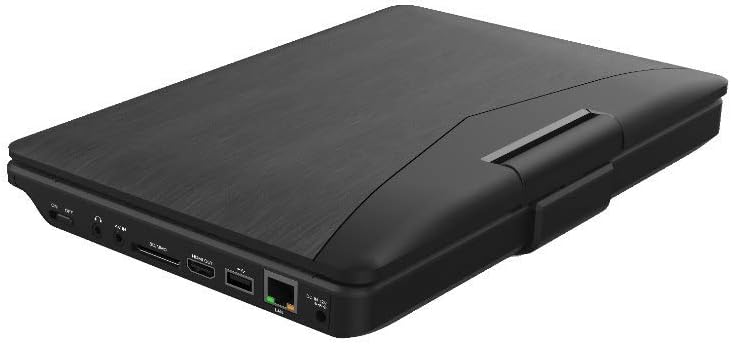
3.2 paveikslas: Šoninė view Juodaodžiųweb Portable Blu-ray/DVD Player (SDVD1183-BW) when closed, highlighting the various input/output ports. These include the DC IN port, USB port, SD card slot, HDMI OUT port, and LAN (RJ45) port.
3.2 Šoninio skydelio prievadai
- DC in: Maitinimo įvestis kintamosios srovės adapteriui.
- USB prievadas: Prijunkite USB atmintines, kad galėtumėte atkurti medijos failus.
- SD kortelės lizdas: Insert SD memory cards for media playback.
- HDMI OUT: Connect to an external display (TV, monitor) for larger viewing.
- LAN (RJ45) prievadas: For wired network connection (if applicable for online features, though not explicitly stated for this model).
- Ausinių lizdas: 3.5mm audio output for private listening.
4. Sąranka
4.1 Akumuliatoriaus įkrovimas
- Connect the supplied AC power adapter to the DC IN port on the player.
- Kitą kintamosios srovės adapterio galą įkiškite į standartinį sieninį lizdą.
- The charging indicator light will illuminate, typically red, during charging. It will change color (e.g., green or off) when fully charged.
- Prieš pirmą kartą naudojant, pilnai įkraukite maždaug 4–6 valandas.
4.2 Įjungimas / išjungimas
- Norėdami įjungti: Open the screen and press the GALIA mygtuką. Ekranas įsijungs.
- Norėdami išjungti: Paspauskite ir palaikykite GALIA mygtuką, kol ekranas išsijungs.
5. Naudojimo instrukcijos
5.1 Playing Blu-ray/DVD Discs
- Įsitikinkite, kad grotuvas įjungtas.
- Gently open the disc tray cover.
- Place a Blu-ray or DVD disc onto the spindle with the label side facing up. Press down gently until it clicks into place.
- Close the disc tray cover. The player will automatically detect the disc and begin playback or display the disc menu.
- Naudokite naršymo mygtukus ir ENTER to select options from the disc menu.
- Naudokite PALEISTI / PAUZĖ, STOP, FF, ir REW mygtukai, skirti valdyti atkūrimą.
5.2 Playing Media from USB/SD Card
- Įkiškite USB atmintinę į USB prievadą arba SD kortelę į SD kortelės lizdą.
- Paspauskite REŽIMAS/ŠALTINIS button to select "USB" or "SD" as the input source.
- The player will display the file browser. Use the navigation buttons to browse your media files (vaizdo įrašai, nuotraukos, muzika).
- Paspauskite ENTER pasirinkti ir paleisti file.
5.3 Nustatymų reguliavimas
- Paspauskite NUSTATYMAS button to access the system settings menu.
- Use the navigation buttons to select categories such as "Video Setup," "Audio Setup," "Language Setup," etc.
- Paspauskite ENTER to enter a sub-menu and adjust settings like screen brightness, contrast, aspect ratio, audio output, and subtitle preferences.
- Paspauskite NUSTATYMAS dar kartą išeiti iš meniu.
5.4 Connecting to an External Display (HDMI)
- Ensure both the portable player and the external display (TV/monitor) are powered off.
- Prijunkite vieną HDMI kabelio galą (nepridedamas) prie HDMI OUT port on the portable player.
- Connect the other end of the HDMI cable to an HDMI input port on your external display.
- Power on both devices. Select the corresponding HDMI input on your external display.
- The portable player's output will now be displayed on the external screen. The portable player's screen may turn off or mirror the content, depending on settings.
5.5 Ausinių naudojimas
- Plug standard 3.5mm headphones into the headphone jack on the side of the player.
- Prijungus ausines, vidiniai garsiakalbiai automatiškai nutildomi.
- Reguliuokite garsumą naudodami VOL +/- mygtukai.
6. Priežiūra
6.1 Prietaiso valymas
- Prieš valydami visada atjunkite maitinimo adapterį.
- Išorinius paviršius valykite minkštu, sausu, nepūkuotu skudurėliu.
- For the screen, use a screen-specific cleaning cloth or solution, applying it to the cloth first, not directly to the screen.
- Nenaudokite abrazyvinių valiklių, vaško ar tirpiklių.
6.2 Diskų priežiūra
- Handle discs by their edges to avoid fingerprints and scratches on the playing surface.
- Nenaudojamus diskus laikykite dėkluose.
- If a disc is dirty, wipe it gently from the center outwards with a soft, lint-free cloth. Do not use harsh chemicals.
7. Problemų sprendimas
| Problema | Galima priežastis | Sprendimas |
|---|---|---|
| Grotuvas neįsijungia. | Baterija išsikrovusi. Maitinimo adapteris neprijungtas arba sugedęs. | Connect the AC adapter and charge the battery. Ensure the AC adapter is securely connected to both the player and a working power outlet. |
| Ekrane nėra nuotraukos. | Screen brightness too low. HDMI cable connected to external display. | Adjust screen brightness in the SETUP menu. Disconnect HDMI cable or ensure external display is correctly configured. |
| Nėra garso. | Garsumas per mažas arba nutildytas. Prijungtos ausinės. Audio settings incorrect. | Padidinkite garsumą naudodami VOL+ mygtuką. Disconnect headphones if you want sound from speakers. Check audio settings in the SETUP menu. |
| Disko negalima leisti. | Diskas nešvarus, subraižytas arba neteisingai įdėtas. Disc format not supported. Region code mismatch. | Clean the disc and reinsert it correctly. Ensure the disc is a supported Blu-ray or DVD format. This player supports region-free or compatible region discs. |
| USB/SD media not recognized. | Pasirinktas neteisingas įvesties šaltinis. File formatas nepalaikomas. USB drive/SD card corrupted or incompatible. | Paspauskite REŽIMAS/ŠALTINIS to select "USB" or "SD". Refer to specifications for supported file formatai. Try a different USB drive or SD card. Ensure it is formatted correctly (e.g., FAT32). |
8. Specifikacijos
- Modelis: SDVD1183-BW
- Ekrano dydis: 11.4 colių
- Ekrano skiriamoji geba: 1280x720
- Medijos tipas: Blu-Ray, DVD
- Ryšys: USB, SD Card Slot, HDMI Out, LAN (RJ45), 3.5mm Headphone Jack
- Maitinimo šaltinis: AC Adapter, Built-in Lithium Ion Battery
- Prekės svoris: Maždaug 4.15 svarų (1.88 kg)
- Gaminio matmenys (PxPxA): 16 x 14.5 x 3.5 colio (40.64 x 36.83 x 8.89 cm)
- Gamintojas: Juodaweb
9. Garantija ir palaikymas
For warranty information and technical support, please refer to the documentation provided at the time of purchase or contact the retailer. As this product is often sold as "Renewed," specific warranty terms may vary. Please consult the Amazon Renewed Guarantee for details regarding refurbished products purchased through Amazon.
For further assistance, you may also visit the official Blackweb parama websvetainėje arba susisiekite su jų klientų aptarnavimo tarnyba, jei tokia yra.