
1. Įvadas
The Alpine X308U Mech-Less Navigation Receiver is designed to provide advanced smartphone integration and a reliable built-in navigation system for your vehicle. This manual provides essential information for the proper installation, operation, and maintenance of your device.
Pagrindinės funkcijos:
- 8-inch WVGA High-Resolution Capacitive Touch Display
- Compatibility with Apple CarPlay and Android Auto
- Embedded Navigation with 3D & 2D mapping and Pinch-to-Zoom interface
- Bluetooth hands-free calling and audio streaming
- Built-In HD Radio Tuner and SiriusXM Satellite Radio readiness
- Multiple connectivity options including HDMI input/output and USB
- Advanced audio tuning features: 9-band parametric EQ and 6-channel time correction
- Support for FLAC, AAC, MP3, WMA, HE-AC Playback
- Accessory Control Ready (KAC-001 Required) and iDatalink Maestro Module compatibility
2. Produktas baigtasview

2.1 pav.: priekis View with Navigation Display. This image shows the Alpine X308U unit with its 8-inch high-resolution capacitive touch display active, presenting a detailed 3D navigation map. The screen displays street names, distances, and navigation icons, demonstrating the unit's integrated GPS capabilities. Control buttons are visible along the bottom edge of the screen.

2.2 pav.: priekis View with Media Interface. This image illustrates the Alpine X308U's user interface for media playback and radio tuning. The display shows current FM radio frequency (105.8 MHz), preset stations, and options for HDMI, Music, Pandora, and Bluetooth Audio. Album art and song information are also visible, highlighting the unit's multimedia capabilities.

Figure 2.3: Audio Settings Interface. This image displays the "BASS ENGINE SQ" audio adjustment screen on the Alpine X308U. Users can select from various sound presets like Standard, Punch, Rich, Mid Bass, and Low Bass, and adjust levels for Bass Engine, Navi Audio, and Back Audio. This interface demonstrates the unit's comprehensive audio customization options.

2.4 pav.: Galinio skydelio jungtys. Šis paveikslėlis pateikia išsamų view of the rear panel of the Alpine X308U, highlighting its various input and output ports. Visible connections include GPS antenna input, USB ports, HDMI In, HDMI Out, and the main wiring harness connector. A cooling fan is also visible on the left side, indicating thermal management features.
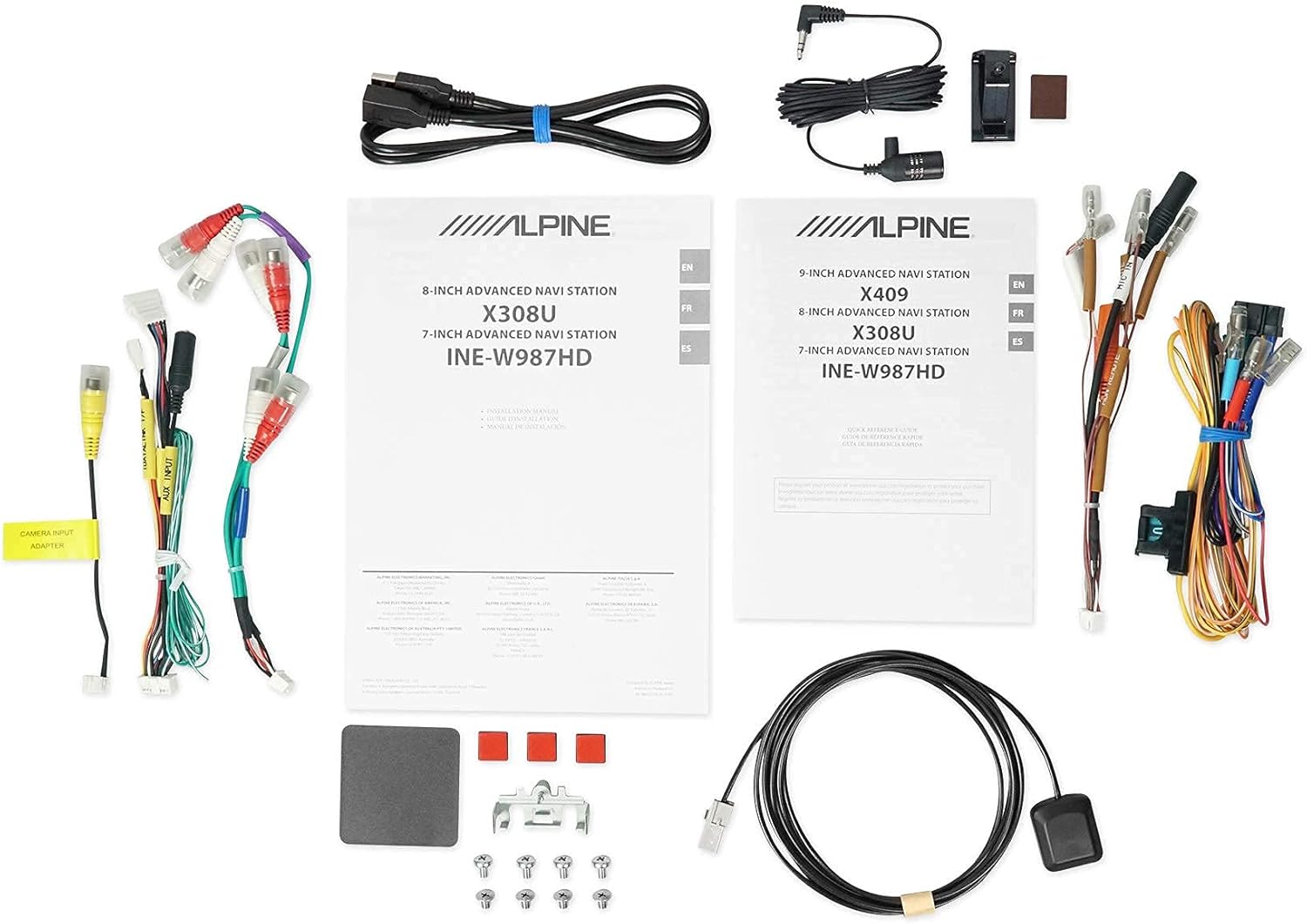
2.5 pav.: Įtraukti komponentai. This image displays a selection of cables and accessories that come with the Alpine X308U unit. These include various wiring harnesses, RCA cables for audio/video connections, a USB extension cable, and a GPS antenna. These components are essential for the proper installation and functionality of the receiver.
3. Sąranka ir diegimas
Proper installation is crucial for the optimal performance of your Alpine X308U. It is highly recommended that installation be performed by a qualified professional car audio installer.
3.1. Kontrolinis sąrašas prieš diegimą:
- Įsitikinkite, kad yra visi komponentai, išvardyti skyriuje „Kas yra dėžutėje“.
- Prieš pradėdami bet kokius elektros darbus, atjunkite neigiamą automobilio akumuliatoriaus gnybtą.
- Review your vehicle's specific wiring diagrams and dash disassembly instructions.
3.2. Laidų jungtys:
Connect the main wiring harness to the vehicle's power, ground, and speaker wires. Utilize the provided connectors for a secure fit. Refer to the wiring diagram included with your unit for specific color codes and pin assignments.
- Maitinimo jungtys: Connect the yellow wire (constant 12V), red wire (switched 12V), and black wire (ground).
- Garsiakalbių išvestys: Connect the speaker wires to the corresponding vehicle speakers. Ensure correct polarity.
- HDMI įvestis / išvestis: Use the HDMI ports for connecting external video sources or outputting video to a rear entertainment system. Note that HDMI output functionality may be limited to specific Alpine accessories.
- USB įvestis: Connect USB devices for media playback or smartphone integration (CarPlay/Android Auto).
- Kameros įvestis: Connect a rear-view camera to the dedicated input for enhanced safety. The unit supports up to 3 cameras with the optional KCX-C250MC Multi-camera selector.
- iš ankstoamp Išėjimai: Utilize the 6-channel pre-amp išėjimai išoriniam prijungimui ampgelbėtojai.
- GPS antena: GPS anteną montuokite vietoje, kur nėra šviesos. view of the sky for optimal navigation performance.
3.3. Įrenginio montavimas:
Securely mount the X308U in your vehicle's dashboard using the provided mounting hardware. Ensure adequate ventilation around the unit to prevent overheating.
4. Naudojimo instrukcijos
4.1. Pagrindinė operacija:
- Maitinimo įjungimas/išjungimas: Norėdami įjungti arba išjungti įrenginį, paspauskite ir palaikykite nuspaudę maitinimo mygtuką (paprastai esantį priekiniame skydelyje).
- Garsumo valdymas: Adjust volume using the dedicated volume buttons or on-screen controls.
- Jutiklinio ekrano sąsaja: Navigate through menus and select functions by tapping icons on the capacitive touch display. The unit supports 4-Way Swipe Action Control.
- Meniu mygtukas: Access the main menu to switch between different sources and settings.
4.2. Navigacijos sistema:
- Accessing Navigation: Pagrindiniame meniu palieskite piktogramą „Navigacija“.
- Įvedimas į paskirties vietas: Use the on-screen keyboard to input addresses, points of interest, or select from recent destinations.
- Žemėlapis View: Perjungti 2D ir 3D žemėlapius views. Use pinch-to-zoom gestures to adjust the map scale.
- Nurodymai balsu: Follow spoken turn-by-turn directions for guidance.
4.3. Smartphone Integration (CarPlay & Android Auto):
- Connecting Your Smartphone: Connect your compatible iPhone or Android phone to the unit's USB port using a certified USB cable.
- Activating CarPlay/Android Auto: Once connected, the respective interface will automatically launch or prompt you to activate it on the screen.
- Programų naudojimas: Access supported navigation, music, messaging, and communication apps directly from the unit's display.
4.4. „Bluetooth“ funkcijos:
- Įrenginio susiejimas: Go to the Bluetooth settings menu, enable pairing mode on the X308U, and search for the unit on your smartphone. Select "Alpine X308U" and confirm the pairing code.
- Skambinimas laisvų rankų įranga: Make and receive calls directly through the unit's microphone and vehicle speakers.
- Garso transliacija: Belaidžiu būdu transliuokite muziką iš susieto išmaniojo telefono.
4.5. Garso nustatymai:
- Ekvalaizeris: Access the 9-band parametric EQ to fine-tune audio frequencies.
- Laiko korekcija: Sureguliuokite garsątage for optimal listening position using the 6-channel time correction feature.
- TuneIt App: For advanced audio tuning and sharing settings, download and use the Alpine TuneIt App on your smartphone.
5. Priežiūra
Regular maintenance ensures the longevity and optimal performance of your Alpine X308U.
- Ekrano valymas: Use a soft, lint-free cloth specifically designed for electronic screens to gently wipe the display. Do not use abrasive cleaners or solvents.
- Bendras valymas: Laikykite įrenginį be dulkių ir šiukšlių. Išorę valykite minkšta, sausa šluoste.
- Programinės įrangos atnaujinimai: Reguliariai tikrinkite „Alpine“ website for firmware updates to ensure your unit has the latest features and bug fixes. Follow the instructions provided with the update carefully.
- Aplinkos sąlygos: Venkite įrenginio ilgalaikio laikymo tiesioginiuose saulės spinduliuose, itin aukštose temperatūrose ar drėgmės.
6. Problemų sprendimas
If you encounter issues with your Alpine X308U, refer to the following common troubleshooting steps before contacting support.
| Problema | Galima priežastis | Sprendimas |
|---|---|---|
| Nėra maitinimo / Įrenginys neįsijungia. | Atsilaisvinęs maitinimo laidas, perdegęs saugiklis, automobilio akumuliatoriaus problema. | Check all power wiring connections. Inspect and replace any blown fuses. Ensure vehicle battery is charged. |
| Nėra garso iš garsiakalbių. | Speaker wires disconnected, incorrect audio settings, unit in mute mode. | Verify speaker wire connections. Check audio settings (e.g., fader/balance, EQ). Ensure unit is not muted. |
| Navigation not working or inaccurate. | GPS antenna not properly connected or obstructed, outdated map data. | Įsitikinkite, kad GPS antena yra tvirtai prijungta ir turi aiškų view of the sky. Check for available map updates. |
| „Bluetooth“ įrenginys nesusijungia. | Device not in pairing mode, incorrect pairing procedure, interference. | Įsitikinkite, kad abu įrenginiai veikia susiejimo režimu. Ištrinkite ankstesnius susiejimus ir bandykite dar kartą. Priartėkite prie įrenginio. |
| Jutiklinis ekranas nereaguoja. | Laikinas programinės įrangos triktis, reikalingas ekrano kalibravimas. | Perform a soft reset (refer to manual for specific method). If issue persists, contact support. |
7. Specifikacijos
| Funkcija | Detalė |
|---|---|
| Modelio numeris | X308U |
| Ekrano dydis | 8 colių (21 cm įstrižainė) |
| Ekrano tipas | WVGA High-Resolution Capacitive Touch Display |
| Maksimali galia | 50 Watts x 4 channels |
| CTA-2006 Power Rating | 18 Watts x 4 channels |
| iš ankstoamp Išėjimai | 3 (4-Volt) |
| Ryšio technologija | Bluetooth, USB, HDMI |
| Žemėlapio tipas | Satellite, North America (Built-in 3D & 2D Navigation) |
| Gaminio matmenys | 12 x 12 x 12 colio |
| Prekės svoris | 6.4 svaro |
| Įtraukti komponentai | HDMI input, USB input, composite A/V input, rear-view camera input, HDMI output, 6-channel preamp outputs, USB source |
8. Garantija ir palaikymas
Šiam produktui taikoma gamintojo garantija. Dėl konkrečių sąlygų, įskaitant garantijos laikotarpį ir aprėpties informaciją, žr. prie pirkinio pridėtą garantinę kortelę.
Klientų aptarnavimas:
For technical assistance, troubleshooting beyond this manual, or warranty claims, please contact Alpine customer support. Visit the official Alpine websvetainę, kurioje rasite naujausią kontaktinę informaciją ir pagalbos išteklius.
Pastaba: Išsaugokite pirkimo įrodymą, kad galėtumėte patvirtinti garantiją.