
Įvadas
This manual provides instructions for the Extreme Networks Summit X460-24p, a high-performance, managed Layer 3 Ethernet switch designed for enterprise and data center environments. It features 24 Gigabit Ethernet ports with Power over Ethernet (PoE) capabilities, along with additional SFP and shared Gigabit SFP ports for flexible connectivity.
Saugos informacija
Saugos gairės
- Always disconnect all power supply inputs before removing any panel for servicing.
- This device contains a Class 1 Laser product. Avoid direct eye exposure to beam.
- Montavimo metu pasirūpinkite tinkamu įžeminimu.
- Refer to the installation manual for power cord selection and additional compliance markings.
Pakuotės turinys
Kas yra dėžutėje
- Extreme Networks Summit X460-24p Switch
- Maitinimo laidas (priklausomai nuo regiono)
- Montavimo ant stovo komplektas
- Dokumentacija (šis vadovas)
Produktas baigtasview
The Summit X460-24p switch is designed for efficient network management and high-speed data transfer.
Galinis skydelis

This image displays the rear panel of the Summit X460-24p switch, highlighting the power input, fan modules, and the SummitStack ports. The overall chassis is purple.

Išsamią view of the SummitStack ports (Stack Port 1 and Stack Port 2) located on the rear of the switch, used for stacking multiple switches.
Produkto etiketė
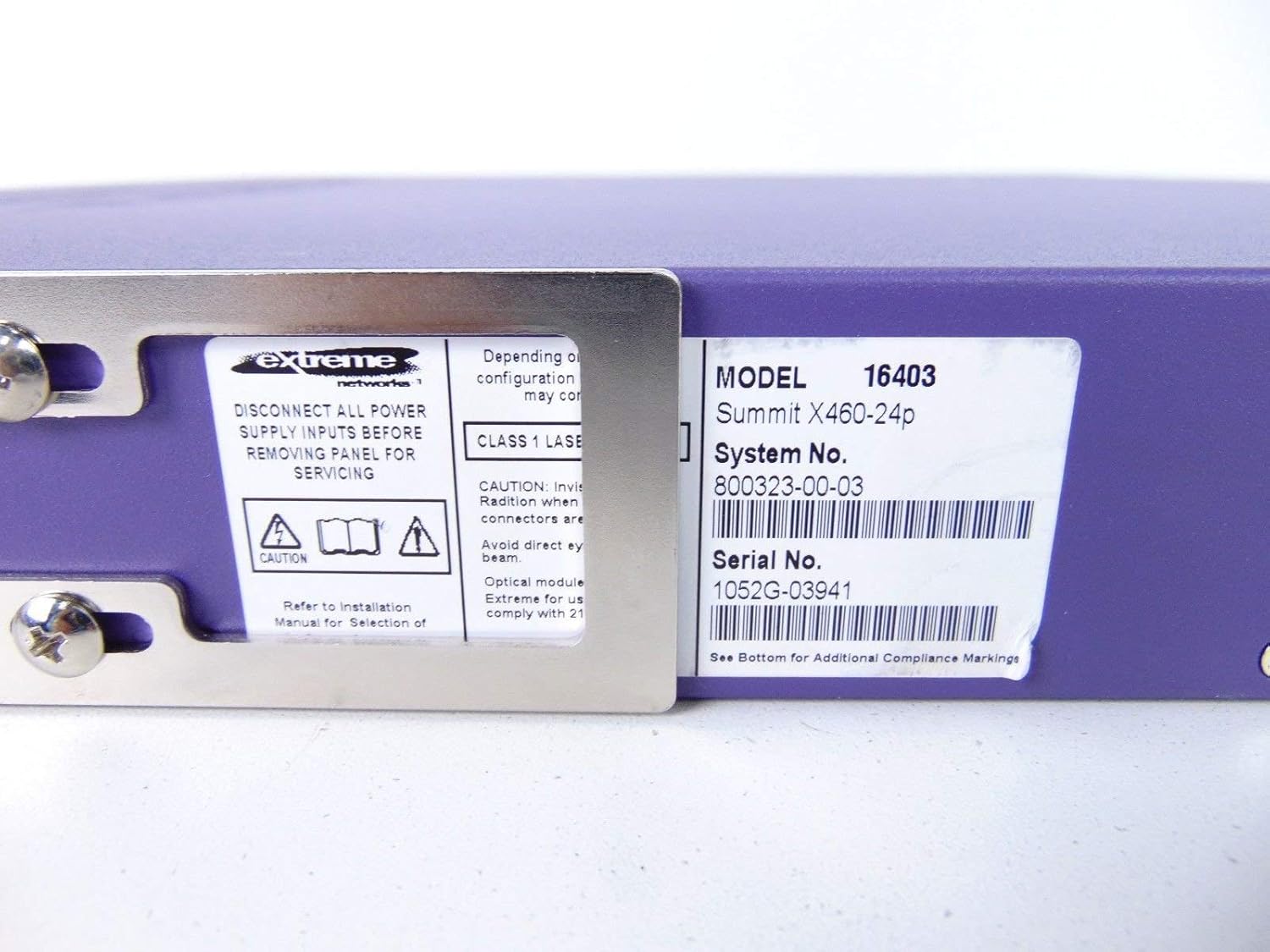
This label provides critical identification information for the switch, including Model: 16403, Summit X460-24p, System No.: 800323-00-03, and Serial No.: 1052G-03941.
Pasirenkami komponentai

This image shows the label for an optional Extreme Networks Summit 750W PoE AC Power Supply Unit (PSU), Model 10931, System No. 800382-00-03, Serial No. 1053A-41986.

This image displays the label for an optional Extreme Networks SummitStack Module, Model 16419, System No. 800384-00-01, Serial No. 1122G-02565.
Sąranka
Diegimo vadovas
Stovo montavimas
The Summit X460-24p is designed for standard 19-inch rack mounting. Use the provided rack-mounting kit to secure the switch in a server rack. Ensure adequate ventilation around the unit.
Maitinimo prijungimas
Connect the power cord to the AC power inlet on the rear of the switch and then to a grounded electrical outlet. The switch will power on automatically.
Tinklo kabelių prijungimas
- Connect Ethernet cables from your network devices to the 24 10/100/1000Base-T PoE ports on the front panel.
- For uplink or fiber connections, use the SFP or shared Gigabit SFP ports.
- For stacking, connect SummitStack ports on multiple switches using appropriate stacking cables.
Initial Configuration Access
Access the switch's management interface via a console cable connected to the console port, or through a web browser if the switch has a default IP address configured. Refer to the Extreme Networks documentation for detailed initial setup procedures.
Naudojimo instrukcijos
Pagrindinė operacija
Maitinimo įjungimas/išjungimas
The switch powers on automatically when connected to a power source. To power off, disconnect the power cord. For proper shutdown, it is recommended to use the software-based shutdown command if available.
LED indikatoriai
Observe the LED indicators on the front panel for status information regarding power, system health, port activity, and PoE status. Consult the full product documentation for a detailed explanation of each LED's behavior.
Valdymo sąsaja
The switch can be managed via a Command Line Interface (CLI) accessible through the console port or Telnet/SSH, or through a webpagrįsta grafine vartotojo sąsaja (GUI).
Priežiūra
Priežiūra ir priežiūra
Valymas
Keep the switch clean and free of dust. Use a soft, dry cloth for external cleaning. Do not use liquid or aerosol cleaners.
Programinės aparatinės įrangos naujiniai
Periodically check the Extreme Networks support website for firmware updates to ensure optimal performance and security. Follow the provided instructions for firmware upgrade procedures.
Ventiliatoriaus ir maitinimo moduliai
The switch may feature hot-swappable fan and power supply modules. Refer to the Extreme Networks documentation for instructions on replacement if necessary.
Trikčių šalinimas
Bendros problemos
Nėra galios
- Įsitikinkite, kad maitinimo laidas yra tvirtai prijungtas tiek prie jungiklio, tiek prie maitinimo lizdo.
- Patikrinkite, ar maitinimo lizdas veikia.
Port Link Down
- Patikrinkite Ethernet kabelio jungtį abiejuose galuose.
- Patikrinkite, ar prijungtas įrenginys įjungtas ir veikia tinkamai.
- Check the port status via the management interface.
Tinklo ryšio problemos
- Verify IP configuration and network settings.
- Patikrinkite, ar nėra nesuderinamų IP adresų.
- Consult network diagnostics tools.
Specifikacijos
Techninės specifikacijos
| Funkcija | Aprašymas |
|---|---|
| Modelis | Summit X460-24p (Part Number: 16403) |
| Uostai | 24 x 10/100/1000Base-T PoE+ ports, 4 x shared Gigabit SFP, 4 x SFP |
| Sluoksnis | 3 sluoksnio valdomas jungiklis |
| Prekės ženklas | Ekstremalūs tinklai |
| Sąsajos tipas | PoE, SFP |
| Sistemos numeris | 800323-00-03 |
| Serijos numeris | 1052G-03941 |
| UPC | 683332278646 |
Garantija ir palaikymas
Informacija apie garantiją
This product typically comes with a 90-day limited warranty. For specific warranty terms and conditions, please refer to the official Extreme Networks warranty statement or contact your vendor.
Techninė pagalba
For technical assistance, visit the official Extreme Networks support websvetainėje arba susisiekite su jų klientų aptarnavimo tarnyba. Kreipdamiesi pagalbos, turėkite po ranka savo produkto modelį ir serijos numerį.