
i-Star T-7M1HD-RED
Vartotojo vadovas
ISTAR T-7M1HD-RED 5.25" to 3.5" 2.5" 12Gb/s HDD SSD Hot-swap Rack
Model: T-7M1HD-RED
1. Įvadas
The i-Star T-7M1HD-RED is an aluminum hot-swappable mobile rack designed to convert a 5.25" drive bay into a versatile bay for 3.5" or 2.5" HDDs/SSDs. It features a high-performance SAS/SATA interface, offering robust functionality and compact design. This unit is built for durability and includes an 80mm blower fan for enhanced cooling, ensuring optimal performance even under demanding conditions. LED indicators provide real-time monitoring of power and hard drive activity.

1 pav.: priekis view of the T-7M1HD-RED hot-swap rack, showing the 5.25" bay form factor and the red drive insert.
2. Pagrindinės savybės
- Power/Drive Activity LEDs: Visual indicators for system power and hard drive read/write operations.
- Point to Point, Free from Master/Slave Setting: Simplifies drive configuration and connectivity.
- Best Air Ventilation with 1x80mm HDD Blower Fan: Integrated fan for efficient heat dissipation, maintaining optimal drive temperatures.
- Įjungimo/išjungimo mygtukas: Convenient control for the installed drive.
- Cableless Connection, Support Plug & Play, Hot-Swappable: Enables easy installation, removal, and replacement of drives without system shutdown.
3. Pakuotės turinys
Patikrinkite, ar jūsų siuntinyje yra visi toliau išvardyti daiktai:
- ISTAR T-7M1HD-RED Hot-swap Rack Unit
- SATA Data Cable (typically red)
- Tvirtinimo varžtai
- Vartotojo vadovas (šis dokumentas)

Figure 2: Included accessories, showing the SATA data cable and mounting screws.
4. Sąranka ir diegimas
Follow these steps to properly install your T-7M1HD-RED hot-swap rack and integrate your drives.
4.1 Installing the Rack into a PC Bay
- Įsitikinkite, kad jūsų kompiuteris yra išjungtas ir atjungtas nuo sieninio lizdo.
- Atidarykite kompiuterio korpusą, kad pasiektumėte vidinius diskų įrenginius.
- Locate an available 5.25" drive bay. Remove any front panel covers or brackets if necessary.
- Slide the T-7M1HD-RED unit into the 5.25" bay from the front of the case until the mounting holes align.
- Secure the unit using the provided mounting screws on both sides of the rack.

3 pav.: šonas view of the rack, highlighting the mounting points for installation into a 5.25" PC bay.
4.2 Maitinimo ir duomenų kabelių prijungimas
- Connect a SATA power cable from your power supply unit (PSU) to the power connector on the rear of the T-7M1HD-RED unit.
- Connect one end of the provided SATA data cable to the data port on the rear of the T-7M1HD-RED unit.
- Connect the other end of the SATA data cable to an available SATA port on your motherboard.

4 pav. Apačia view of the rack, illustrating the location of the SATA data and power connectors.
4.3 Installing a 2.5" or 3.5" HDD/SSD
- Open the front door of the T-7M1HD-RED unit.
- Carefully slide your 2.5" or 3.5" HDD/SSD into the drive bay until it firmly connects with the internal SATA/SAS connector. Ensure the drive is oriented correctly.
- Close the front door. The mechanism will secure the drive in place.
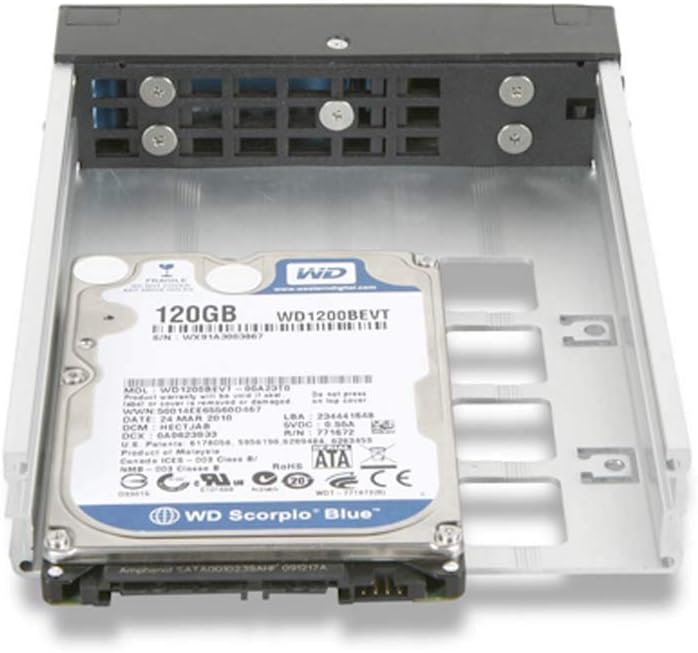
Figure 5: A 2.5" hard drive being inserted into the hot-swap rack.
5. Naudojimo instrukcijos
5.1 Įjungimas / išjungimas
After installing the rack and a drive, power on your computer. The T-7M1HD-RED unit has a dedicated power button on its front panel. Press this button to power on or power off the installed drive. The Power LED will illuminate when the drive is powered on.
5.2 Karštojo keitimo diskai
The T-7M1HD-RED supports hot-swapping, allowing you to insert or remove drives while the computer is running, provided your operating system and motherboard support this feature (e.g., AHCI mode enabled in BIOS/UEFI). Always ensure the drive is safely ejected or unmounted through your operating system before physically removing it to prevent data loss.
5.3 LED indikatoriai
- Maitinimo šviesos diodas: Indicates that the rack unit and the installed drive are receiving power.
- Veiklos šviesos diodas: Flashes to indicate data read/write activity on the installed drive.
6. Priežiūra
To ensure optimal performance and longevity of your T-7M1HD-RED hot-swap rack, consider the following maintenance tips:
- Dulkių šalinimas: Periodically inspect the unit's fan and ventilation openings for dust accumulation. Use compressed air to gently clear any dust, ensuring proper airflow for the integrated blower fan.
- Švara: Keep the exterior of the unit clean with a soft, dry cloth. Avoid using liquid cleaners directly on the unit.
- Aplinkos sąlygos: Operate the unit within recommended temperature and humidity ranges to prevent damage to internal components and installed drives.
7. Problemų sprendimas
If you encounter issues with your T-7M1HD-RED hot-swap rack, refer to the following common problems and solutions:
| Problema | Galima priežastis | Sprendimas |
|---|---|---|
| Sistema neaptiko disko. | Loose SATA data/power cables, drive not fully seated, BIOS/UEFI settings. |
|
| Maitinimo šviesos diodas išjungtas. | No power to the unit, unit's power button off. |
|
| Drive activity LED not flashing. | No drive activity, drive not recognized, faulty LED. |
|
8. Specifikacijos
| Funkcija | Detalė |
|---|---|
| Prekės ženklas | „i-Star“ |
| Serija | T-7M1HD-RED |
| Modelio numeris | T-7M1HD-RED |
| Prekės svoris | 1.62 svaro |
| Gaminio matmenys (IxPxH) | 8 x 6 x 2 colio |
| Gamintojas | iStar |
| ASIN | B07V1229PF |
| Pasiekiama pirmoji data | 5 m. liepos 2019 d |
| Suderinamumas | 5.25" PC Drive Bay, 3.5" / 2.5" SAS/SATA HDDs/SSDs |
| Sąsaja | 12Gb/s SAS/SATA |
| Aušinimas | 1x 80mm HDD Blower Fan |
9. Garantija ir palaikymas
For information regarding warranty coverage and technical support for your i-Star T-7M1HD-RED hot-swap rack, please refer to the official i-Star websvetainėje arba susisiekite tiesiogiai su jų klientų aptarnavimo tarnyba. Išsaugokite pirkimo kvitą kaip pirkimo įrodymą bet kokiems garantiniams prašymams.
For further assistance, you may visit the i-Star store on Amazon: i-Star Amazon Store
Ask a question about this manual
Ask about setup, troubleshooting, compatibility, parts, safety, or missing instructions. Manuals+ will review the question and use this page’s manual context to help answer it.