
Įvadas
This manual provides comprehensive instructions for the setup, operation, and maintenance of your Zerone Universal Remote Control. This remote is designed to function with various Pioneer DVD player models, offering a convenient replacement or secondary control unit.
Suderinamumas
The Zerone Universal Remote Control is compatible with the following Pioneer DVD player models:
- Pioneer VXX2811
- Pioneer VXX2914
- Pioneer VXX3218
- Pioneer VXX2801
- Pioneer VXX2800
- Pioneer VXX2913
For optimal performance, ensure your DVD player model is listed above.
Sąranka
1. Akumuliatoriaus įdėjimas
- Nuotolinio valdymo pulto gale raskite baterijų skyrių.
- Norėdami atidaryti, stumkite akumuliatoriaus dangtelį žemyn arba paspauskite fiksatorių ir pakelkite.
- Insert two (2) AA 1.5V batteries, ensuring the positive (+) and negative (-) terminals align correctly with the markings inside the compartment.
- Uždėkite akumuliatoriaus dangtelį, stumdami jį atgal į vietą, kol jis tvirtai spragtelės.
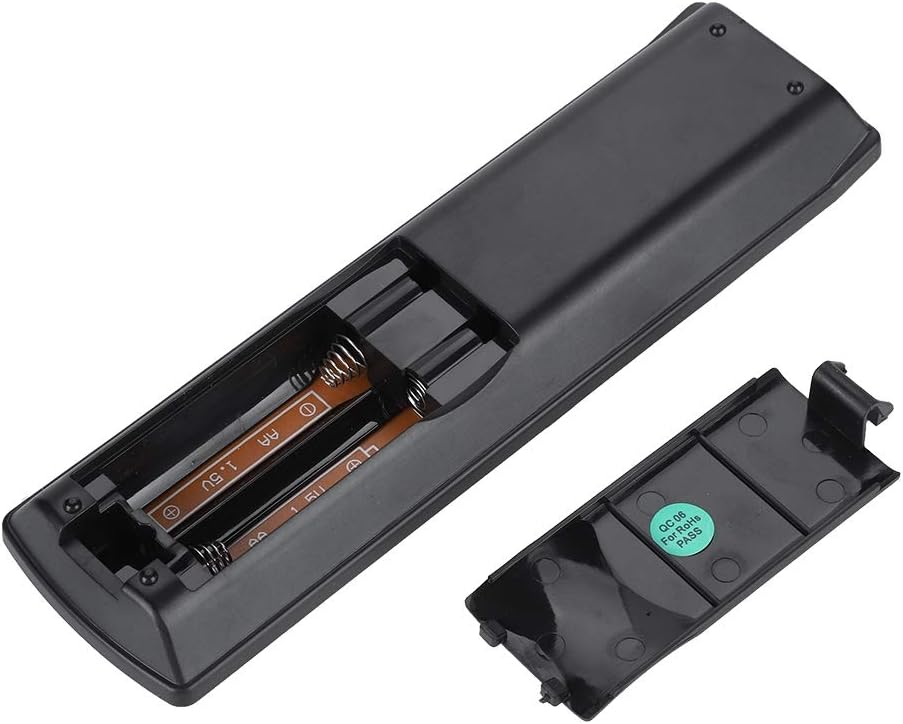
Vaizdas: Galinis view of the Zerone remote control, showing the battery compartment cover.

Image: The battery compartment of the remote control with two AA batteries correctly inserted.
No programming or setup is required. Once batteries are installed, the remote is ready for use with compatible Pioneer DVD players.
Naudojimo instrukcijos
Point the remote control directly at your Pioneer DVD player. The effective control distance is typically over 8 meters (approximately 26 feet), though this may vary based on environmental factors and the specific DVD player model.

Vaizdas: priekis view of the Zerone Universal Remote Control, displaying all buttons and their labels.
Pagrindinės funkcijos:
- BUDĖJIMO REŽIMAS / ĮJUNGTAS: Powers the DVD player on or off.
- ATIDARYTI UŽDARYTI: Atidaro arba uždaro disko dėklą.
- GARSO: Pasirenka garso takelius arba kalbas.
- SUBTITRAS: Perjungia arba pasirenka subtitrų parinktis.
- KAMPAS: Pakeičia viewing angle if supported by the DVD.
- Skaičių mygtukai (0–9): Direct track selection or input.
- IŠVALYTI: Clears numerical input.
- Įveskite: Patvirtina pasirinkimus.
- VIRŠUS MENIU: Accesses the main menu of the DVD.
- MENIU: Accesses the disc menu.
- HOME MENU: Navigates to the home menu of the DVD player.
- GRĄŽINIMAS: Grįžta į ankstesnį ekraną arba meniu.
- Krypties klaviatūra (aukštyn, žemyn, kairėn, dešinėn) ir ENTER: Naršo meniu ir patvirtina pasirinkimus.
- Playback Controls (Play, Pause, Stop, Fast Forward, Rewind, Skip Forward, Skip Backward): Standartinės medijos atkūrimo funkcijos.
- ŽAIDIMO REŽIMAS: Pasirenka atkūrimo režimus (pvz., kartoti, groti atsitiktine tvarka).
- APSUPTI: Reguliuoja erdvinio garso nustatymus.
- ZOOM: Priartina arba atitolina vaizdo įrašą.
- DISPLAY: Rodo ekrane rodomą informaciją.

Image: A hand holding the Zerone remote control, demonstrating its ergonomic design and ease of use.

Image: The remote control positioned in front of a television displaying content, illustrating its intended use.

Image: A visual representation of the remote control's effective operating distance, indicating a range of over 8 meters.
Priežiūra
- Valymas: Nuotolinio valdymo pultą valykite minkšta, sausa šluoste. Nenaudokite skystų valiklių ar abrazyvinių medžiagų.
- Baterijos keitimas: Pakeiskite baterijas, kai nuotolinio valdymo pultas reaguoja lėtai arba nustoja veikti. Visada keiskite abi baterijas vienu metu naujomis.
- Saugykla: Nuotolinio valdymo pultą laikykite vėsioje, sausoje vietoje, apsaugotoje nuo tiesioginių saulės spindulių ir ekstremalių temperatūrų.
- Venkite žalos: Do not drop the remote or expose it to water.
Trikčių šalinimas
- Nuotolinis nereaguoja:
- Įsitikinkite, kad baterijos yra tinkamai įdėtos tinkamu poliškumu.
- Pakeiskite senas baterijas naujomis AA baterijomis.
- Patikrinkite, ar nėra kliūčių tarp nuotolinio valdymo pulto ir DVD grotuvo infraraudonųjų spindulių jutiklio.
- Ensure you are within the effective operating range (typically within 8 meters).
- Kai kurios funkcijos neveikia:
- Verify that your Pioneer DVD player model is listed in the compatibility section.
- Some advanced functions may be specific to the original remote or not supported by all DVD player models.
Specifikacijos
| Korpuso medžiaga | High-grade ABS |
| Kontrolinis atstumas | > 8 meters (316 inches) |
| Baterijos tipas | 2 x AA 1.5V Batteries (Not included) |
| Matmenys | Apytiksliai 174 x 49 x 20 mm (6.85 x 1.93 x 0.79 colio) |
| Svoris | Apytiksliai 75 g (2.46 uncijos) |
| Modelio numeris | 743562180017 |
Garantija ir palaikymas
For warranty information or technical support, please refer to the documentation provided with your purchase or contact the manufacturer, Zerone, directly through their official channels. Keep your purchase receipt as proof of purchase.