
Yaheetech YT-00093701
„Yaheetech“ mobiliojo televizoriaus stovo naudojimo instrukcija
Modelis: YT-00093701
Prekės ženklas: Yaheetech
1. Įvadas
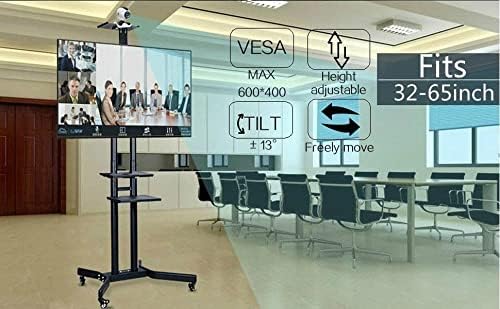
This manual provides detailed instructions for the assembly, operation, and maintenance of your Yaheetech Mobile TV Stand. Designed for flat panel screens ranging from 32 to 75 inches and supporting up to 110 pounds, this stand offers mobility, adjustable viewing angles, and convenient storage. Please read this manual thoroughly before assembly and use to ensure safe and optimal performance.

The Yaheetech Mobile TV Stand is equipped with multi-directional locking castors for easy movement and stability, adjustable height and tilt for optimal viewing, and integrated cable management to keep your setup tidy. It also includes multiple shelves for media devices and accessories.
2. Saugos gairės
Adhere to the following safety precautions to prevent injury or damage to the product:
- Svorio talpa: Do not exceed the maximum weight capacity of 110 pounds (50 kg) for the TV mount and 22 pounds (10 kg) for each shelf.
- TV dydis: Ensure your TV is within the recommended size range of 32-75 inches.
- VESA suderinamumas: Verify your TV's VESA mounting pattern is compatible (100x100mm to 600x400mm).
- Surinkimas: Assemble the stand on a soft, clean surface to prevent scratches. Follow all assembly steps precisely.
- Stabilumas: Always lock the wheels when the stand is stationary to prevent accidental movement.
- Vaikai ir augintiniai: Keep children and pets away from the stand during assembly and ensure the TV is securely mounted to prevent tipping.
- Judėjimas: When moving the stand, ensure the TV is stable and move slowly, especially over uneven surfaces.
3. Pakuotės turinys
Before beginning assembly, please verify that all parts are present and undamaged. Refer to the detailed parts list provided in the official PDF installation manual for a complete inventory.
You can access the official installation manual čia.
4. Surinkimo instrukcijos
For detailed, step-by-step assembly instructions, please refer to the official PDF installation manual linked above. The following provides a general overview surinkimo proceso.
4.1. Pagrindo surinkimas
Attach the support columns to the base frame, ensuring all screws are tightened securely. Install the universal wheels onto the base, making sure the locking wheels are positioned as desired for easy access.

4.2. Lentynų montavimas
The two main shelves and the top tray are adjustable. Position them at your desired height along the support columns. Ensure they are level and securely fastened. The non-slip large trays provide stable surfaces for your devices.
4.3. TV Mount Attachment
Attach the TV mounting brackets to the rear of your television using the appropriate screws and spacers provided. Ensure the VESA pattern on your TV matches the compatible patterns of the mount. The mount supports VESA patterns from 100x100mm to 600x400mm.

4.4. Televizoriaus montavimas
Carefully lift your TV and hook the mounted brackets onto the TV stand's main mounting plate. Secure the TV in place using the safety screws or locking mechanisms to prevent accidental dislodgement. Ensure the TV is centered and stable.
5. Operacija
5.1. Aukščio reguliavimas
The TV mount plate can be adjusted in height from 43.3 inches to 63 inches (from the ground). To adjust, loosen the securing bolts on the main columns, carefully raise or lower the TV to the desired height, and then re-tighten the bolts firmly. Ensure both sides are adjusted equally.
5.2. Pakreipimo reguliavimas
The TV mount allows for a tilt adjustment of up to ±13 degrees. To adjust the tilt, loosen the tilt adjustment knobs on the side of the TV mount, angle the TV to your preferred viewing position, and then tighten the knobs to secure it.

5.3. Judrumas ir užsifiksuojantys ratukai
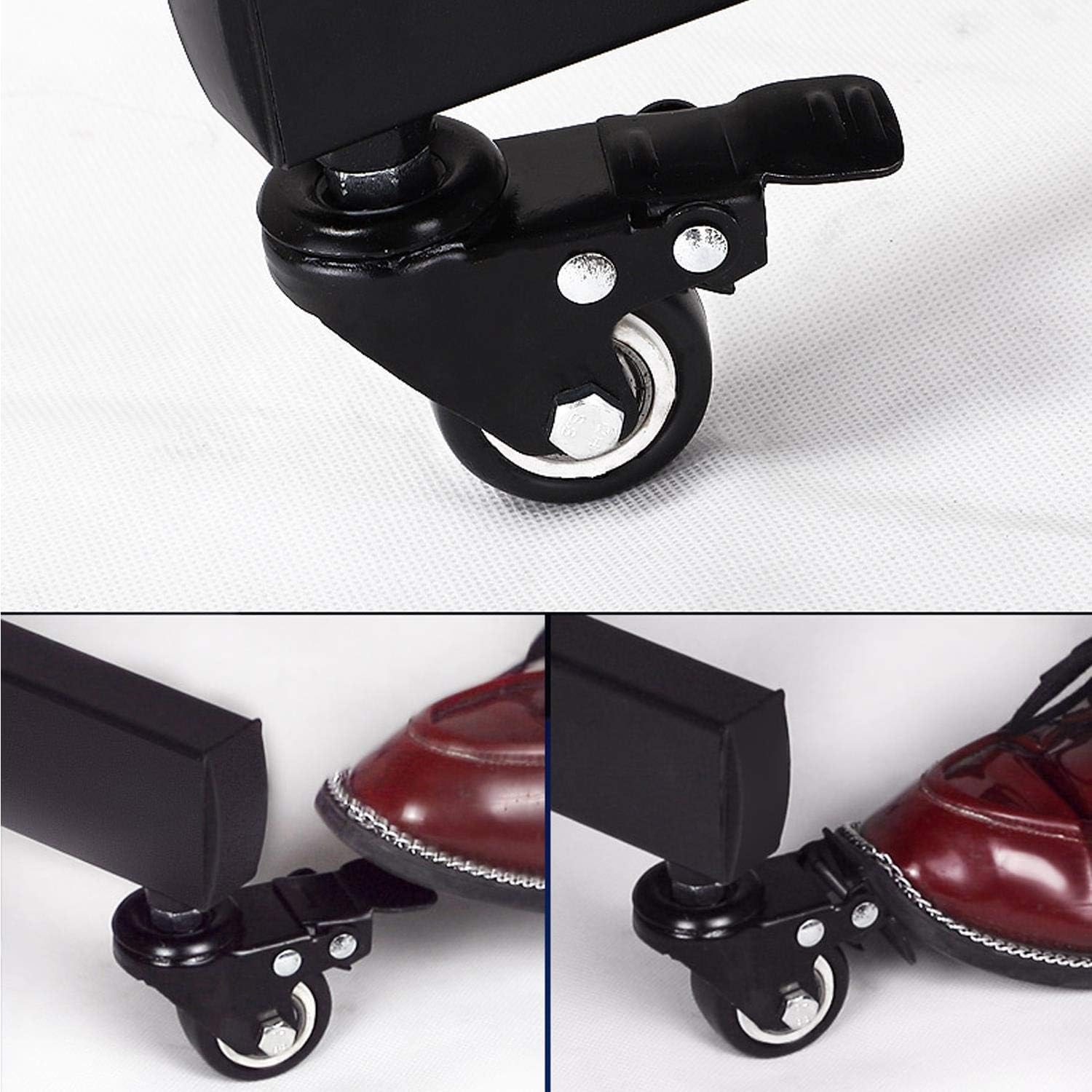
The stand features four 360° swivel castors for easy movement. Two of these wheels are equipped with brakes. To move the stand, unlock the braked wheels. To secure the stand in a stationary position, press down on the brake levers on the two locking wheels until they click into place.
5.4. Kabelių valdymas
The main support columns are designed with hollow sections for cable management. Route your TV and device cables through these hollow tubes to maintain a clean and organized appearance, preventing tangles and potential hazards.

6. Priežiūra
- Valymas: Nuvalykite stovą minkšta,amp šluoste. Venkite abrazyvinių valiklių ar tirpiklių, kurie gali pažeisti apdailą.
- Patikrinimai: Periodiškai patikrinkite visus varžtus ir veržles, kad jie būtų tvirtai priveržti. Jei reikia, priveržkite.
- Ratų priežiūra: Kad ratai judėtų sklandžiai, laikykite juos be šiukšlių.
7. Problemų sprendimas
- Issue: Stand is unstable or wobbles.
- Sprendimas: Ensure all assembly screws are fully tightened. Verify the TV is securely mounted and centered. Check that the floor surface is level. If moving, ensure wheels are locked when stationary.
- Issue: Wheels do not roll smoothly or lock properly.
- Sprendimas: Check for any debris or obstructions in the wheels. Ensure the brake levers are fully engaged or disengaged. Clean the wheels if necessary.
- Issue: TV cannot be tilted or adjusted for height.
- Sprendimas: Loosen the adjustment knobs/bolts sufficiently before attempting to adjust. Ensure no cables are obstructing movement. Re-tighten after adjustment.
8. Specifikacijos
| Funkcija | Detalė |
|---|---|
| Modelio numeris | YT-00093701 |
| Suderinami televizoriaus dydžiai | 32-75 colių |
| Maksimali televizoriaus svorio talpa | 110 svarai (50 kg) |
| VESA suderinamumas | 100x100mm iki 600x400mm |
| Aukščio reguliavimo diapazonas | 43.3 - 63 inches (from ground) |
| Pakreipimo kampas | ±13 laipsnių |
| Lentynos svorio talpa | 22 svarai (10 kg) vienai lentynai |
| Medžiaga | Legiruotasis plienas |
| Spalva | Juoda |
| Gaminio matmenys | 35.04 x 25.98 x 77.36 colio |
| Prekės svoris | 33.3 svaro |

9. Garantija ir palaikymas
For warranty information, product support, or to purchase replacement parts, please contact Yaheetech customer service or visit the official Yaheetech store on Amazon:
Prašome išsaugoti pirkimo kvitą garantiniams reikalavimams.
10. Papildomi ištekliai
While no official seller videos were provided in the product data, you may find additional visual guides or tips by searching for 'Yaheetech Mobile TV Stand assembly' on video platforms. Always refer to this manual and the official PDF for accurate product information.

Ask a question about this manual
Ask about setup, troubleshooting, compatibility, parts, safety, or missing instructions. Manuals+ will review the question and use this page’s manual context to help answer it.