Įvadas
This manual provides detailed instructions for the setup, operation, and maintenance of your DOYO 270-Degree Racing Wheel and Pedals. Please read this manual thoroughly before use to ensure proper functionality and a safe gaming experience. This racing wheel is designed for use with PC, PS3, PS4, Xbox One, Xbox Series X|S, and Nintendo Switch platforms.
Svarbi saugos informacija
- Saugokite prietaisą nuo vandens ir kitų skysčių.
- Nelaikykite prietaiso nuo ekstremalių temperatūrų ar tiesioginių saulės spindulių.
- Venkite įrenginio ardymo ar modifikavimo, nes tai gali panaikinti garantiją ir sukelti gedimų.
- Prieš naudodami įsitikinkite, kad visi jungtys yra saugūs.
- Use only the provided accessories with the racing wheel.
Pakuotės turinys
Patikrinkite, ar pakuotėje yra visi reikalingi daiktai:
- DOYO 270-Degree Racing Wheel
- Pedalų blokas (dujos ir stabdžiai)
- Montavimas Clamps (2x)
- Vartotojo vadovas (šis dokumentas)
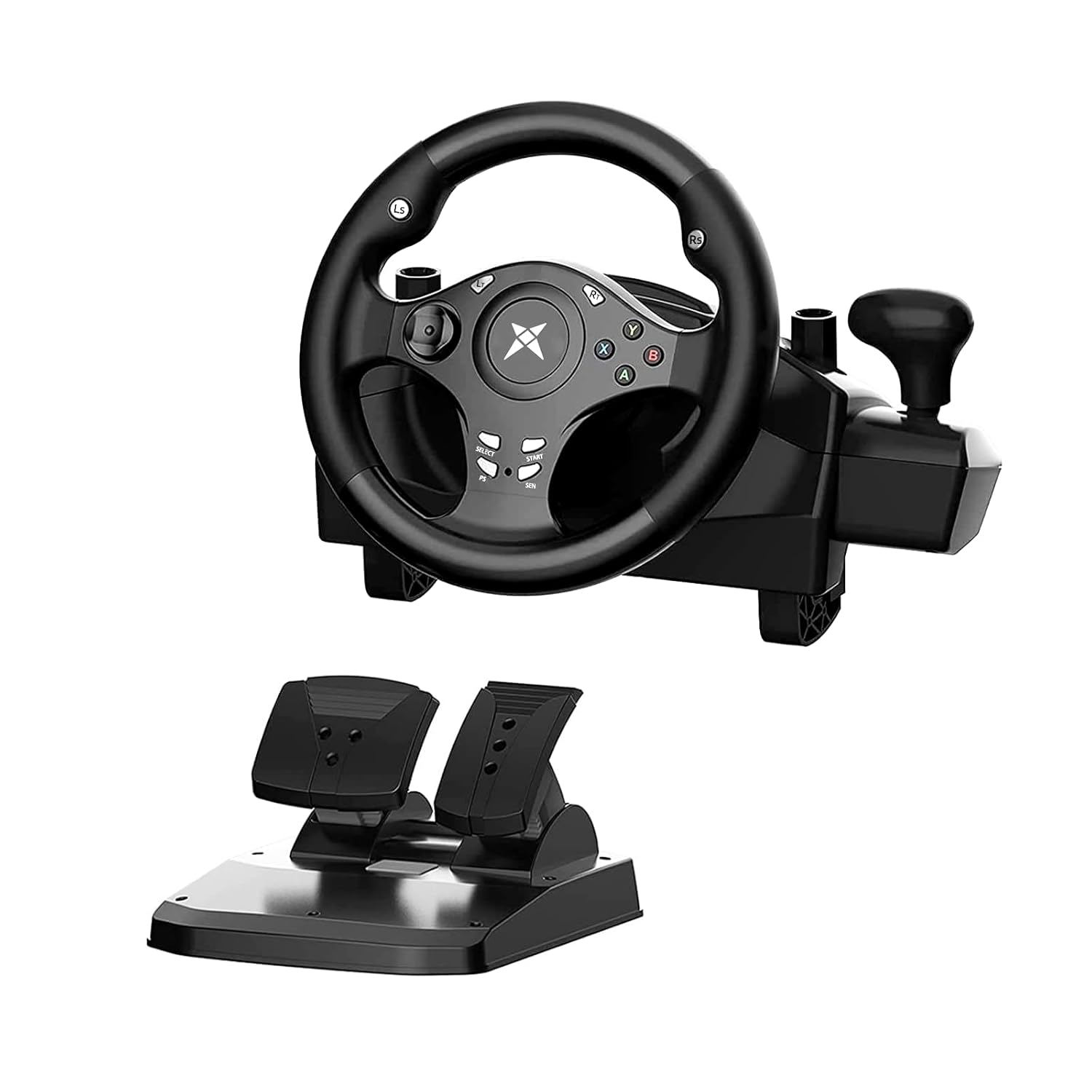
Image: The DOYO 270-Degree Racing Wheel with its accompanying pedal unit, showcasing pagrindiniai pakuotėje esantys komponentai.
Sąrankos instrukcijos
1. Lenktyninio rato montavimas
The racing wheel can be securely mounted to a desk or table using the included clamps, or placed on your lap.
- Montavimas darbalaukyje: Pritvirtinkite du klamps to the bottom of the racing wheel unit. Position the wheel on the edge of your desk and tighten the clamps until the wheel is stable. Ensure the desk thickness is within the clamp's capacity (approximately 0.2 to 2.44 inches).
- Lap Placement: The curved base of the racing wheel allows for comfortable placement directly on your lap for gaming.

Image: Illustration of how to attach and use the mounting clamps for securing the racing wheel to a surface.
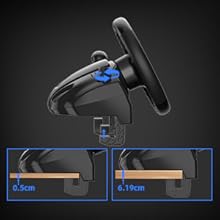
Image: Detail showing the adjustable range of the mounting clamps, accommodating surfaces from 0.2 inches to 2.44 inches thick.
2. Pedalų bloko prijungimas
Connect the cable from the pedal unit to the designated port on the back of the racing wheel. Do not connect the pedals directly to your PC or console.

Image: The linear pedal system, featuring separate gas and brake pedals for precise control.
3. Connecting to Your Gaming Platform
The DOYO Racing Wheel is compatible with multiple platforms. Follow the specific instructions for your system:
- Kompiuteris: Connect the racing wheel's USB cable directly to an available USB port on your computer. Drivers should install automatically.
- PS3/PS4/Switch/Android: Connect the racing wheel's USB cable directly to an available USB port on your console or Android device.
- Xbox One/Xbox Series X|S: Connect the racing wheel's USB cable to an available USB port on your Xbox console. Svarbu: You must also connect your original Xbox controller (powered on) to the racing wheel via a data cable (not included) to enable full functionality.

Image: Diagram illustrating how to connect the racing wheel to a PS4 console and an Xbox One console, highlighting the need for an original controller for Xbox platforms.
Naudojimo instrukcijos
1. Pagrindiniai valdikliai
- Vairas: Provides 270 degrees of rotation (135 degrees left and 135 degrees right) for precise steering control.
- pedalai: The pedal unit includes a gas pedal and a brake pedal. These are linear pedals, meaning the input strength corresponds to how far the pedal is pressed.
- Mygtukai: The wheel features standard gaming buttons (A, B, X, Y, D-pad, L1/R1, L2/R2, Select, Start, PS/Home, SEN) for in-game actions.
- Sequential Gear Lever: Use the integrated gear lever for sequential shifting in compatible games.

Image: The ergonomically designed steering wheel, highlighting its 270-degree rotation capability and comfortable grip.

Vaizdas: Stambus planas view of the racing wheel's features, including the D-pad for precise operation, responsive buttons, dual motor vibration indicators, and the sequential gear lever.
2. Jautrumo reguliavimas
The racing wheel offers 7 levels of sensitivity adjustment to suit different games and driving styles. To adjust the sensitivity:
- Paspauskite SEN button located on the center of the wheel.
- Each press cycles through the 7 sensitivity levels. The current level may be indicated by an LED or in-game feedback (refer to your game's settings).

Image: Diagram illustrating the 7-level sensitivity adjustment feature of the racing wheel, with a close-up on the 'SEN' button.
3. Vibracijos grįžtamasis ryšys
The racing wheel features dual motor vibration, providing realistic feedback based on in-game events such as collisions, road surfaces, and engine RPMs. This enhances the immersive driving experience.

Image: Visual representation of the motor vibration feature, showing how the wheel generates realistic feedback during gameplay.
Platform and Game Compatibility
The DOYO 270-Degree Racing Wheel is compatible with a wide range of gaming platforms and titles:
- Platformos: PC, PlayStation 3 (PS3), PlayStation 4 (PS4), Xbox One, Xbox Series X|S, Nintendo Switch, Android.
- Pastaba: Not compatible with Apple computers.
Recommended Games:

Image: A collage of game titles recommended for use with the DOYO Racing Wheel, categorized by platform (PS, Switch, PC, Xbox).
Some popular compatible titles include:
- PS Platform: Need For Speed 20, The Crew 2, GRID Autosport, Project CARS, Gran Turismo 5, Ridge Racer 7.
- Switch Platform: Asphalt, Gear.Club Unlimited, Sonic Racing, Mario Kart 8, GRIP: Combat Racing, Fast RMX.
- Kompiuterio platforma: Euro Truck Simulator 2, DiRT Rally 2.0, Need For Speed 20, Truck Life, CTS, Assetto Corsa.
- Xbox Platform: Forza Horizon 4, Need For Speed Payback, DiRT 3, Project CARS 2, The Crew 2, Forza Motorsport 7.
Priežiūra
- Valymas: Use a soft, dry cloth to clean the racing wheel and pedals. Do not use abrasive cleaners or solvents.
- Saugykla: Kai nenaudojate, laikykite prietaisą vėsioje, sausoje vietoje, toliau nuo tiesioginių saulės spindulių ir ekstremalių temperatūrų.
- Kabelių valdymas: Venkite staigių kabelių lenkimų ar įlinkimų, kad nepažeistumėte jų.
Trikčių šalinimas
If you encounter issues with your DOYO Racing Wheel, please refer to the following common solutions:
- Wheel Not Responding/Steering Issues:
- Įsitikinkite, kad visi laidai yra tvirtai prijungti.
- For Xbox platforms, confirm that an original, powered-on Xbox controller is connected to the racing wheel via a data cable.
- Try connecting the wheel to a different USB port on your console/PC.
- Restart your console/PC and the racing wheel.
- Check game settings for controller configuration and calibration options.
- Neveikiantys pedalai:
- Ensure the pedal unit is correctly plugged into the racing wheel, not directly into the console/PC.
- Verify that the game supports racing wheel pedals.
- Nėra vibracijos grįžtamojo ryšio:
- Check in-game settings to ensure force feedback or vibration is enabled.
- Some games may not fully support vibration features.
- Shifter Issues:
- Ensure the game supports sequential shifting.
- Calibrate the shifter within the game's controller settings if available.
- Difficulty with Setup (No Instructions):
- This manual serves as a comprehensive guide. If further assistance is needed, refer to the Support section.
Specifikacijos
| Funkcija | Detalė |
|---|---|
| Modelio numeris | R270 |
| Sukimosi kampas | 270 laipsnių |
| Gaminio matmenys | 14.2 x 12.2 x 11.4 colio |
| Prekės svoris | 6.39 svaro |
| Suderinamumas | PC, PS3, PS4, Xbox One, Xbox Series X|S, Switch, Android |
| Vibracija | Dviguba variklio vibracija |
| Pedalai | Linear Gas and Brake Pedals |
| Jautrumas | Reguliuojamas 7 lygių |
| Gamintojas | DOYO |
| Pasiekiama pirmoji data | 26 m. liepos 2019 d |
Garantija ir klientų aptarnavimas
DOYO offers a satisfaction guarantee for its products. If you encounter any issues or have questions regarding your DOYO 270-Degree Racing Wheel, please contact DOYO customer service for assistance.
For the most up-to-date warranty information and support options, please refer to the official DOYO websvetainėje arba susisiekite su pardavėju, iš kurio įsigijote produktą.
Kontaktinė informacija: Please refer to your product packaging or the official DOYO website for specific customer service contact details.
Oficialūs produktų vaizdo įrašai
No official seller-created product videos were provided in the available data for this manual.