
Norlake 154014
Norlake 154014 Digital Control for Dixell XC10CX-5P00G, 230V - Instruction Manual
Model: 154014 | Brand: Norlake
Įvadas
This manual provides detailed instructions for the installation, operation, and maintenance of the Norlake 154014 Digital Control, designed for Dixell XC10CX-5P00G units operating at 230V. Please read this manual thoroughly before installation and use to ensure proper function and safety.
Saugos informacija
Always follow basic safety precautions when installing, operating, or maintaining this device. Failure to do so may result in personal injury or damage to the equipment.
- Ensure the power supply is disconnected before any installation or maintenance procedures.
- This device operates at 230V. Only qualified personnel should perform electrical connections.
- Do not expose the control unit to excessive moisture or extreme temperatures outside its specified operating range.
- Prieš įjungdami maitinimą, patikrinkite, ar visos jungtys yra tvirtos ir tinkamos.
Kas yra dėžutėje
The package for your Norlake 154014 Digital Control should contain the following item:
- 1 x Norlake 154014 Digital Control (Replacement Part)
Diegimas ir sąranka
The Norlake 154014 Digital Control is designed for integration into compatible refrigeration systems, specifically Dixell XC10CX-5P00G models. Proper installation is crucial for optimal performance.
Valdymo bloko montavimas
The unit is typically panel-mounted. Ensure adequate space for ventilation and access to wiring terminals.
Elektros jungtys
Refer to the wiring diagram printed on the top of the control unit for correct electrical connections. The unit requires a 230V power supply.
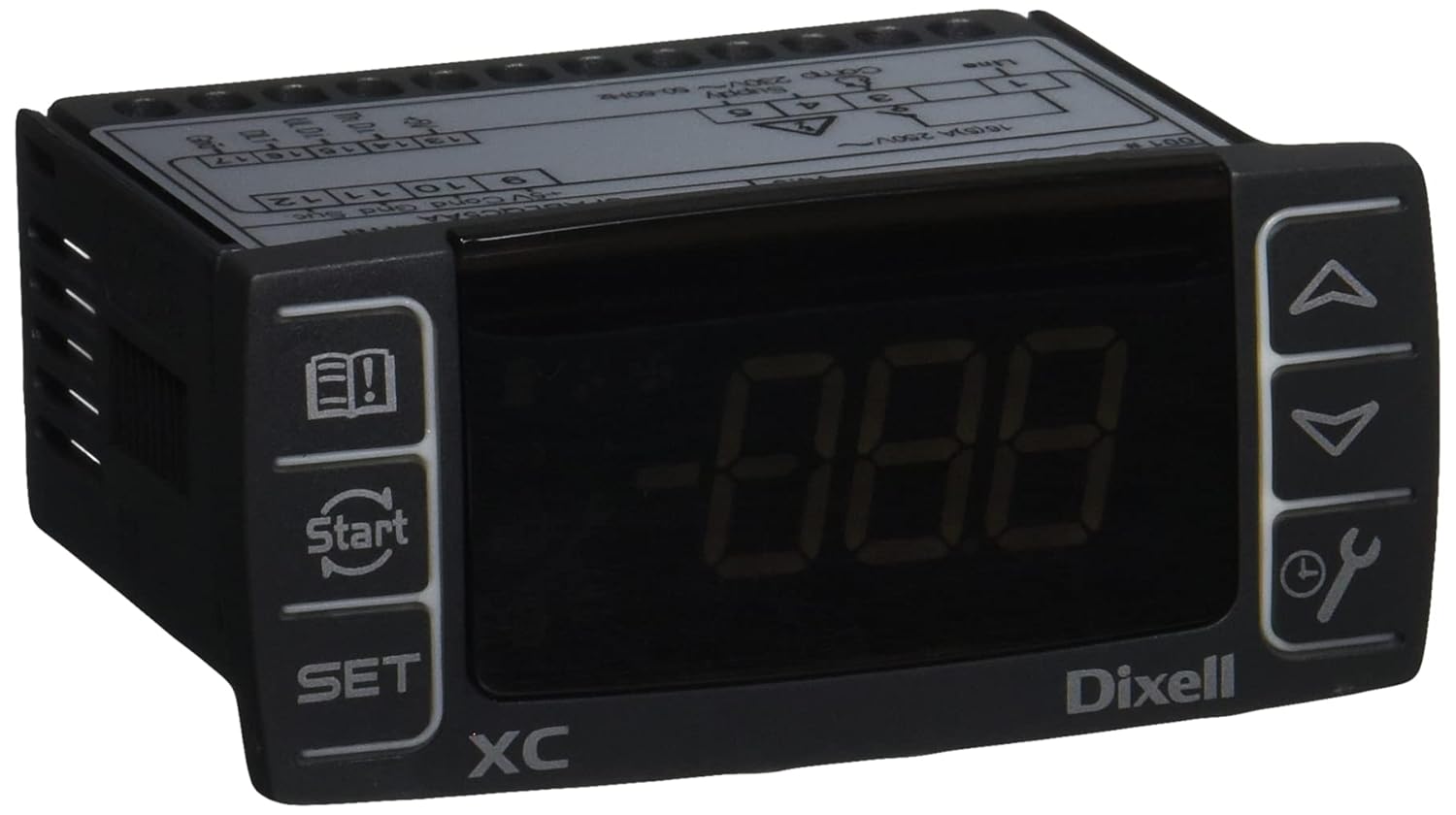
Image: Norlake 154014 Digital Control Unit. This image displays the front face of the digital control unit, featuring a digital display, control buttons (up, down, set, start, manual/wrench icon, and a book/exclamation mark icon), and the "Dixell XC" branding. The top of the unit shows terminal connections and voltage ratings (230V).
Svarbiausi prijungimo taškai:
- Linija (L): Pagrindinis maitinimo įėjimas.
- Supply (230V~ 50-60Hz): Power input terminals (e.g., terminals 4 and 5).
- Kompresorius (kompresorius): Output for compressor control.
- 16(5)A 250V~: Didžiausia srovė ir ttage rating for certain outputs.
- Jutiklio įėjimai: Terminals for temperature probes (e.g., 10, 11, 12 for NTC sensors).
- Skaitmeniniai įėjimai: Terminals for external switches or signals (e.g., 13, 14, 15, 16, 17).
Ensure all wiring complies with local electrical codes and standards.
Naudojimo instrukcijos
The Dixell XC10CX-5P00G digital control provides precise temperature management and system monitoring.
Pagrindinė operacija
- Maitinimas: Once correctly wired, apply power to the unit. The digital display will illuminate.
- Temperatūros rodymas: The main display typically shows the current temperature of the controlled environment.
- SET mygtukas: Paspauskite NUSTATYTI mygtuką prie view or modify the setpoint temperature. Use the Up ir Žemyn arrows to adjust the value. Press NUSTATYTI dar kartą patvirtinti.
- Rodyklės aukštyn/žemyn: Naudojamas naršyti meniu ir reguliuoti vertes.
- Start/Stop mygtukas: The button with the circular arrow and "Start" text is typically used to manually start or stop a defrost cycle or other specific functions.
- Manual/Wrench Button: The button with the wrench and clock icon may access advanced settings or manual control functions.
- Information/Alarm Button: The button with the book and exclamation mark icon is often used to view alarms or access information about the unit's status.
Išplėstiniai nustatymai
Accessing advanced parameters usually involves holding the NUSTATYTI button for several seconds or a combination of buttons. Refer to the comprehensive Dixell XC10CX-5P00G manual for detailed parameter descriptions and adjustment procedures. Incorrect parameter settings can lead to system malfunction.
Priežiūra
Regular maintenance ensures the longevity and reliable operation of your digital control unit.
- Valymas: Reguliariai valykite priekinį skydelį minkštu,amp audinys. Nenaudokite abrazyvinių valiklių ar tirpiklių.
- Jungtys: Kasmet patikrinkite visas elektros jungtis, ar jos nėra sandarios ir ar nėra korozijos požymių.
- Jutiklio vientisumas: Ensure temperature sensors are clean and properly positioned.
- Programinės įrangos atnaujinimai: Consult Norlake or Dixell for information on any available firmware updates.
Prieš atlikdami bet kokią techninę priežiūrą, visada atjunkite maitinimą.
Trikčių šalinimas
This section provides solutions to common issues you might encounter with the Norlake 154014 Digital Control.
| Problema | Galima priežastis | Sprendimas |
|---|---|---|
| Ekranas tuščias | Nėra maitinimo; Atsilaisvinę laidai; Perdegęs saugiklis. | Patikrinkite maitinimo jungtį; Patikrinkite laidus; Jei reikia, pakeiskite saugiklį. |
| Neteisingas temperatūros rodmuo | Faulty sensor; Sensor not properly connected or positioned. | Check sensor wiring; Reposition sensor; Replace sensor if damaged. |
| Įrenginys nereaguoja į mygtukų paspaudimus | Keypad malfunction; Unit frozen. | Power cycle the unit; Contact technical support if issue persists. |
| System not cooling/heating as expected | Incorrect setpoint; Parameter misconfiguration; External system issue. | Verify setpoint; Review advanced parameters; Check compressor/fan operation. |
For issues not listed here, or if troubleshooting steps do not resolve the problem, please contact Norlake technical support.
Specifikacijos
- Modelio numeris: 154014
- Produkto tipas: Digital Control for Dixell XC10CX-5P00G
- ttage: 230 V
- Dažnis: 50-60Hz
- Matmenys (produktas): Approximately 9.0" (L) x 6.0" (W) x 5.0" (H) (based on package dimensions)
- Svoris (produktas): Maždaug 8.48 uncijos
- Kilmės šalis: Italija
- Gamintojas: Norlake
- ASIN: B07VQJW5QV
Garantija ir palaikymas
For warranty information and technical support regarding your Norlake 154014 Digital Control, please refer to the documentation provided with your original purchase or contact Norlake directly. Keep your purchase receipt and model number handy when contacting support.
Norlake Contact Information: Please visit the official Norlake websvetainėje arba ieškokite naujausios kontaktinės informacijos ant produkto pakuotės.
Ask a question about this manual
Ask about setup, troubleshooting, compatibility, parts, safety, or missing instructions. Manuals+ will review the question and use this page’s manual context to help answer it.