
1. Įvadas
Thank you for choosing the Ahuja DPA-570 Mixer Amplifier. This manual provides essential information for the safe and efficient operation of your device. Please read it thoroughly before use and retain it for future reference. The DPA-570 is designed for public address applications, offering versatile audio mixing and amplifikacijos galimybes.
2. Saugos instrukcijos
- Maitinimo šaltinis: Prijunkite amplifier only to the specified AC voltage or a compatible 12V DC car battery. Ensure the power outlet is properly grounded.
- Vėdinimas: Neužblokuokite ventiliacijos angų. Užtikrinkite pakankamą oro cirkuliaciją aplink įrenginį, kad jis neperkaistų.
- Drėgmė: Laikykite amplifier away from water, rain, and excessive humidity. Do not operate with wet hands.
- Vieta: Place the unit on a stable, flat surface. Avoid direct sunlight, heat sources, or areas with high vibration.
- Aptarnavimas: Nemėginkite patys aptarnauti šio gaminio. Visą techninę priežiūrą patikėkite kvalifikuotam aptarnavimo personalui.
- Valymas: Prieš valydami atjunkite maitinimą. Naudokite minkštą, sausą šluostę. Nenaudokite skystų valiklių ar aerozolių.
3. Pakuotės turinys
Patikrinkite, ar jūsų pakuotėje yra šie elementai:
- Ahuja DPA-570 Mixer Ampkėlimo blokas
- Kintamosios srovės maitinimo laidas
- Remote Control for MP3 Player
- Vartotojo vadovas (šis dokumentas)
Jei trūksta kokių nors prekių arba jos pažeistos, nedelsdami susisiekite su pardavėju.
4. Produktas baigtasview
The Ahuja DPA-570 is a robust mixer amplifier designed for various public address needs. It features multiple inputs and controls for flexible audio management.
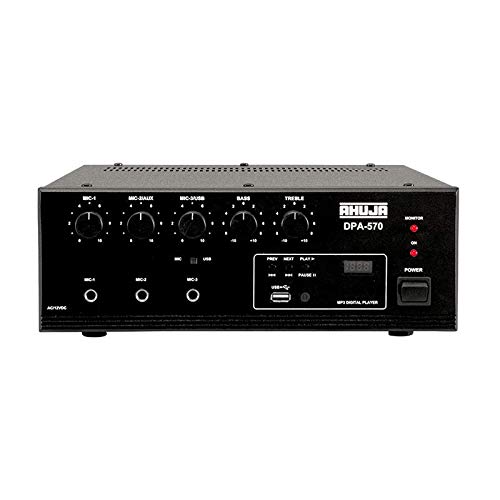
1 pav.: priekis view of the Ahuja DPA-570 Mixer Amplifier, showing input jacks, control knobs, and the MP3 player interface.
Pagrindinės funkcijos:
- 3 Microphone Inputs & 1 Auxiliary Input: Allows connection of multiple audio sources.
- Integruotas MP3 grotuvas: Features a USB reader for playing audio files directly, controlled via the front panel or remote.
- Linijos išvestis: Provides an output for connecting to an external booster amplifier for expanded sound coverage.
- Active Bass & Treble Controls: Independent controls for adjusting the low and high frequencies of the audio output.
- AC/DC Operation: Automatically switches to DC power (car battery) if AC power fails, ensuring uninterrupted operation.
5. Sąranka
Follow these steps to set up your Ahuja DPA-570 Mixer Ampgyvybingesnis:
- Vieta: Padėkite vietą amplifier on a stable, flat surface in a well-ventilated area, away from direct heat or moisture.
- Garsiakalbio jungtis: Connect your speakers to the appropriate speaker output terminals on the rear panel. Ensure correct polarity (+ to + and - to -) and impedance matching. Refer to the amplifier's specifications for compatible speaker impedance.
- Mikrofono jungtis: Plug your microphones into the MIC 1, MIC 2, or MIC 3 input jacks on the front panel.
- Auxiliary Device Connection: Connect external audio sources (e.g., CD player, smartphone) to the AUX input jack using an appropriate cable.
- Maitinimo jungtis:
- Kintamosios srovės maitinimas: Prijunkite pridedamą kintamosios srovės maitinimo laidą prie amp„Lifier“ kintamosios srovės įvado, o tada – į tinkamą sieninį lizdą.
- Nuolatinė srovė (pasirinktinai): For battery operation, connect a 12V DC car battery to the DC input terminals on the rear panel, observing correct polarity. The unit will automatically switch to DC power if AC power is interrupted.
- Pradinis įjungimas: Prieš įjungdami, įsitikinkite, kad visi garsumo valdikliai yra nustatyti ties minimaliu lygiu ampgyvesnis.
6. Naudojimo instrukcijos
6.1 Pagrindinės operacijos
- Maitinimas: Paspauskite maitinimo jungiklį, kad įjungtumėte amplifer. Užsidegs maitinimo indikatoriaus lemputė.
- Garso reguliavimas: Gradually increase the MASTER volume control to the desired listening level. Adjust individual MIC and AUX volume controls as needed.
- Tono valdymas: Use the BASS and TREBLE knobs to adjust the low and high frequencies of the audio output to your preference.
6.2 Using the MP3 Player
- Įdėkite USB atmintinę: Įdėkite USB atmintinę, kurioje yra MP3 garso įrašų fileį USB prievadą priekiniame skydelyje.
- Pasirinkite režimą: The amplifier should automatically switch to USB mode. If not, press the 'MODE' button on the front panel or remote control until USB mode is selected.
- Atkūrimo valdikliai: Use the play/pause, next, and previous track buttons on the front panel or remote control to manage playback.
- Apimtis: Adjust the MP3 player's volume using its dedicated control or the main volume control.
7. Priežiūra
- Valymas: Reguliariai valykite išorę ampminkštu, sausu skudurėliu. Nenaudokite abrazyvinių valiklių ar tirpiklių.
- Vėdinimas: Ensure that the ventilation grilles are free from dust and debris to maintain proper cooling.
- Saugykla: Kai ilgesnį laiką nenaudojate, laikykite amplifier in a cool, dry place, protected from dust and extreme temperatures.
- Kabelio apžiūra: Periodiškai patikrinkite visus kabelius, ar nėra susidėvėjimo ar pažeidimų požymių. Nedelsdami pakeiskite pažeistus kabelius.
8. Problemų sprendimas
| Problema | Galima priežastis | Sprendimas |
|---|---|---|
| Nėra galios | Neprijungtas maitinimo laidas; Sugedęs maitinimo lizdas; AmpIšjunkite liferio maitinimo jungiklį. | Patikrinkite maitinimo laido jungtį; Išbandykite kitą lizdą; Įsitikinkite, kad maitinimo jungiklis yra ĮJUNGTAS. |
| Nėra garso išvesties | Speaker cables disconnected; Volume controls too low; Input source not selected or faulty. | Check speaker connections; Increase MASTER and input volume; Verify input source is active and correctly connected. |
| Iškraipytas garsas | Volume too high; Incorrect impedance speakers; Faulty cables. | Reduce volume; Ensure speaker impedance matches amplifier; Replace faulty cables. |
| MP3 grotuvas neveikia | USB drive not inserted correctly; USB drive corrupted; Incorrect file formatu. | Reinsert USB drive; Try a different USB drive; Ensure fileyra MP3 formatu. |
9. Specifikacijos
| Funkcija | Specifikacija |
|---|---|
| Prekės ženklas | Ahudža |
| Modelio numeris | DPA-570 |
| Kanalų skaičius | 4 |
| Gaminio matmenys (D x P x A) | 34 gylio x 36 pločio x 32 aukščio centimetrų |
| Prekės svoris | 6900 gramų |
| Ryšio technologija | Pagalbinis, USB |
| Maitinimo šaltinio tipas | AC (Mains), Battery Powered (12V DC) |
| Išvesties jungties tipas | 1/4" TRS (balanced) |
| Garso įvestis | USB |
| Kilmės šalis | Kinija |
10. Garantija ir palaikymas
Ahuja products are manufactured to high-quality standards. For warranty information, please refer to the warranty card included with your product or visit the official Ahuja websvetainėje. Išsaugokite pirkimo kvitą kaip pirkimo įrodymą garantiniams reikalavimams.
For technical support, service, or inquiries, please contact Ahuja customer service through their official channels. Contact details can typically be found on the product packaging or the manufacturer's websvetainę.