
Įvadas
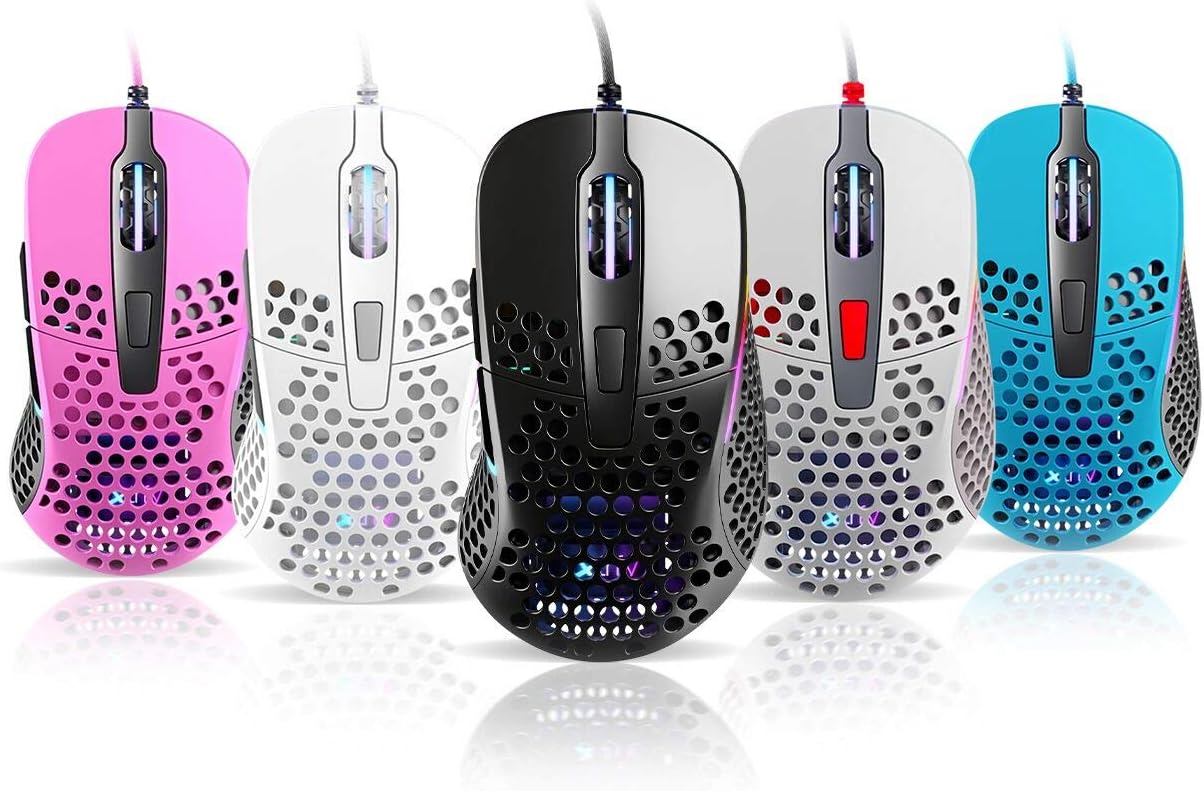
Thank you for choosing the Xtrfy M4 RGB Ultralight Gaming Mouse. This manual provides essential information for setting up, operating, and maintaining your new gaming mouse. The Xtrfy M4 is designed for high-performance gaming, featuring an ultralight design, customizable RGB illumination, and an ergonomic shape for comfortable use.
Prieš naudodami gaminį, atidžiai perskaitykite šį vadovą, kad užtikrintumėte optimalų veikimą ir ilgaamžiškumą.
Pakuotės turinys
Įsitikinkite, kad pakuotėje yra visi daiktai:
- Xtrfy M4 RGB Ultralight Gaming Mouse
- Vartotojo vadovas (šis dokumentas)

Sąrankos instrukcijos
- Išpakuokite pelę: Carefully remove the Xtrfy M4 mouse from its packaging.
- Prisijunkite prie kompiuterio: Įkiškite pelės USB jungtį į laisvą kompiuterio USB prievadą.
- Tvarkyklės diegimas: The mouse is plug-and-play and typically does not require additional drivers. Your operating system should automatically detect and install the necessary drivers.
- Pradinis bandymas: Judinkite pelę ir spustelėkite mygtukus, kad įsitikintumėte, jog jie veikia tinkamai.

Naudojimo instrukcijos
Mygtukų funkcijos
The Xtrfy M4 features 6 programmable buttons:
- Kairysis spustelėjimas: Pirminis veiksmas.
- Dešiniuoju pelės mygtuku spustelėkite: Antrinis veiksmas.
- Slinkties ratukas (spustelėjimas): Vidurinis paspaudimas / universalus slinkimas.
- Pirmyn mygtukas: Default for navigating forward in web naršyklės / programos.
- Mygtukas atgal: Default for navigating backward in web naršyklės / programos.
- DPI mygtukas: Cycles through DPI settings (located behind the scroll wheel).
DPI nustatymai
The DPI (Dots Per Inch) button allows you to adjust the mouse sensitivity on the fly. Press the DPI button to cycle through preset DPI levels. The RGB lighting on the mouse may change color to indicate the current DPI setting.
Refer to the official Xtrfy website or software (if available) for detailed information on specific DPI levels and their corresponding LED colors.
RGB apšvietimas
The Xtrfy M4 features customizable RGB lighting. Specific controls for lighting effects and colors are typically managed through dedicated software provided by Xtrfy. Please visit the official Xtrfy support page to download any available software for advanced customization.

Priežiūra
Proper maintenance ensures the longevity and performance of your Xtrfy M4 mouse.
- Valymas: Pelės paviršiui nuvalyti naudokite minkštą, sausą šluostę. Jei nešvarumai sunkiai įveikiami, šiek tiek pamirkykite.ampNuvalykite šluostę vandeniu arba švelniu valymo tirpalu. Venkite stiprių cheminių medžiagų ar abrazyvinių medžiagų.
- Jutiklio priežiūra: Pelės apačioje esantį optinį jutiklį laikykite švarų, be dulkių ar šiukšlių. Jei reikia, naudokite vatos tamponą arba suslėgtą orą.
- Kabelio priežiūra: Venkite staigių lenkimų ar per didelio pelės laido tempimo, kad nepažeistumėte jo.
- Saugykla: Kai nenaudojate, laikykite pelę švarioje, sausoje vietoje, toliau nuo ekstremalių temperatūrų.
Trikčių šalinimas
If you encounter issues with your Xtrfy M4 mouse, try the following solutions:
- Pelė nereaguoja:
- Įsitikinkite, kad USB laidas yra tvirtai prijungtas prie veikiančio USB prievado.
- Pabandykite prijungti pelę prie kito USB prievado.
- Iš naujo paleiskite kompiuterį.
- Žymeklio judėjimas yra netolygus arba trūkčiojantis:
- Nuvalykite optinį jutiklį pelės apačioje.
- Įsitikinkite, kad pelę naudojate ant švaraus, neatspindinčio paviršiaus arba pelės kilimėlio.
- Check for any software conflicts or outdated drivers (though typically not required, ensure your OS is up to date).
- RGB apšvietimas neveikia:
- Įsitikinkite, kad pelė tinkamai prijungta.
- If using Xtrfy software, check its settings to ensure lighting is enabled and configured correctly.
If these steps do not resolve the issue, please contact Xtrfy customer support for further assistance.
Specifikacijos
| Funkcija | Detalė |
|---|---|
| Prekės ženklas | Xtrfy |
| Modelis | M4 |
| Spalva | Mėlyna (kaip nurodyta produkto variante) |
| Ryšio technologija | USB |
| Ypatinga funkcija | Ergonomic Design, Ultralight, RGB Illumination |
| Mygtukų skaičius | 6 |
| Svoris | 69 grams (Ultralight) |
Garantija ir palaikymas
Xtrfy products are manufactured to the highest quality standards. For information regarding warranty coverage, please refer to the warranty card included with your product or visit the official Xtrfy websvetainę.
For technical support, FAQs, driver downloads, or further assistance, please visit the Xtrfy support page: