
1. Įvadas
The Okaysou AirMic4S Air Purifier is designed to provide clean and fresh air in your home or office. It features an advanced filtration system to capture and reduce airborne particles, odors, and harmful gases, contributing to a healthier indoor environment.

Figure 1.1: Okaysou AirMic4S Air Purifier, illustrating its capability to filter various airborne contaminants including dust, pollen, dander, smoke, and VOCs.
This manual provides detailed instructions for the setup, operation, maintenance, and troubleshooting of your AirMic4S Air Purifier. Please read it thoroughly before use and keep it for future reference.
2. Saugos informacija
Kad sumažintumėte gaisro, elektros smūgio ar sužalojimo riziką, laikykitės šių saugos priemonių:
- Prieš perkeldami, valydami ar keisdami filtrus, visada atjunkite oro valytuvą nuo elektros tinklo.
- Nenaudokite įrenginio su pažeistu laidu arba kištuku.
- Laikykite maitinimo laidą toliau nuo įkaitusių paviršių.
- Neužblokuokite oro angų ir nestatykite įrenginio ant minkšto paviršiaus, kur angos gali būti užblokuotos.
- Nemerkite įrenginio į vandenį ar kitus skysčius.
- Šis prietaisas nėra skirtas naudoti asmenims (įskaitant vaikus), kurių fizinės, jutimo ar psichinės galimybės yra ribotos arba kurie neturi patirties ir žinių, nebent už jų saugumą atsakingas asmuo juos prižiūrėtų arba instruktuotų, kaip naudoti prietaisą. .
- Use only genuine Okaysou replacement filters to maintain optimal performance and warranty.
3. Produktas baigtasview
The Okaysou AirMic4S features a compact design with powerful air purification capabilities. It utilizes a multi-stage filtration system to effectively clean the air.

3.1 pav.: priekis view of the Okaysou AirMic4S Air Purifier, showcasing savo elegantišku dizainu.
3.1 Pagrindiniai komponentai
- Oro įleidimo grotelės: Located on the lower section, designed to capture hair and large particles.
- Valdymo skydelis: Top-mounted touch panel for all functions.
- Oro išleidimo anga: Top grille for purified air release.
- Filtro skyrius: Houses the multi-stage filtras.
3.2 Filtravimo sistema
The AirMic4S employs an advanced 3-stage H13 True HEPA filtration system:
- Plaunamas pirminis filtras: The first defense, capturing large particles like hair and fur.
- H13 tikrasis HEPA filtras: Captures pollen, dander, dust, smell, and smoke particles as small as 0.3 microns.
- Aktyvios anglies filtras: Effectively absorbs stubborn and unwanted odors, harmful gases, and VOCs.

Figure 3.2: Illustration of the advanced 3-stage H13 True HEPA filtration system, detailing the washable pre-filter, H13 True HEPA filter, and active carbon filter.
4. Sąranka
Follow these steps to set up your Okaysou AirMic4S Air Purifier:
- Išpakuokite įrenginį: Atsargiai išimkite oro valytuvą iš pakuotės.
- Nuimkite filtro pakuotę: Before first use, unscrew the bottom cover (twist counter-clockwise) and remove the plastic packaging from the filter.
- Įdiekite filtrą iš naujo: Įdėkite filtrą atgal į įrenginį, įsitikindami, kad jis tinkamai įstatytas.
- Saugus apatinis dangtelis: Replace the bottom cover and twist clockwise to secure it.
- Vieta: Place the air purifier on a firm, level surface. Ensure there is adequate space around the unit for proper airflow (at least 6 inches from walls or furniture).
- Prijunkite: Prijunkite maitinimo laidą prie tinkamo elektros lizdo.
5. Naudojimo instrukcijos
The AirMic4S features an intuitive touch control panel for easy operation.

Figure 5.1: The control panel of the AirMic4S, showing buttons for power, fan speed, timer, filter reset, and night light/sleep mode.
5.1 Valdymo skydelio funkcijos
- Maitinimo mygtukas (⑁): Paspauskite, kad įjungtumėte arba išjungtumėte įrenginį.
- Fan Speed Button (✴): Perjungia ventiliatoriaus greičius (mažas, vidutinis, didelis).
- Timer Button (⌛): Sets the operating timer for 2, 4, or 8 hours. The unit will automatically turn off after the selected time.
- Night Light Mode (🌙): Activates or deactivates the night light feature.
- Sleep Mode (🌛): Activates a quiet operation mode (as low as 24dB) for undisturbed sleep.
- Filter Reset Indicator (📄): Lights up when it's time to replace the filter. Press and hold to reset after filter replacement.
5.2 Bendras veikimas
- Maitinimas: Press the Power button to start the air purifier. It will typically start on a low fan speed.
- Sureguliuokite ventiliatoriaus greitį: Press the Fan Speed button repeatedly to cycle through the desired fan speeds (Low, Medium, High).
- Nustatyti laikmatį: Press the Timer button to select 2H, 4H, or 8H. The corresponding indicator will light up.
- Įjungti miego režimą: Press the Sleep Mode button to enter ultra-quiet operation. The night light may dim or turn off in this mode.
- Control Night Light: Use the Night Light button to toggle the light on or off independently.
- Išjungti: Dar kartą paspauskite maitinimo mygtuką, kad išjungtumėte įrenginį.
6. Priežiūra
Reguliarus valytuvo valymas užtikrina optimalų veikimą ir pailgina jo tarnavimo laiką.
6.1 Filtro keitimas
The filter replacement indicator will illuminate when it's time to change the filter. Filter lifespan varies based on usage and air quality.
- Ištraukite oro valytuvą iš maitinimo lizdo.
- Turn the unit upside down and twist the bottom cover counter-clockwise to remove it.
- Išimkite seną filtrą.
- Insert a new genuine Okaysou filter into the unit.
- Replace the bottom cover and twist clockwise to secure it.
- Plug in the unit. With the unit powered on, press and hold the Filter Reset button for 3-5 seconds until the indicator light turns off.
Okaysou offers 4 optional replacement filters tailored to specific needs:
- Original Filter: Best for general use, absorbing odors, dander, pollen, smoke.
- Customized Blue Filter (G-Defense Filter): Best for humid environments to absorb harmful substances.
- Customized Green Filter (Toxin Absorber Filter): Best for areas with high levels of toxins, vehicle exhaust, VOCs.
- Yellow Odor Remover Filter: Best for powerfully reducing odors from ash, wildfire, cooking.

Figure 6.1: Various optional replacement filters available for the AirMic4S, each designed for specific air purification needs.
6.2 Įrenginio valymas
- Oro valytuvo išorę nuvalykite minkštu, sausu skudurėliu.
- The washable pre-filter can be gently cleaned with a soft brush or vacuum cleaner to remove large dust and hair particles. Ensure it is completely dry before reinstallation.
- Nenaudokite abrazyvinių valiklių ar tirpiklių.
7. Problemų sprendimas
If you encounter issues with your AirMic4S Air Purifier, refer to the following table for common problems and solutions:
| Problema | Galima priežastis | Sprendimas |
|---|---|---|
| Įrenginys neįsijungia. | Neįjungta; maitinimas išjungtastage; filtras netinkamai sumontuotas. | Ensure unit is securely plugged in. Check power supply. Verify filter is unwrapped and correctly seated, and bottom cover is secured. |
| Oro srautas silpnas arba triukšmingas. | Filter is dirty or clogged; air inlets/outlets blocked. | Clean or replace the filter. Ensure nothing is obstructing the air inlets or outlets. |
| Kvapas išlieka. | Filter needs replacement; strong external odor source. | Replace the filter, especially if using the Original filter for strong odors. Consider using an Odor Remover filter. Ensure the room is adequately ventilated. |
| Filter Reset light remains on after replacement. | Filtro atstatymas atliktas neteisingai. | With the unit powered on, press and hold the Filter Reset button for 3-5 seconds until the light turns off. |
If the problem persists after trying these solutions, please contact Okaysou customer support.
8. Specifikacijos
| Funkcija | Detalė |
|---|---|
| Modelio numeris | AirMic 4S |
| Gaminio matmenys | 8.7 "D x 8.7" P x 11.89" A |
| Svoris | 6.6 svaro |
| Nominali galia | 25 vatų |
| Triukšmo lygis | 24 dB (miego režimas) |
| Aprėpties sritis | Up to 300 sq. ft. (5x per hour in 150 sq.ft, 3x per hour in 300 sq.ft, 2x per hour in 580 sq.ft) |
| Filtravimo tipas | H13 True HEPA (3-Stage) |
| Be ozono | 100 % be ozono |
| Sertifikatai | CARB, CE, RoHS, ETL Listed |
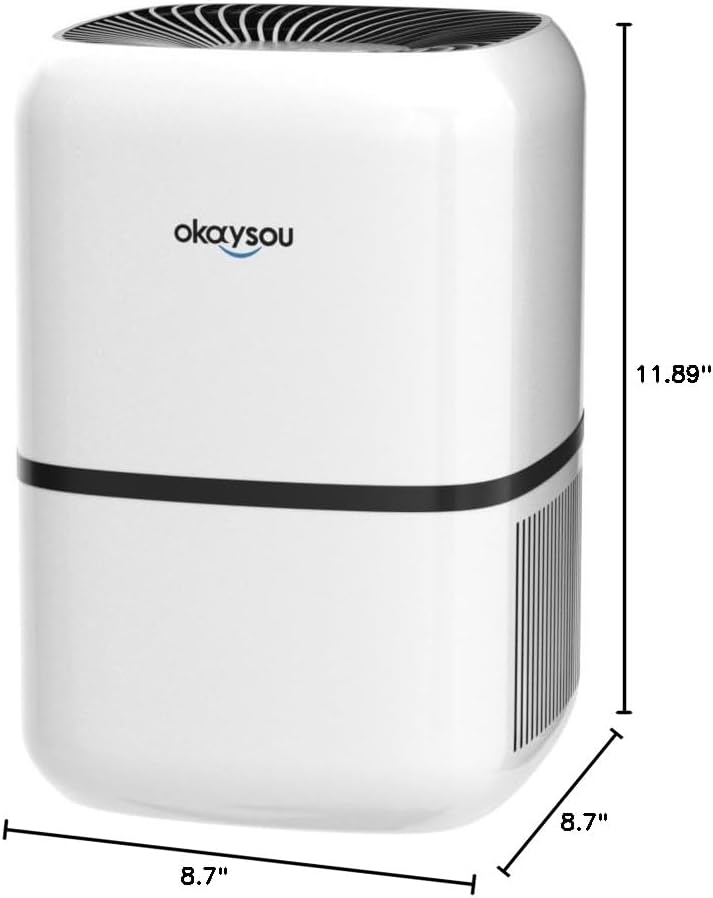
8.1 pav.: Matmenys view of the Okaysou AirMic4S Air Purifier, showing its height, depth, and width.
9. Garantija ir palaikymas
The Okaysou AirMic4S Air Purifier comes with a 5 metų garantija. Okaysou also provides lifetime US-based customer support.
For warranty claims, technical assistance, or any questions regarding your product, please contact Okaysou customer support through their official channels or refer to the contact information provided with your purchase.
You can also visit the official Okaysou store on Amazon for more information and support: Okaysou Amazon Store