
Įvadas
This manual provides essential information for setting up, operating, maintaining, and troubleshooting your Xiaomi Redmi Note 8 Pro smartphone. Please read this guide carefully to ensure optimal performance and longevity of your device.
Sąranka
Pakuotės turinys
Patikrinkite, ar jūsų pakuotėje yra šie elementai:
- „Xiaomi Redmi Note 8 Pro“ išmanusis telefonas
- Earphone Kit
- Įkrovimo blokas
- C tipo USB kabelis
- Vartotojo vadovas
SIM kortelių įdėjimas
The Redmi Note 8 Pro supports dual Nano-SIM cards. Use the provided SIM ejector tool to open the SIM tray located on the side of the device. Carefully place your Nano-SIM cards into the designated slots, ensuring the gold contacts face downwards. Reinsert the tray firmly.
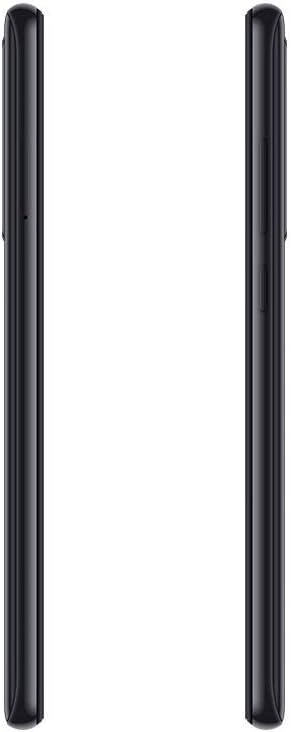
Vaizdas: Šoninė view of the Redmi Note 8 Pro, illustrating the location of the SIM card tray and physical buttons.
Initial Power On and Basic Configuration
Press and hold the Power button until the Xiaomi logo appears. Follow the on-screen instructions to select your language, connect to a Wi-Fi network, and set up your Google account. This process will guide you through essential settings to prepare your device for use.
Prietaiso valdymas
Ekranas ir navigacija
Your Redmi Note 8 Pro features a 6.53-inch FHD+ Dot Drop Display with a resolution of 2340 x 1080 pixels. Navigate the interface using touch gestures. The power button is located on the right side, along with the volume rocker. The device runs on Android with Xiaomi's MIUI interface, offering a customizable user experience.

Vaizdas: priekis view of the Redmi Note 8 Pro, showcasing its 6.53-inch FHD+ Dot Drop Display.
Kameros ypatybės
The device is equipped with a 64MP AI Quad Camera system on the rear, allowing for versatile photography in various scenarios. The camera module includes multiple lenses for wide-angle, macro, and depth sensing. Open the Camera app to explore different modes and settings.

Vaizdas: Galinis view of the Redmi Note 8 Pro, highlighting the 64MP AI Quad Camera system.
Baterija ir įkrovimas
The Redmi Note 8 Pro features a 4500mAh high-capacity battery. Use the provided USB Type-C cable and charging block to charge your device. For optimal battery life, avoid extreme temperatures and fully discharging the battery frequently.
Ryšys
The smartphone supports 4G cellular networks and NFC (Near Field Communication) for contactless payments and quick pairing with compatible devices. Bluetooth and Wi-Fi connectivity are also available for wireless communication and internet access.

Vaizdas: Viršus ir apačia view of the Redmi Note 8 Pro, showing the USB-C port, 3.5mm headphone jack, and speaker grille.
Priežiūra
Įrenginio valymas
Use a soft, lint-free cloth to clean the screen and body of your smartphone. Avoid using harsh chemicals or abrasive materials, as these can damage the device's finish. For stubborn smudges, lightly dampNuvalykite šluostę vandeniu arba ekrano valikliu, skirtu specialiai elektronikai.
Atsparumas vandeniui
The Xiaomi Redmi Note 8 Pro is nėra atsparus vandeniui. Avoid exposing the device to water, rain, or excessive humidity. Liquid damage is not covered under warranty.
Programinės įrangos atnaujinimai
Reguliariai tikrinkite, ar yra programinės įrangos atnaujinimų, ir juos įdiekite, kad jūsų įrenginyje būtų naujausios funkcijos, saugos pataisymai ir našumo patobulinimai. Paprastai šią parinktį galite rasti įrenginio nustatymuose, skiltyje „Apie telefoną“ arba „Sistemos naujiniai“.
Trikčių šalinimas
Bendros problemos ir sprendimai
- Įrenginys neįsijungia: Įsitikinkite, kad akumuliatorius įkrautas. Prijunkite įrenginį prie įkroviklio ir palaukite kelias minutes, prieš bandydami jį vėl įjungti. Jei jis vis tiek neįsijungia, pabandykite ilgiau (10–15 sekundžių) palaikyti nuspaustą maitinimo mygtuką.
- Įkrovimo problemos: Check if the charging cable and adapter are securely connected. Try using a different cable or adapter to rule out faulty accessories. Ensure the charging port is clean and free of debris.
- Camera focus problems: Ensure the camera lens is clean and free from smudges. In some low-light conditions, autofocus may be slower. Try tapping on the screen to manually focus on your subject.
- Lėtas veikimas: Close unused applications running in the background. Clear cache data for apps that are frequently used. Consider restarting your device periodically. If performance issues persist, a factory reset might be necessary (back up your data first).
Atstatyti gamyklinius nustatymus
A factory reset will erase all data from your device and restore it to its original factory settings. This can resolve persistent software issues. Before performing a factory reset, ensure you have backed up all important data. The option is typically found in Settings > System > Reset options.
Specifikacijos
| Prekės ženklas | XIAOMI |
| Modelio pavadinimas | Redmi Note 8 Pro |
| Operacinė sistema | Android |
| RAM | 6 GB |
| Sandėliavimo talpa | 128 GB |
| Ekrano dydis | 6.53 colių |
| Ekrano raiška | 2340 x 1080 (Full HD+) |
| Korinio ryšio technologija | 4G |
| Ryšio technologija | NFC |
| SIM kortelių lizdai | Dvi SIM kortelės |
| SIM kortelės dydis | Nano |
| Atsparumo vandeniui lygis | Neatsparus vandeniui |
| Ausinių lizdas | 3.5 mm |
| Galinės kameros skiriamoji geba | 64 Megapixels (Quad Camera) |
| Baterijos talpa | 4500 mAh |
| Procesorius | G90T liquidcool System |
Informacija apie garantiją
The Xiaomi Redmi Note 8 Pro comes with a 2 metų gamintojo garantija from the date of purchase. This warranty covers defects in materials and workmanship under normal use. It does not cover damage caused by accidents, misuse, unauthorized modifications, or liquid exposure. Please retain your proof of purchase for warranty claims.
Palaikymas
For further assistance, technical support, or to inquire about service and repairs, please visit the official Xiaomi website or contact their customer service. You can find detailed support resources, FAQs, and contact information on their official support pages.
Oficialus „Xiaomi“ Websvetainė: www.mi.com/global/support