
1. Įvadas
Thank you for choosing the AUNA Pro Amp-Pro1 BT PA Ampkeltuvas. Tai amplifier is designed to deliver professional-level sound for various events, including karaoke nights, parties, and general audio amplification. It features a robust 2 x 50W RMS output, Bluetooth connectivity, multiple microphone inputs, USB/SD media playback, and a 7-band equalizer for precise sound control. This manual provides essential information for safe operation, setup, and maintenance of your device.
2. Saugos instrukcijos
Please read these safety instructions carefully before operating the device and keep them for future reference. Failure to follow these instructions may result in electric shock, fire, or other hazards.
- Maitinimas: Connect the device only to a 230 V, 50 Hz AC power outlet. Ensure the power cord is not damaged or pinched.
- Vėdinimas: Do not block any ventilation openings. Ensure adequate airflow around the unit to prevent overheating. Do not place the amplifier on soft surfaces that may block vents.
- Vanduo ir drėgmė: Do not expose the device to rain or moisture. Do not place objects filled with liquids, such as vases, on or near the ampgyvesnis.
- Šilumos šaltiniai: Laikykite amplifier away from heat sources such as radiators, heat registers, stoves, or other heat-producing appliances.
- Valymas: Prieš valydami atjunkite įrenginį nuo maitinimo lizdo. Naudokite sausą, minkštą šluostę. Nenaudokite skystų ar aerozolinių valiklių.
- Aptarnavimas: Nebandykite patys taisyti šio gaminio. Visus techninės priežiūros darbus patikėkite kvalifikuotiems techninės priežiūros specialistams. Atidarius įrenginį, galite būti paveikti pavojingo aukšto slėgio vandens.tages ar kitų pavojų.
- Objekto ir skysčio įvedimas: Niekada nespauskite jokių daiktų į šį gaminį per angas, nes jie gali liesti pavojingą tūrįtage taškais arba trumpam sutrumpinti dalis, dėl kurių gali kilti gaisras arba įvykti elektros smūgis.
- Vieta: Place the unit on a stable, level surface. Avoid placing it in direct sunlight or in areas with high humidity or dust.
3. Produktas baigtasview
The AUNA Pro Amp-Pro1 BT is a versatile PA amplifier designed for powerful audio output and flexible connectivity. It can be used as a standalone unit or installed in a 19-inch Hi-Fi rack.
Pagrindinės funkcijos:
- Galingas išėjimas: 2 x 50 W RMS power at 4 ohms.
- Bluetooth funkcija: For wireless audio streaming from smartphones, tablets, or laptops.
- Keli mikrofono įėjimai: Three fully adjustable 6.3 mm jack microphone inputs for karaoke and vocal performances.
- Medijos atkūrimas: USB port and SD/MMC card slot for direct playback of digital audio files.
- 7 juostų ekvalaizeris: Two-channel, 7-band equalizer for precise adjustment of treble, bass, and mid-range frequencies.
- Platus ryšys: 2 x stereo RCA inputs, 1 x antenna input, 1 x 3.5 mm AUX input, and 2 x stereo speaker outputs.
- Montuojamas ant stovo: Suitable for installation in a 19-inch Hi-Fi rack.
Priekinio skydelio valdikliai ir jungtys:
The front panel provides access to power, microphone inputs, media playback controls, and sound adjustments.

Galinio skydelio jungtys:
The rear panel houses the main audio inputs and speaker outputs.

4. Sąranka ir jungtys
Follow these steps to set up your AUNA Pro Amp-Pro1 BT ampgyvesnis.
4.1 Garsiakalbių prijungimas
- Užtikrinti, amplifier yra išjungtas ir atjungtas nuo elektros lizdo.
- Connect your passive speakers to the stereo speaker outputs on the rear panel. Use appropriate speaker cables.
- For a single set of speakers, ensure their impedance is between 4 and 16 ohms.
- If connecting two sets of speakers simultaneously, ensure their combined impedance is between 8 and 16 ohms.
4.2 Garso šaltinių prijungimas
The amp„lifier“ siūlo įvairias įvesties parinktis:
- RCA įėjimai: Connect external audio devices like CD players, DVD players, or mixers to the 2 x stereo RCA inputs on the rear panel.
- AUX įvestis: For portable devices, use the 3.5 mm AUX input on the front panel.
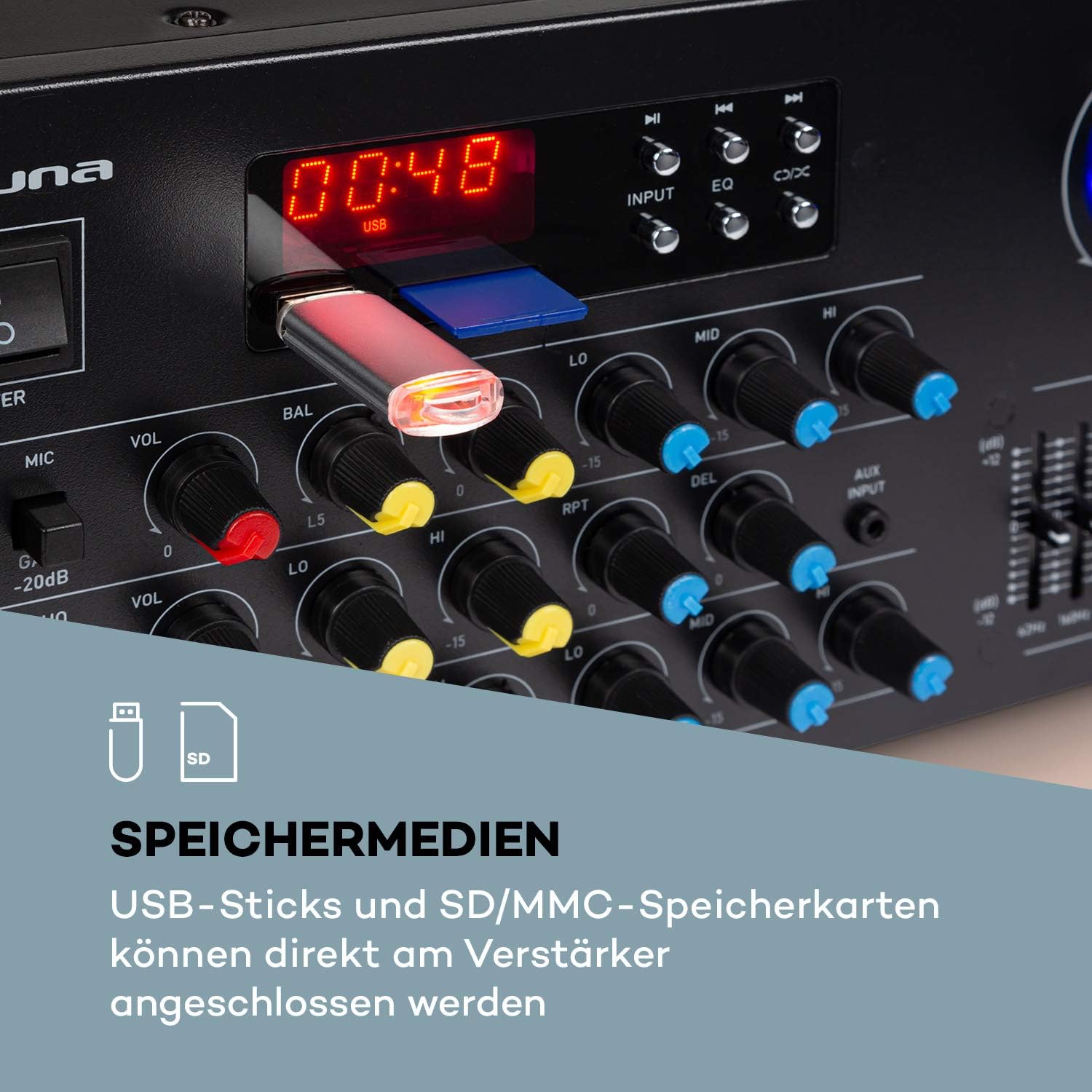
- USB / SD: Insert a USB stick or SD/MMC card into the respective slots on the front panel for direct media playback.
- Bluetooth: Belaidžiam garso transliavimui iš suderinamų įrenginių.
4.3 Mikrofonų prijungimas
Connect up to three 6.3 mm jack microphones to the dedicated inputs on the front panel.

4.4 Maitinimo jungtis
Kai prijungsite visas garso ir garsiakalbių jungtis, prijunkite amplifier's power cord into a suitable 230 V, 50 Hz AC power outlet.
5. Naudojimo instrukcijos
5.1 Įjungimas / išjungimas
Paspauskite GALIA mygtuką priekiniame skydelyje, kad įjungtumėte amplifier on or off. The display will illuminate when the unit is powered on.
5.2 Šaltinio pasirinkimas
Naudokite ĮVESTIS selector button on the front panel to cycle through available audio sources: Bluetooth, USB, SD, AUX, and RCA inputs.
5.3 Bluetooth veikimas
- Select the Bluetooth input source using the ĮVESTIS button. The display will show 'BLUE' or a similar indicator.
- Įjunkite „Bluetooth“ savo išmaniajame telefone, planšetiniame kompiuteryje arba nešiojamajame kompiuteryje.
- Ieškokite available devices and select 'AUNA Amp-Pro1 BT' (or similar) from the list.
- Susiejus, galite belaidžiu būdu transliuoti garsą į ampgyvesnis.

5.4 USB/SD atkūrimas
- Insert a USB stick or SD/MMC card into the corresponding slot on the front panel.
- Select the USB or SD input source using the ĮVESTIS mygtuką. The amp„Lifier“ automatiškai aptiks ir pradės leisti suderinamą garso įrašą files.
- Use the playback controls (Play/Pause, Next, Previous) on the front panel to manage your music.
5.5 Mikrofono valdikliai
Each microphone input has individual volume, 3-band equalizer (treble, mid, bass), balance, and echo effect controls. The echo effect also has 2-band equalizer, repeat, delay, and volume controls.
- Sureguliuokite MIC VOL knob for the overall microphone volume.
- Naudokite individualų VOL knobs for each microphone input.
- Sureguliuokite LO, VIDURYS, HI knobs for microphone equalization.
- Control the echo effect using the ECHO, RPT (Repeat), and DEL (Delay) knobs.
5.6 Ekvalaizerio reguliavimas
The amplifier features a 2-channel, 7-band equalizer to fine-tune your audio output. Adjust the sliders for each frequency band (62Hz, 160Hz, 400Hz, 1KHz, 3KHz, 8KHz, 16KHz) to shape your sound.

5.7 Pagrindinis garsumo valdymas
Adjust the large PAGRINDINIS GARSAS knob to control the overall output level of the ampgyvesnis.
6. Priežiūra
6.1 Valymas
Visada atjunkite amplifier before cleaning. Use a soft, dry cloth to wipe the exterior surfaces. Do not use abrasive cleaners, waxes, or solvents, as they may damage the finish.
6.2 Saugykla
Jei amplifier will not be used for an extended period, unplug it from the power outlet and store it in a cool, dry place, away from direct sunlight and extreme temperatures.
6.3 Saugiklio keitimas
The amplifier is equipped with a 2A fuse. If the unit fails to power on, the fuse may need replacement. This should only be performed by qualified service personnel to ensure safety and proper operation.
7. Problemų sprendimas
Jei kyla problemų dėl savo amplifier, žr. šias dažniausiai pasitaikančias problemas ir sprendimus:
| Problema | Galima priežastis | Sprendimas |
|---|---|---|
| Nėra galios | Power cord unplugged; Power outlet faulty; Fuse blown | Check power cord connection; Try a different outlet; Contact service for fuse replacement. |
| Nėra garso išvesties | Incorrect input selected; Volume too low; Speakers not connected or faulty; Mute function active | Select correct input source; Increase Master Volume; Check speaker connections; Ensure no mute is active. |
| Bluetooth neprisijungia | Amplifier not in Bluetooth mode; Device not discoverable; Interference | Select Bluetooth input; Ensure Bluetooth is enabled on your device and in pairing mode; Move devices closer; Restart both devices. |
| Mikrofonas neveikia | Microphone not connected; Microphone volume too low; Microphone faulty | Check microphone connection; Increase individual MIC VOL; Test with another microphone. |
| Iškraipytas garsas | Volume too high; Input signal too strong; Speaker impedance mismatch | Reduce Master Volume or input source volume; Check speaker impedance. |
Jei problema išlieka ir išbandžius šiuos sprendimus, susisiekite su klientų aptarnavimo tarnyba.
8. Techninės specifikacijos
Below are the technical specifications for the AUNA Pro Amp-Pro1 BT PA Ampgyvybingesnis:
| Funkcija | Specifikacija |
|---|---|
| Išėjimo galia | 2 x 50 W RMS at 4 ohms |
| Dažnio atsakas | 20 Hz–20 kHz |
| Signalo ir triukšmo santykis | > 76 dB |
| Speaker Impedance (1 set) | 4 16 - XNUMX omų |
| Speaker Impedance (2 sets synchronized) | 8 16 - XNUMX omų |
| Mikrofono įėjimai | 3 x 6.3 mm jack (front) |
| Garso įėjimai | 2 x stereo RCA, 1 x 3.5 mm AUX, USB, SD/MMC |
| Antenos įvestis | 1 x antenna input |
| Garsiakalbių išėjimai | 2 x stereo (screw terminals/banana connector) |
| Maitinimo šaltinis | 230 V, 50 Hz |
| Saugiklis | 2 A |
| Matmenys (P x A x G) | Apytiksl. 43 x 16.3 x 32.5 cm |
| Svoris | apytiksliai 3.0 kg |
| Ryšio technologija | AUX, „Bluetooth“, USB |
| Suderinami įrenginiai | Nešiojamasis kompiuteris, išmanusis telefonas |

9. Informacija apie šalinimą
Do not dispose of this product with normal household waste. This product should be handed over to an applicable collection point for the recycling of electrical and electronic equipment. By ensuring this product is disposed of correctly, you will help prevent potential negative consequences for the environment and human health, which could otherwise be caused by inappropriate waste handling of this product. For more detailed information about recycling of this product, please contact your local city office, your household waste disposal service or the shop where you purchased the product.
10. Garantija ir palaikymas
For warranty information, technical support, or service inquiries, please refer to the documentation provided with your purchase or contact your retailer. You can also visit the official AUNA webSvetainė, kurioje rasite tolesnę pagalbą.