
EARISE M37
EARISE M37 Wooden Box PA System User Manual
Modelis: M37
1. Produktas baigtasview
The EARISE M37 is a portable 100W PA system designed for various audio applications, including home parties, small events, and karaoke. It features a wooden cabinet for enhanced acoustics, built-in Bluetooth connectivity, and comes with two wireless microphones for immediate use. The system supports multiple audio inputs including AUX and USB, offering versatile playback options.

Image: The EARISE M37 PA system, showcasing its wooden box design and two included wireless microphones.
2. Saugos informacija
- Saugokite įrenginį nuo lietaus ar drėgmės, kad išvengtumėte gaisro ar elektros smūgio.
- Do not open the cabinet. There are no user-serviceable parts inside. Refer all servicing to qualified personnel.
- Užtikrinkite tinkamą vėdinimą aplink įrenginį. Neužblokuokite ventiliacijos angų.
- Nestatykite įrenginio šalia šilumos šaltinių, tokių kaip radiatoriai, šildytuvai, viryklės ar kiti prietaisai (įskaitant ampkeltuvai), kurie gamina šilumą.
- Saugokite maitinimo laidą, kad ant jo neužeitų ar nesuspaustų, ypač prie kištukų, patogių lizdų ir toje vietoje, kur jie išeina iš aparato.
- Atjunkite šį įrenginį žaibuojant arba kai nenaudojate ilgą laiką.
3. Pakuotės turinys
Patikrinkite pakuotę, ar joje yra šie daiktai:
- EARISE M37 PA System Unit
- 2x belaidžiai mikrofonai
- Nuotolinio valdymo pultelis
- Maitinimo adapteris
- Vartotojo vadovas (šis dokumentas)

Image: A visual representation of key features and included accessories: wireless microphone, Bluetooth 4.2, USB auto-play, and remote controller.
4. Produkto savybės ir komponentai
Familiarize yourself with the main components and controls of your EARISE M37 PA System.

Image: The control panel of the EARISE M37, showing various inputs and adjustment knobs. Key controls include: Mode, Previous/Next Track, Play/Pause, Record, EQ, Light, Mic 1/2 inputs, AUX In/Out, USB, TF card slot, DC Power In, ON/OFF switch, Charging indicator, ECHO, DELAY, MIC VOL, MASTER VOL, TREBLE, EXTRA BASS, and BASS.
Valdymo skydelio funkcijos:
- MODE: Perjungia įvesties režimus („Bluetooth“, AUX, USB, TF kortelė).
- Ankstesnis / kitas takelis: Naršo takelius medijos atkūrimo metu.
- Leisti / pristabdyti: Valdo medijos atkūrimą.
- Įrašas: Initiates or stops recording (requires USB/TF storage).
- EQ: Reguliuoja ekvalaizatoriaus nustatymus.
- Šviesa: Valdo integruotą LED apšvietimą.
- MIC 1 / MIC 2: Inputs for wired microphones (if used).
- AUX IN / AUX OUT: Audio input and output jacks for external devices.
- USB: USB port for media playback or recording.
- TF: TF (MicroSD) card slot for media playback or recording.
- DC Power IN: Maitinimo įvestis įkrovimui ir veikimui.
- ĮJUNGTI IŠJUNGTI: Įrenginio maitinimo jungiklis.
- Įkrovimo indikatorius: Įkrovimo būseną rodanti lemputė.
- ECHO: Reguliuoja mikrofonų aidėjimo efektą.
- DELAY: Reguliuojamas mikrofonų uždelsimo efektas.
- MIC VOL: Reguliuoja mikrofonų garsumą.
- MASTER VOL: Valdo bendrą sistemos pagrindinį garsumą.
- TREBLE: Reguliuoja aukšto dažnio garso išvestį.
- PAPILDOMAS BASAS: Pagerina žemo dažnio garso išvestį.
- BOSAS: Reguliuoja žemo dažnio garso išvestį.
5. Sąranka
5.1 Charging the PA System
Before first use, fully charge the PA system. Connect the provided power adapter to the "DC Power IN" port on the unit and plug it into a standard wall outlet. The charging indicator light will show the charging status. A full charge provides up to 7 hours of play time.

Image: Illustration highlighting the 3600mAh battery capacity, providing up to 7 hours of continuous play time.
5.2 Wireless Microphone Setup
The two wireless microphones are pre-paired with the PA system. Insert AA batteries (not included) into each microphone. Turn on the microphones using their respective power switches. They should automatically connect to the PA system.
5.3 Garso šaltinių prijungimas
„Bluetooth“ ryšys:
- Turn on the EARISE M37 PA system.
- Paspauskite REŽIMAS button until the display shows "Bluetooth" or a Bluetooth icon.
- Mobiliajame įrenginyje (išmaniajame telefone, planšetiniame kompiuteryje ir kt.) įjunkite „Bluetooth“ ir ieškokite galimų įrenginių.
- Select "EARISE M37" from the list. Once connected, you will hear a confirmation sound.

Image: A hand holding a smartphone displaying a Bluetooth connection screen, indicating the ease of pairing with the EARISE M37 PA system.
USB/TF kortelės atkūrimas:
Insert a USB flash drive or TF (MicroSD) card containing MP3 audio files into the respective port. The system will automatically detect and begin playing music. Use the Previous/Next Track and Play/Pause buttons to control playback.
AUX įvestis:
Prijunkite išorinį garso įrenginį (pvz., MP3 grotuvą, kompiuterį) prie Aux in port using a 3.5mm audio cable (not included). Press the REŽIMAS button until AUX input is selected.
6. Naudojimo instrukcijos
6.1 Maitinimo įjungimas/išjungimas
To turn the unit on or off, use the ĮJUNGTA/IŠJUNGTA switch located on the control panel.
6.2 Garsumo ir efektų reguliavimas
- MASTER VOL: Rotate this knob to adjust the overall volume of the PA system.
- MIC VOL: Reguliuoja prijungtų mikrofonų garsumą.
- ECHO / DELAY: Use these knobs to add or reduce echo and delay effects to the microphone sound.
- TREBLE / BASS / EXTRA BASS: Adjust these knobs to fine-tune the high and low frequencies of the audio output.
6.3 Mikrofonų naudojimas
Once the wireless microphones are powered on and connected, speak into them. Adjust the MIC VOL, ECHO, ir ATLAIKYMAS knobs on the PA system to achieve the desired sound. For optimal performance, hold the microphone a few inches from your mouth.

Image: Two individuals enjoying karaoke with the EARISE M37 PA system and its wireless microphones, demonstrating typical usage.
6.4 Įrašymo funkcija
To record audio (e.g., microphone input or music playback), ensure a USB flash drive or TF card is inserted into the corresponding slot. Press the ĮRAŠAS button to start recording. Press it again to stop. Recorded files will be saved to the inserted storage device.
7. Priežiūra
- Prietaisą valykite minkštu, sausu skudurėliu. Nenaudokite abrazyvinių valiklių ar tirpiklių.
- Store the PA system in a cool, dry place away from direct sunlight and extreme temperatures.
- If the unit will not be used for an extended period, fully charge the battery before storage and recharge it every few months to maintain battery health.
8. Problemų sprendimas
| Problema | Galima priežastis | Sprendimas |
|---|---|---|
| Nėra galios | Baterija išsikrovusi; Maitinimo laidas neprijungtas. | Charge the unit; Ensure power cable is securely connected. |
| Nėra garso iš mikrofonų | Microphones off; Batteries low/dead; MIC VOL too low. | Turn on microphones; Replace batteries; Increase MIC VOL. |
| Bluetooth neprisijungia | PA system not in Bluetooth mode; Device too far; Interference. | Press MODE button to select Bluetooth; Move device closer; Restart both devices. |
| USB/TF kortelė neveikia | Neteisinga file formatavimas; kortelė / diskas netinkamai įdėtas; sugadintas files. | Užtikrinti files are MP3; Reinsert card/drive; Try different files/device. |
9. Specifikacijos
| Funkcija | Detalė |
|---|---|
| Prekės ženklas | EARISE |
| Modelis | M37 |
| Išėjimo vattage | 100 vatų |
| Maitinimo šaltinis | Maitinamas baterijomis |
| Ryšio technologija | Bluetooth, USB, AUX |
| Bluetooth versija | 4.2 (from image) |
| Garso įvestis | Belaidis mikrofonas, AUX |
| Kanalų skaičius | 2 |
| Prekės svoris | 11.62 svaro |
| Pakuotės matmenys | 18.7 x 12 x 11.9 colio |
| Produkto matmenys (apytiksliai) | 32.5 cm (12.8 in) H x 25.5 cm (10 in) W x 23.8 cm (9.4 in) D |
| Spalva | Juoda |
| Montavimo tipas | Stalviršis |
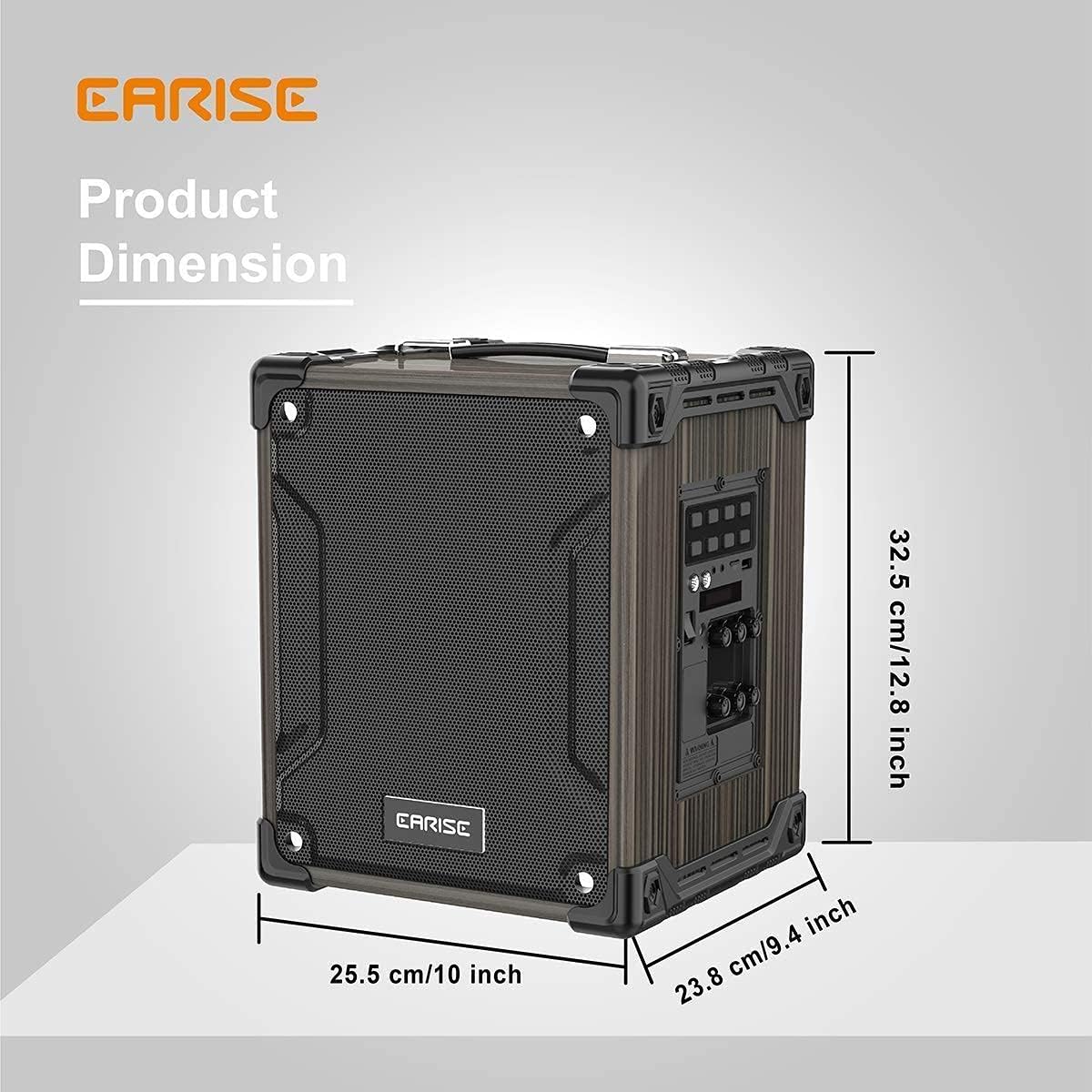
Image: Product dimensions of the EARISE M37, measuring approximately 32.5 cm (12.8 inches) in height, 25.5 cm (10 inches) in width, and 23.8 cm (9.4 inches) in depth.
10. Garantija ir palaikymas
For warranty information or technical support, please refer to the contact details provided with your purchase or visit the official EARISE websvetainėje. Išsaugokite pirkimo įrodymą garantiniams reikalavimams.
Ask a question about this manual
Ask about setup, troubleshooting, compatibility, parts, safety, or missing instructions. Manuals+ will review the question and use this page’s manual context to help answer it.