
1. Įvadas
This manual provides essential information for the setup, operation, and maintenance of your Xtrfy K4 RGB Mechanical Gaming Keyboard. Please read these instructions carefully to ensure optimal performance and longevity of your device. The Xtrfy K4 RGB is designed for high-performance gaming and typing, featuring durable mechanical switches and customizable RGB illumination.
2. Pakuotės turinys
Patikrinkite, ar pakuotėje yra visi reikalingi daiktai:
- Xtrfy K4 RGB Mechanical Gaming Keyboard
- USB laidas (pridėtas)
- Vartotojo vadovas (šis dokumentas)
3. Sąranka
Follow these steps to set up your Xtrfy K4 RGB keyboard:
- Išpakuokite klaviatūrą: Atsargiai išimkite klaviatūrą iš pakuotės.
- Prisijunkite prie kompiuterio: Plug the attached USB-A cable from the keyboard into an available USB port on your computer. The keyboard is plug-and-play and does not require additional drivers for basic functionality.
- Vieta: Position the keyboard comfortably on your desk. Ensure stable placement for optimal use.
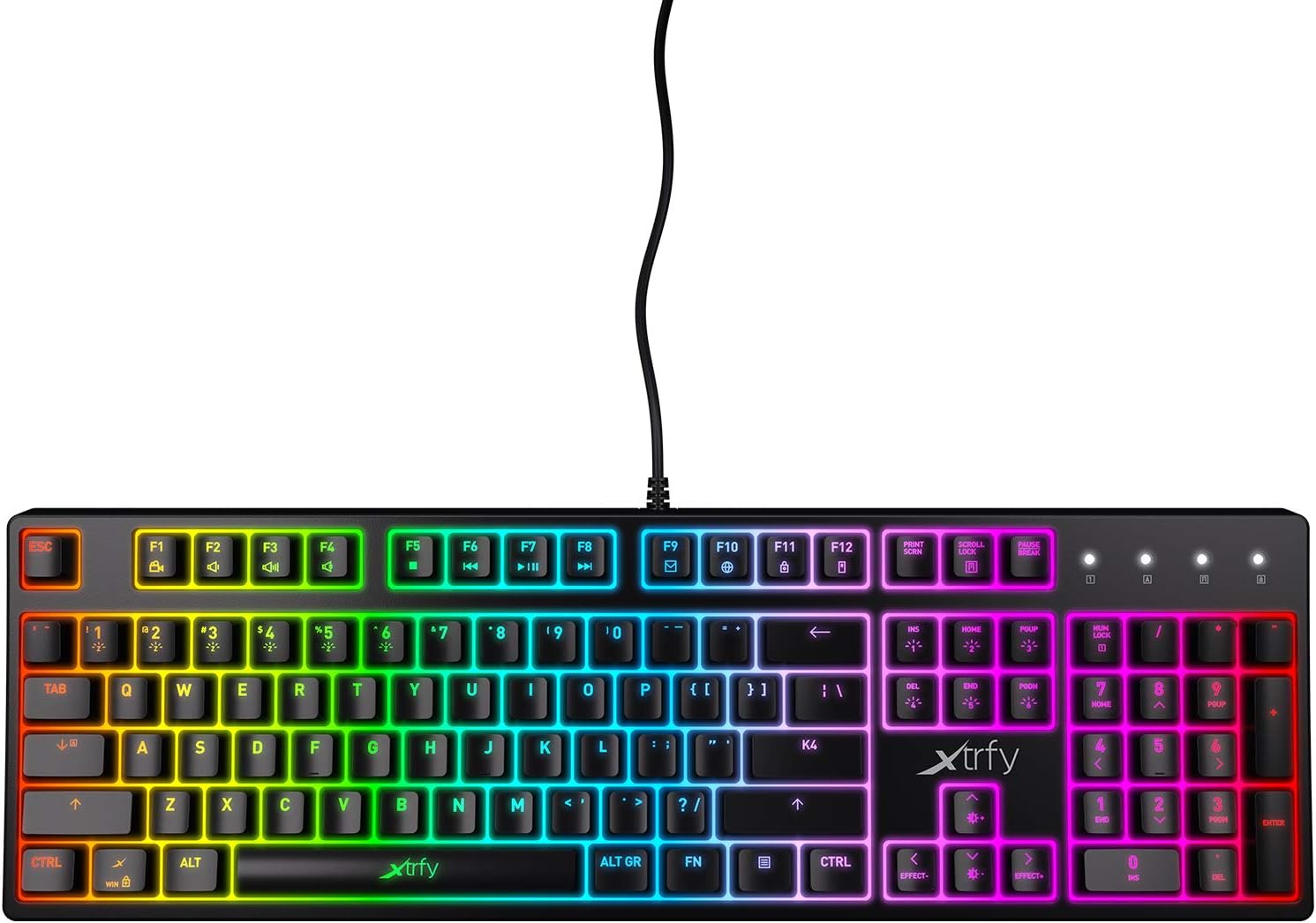
3.1 pav.: Iš viršaus į apačią view of the Xtrfy K4 RGB keyboard, showing key layout and attached USB cable.
4. Naudojimo instrukcijos
4.1 Pagrindinės klaviatūros funkcijos
The Xtrfy K4 RGB functions as a standard mechanical keyboard. All keys are pre-programmed for their respective characters and functions. It features full N-key rollover and a 1000 Hz polling rate for precise and responsive input.
4.2 RGB Illumination Control
The keyboard features customizable RGB illumination. Use the Function (FN) key in combination with specific keys to adjust lighting effects, brightness, and colors. Refer to the keycap legends for specific lighting controls.
- FN + F1–F12: These keys often control media functions or system shortcuts. Specific functions are indicated by icons on the keycaps.
- FN + rodyklių klavišai: Typically used to adjust brightness or change lighting directions/patterns.
- FN + Insert/Home/Page Up/Delete/End/Page Down: These keys are commonly used to cycle through different RGB lighting modes and effects.

Figure 4.1: The Xtrfy K4 RGB keyboard showcasindėl savo pritaikomo RGB apšvietimo.
5. Priežiūra
Tinkama priežiūra užtikrina jūsų klaviatūros ilgaamžiškumą ir našumą:
- Valymas: Klaviatūros paviršių nuvalykite minkšta, sausa šluoste. Gilesniam valymui naudokite suslėgtą orą, kad pašalintumėte dulkes ir šiukšles iš tarpų tarp klavišų dangtelių. Venkite naudoti stiprias chemines medžiagas ar abrazyvines medžiagas.
- Keycap Removal (Advanced): If necessary, keycaps can be carefully removed using a keycap puller for thorough cleaning. Exercise caution to avoid damaging the switches.
- Saugykla: Kai nenaudojate klaviatūros, laikykite ją švarioje, sausoje vietoje, toliau nuo tiesioginių saulės spindulių ir ekstremalių temperatūrų.
6. Problemų sprendimas
If you encounter issues with your Xtrfy K4 RGB keyboard, refer to the following common solutions:
- Klaviatūra nereaguoja:
- Įsitikinkite, kad USB laidas yra tvirtai prijungtas tiek prie klaviatūros, tiek prie kompiuterio.
- Pabandykite prijungti klaviatūrą prie kito USB prievado.
- Iš naujo paleiskite kompiuterį.
- RGB apšvietimas neveikia / yra netinkamas:
- Check if the lighting is turned off or set to a very low brightness using the FN key combinations.
- Jei naudojate trečiųjų šalių apšvietimo valdymo programas, įsitikinkite, kad nėra programinės įrangos konfliktų.
- Neregistruojami raktai:
- Nuvalykite paveiktą klavišo sritį, kad pašalintumėte visas šiukšles, kurios gali trukdyti jungikliui.
- If the issue persists, contact Xtrfy support.
7. Specifikacijos
| Funkcija | Detalė |
|---|---|
| Prekės ženklas | Xtrfy |
| Modelio numeris | XG-K4-RGB-R-US |
| Serija | K4RGB |
| Klaviatūros aprašymas | Mechaninis |
| Raktų jungikliai | Mechanical key switches (e.g., Kailh Red, depending on variant) |
| Apšvietimas | Pritaikomas RGB |
| Apklausos rodiklis | 1000 Hz |
| N klavišo perkėlimas | Full N-key rollover |
| Ryšys | USB-A (Corded Electric) |
| Suderinami įrenginiai | PC/Mac |
| Prekės svoris | 2.2 svaro (apie 1 kg) |
| Gaminio matmenys (IxPxH) | 17.44 colio x 17.44 colio x 1.54 colio (apytiksliai 44.3 x 44.3 x 3.9 cm) |
| Spalva | Juoda |
8. Garantija ir palaikymas
Xtrfy products are manufactured to high standards and come with a limited warranty. For specific warranty terms and conditions, please refer to the official Xtrfy websvetainėje arba susisiekite su jų klientų aptarnavimo tarnyba.
For technical assistance, troubleshooting beyond this manual, or warranty claims, please visit the official Xtrfy support page or contact their customer service directly. Keep your purchase receipt as proof of purchase.
Palaikymas internetu: www.xtrfy.com/support