
Įvadas
The UNITEK Y3035 Storage Drive Enclosure provides a convenient solution for connecting 2.5-inch or 3.5-inch SATA I/II/III Hard Disk Drives (HDDs) or Solid State Drives (SSDs) to your computer via a high-speed USB 3.0 interface. This enclosure allows you to utilize old hard drives as external storage, facilitating data recovery, backup, or expansion of your system's storage capacity.
Produkto savybės
- Visuotinis suderinamumas: Supports 2.5-inch and 3.5-inch SATA I/II/III HDDs and SSDs.
- Didelės spartos duomenų perdavimas: USB 3.0 (USB 3.1 Gen 1) interface offers data transfer rates up to 5Gbps. Backwards compatible with USB 2.0 and USB 1.1.
- UASP palaikymas: Implements USB Attached SCSI Protocol for enhanced read and write speeds, improving performance by up to 30% compared to traditional USB 3.0.
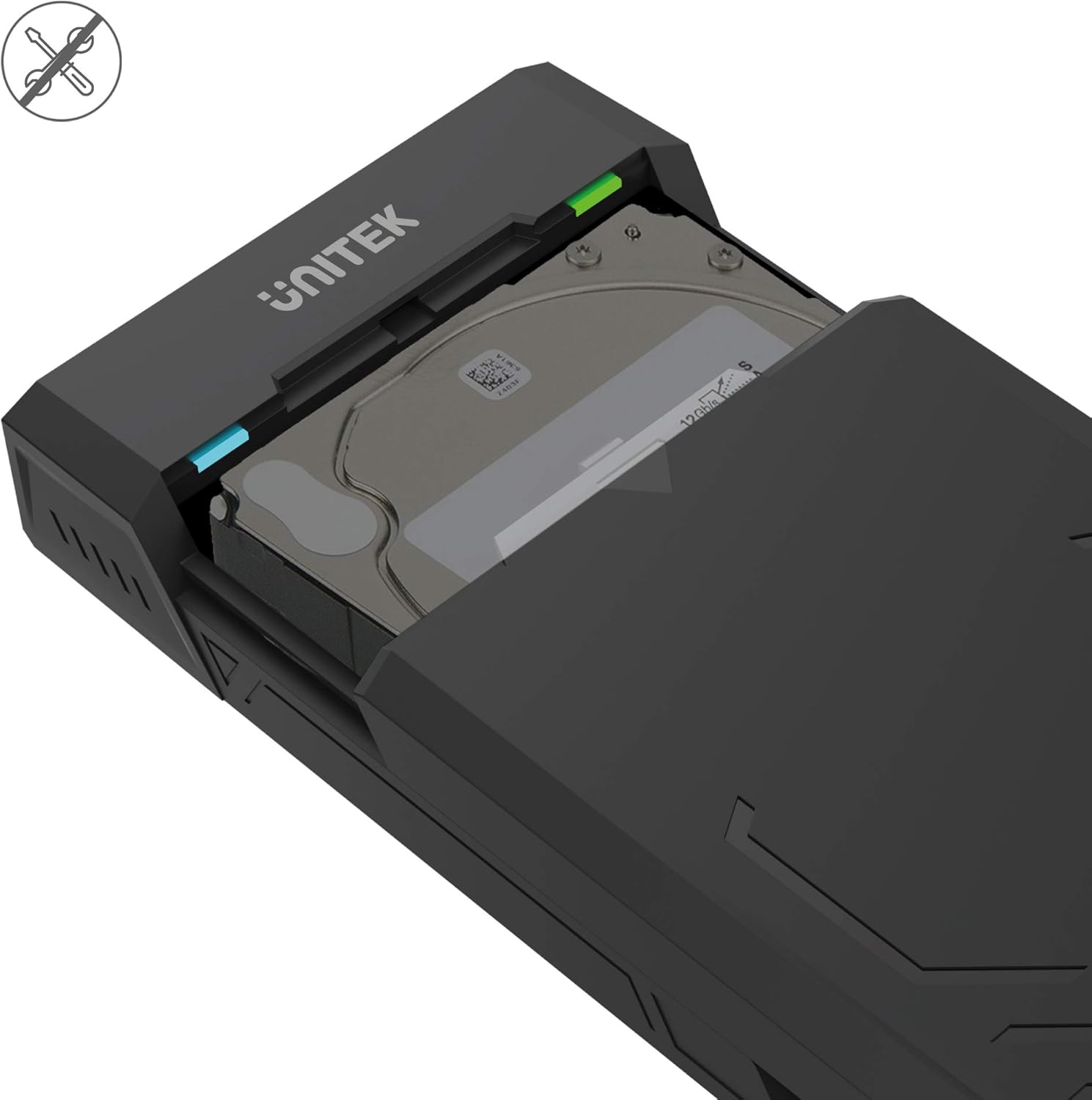
- Dizainas be įrankių: Allows for quick and easy installation and removal of hard drives without the need for tools.
- Automatinis miego režimas: Po 30 minučių neveiklumo persijungia į miego režimą, kad taupytų energiją ir pailgintų disko tarnavimo laiką.
- Efektyvus šilumos išsklaidymas: Designed with ventilation openings to facilitate heat dissipation and maintain optimal operating temperatures.
- Plug & Play: No additional drivers are required for operation on most modern operating systems.

Pakuotės turinys
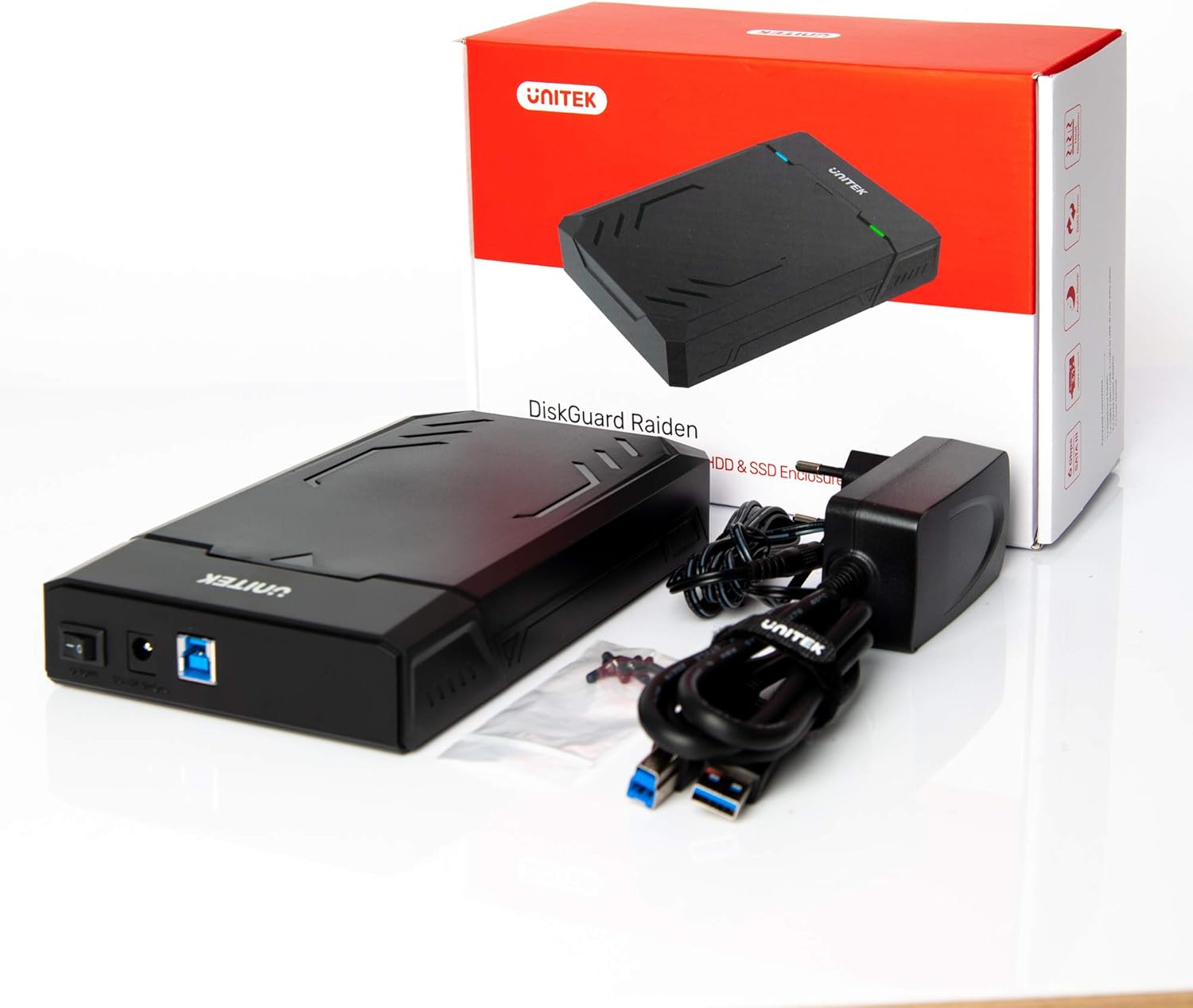
Prašome patikrinti, ar pakuotėje yra visi reikalingi daiktai:
- UNITEK Y3035 Hard Drive Enclosure
- USB 3.0 duomenų kabelis
- Power Adapter (for 3.5-inch HDDs or drives requiring external power)
Sąrankos instrukcijos
Follow these steps to install your hard drive into the enclosure:
- Atidarykite korpusą: Gently slide open the top cover of the UNITEK Y3035 enclosure.
- Įdėkite kietąjį diską: Align your 2.5-inch or 3.5-inch SATA HDD/SSD with the SATA connector inside the enclosure. Carefully push the drive into the connector until it is firmly seated.
- Uždarykite korpusą: Slide the top cover back into place until it clicks securely.
- Prijunkite USB kabelį: Connect one end of the provided USB 3.0 data cable to the enclosure's USB port and the other end to an available USB 3.0 port on your computer.
- Connect Power Adapter (if necessary): For 3.5-inch hard drives, or if your 2.5-inch drive requires additional power, connect the provided power adapter to the enclosure's power input and then to a wall outlet. 2.5-inch drives may be bus-powered by the USB port alone.
Naudojimo instrukcijos
Once connected, the UNITEK Y3035 enclosure operates as a standard external storage device.
- Automatinis aptikimas: Your operating system should automatically detect the connected drive. If it's a new drive, you may need to initialize and format it through Disk Management (Windows) or Disk Utility (macOS) before use.
- Prieiga prie duomenų: The drive will appear as a removable storage device in 'My Computer' or 'Finder'. You can drag and drop files, or use it for backups and other storage tasks.
- Saugus pašalinimas: Always safely eject the drive from your operating system before disconnecting the USB cable or power adapter to prevent data corruption.
- Miegojimo rezimas: The enclosure will automatically enter sleep mode after approximately 30 minutes of inactivity. The drive will spin down, and the indicator light may change or turn off. It will resume operation when accessed again.


Priežiūra
To ensure the longevity and optimal performance of your UNITEK Y3035 enclosure:
- Valymas: Korpuso išorę valykite minkšta, sausa šluoste. Venkite skystų valiklių ar tirpiklių.
- Aplinka: Keep the enclosure in a cool, dry place, away from direct sunlight, extreme temperatures, and high humidity.
- Tvarkymas: Handle the enclosure with care to prevent physical damage. Avoid dropping or subjecting it to strong impacts.
- Vėdinimas: Įsitikinkite, kad ventiliacijos angos nėra užblokuotos, kad šiluma tinkamai išsisklaidytų.
Trikčių šalinimas
If you encounter issues with your UNITEK Y3035 enclosure, refer to the following common solutions:
- Diskas neaptiktas:
- Ensure the hard drive is correctly seated within the enclosure's SATA connector.
- Įsitikinkite, kad USB kabelis yra tvirtai prijungtas tiek prie korpuso, tiek prie kompiuterio.
- If using a 3.5-inch HDD, confirm the power adapter is connected and receiving power.
- Pabandykite prijungti korpusą prie kito kompiuterio USB prievado.
- Test the enclosure with a different hard drive, or test the hard drive in another enclosure/system to isolate the issue.
- Patikrinkite Disko tvarkymą („Windows“) arba Disko įrankį („macOS“), kad pamatytumėte, ar diskas atpažįstamas, bet neinicializuotas arba neformatuotas.
- Mažas perdavimo greitis:
- Ensure the enclosure is connected to a USB 3.0 port on your computer. USB 2.0 ports will result in slower speeds.
- Verify that your operating system and drivers support USB 3.0 and UASP.
- The actual transfer speed can be affected by the performance of the installed hard drive.
- Korpusas atsitiktinai atsijungia:
- Ensure the power adapter is providing stable power, especially for 3.5-inch drives.
- Check for loose USB cable connections.
- Avoid connecting the enclosure through unpowered USB hubs.
Specifikacijos
| Modelis | Y3035 |
| Prekės ženklas | Unitek |
| Suderinami diskų tipai | 2.5-inch / 3.5-inch SATA I/II/III HDD/SSD |
| Techninės įrangos sąsaja | SATA 6.0 Gb/s, USB 3.0 (USB 3.1 Gen 1), USB 2.0, USB 1.1 |
| Duomenų perdavimo sparta | Iki 5 gigabitų per sekundę (USB 3.0) |
| Palaikomų įrenginių kiekis | 1 |
| Korpuso medžiaga | Plastikiniai |
| Spalva | Juoda |
| Prekės svoris | 270 gramų |
| Suderinami įrenginiai | Nešiojamasis kompiuteris, stacionarus kompiuteris |
| Gamintojas | „Allterco Robotics EOOD“ |

Garantija ir palaikymas
For warranty information, technical support, or further inquiries regarding your UNITEK Y3035 enclosure, please visit the official Unitek websvetainėje arba susisiekite su jų klientų aptarnavimo skyriumi. Išsamesnės informacijos paprastai galite rasti ant produkto pakuotės arba gamintojo websvetainę.