
1. Įvadas
Thank you for choosing the Awei A831BL Bluetooth In-Ear Headset. This manual provides essential information for the safe and efficient use of your device. Please read it carefully before use and retain it for future reference.
The Awei A831BL is a wireless in-ear headset designed for mobile phone use, offering up to 8 hours of continuous talk and music playback. It features pure, high-quality bass sound and is suitable for various activities.
2. Pakuotės turinys
Patikrinkite pakuotę, ar joje yra šie daiktai:
- Awei A831BL Bluetooth In-Ear Headset
- USB įkrovimo laidas
- Ausų antgaliai (įvairių dydžių)
- Vartotojo vadovas
3. Produktas baigtasview
Familiarize yourself with the components of your Awei A831BL headset.
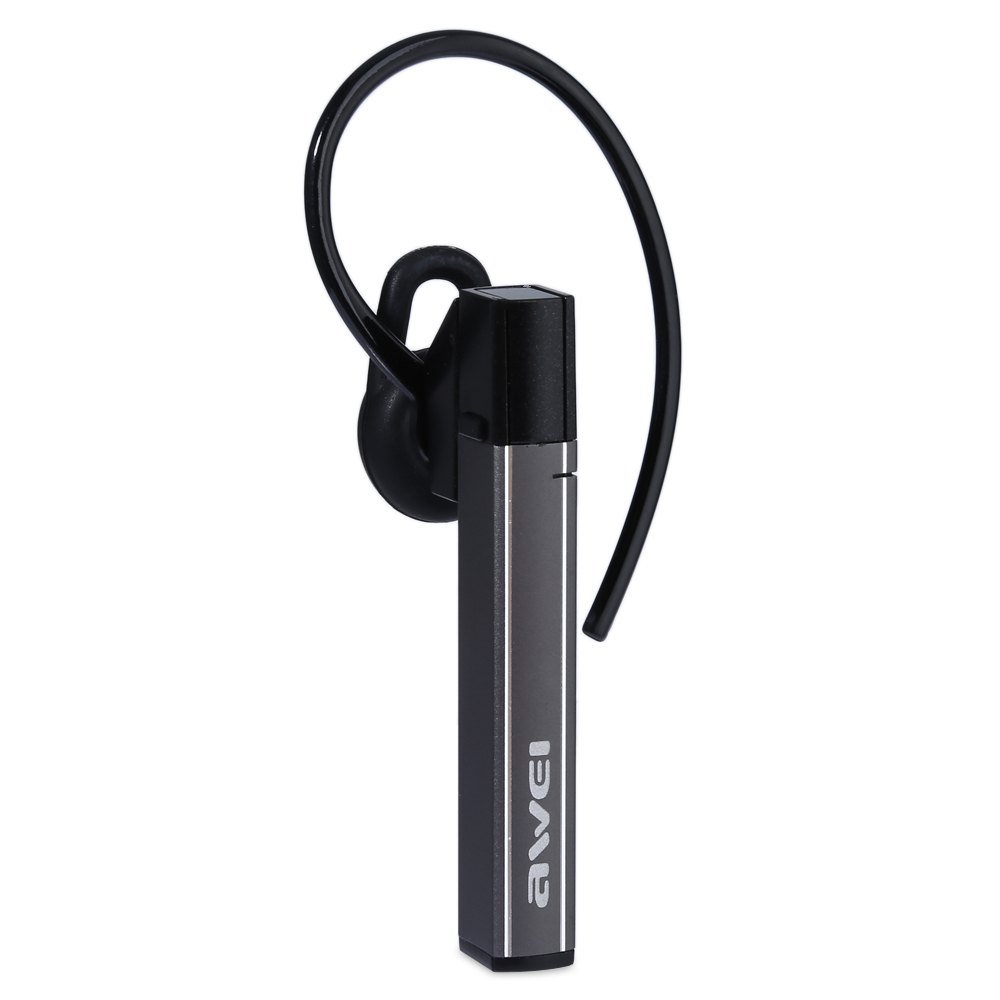
Image: The Awei A831BL Bluetooth In-Ear Headset in grey, showing the earbud design and inline controls.
The headset features an ergonomic in-ear design for comfortable wear, especially during activities. It includes an integrated microphone for hands-free calls and inline controls for managing audio and calls.
4. Sąranka
4.1 Ausinių įkrovimas
- Prijunkite USB įkrovimo laidą prie ausinių įkrovimo prievado.
- Kitą USB kabelio galą prijunkite prie USB maitinimo adapterio (nepridedamas) arba kompiuterio USB prievado.
- The indicator light will illuminate (e.g., red) during charging.
- Once fully charged, the indicator light will change (e.g., turn blue or turn off).
A full charge provides up to 8 hours of talk or music playback time.
4.2 Bluetooth poravimas
- Įsitikinkite, kad ausinės yra visiškai įkrautos ir išjungtos.
- Press and hold the Multi-function button (usually the center button on the inline control) for approximately 5-7 seconds until the indicator light flashes red and blue alternately, indicating pairing mode.
- Mobiliajame telefone arba „Bluetooth“ įrenginyje įjunkite „Bluetooth“ ir ieškokite galimų įrenginių.
- Iš rastų įrenginių sąrašo pasirinkite „Awei A831BL“.
- Jei jūsų paprašys slaptažodžio, įveskite „0000“ (keturis nulius).
- Once successfully paired, the indicator light will flash blue slowly, and you may hear a confirmation tone.
Įjungus ausines, jos automatiškai bandys prisijungti prie paskutinio suporuoto įrenginio.
5. Naudojimo instrukcijos
5.1 Maitinimo įjungimas/išjungimas
- Maitinimas: Press and hold the Multi-function button for about 3 seconds until the blue indicator light flashes.
- Išjungti: Press and hold the Multi-function button for about 3-4 seconds until the red indicator light flashes briefly and then turns off.
5.2 Muzikos atkūrimas
- Leisti / pristabdyti: Vieną kartą paspauskite daugiafunkcį mygtuką.
- Pagarsink: Paspauskite mygtuką „+“.
- Patildyti: Paspauskite mygtuką „-“.
- Kitas takelis: Paspauskite ir palaikykite nuspaudę mygtuką „+“.
- Ankstesnis takelis: Paspauskite ir palaikykite nuspaudę mygtuką „-“.
5.3 Skambučių valdymas
- Atsiliepti į skambutį: Kai skambinate, vieną kartą paspauskite daugiafunkcį mygtuką.
- Baigti skambutį: Skambučio metu vieną kartą paspauskite daugiafunkcį mygtuką.
- Atmesti skambutį: Kai skambinate, paspauskite ir palaikykite daugiafunkcį mygtuką maždaug 2 sekundes.
- Perrink paskutinį numerį: Du kartus paspauskite daugiafunkcinį mygtuką.
The integrated microphone allows for clear hands-free communication.
6. Priežiūra
- Reguliariai valykite ausines minkštu, sausu skudurėliu.
- Avoid exposing the headset to extreme temperatures, humidity, or corrosive substances.
- Nebandykite ardyti ar modifikuoti ausinių, nes tai panaikins garantiją ir gali sukelti gedimų.
- Laikykite ausines vėsioje, sausoje vietoje, kai nenaudojate.
7. Problemų sprendimas
| Problema | Sprendimas |
|---|---|
| Ausinės neįsijungia. | Ensure the headset is fully charged. Connect it to a power source and try again. |
| Nepavyksta susieti su įrenginiu. | Ensure the headset is in pairing mode (flashing red and blue). Turn off and on your device's Bluetooth. Move closer to the device. Clear previous Bluetooth connections on your device. |
| Nėra garso arba garsas per mažas. | Patikrinkite garsumo lygius ausinėse ir prijungtame įrenginyje. Įsitikinkite, kad ausinės tinkamai prijungtos. |
| Prasta skambučių kokybė. | Ensure the microphone is not obstructed. Move to an area with less interference. Check your phone's signal strength. |
8. Specifikacijos
| Funkcija | Detalė |
|---|---|
| Prekės ženklas | Awei |
| Modelio numeris | A831BL |
| Spalva | Pilka |
| Ryšio technologija | Belaidis ryšys („Bluetooth“) |
| Ausinių tipas | Į ausis |
| Mikrofonas | Taip |
| Triukšmo panaikinimas | Nr |
| Baterijos veikimo laikas | Up to 8 hours (talk/music) |
| Garso ypatybės | Pure, high-quality bass sound |
| Medžiaga | Plastikiniai |
| Suderinami įrenginiai | Mobilieji telefonai |
9. Garantija ir palaikymas
Awei products are designed and manufactured to the highest quality standards. For warranty information and customer support, please refer to the warranty card included in your package or contact your local retailer. Keep your purchase receipt as proof of purchase.
Dėl papildomos pagalbos apsilankykite oficialioje Awei svetainėje websvetainėje arba susisiekite su klientų aptarnavimo skyriumi.