
Awei A831BL
Awei A831BL In-Ear Bluetooth Headset User Manual
Modelis: A831BL
Įvadas
This manual provides detailed instructions for the proper use and maintenance of your Awei A831BL In-Ear Bluetooth Headset. Please read this manual carefully before using the device to ensure optimal performance and longevity.
Produktas baigtasview
The Awei A831BL is a wireless in-ear Bluetooth headset designed for mobile phone use, offering clear audio and a built-in microphone. It is suitable for various activities, including sports.
Pagrindinės funkcijos:
- Belaidis Bluetooth ryšys
- Į ausis įdedamas dizainas
- Integrated microphone for calls
- Up to 8 hours of continuous talk/music time
- Pure bass and high-quality sound
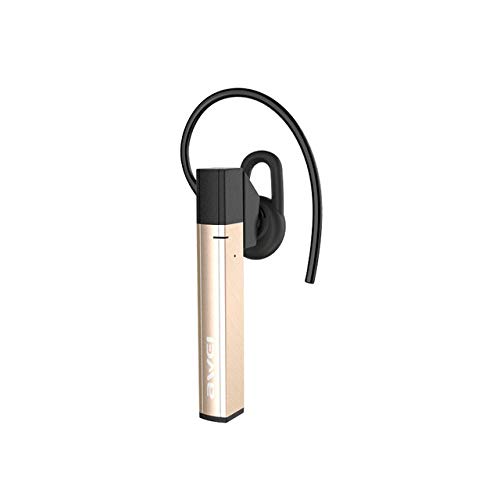
1 paveikslas: Awei A831BL In-Ear Bluetooth Headset. This image shows the compact design of the headset, highlighting its in-ear form factor and wireless nature.
Sąranka
1. Ausinių įkrovimas
Before first use, fully charge the headset. Connect the charging cable to the headset's charging port and the other end to a USB power source (e.g., computer, wall adapter). The indicator light will typically show red during charging and turn blue or off when fully charged.
2. Suporavimas su „Bluetooth“ įrenginiu
- Įsitikinkite, kad ausinės išjungtos.
- Press and hold the multi-function button (usually the power button) for approximately 5-7 seconds until the indicator light flashes red and blue alternately. This indicates pairing mode.
- Mobiliajame telefone arba „Bluetooth“ įrenginyje eikite į „Bluetooth“ nustatymus ir įjunkite „Bluetooth“.
- Ieškokite available devices. The headset should appear as "Awei A831BL" or similar.
- Select the headset from the list to connect. If prompted for a password, enter "0000".
- Once successfully paired, the indicator light will typically flash blue slowly or turn off, and you may hear an audible confirmation.
Pastaba: The headset will automatically attempt to reconnect to the last paired device when turned on, if the device's Bluetooth is active and within range.
Naudojimo instrukcijos
Maitinimo įjungimas/išjungimas
- Maitinimas: Press and hold the multi-function button for about 3 seconds until the blue indicator light flashes and you hear a power-on prompt.
- Išjungti: Press and hold the multi-function button for about 3-4 seconds until the red indicator light flashes and you hear a power-off prompt.
Muzikos atkūrimas
- Leisti / pristabdyti: Vieną kartą paspauskite daugiafunkcį mygtuką.
- Kitas takelis: Paspauskite ir palaikykite garsumo didinimo (+) mygtuką.
- Ankstesnis takelis: Paspauskite ir palaikykite garsumo mažinimo (-) mygtuką.
- Pagarsink: Trumpai paspauskite garsumo didinimo (+) mygtuką.
- Patildyti: Trumpai paspauskite garsumo mažinimo (-) mygtuką.
Skambučių valdymas
- Atsiliepti / Baigti skambutį: Vieną kartą paspauskite daugiafunkcį mygtuką.
- Atmesti skambutį: Paspauskite ir palaikykite daugiafunkcį mygtuką maždaug 2 sekundes.
- Perrink paskutinį numerį: Dukart paspauskite daugiafunkcį mygtuką.
Priežiūra
- Keep the headset dry. Avoid exposure to moisture or liquids.
- Clean the headset with a soft, dry cloth. Do not use abrasive cleaners.
- Laikykite ausines vėsioje, sausoje vietoje, toliau nuo ekstremalių temperatūrų.
- Venkite ausinių numetimo ir stiprių smūgių.
- Nebandykite ardyti ar modifikuoti ausinių, nes tai panaikins garantiją.
Trikčių šalinimas
| Problema | Sprendimas |
|---|---|
| Ausinės neįsijungia. | Ensure the headset is fully charged. Connect it to a power source and try again. |
| Nepavyksta susieti su įrenginiu. |
|
| Nėra garso arba garsas per mažas. |
|
| Skambučių kokybė prasta. |
|
Specifikacijos
| Funkcija | Detalė |
|---|---|
| Modelio numeris | A831BL |
| Prekės ženklas | Awei |
| Spalva | Auksas |
| Ryšio technologija | Belaidis ryšys („Bluetooth“) |
| Ausinių formos faktorius | Į ausis |
| Mikrofonas | Taip |
| Triukšmo panaikinimas | Nr |
| Battery Life (Talk/Music) | Iki 8 valandų |
| Valdymo tipas | Garsumo valdymas |
| Medžiaga | Plastikiniai |
| Įtraukti komponentai | Ausų pagalvėlės |
| Gaminio matmenys | 16.8 x 10.4 x 3.6 cm; 150 gramų |
Garantija ir palaikymas
Dėl garantijos informacijos ar techninės pagalbos žr. prie pirkinio pridėtus dokumentus arba susisiekite tiesiogiai su gamintoju. Išsaugokite pirkimo įrodymą, jei galėtumėte pateikti pretenzijas dėl garantijos.
Ask a question about this manual
Ask about setup, troubleshooting, compatibility, parts, safety, or missing instructions. Manuals+ will review the question and use this page’s manual context to help answer it.