
1. Įvadas
This manual provides comprehensive instructions for the IMILAB CMSXJ16A Smart Home Security Camera, a product of XIAOMI. It covers setup, operation, maintenance, and troubleshooting to ensure optimal performance and security monitoring. Please read this manual carefully before using the product and retain it for future reference.
2. Produktas baigtasview
2.1 Pakuotės turinys
Patikrinkite, ar pakuotėje yra visi reikalingi daiktai:
- IMILAB Home Security Camera Basic x 1
- Naudojimo instrukcija x 1
- Maitinimo kabelis x 1
- Power Adapter (UK/EU/US) x 1
- Wall Mounting Package x 1 (includes screws and wall plugs)
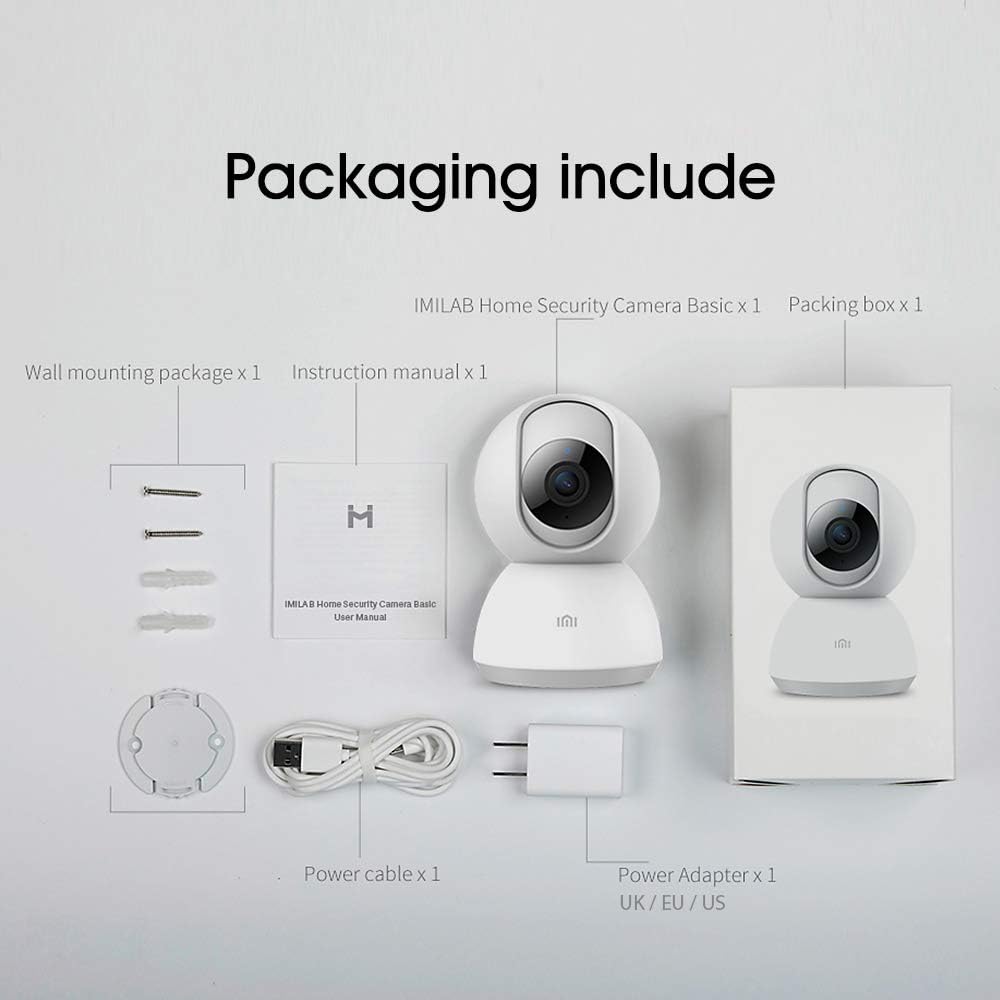
Image: Contents of the IMILAB CMSXJ16A camera package.
2.2 Kameros komponentai
The IMILAB CMSXJ16A camera features a compact, spherical design with a rotating base for 360-degree coverage. Key components include the lens, microphone, speaker, status indicator light, and power port.

Vaizdas: priekis view of the IMILAB CMSXJ16A camera.
2.3 Pagrindinės savybės
- FHD (1080P) Resolution: Provides clear and detailed image quality.
- 360° sukimasis: Siūlo panoraminį vaizdą viewing for comprehensive area coverage.
- Glare-Free Night Vision: Equipped with F2.1 aperture and 8x 940mm infrared LEDs for a visible distance of 10m.
- Tikrų spalvų naktinis matymas: Maintains full color in low light conditions, even at 100 lumens.
- AI žmogaus aptikimas: Advanced AI reduces unnecessary alerts by 70% for more accurate notifications.
- Crying Baby Notification: Alerts you to the sound of a crying baby.
- Kelios saugojimo parinktys: Supports cloud storage, up to 64GB Micro TF card, and NAS storage.
- H.265 vaizdo kodavimas: Efficiently compresses video, saving storage space while maintaining quality.
3. Sąranka
3.1 Įjungimas
- Connect the power cable to the camera's power port.
- Įjunkite maitinimo adapterį į standartinį elektros lizdą.
- The camera will power on, and the status indicator light will begin to flash, indicating it is ready for connection.
3.2 Programos diegimas
Download the official IMILAB Home Security app from your smartphone's app store. The app is compatible with Android 4.4 and above, and iOS 8.0 and above.
- Ieškokite "IMILAB Home Security" in the Google Play Store (for Android) or Apple App Store (for iOS).
- Atsisiųskite ir įdiekite programą.
- Atidarykite programą ir vadovaukitės ekrane pateikiamomis instrukcijomis, kad sukurtumėte paskyrą arba prisijunkite.
3.3 Prisijungimas prie „Wi-Fi“.
Follow the in-app instructions to connect your camera to your home Wi-Fi network. This typically involves scanning a QR code generated by the app with the camera's lens.
3.4 Fotoaparato montavimas
The camera supports wall mounting. Use the provided wall mounting package for secure installation.
- Pasirinkite tinkamą montavimo vietą, užtikrindami laisvą matymo lauką view ir prieigą prie elektros lizdo.
- Use the mounting base as a template to mark drill holes on the wall.
- Gręžkite skyles ir įkiškite sieninius kaiščius.
- Secure the mounting base to the wall with screws.
- Attach the camera to the mounting base.
4. Naudojimo instrukcijos
4.1 Tiesiogiai View ir nuotolinio valdymo pultą
Once connected, open the IMILAB Home Security app to access the live video feed from your camera. You can remotely control the camera's 360-degree rotation to view different areas of your space.

Image: Live view of the camera feed on mobile devices, demonstrating H.265 encoding efficiency.
4.2 Naktinis matymas
The camera automatically switches to night vision mode in low light conditions. It features glare-free infrared night vision and true color night vision for clear visibility even in very dim environments.

Image: Demonstration of glare-free and true color night vision capabilities.
4.3 AI Human Detection and Notifications
The camera utilizes AI to detect human movement, significantly reducing false alarms from pets or other non-human movements. You will receive precise notifications on your smartphone when human activity is detected.

Image: AI movement notification interface in the mobile application.
4.4 Crying Baby Detection
Enable the crying baby detection feature in the app to receive alerts if the camera detects the sound of a baby crying, providing an additional layer of monitoring for nurseries.
4.5 Vaizdo įrašymas ir saugojimas
The camera supports real-time video recording with multiple storage options:
- Saugykla debesyje: Subscribe to cloud services for secure off-site storage of your recordings.
- Mikro TF kortelė: Insert a Micro TF card (up to 64GB, not included) into the camera for local storage.
- NAS saugykla: Connect the camera to a Network Attached Storage (NAS) device for expanded local storage capabilities.
4.6 H.265 Video Encoding
The camera uses H.265 video encoding, which allows for more efficient compression of video files. This means you can save the same quality video with approximately 50% less file size compared to H.264, optimizing storage and bandwidth usage.
5. Priežiūra
To ensure the longevity and optimal performance of your camera, follow these maintenance guidelines:
- Valymas: Švelniai nuvalykite fotoaparato objektyvą ir korpusą minkštu, sausu skudurėliu. Nenaudokite stiprių cheminių medžiagų ar abrazyvinių valiklių.
- Vieta: Ensure the camera is placed in a stable environment, away from direct sunlight, extreme temperatures, and high humidity.
- Firmware atnaujinimai: Reguliariai tikrinkite programėlę, ar nėra programinės įrangos atnaujinimų, kad įsitikintumėte, jog jūsų kameroje yra naujausios funkcijos ir saugumo patobulinimai.
6. Problemų sprendimas
If you encounter issues with your IMILAB CMSXJ16A camera, refer to the following common solutions:
- Kamera neprisijungia: Ensure your Wi-Fi network is 2.4GHz (5GHz is not supported). Check Wi-Fi signal strength. Restart the camera and your router.
- Prasta vaizdo kokybė: Clean the camera lens. Ensure adequate lighting in the environment. Check your internet connection speed.
- Nėra pranešimų: Verify that notifications are enabled in both the camera app settings and your smartphone's system settings. Check network connectivity.
- Fotoaparatas neprisijungęs: Check the power connection. Ensure your Wi-Fi network is active and the camera is within range. Restart the camera.
- Micro TF Card Not Detected: Ensure the card is inserted correctly. Format the card through the app if it's new or has issues. Use a compatible Micro TF card (up to 64GB).
7. Specifikacijos
| Funkcija | Specifikacija |
|---|---|
| Modelio numeris | CMSXJ16A |
| Matmenys (I x P x A) | 10.8 x 7.6 x 7.6 cm |
| Svoris | 211 gramų |
| Vaizdo raiška | 1080p (Full HD) |
| Laukas View / Angle of View | 360 laipsnių |
| Naktinio matymo atstumas | 10 metrų |
| Infraraudonieji šviesos diodai | 8x940mm |
| Diafragma | F2.1 |
| Ryšio technologija | Wired, Wireless (Wi-Fi 2.4GHz) |
| Maitinimo šaltinis | Mains Powered (via 5V, 5W adapter) |
| Suderinami įrenginiai | Išmanusis telefonas („Android 4.4+“, „iOS 8.0+“) |
| Saugojimo parinktys | Cloud, Micro TF Card (max 64GB), NAS |
| Vaizdo įrašymo formatas | MP4 (H.265 kodavimas) |
| Naudojimas viduje / lauke | Vidinis |
| Montavimo tipas | Sieninis laikiklis |
8. Garantija ir palaikymas
Dėl garantijos informacijos ir techninės pagalbos kreipkitės į oficialią IMILAB svetainę. websvetainėje arba susisiekite su jų klientų aptarnavimo tarnyba. Išsaugokite pirkimo kvitą kaip pirkimo įrodymą garantijos pretenzijoms.