
1. Įvadas
This manual provides detailed instructions for the installation, operation, and maintenance of your BINIZE Android 13 Car Stereo. This 9-inch touchscreen head unit is designed for Toyota Camry models from 2006 to 2011, offering advanced features such as Wireless CarPlay, Android Auto, GPS navigation, WiFi connectivity, and support for a backup camera.
Prieš naudodami gaminį, atidžiai perskaitykite šį vadovą, kad užtikrintumėte tinkamą veikimą ir saugą.
2. Sąranka ir diegimas
Tinkamas įrengimas yra labai svarbus optimaliam veikimui. Jei nesate tikri dėl kurių nors veiksmų, rekomenduojama kreiptis į specialistus.
2.1 Pakuotės turinys
Patikrinkite, ar pakuotėje yra visi komponentai:
- BINIZE Android 13 Car Stereo Head Unit (9-inch)
- Maitinimo kabelis
- RCA įvesties/išvesties kabeliai
- 2 USB laidai
- GPS antena
- Instrukcijų vadovas (šis dokumentas)
- Kameros įvesties kabelis
- Atsarginė kamera

Figure 2.1: Included components of the BINIZE Android 13 Car Stereo.
2.2 Transporto priemonių suderinamumas
This head unit is specifically designed for Toyota Camry models manufactured between 2006 and 2011.

Figure 2.2: BINIZE Car Stereo installed in a compatible Toyota Camry dashboard.

2.3 pav.: Prieš ir po įdiegimo view of the BINIZE Car Stereo in a Toyota Camry.
2.3 Laidai ir jungtys
Connect the power harness, RCA cables, USB cables, GPS antenna, and backup camera input as per the wiring diagram provided with your unit. Ensure all connections are secure to prevent malfunctions.
Pastaba: If the provided wiring harness is incompatible with your vehicle, contact customer service for an appropriate replacement.
2.4 Pradinis įjungimas
After installation, turn on your vehicle's ignition. The head unit should power on automatically. Follow any on-screen prompts for initial setup.
3. Naudojimo instrukcijos
3.1 Pradinis ekranas ir naršymas
The home screen provides access to all main functions and applications. Swipe left or right to navigate through app pages. Tap on an icon to launch the corresponding application.

Figure 3.1: Main interface of the BINIZE Android 13 Car Stereo.
3.2 Belaidis „CarPlay“ ir „Android Auto“
The unit supports both Wireless CarPlay and Wireless Android Auto for seamless smartphone integration. Connect your phone via Bluetooth and Wi-Fi to access navigation, music, calls, and messaging apps directly on the car stereo.

3.2 pav.: Belaidžio „CarPlay“ ir „Android Auto“ funkcionalumas.
3.3 Veidrodinio susiejimo funkcija
For apps not supported by CarPlay or Android Auto, use the Mirror Link function to display your smartphone screen (both iOS and Android) on the car stereo. This allows for viewing videos and other content.

Figure 3.3: Mirror Link feature in action.
Video 3.1: Demonstration of the Binize car stereo's features, including screen mirroring.
3.4 GPS navigacija
The unit features a built-in GPS receiver and antenna. You can use pre-installed navigation apps or download others from the Play Store. Both online and offline maps are supported.

3.4 pav.: GPS navigacijos sąsaja.
3.5 FM radijas
Access FM radio stations with a tuning range of 87.5-108 MHz. Save your favorite stations for quick access.
3.5 pav.: FM radijo sąsaja.
3.6 Muzikos ir vaizdo įrašų atkūrimas
Enjoy lossless music playback and high-definition video. The unit supports various audio and video formats. You can download media apps from the Play Store.
Figure 3.6: Music and Video playback interfaces.
3.7 Digital Signal Processor (DSP) and Equalizer
Customize your audio experience with the built-in DSP. Adjust multi-band EQ settings, equal loudness, and sound field to achieve true stereo surround sound through the 6-speaker output.

Figure 3.7: DSP and Equalizer settings.
3.2 vaizdo įrašas: Viršview of the Binize 10 Inch Double Din Touchscreen Android Car Stereo features.
3.8 Galinio vaizdo kameros funkcionalumas
The unit supports AHD HD reversing cameras. When the vehicle is in reverse, the screen automatically displays the camera feed with reversing guidelines for safer parking.
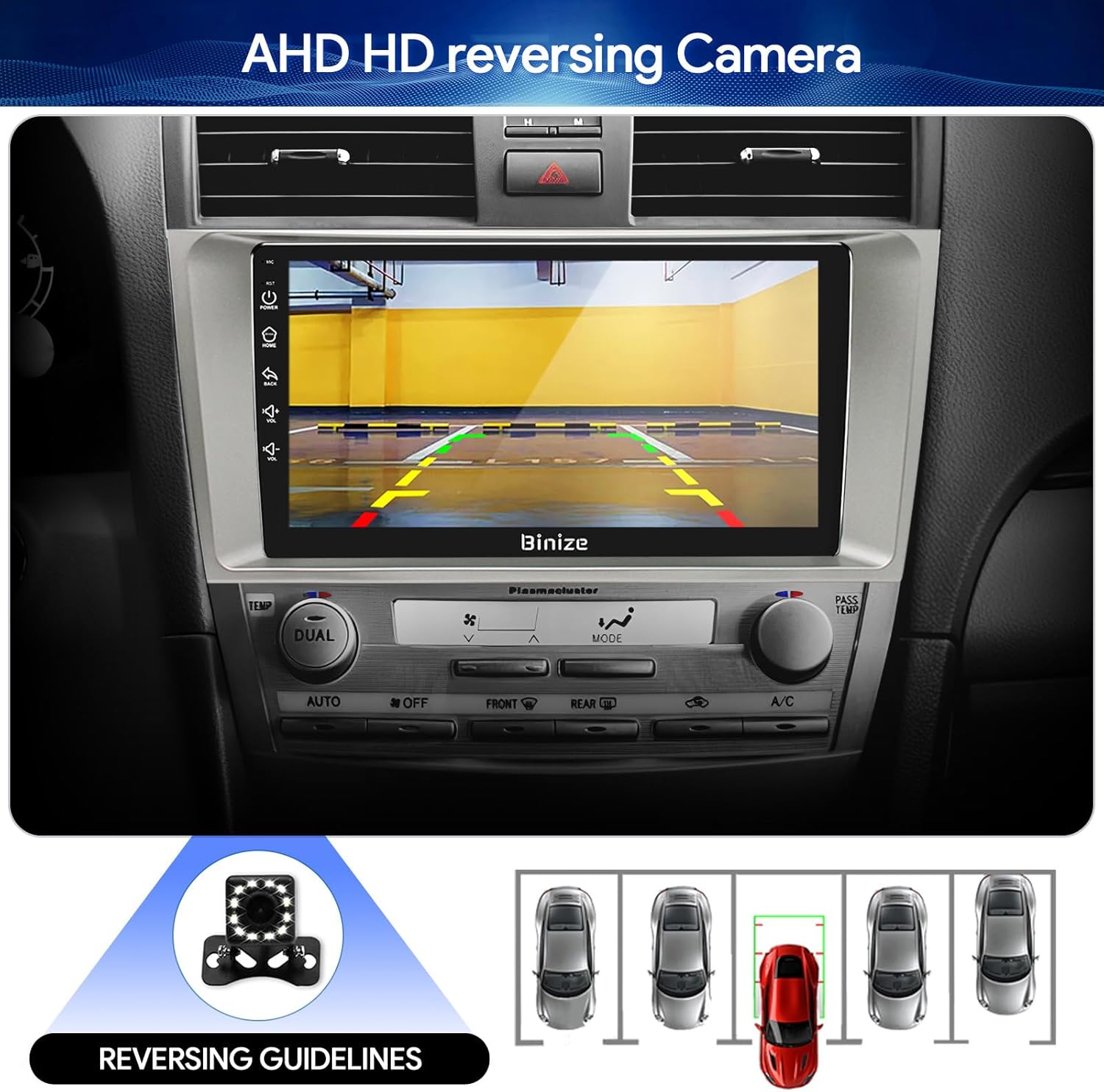
Figure 3.8: Backup camera display with reversing guidelines.
3.9 Bluetooth 5.0 for Hands-Free Calling
Connect your phone via Bluetooth 5.0 for faster network transmission and hands-free calling. Dial, answer, or receive calls directly from the head unit.
3.9 pav.: „Bluetooth“ laisvų rankų skambinimo sąsaja.
4. Priežiūra
4.1 Ekrano valymas
Jutiklinį ekraną švelniai nuvalykite minkšta, nepūkuota šluoste. Venkite abrazyvinių valiklių ar stiprių cheminių medžiagų, kurios gali pažeisti ekraną.
4.2 Programinės įrangos naujiniai
Periodically check for software updates to ensure optimal performance and access to new features. Updates can typically be performed via Wi-Fi or USB.
5. Problemų sprendimas
- Nėra galios: Check all power connections and vehicle's fuse box. Ensure the ignition is on.
- Nėra garso: Verify speaker connections, volume levels, and EQ settings. Check if the unit is muted.
- GPS signalo problemos: Įsitikinkite, kad GPS antena tinkamai sumontuota ir turi laisvą view dangaus.
- „Bluetooth“ ryšio problemos: Įsitikinkite, kad „Bluetooth“ įjungtas ir pagrindiniame įrenginyje, ir telefone. Pabandykite atjungti ir iš naujo susieti įrenginius.
- Vairo valdikliai neveikia: Refer to the "SW Learning" or "Steering Wheel Setting" in the unit's settings menu to configure the controls.
- Screen Lag/Unresponsiveness: Restart the unit. If issues persist, consider a factory reset (note: this will erase personal data).
- Wiring Harness Incompatibility: If the provided wiring harness does not fit your vehicle, contact BINIZE customer service for assistance.
6. Specifikacijos
| Funkcija | Specifikacija |
|---|---|
| Prekės svoris | 2.84 svaro |
| Pakuotės matmenys | 11.2 x 7.2 x 3.7 colio |
| Ekrano dydis | 10.1 colių |
| Balso komanda | Mygtukai, mikrofonas, jutiklinis ekranas |
| Prekės ženklas | BINIZE |
| Transporto priemonės paslaugos tipas | Automobilis |
| Ypatinga funkcija | „Bluetooth“, jutiklinis ekranas |
| Ryšio technologija | „Bluetooth“, USB, „Wi-Fi“ |
| Žemėlapio tipas | Online and Offline |
| Garso išvesties režimas | Garsiakalbis, Stereo |
| Montavimo tipas | Prietaisų skydelio laikiklis |
| Rezoliucija | 1024 x 600 |
| Operacinė sistema | Android |
7. Garantija ir palaikymas
BINIZE offers top-notch customer service. If you encounter any problems before or after sale, please contact the BINIZE customer service team via Amazon email. They are committed to assisting you with any issues and can provide support for online updates and warranty information.
For further assistance, please refer to the contact information provided with your purchase or visit the official BINIZE store on Amazon.