
1. Įvadas
Ačiū, kad pirkoteasing the Moukey MAMP1 220W Bluetooth Dual Channel Power Ampkeltuvas. Tai amplifier is designed to provide powerful and versatile audio amplification for various applications, including karaoke, home theater systems, and general audio playback. It features multiple input options, Bluetooth 5.0 connectivity, and intuitive controls for an enhanced audio experience. Please read this manual thoroughly before use to ensure proper operation and to maximize the product's performance.
2. Saugos instrukcijos
Kad išvengtumėte elektros smūgio, gaisro ar įrenginio sugadinimo, laikykitės šių saugos priemonių:
- Saugokite šį įrenginį nuo lietaus ar drėgmės.
- Neatidarykite casing. Viduje nėra dalių, kurias galėtų aptarnauti vartotojas. Visus techninės priežiūros darbus patikėkite kvalifikuotiems darbuotojams.
- Užtikrinkite maitinimo šaltinio ttage atitinka ant įrenginio nurodytus reikalavimus.
- Place the unit on a stable, flat surface with adequate ventilation. Do not block ventilation openings.
- Laikykite įrenginį atokiau nuo šilumos šaltinių, tiesioginių saulės spindulių ir per didelio dulkių kiekio.
- Disconnect the power plug from the outlet if the unit will not be used for an extended period.
- Nenaudokite įrenginio šlapiomis rankomis.
3. Pakuotės turinys
Patikrinkite, ar pakuotėje yra visi reikalingi daiktai:
- Moukey MAMP1 Galia Ampkėlimo blokas
- Nuotolinio valdymo pultas
- FM antena
- Vartotojo vadovas (šis dokumentas)
4. Produktas baigtasview
4.1 Priekinio skydelio valdikliai ir funkcijos
The front panel provides access to all primary controls and input ports for easy operation.

Image: Detailed diagram of the Moukey MAMP1 front panel, highlighting each control and port with corresponding numbers.
- Maitinimo jungiklis: Įjungia arba išjungia įrenginį.
- USB / SD Slot: Garso įrašams leisti files from USB drives (max 32GB) or SD cards (max 16GB).
- Režimo mygtukas: Cycles through input modes (Bluetooth, USB, SD, AUX, FM).
- BT mygtukas: Tiesiogiai perjungia į „Bluetooth“ režimą.
- Prev Button: Peršoka į ankstesnį takelį / stotį.
- Paleidimo / pristabdymo mygtukas: Paleidžia arba pristabdo garso atkūrimą.
- Kitas mygtukas: Peršoka į kitą takelį / stotį.
- Skystųjų kristalų ekranas: Shows current mode, track information, or frequency.
- Folder / Track: Navigates through folders or tracks on USB/SD.
- Pagrindinis garsumo rankenėlė: Reguliuoja bendrą išvesties garsumą.
- Ausinių lizdas: 3.5mm output for monitor headphones.
- Microphone 1 Input: 6.35 mm lizdas mikrofonui prijungti.
- Microphone 2 Input: 6.35 mm lizdas antram mikrofonui prijungti.
- Mikrofono garsumo rankenėlė: Reguliuoja prijungtų mikrofonų garsumą.
- Echo rankenėlė: Valdo mikrofonų aidėjimo efektą.
- Boso rankenėlė: Reguliuoja žemo dažnio garso išvestį.
- Aukštoji rankenėlė: Reguliuoja aukšto dažnio garso išvestį.
- Balanso rankenėlė: Reguliuoja kairiojo / dešiniojo kanalų balansą.
- AUX įvesties lizdas: 3.5 mm įvestis išoriniams garso įrenginiams.
- Įvesties parinkiklis: Rotary switch to select between CD, AUX, DVD, and MP3/W inputs.
4.2 Galinio skydelio jungtys
Galiniame skydelyje yra pagrindinės garso įvesties ir išvesties jungtys.

Vaizdas: Galinis view of the Moukey MAMP1 amplifier, showing all input and output ports.

Image: Detailed diagram of the Moukey MAMP1 rear panel, highlighting each connection point.
- Audio Input for DVD (RCA): Connect DVD players or other audio sources.
- Audio Input for CD (RCA): Connect CD players or other audio sources.
- Line Out Jack (RCA): Dėl prisijungimo prie kito ampilgaamžiškumą ar įrašymo įrenginį.
- FM Antenna Jack: Prijunkite pridedamą FM anteną radijo imtuvui.
- Speaker Output Jacks: Connect passive speakers (4-16 Ohm impedance).
- Maitinimo kabelio įvestis: Prijunkite kintamosios srovės maitinimo laidą.
5. Sąranka
5.1 Įdėjimas
Padėkite amplifier on a flat, stable surface. Ensure there is sufficient space around the unit for proper ventilation to prevent overheating.
5.2 Maitinimo jungtis
Connect the power cable to the Power Cable Input on the rear panel of the amplifier, then plug the other end into a suitable AC power outlet (115V AC).
5.3 Garsiakalbio prijungimas
MAMP1 amplifier supports two sets of passive speakers with an impedance of 4-16 Ohms. Use appropriate speaker wire to connect your speakers to the Speaker Output Jacks on the rear panel.

Image: Diagram illustrating how to connect speakers to the amplifier's binding posts.
- Rotate and loosen the speaker knob on the binding post.
- Insert the bare wire (remove approximately 10mm of insulation) into the hole. Ensure correct polarity (+ to + and - to -).
- Tighten the knobs to secure the wires firmly.
5.4 Input Device Connection
Connect your audio sources (CD player, DVD player, tuner, etc.) to the corresponding RCA Audio Input jacks on the rear panel. For microphones, use the 6.35mm jacks on the front panel. For 3.5mm AUX devices, use the front panel AUX Input Jack.
6. Naudojimo instrukcijos
6.1 Maitinimo įjungimas/išjungimas
Paspauskite Maitinimo jungiklis priekiniame skydelyje, kad įjungtumėte amplifier on or off. The LED display will illuminate when the unit is powered on.
6.2 Įvesties pasirinkimas
Naudokite Režimo mygtukas on the front panel or the remote control to cycle through available input sources (Bluetooth, USB, SD, AUX, FM). Alternatively, use the Įvesties parinkiklis knob on the front panel for RCA inputs (CD, AUX, DVD, MP3/W).
6.3 Garsumo valdymas
- Pagrindinis garsas: Pasukite Pagrindinis garsumo reguliatorius to adjust the overall output level of the ampgyvesnis.
- Mikrofono garsumas: Naudokite Mikrofono garsumo rankenėlė to control the volume of connected microphones independently.
6.4 Tonų valdymas
Adjust the audio characteristics using the Boso rankenėlė ir Aukšta rankenėlė to suit your preference. The Balanso rankenėlė allows adjustment of the left and right channel output levels.

Image: Close-up of the Moukey MAMP1 showing the Bass and Treble adjustment knobs.
6.5 Echo Control
Pasukite Echo rankenėlė to add or reduce the echo effect on the microphone inputs, suitable for karaoke applications.
6.6 Bluetooth poravimas
Norėdami prijungti Bluetooth įrenginį:
- Paspauskite BT mygtukas or cycle through modes until "BLUE" appears on the LED display.
- Įjunkite „Bluetooth“ savo išmaniajame telefone, planšetiniame kompiuteryje arba kompiuteryje.
- Ieškokite "Moukey MAMP1" in your device's Bluetooth settings and select it to pair.
- Once paired, you can stream audio wirelessly. Playback will temporarily pause during phone calls to protect privacy.
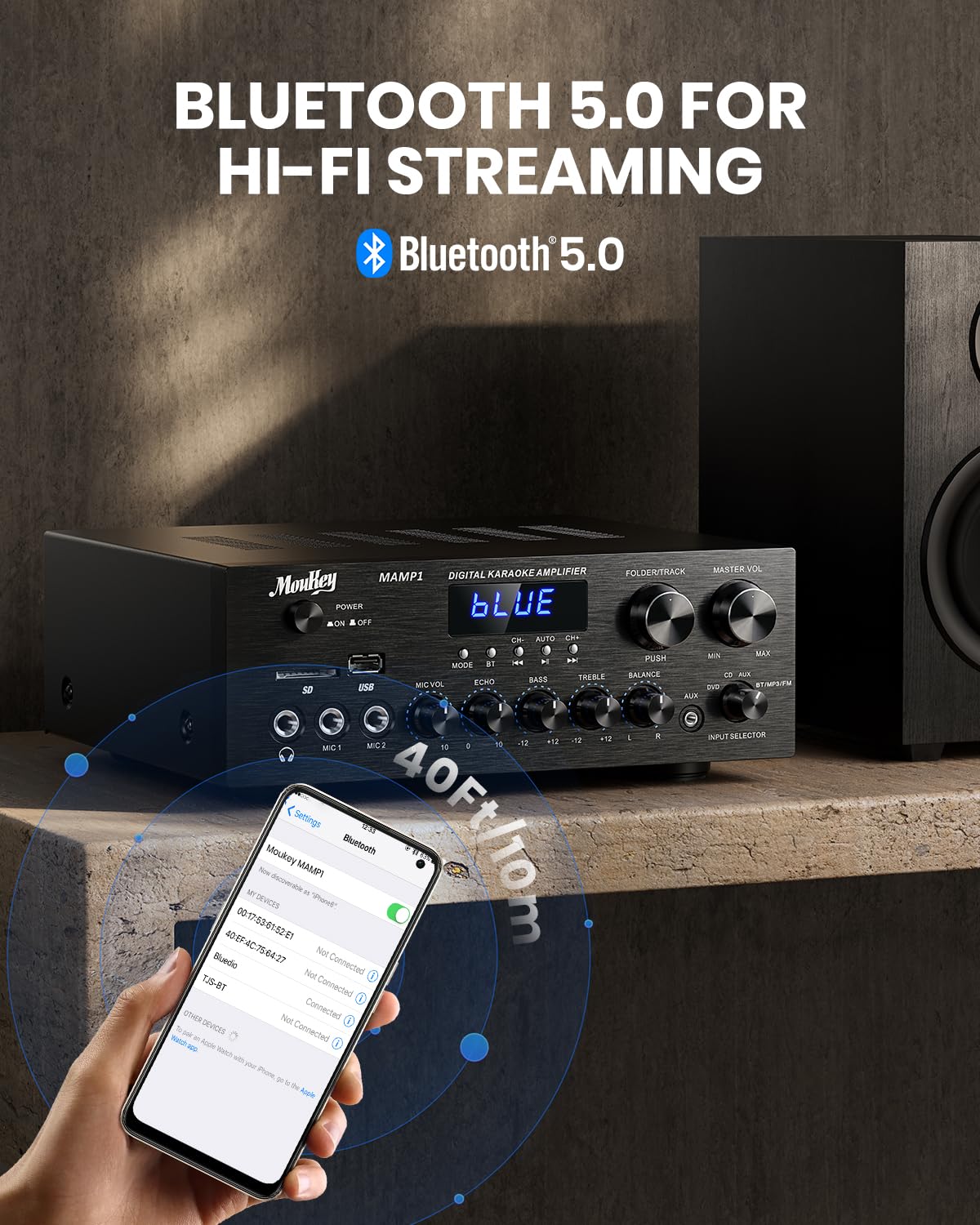
Image: The Moukey MAMP1 amplifier displaying "BLUE" on its screen, indicating Bluetooth mode, with a smartphone showing pairing options.
6.7 USB/SD atkūrimas
Insert a USB drive (max 32GB) or SD card (max 16GB) into the respective slot on the front panel. The amp„Lifier“ automatiškai persijungs į USB / SD režimą ir pradės atkūrimą. Naudokite Ankstesnis, Leisti / pristabdyti, Kitas, ir Aplankas / takelis mygtukai, skirti valdyti atkūrimą.
6.8 FM radijas
Ensure the FM antenna is connected to the rear panel. Select FM mode using the Režimo mygtukas. Naudokite Ankstesnis ir Kitas buttons to tune to radio stations. The LED display will show the current frequency.
7. Priežiūra
Norėdami išlaikyti savo našumą ir išvaizdą ampgyvybingesnis:
- Valymas: Use a soft, dry cloth to wipe the exterior of the unit. Do not use liquid cleaners or abrasive chemicals.
- Vėdinimas: Įsitikinkite, kad ventiliacijos angos yra švarios nuo dulkių ir šiukšlių.
- Saugykla: Jei įrenginį ilgesnį laiką sandėliuosite, atjunkite jį nuo elektros tinklo ir laikykite vėsioje, sausoje vietoje.
8. Problemų sprendimas
If you encounter issues with your Moukey MAMP1 ampdažniausiai pasitaikančias problemas ir jų sprendimus rasite šioje lentelėje:
| Problema | Galima priežastis | Sprendimas |
|---|---|---|
| Nėra galios | Neprijungtas maitinimo laidas; Sugedęs maitinimo lizdas; Išjungtas maitinimo jungiklis. | Ensure power cable is securely connected. Try a different power outlet. Press the power switch to ON. |
| Nėra garso išvesties | Incorrect input selected; Volume too low; Speakers not connected; Speaker wires loose; Mute function active. | Select the correct input source. Increase Master Volume. Check speaker connections and polarity. Ensure mute is off. |
| Bluetooth neprisijungia | Amplifier not in Bluetooth mode; Device too far; Device already paired to another unit. | Užtikrinti amplifier is in Bluetooth mode ("BLUE" on display). Move device closer to amplifier. Disconnect from other devices. |
| Mikrofonas neveikia | Microphone not connected; Mic volume too low; Echo knob set to minimum. | Connect microphone securely. Increase Microphone Volume. Adjust Echo knob. |
| USB / SD atkūrimo problemos | Nepalaikoma file format; USB drive/SD card corrupted; Capacity exceeded. | Užtikrinkite garsą files are in supported formats (e.g., MP3). Try a different USB drive/SD card. Check capacity limits (USB max 32G, SD max 16G). |
Jei problema išlieka ir išbandžius šiuos sprendimus, susisiekite su klientų aptarnavimo tarnyba.
9. Specifikacijos
| Funkcija | Specifikacija |
|---|---|
| Prekės ženklas | Moukey |
| Modelis | MAMP1 |
| Išėjimo galia | 220 vatų |
| Kanalai | 2 |
| ttage | 115 voltai (kintamoji srovė) |
| Garsiakalbio varža | 4-16 omai |
| Bluetooth versija | 5.0 |
| Bluetooth diapazonas | Virš 12 metro (40 pėdų) |
| USB / SD kortelių palaikymas | USB: Max 32GB, SD: Max 16GB |
| Matmenys (I x P x A) | 25 cm x 21.3 cm x 9.5 cm (apytiksliai 10 col. x 8 col. x 4 col.) |
| UPC | 715802779039 |
| Kilmės šalis | Kinija |

Image: The Moukey MAMP1 amplifier with its dimensions labeled.
10. Garantija ir palaikymas
This Moukey MAMP1 Galia Ampkeltuvas ateina su a 1 metų garantija nuo įsigijimo datos. Ši garantija taikoma gamybos defektams ir gedimams įprasto naudojimo sąlygomis.
Garantija netaikoma:
- Damage caused by accident, abuse, misuse, flood, fire, or other natural causes.
- Žala, atsiradusi dėl neleistino modifikavimo ar remonto.
- Damage caused by improper installation or connection.
- Cosmetic damage, such as scratches, dents, and broken plastic on ports.
For warranty claims or technical support, please contact the retailer where you purchased the product or visit the official Moukey website for contact information. Please have your purchase receipt and product model number (MAMP1) ready when contacting support.