
Andoer HDV-201LM
Andoer HDV-201LM 1080p Digital Video Camera User Manual
Model: HDV-201LM
1. Įvadas
This manual provides detailed instructions for the safe and effective use of your Andoer HDV-201LM Digital Video Camera. Please read this manual thoroughly before operating the device and retain it for future reference.
The Andoer HDV-201LM is a 1080p Full HD digital video camera featuring a 5-megapixel CMOS sensor, capable of capturing video at 1920x1080p at 30 frames per second and still images up to 24 megapixels (interpolated). It includes a 16X digital zoom, a 3.0-inch TFT-LCD screen with 270-degree rotation, and supports external accessories via a hot shoe mount.
2. Pakuotės turinys
Patikrinkite, ar pakuotėje yra visi toliau išvardyti daiktai. Jei kurių nors daiktų trūksta arba jie pažeisti, susisiekite su pardavėju.
- 1 x Andoer HDV-201LM Digital Video Camera
- 1 x Camera Bag
- 2 x Rechargeable 3.7V 800mAh Batteries (one pre-installed)
- 1x USB laidas
- 1 x AV kabelis
- 1x nuotolinio valdymo pultas
- 1 x Camera User Manual (English)
- 1 x 0.39X Wide-Angle Lens
- 1 x išorinis mikrofonas
- 1 x Microphone Connection Cable
- 1 x Microphone User Manual (Chinese)
Note: A memory card is not included. A Class 10 or higher SD card (up to 32GB) is strongly recommended for optimal performance.
3. Dalių identifikavimas
Familiarize yourself with the various components of your digital video camera.

3.1 pav.: priekis view of the Andoer HDV-201LM camera with attached wide-angle lens and external microphone.

3.2 pav. Išsamus views highlighting the hot shoe mount, control buttons, battery compartment, and 1/4-inch tripod thread.
- Objektyvas: Pagrindinis optinis komponentas vaizdams ir vaizdo įrašams fiksuoti.
- LCD ekranas: 3.0-inch TFT-LCD display for viewing and menu navigation. Rotates 270 degrees.
- Maitinimo mygtukas: Įjungia arba išjungia fotoaparatą.
- Record/Stop Button: Initiates or stops video recording.
- Nuotraukos mygtukas: Fiksuoja nejudančius vaizdus.
- Priartinimo svirtelė (platinimas/tolinimas): Adjusts digital zoom (Wide/Telephoto).
- Meniu mygtukas: Pasiekia fotoaparato nustatymus.
- Naršymo mygtukai: Naudojamas meniu naršymui ir pasirinkimui.
- Karštos jungties laikiklis: For attaching external accessories like microphones or LED lights.
- Trikojo siūlas: 1/4-inch thread for mounting the camera on a tripod.
- Baterijų skyrius: Talpina įkraunamą bateriją.
- SD kortelės lizdas: Skirta atminties kortelei įdėti.
- USB prievadas: For connecting to a computer or charging.
- AV išvestis: Skirta prijungti prie televizoriaus.
- LED užpildymo lemputė: Suteikia papildomą apšvietimą esant prastam apšvietimui.
4. Sąranka
4.1. Akumuliatoriaus įkrovimas
- Atidarykite akumuliatoriaus skyriaus dangtelį.
- Insert the provided 3.7V 800mAh battery, ensuring correct polarity. If an insulator tab is present, remove it before insertion.
- Uždarykite akumuliatoriaus skyriaus dangtelį.
- Connect the camera to a power source using the USB cable. The charging indicator will illuminate.
- Kai akumuliatorius bus visiškai įkrautas, indikatoriaus lemputė pasikeis arba užges.
4.2. Atminties kortelės įdėjimas
- Įsitikinkite, kad fotoaparatas išjungtas.
- Raskite SD kortelės lizdą.
- Insert a Class 10 or higher SD card (up to 32GB) into the slot until it clicks into place.
- Norėdami išimti, švelniai paspauskite kortelę, kol ji iššoks.
4.3. Attaching the Wide-Angle Lens
- Remove the protective cap from the camera lens.
- Carefully screw the 0.39X wide-angle lens onto the camera's main lens thread until secure.

Figure 4.1: The camera with the 0.39X super wide-angle lens attached, demonstrating its expanded field of view.
4.4. Attaching the External Microphone
- Slide the external microphone into the hot shoe mount on top of the camera.
- Connect the microphone cable to the camera's external microphone input port.
5. Fotoaparato valdymas
5.1. Įjungimas/išjungimas
- To power on, open the LCD screen or press the Galia mygtuką.
- To power off, close the LCD screen or press and hold the Galia mygtuką.
5.2. Vaizdo įrašų įrašymas
- Ensure the camera is in video mode (indicated on the LCD screen). If not, press the Režimas mygtuką, kad perjungtumėte.
- Paspauskite Įrašyti/Sustabdyti button to start recording. A red indicator will typically flash.
- Paspauskite Įrašyti/Sustabdyti mygtuką dar kartą, kad sustabdytumėte įrašymą.
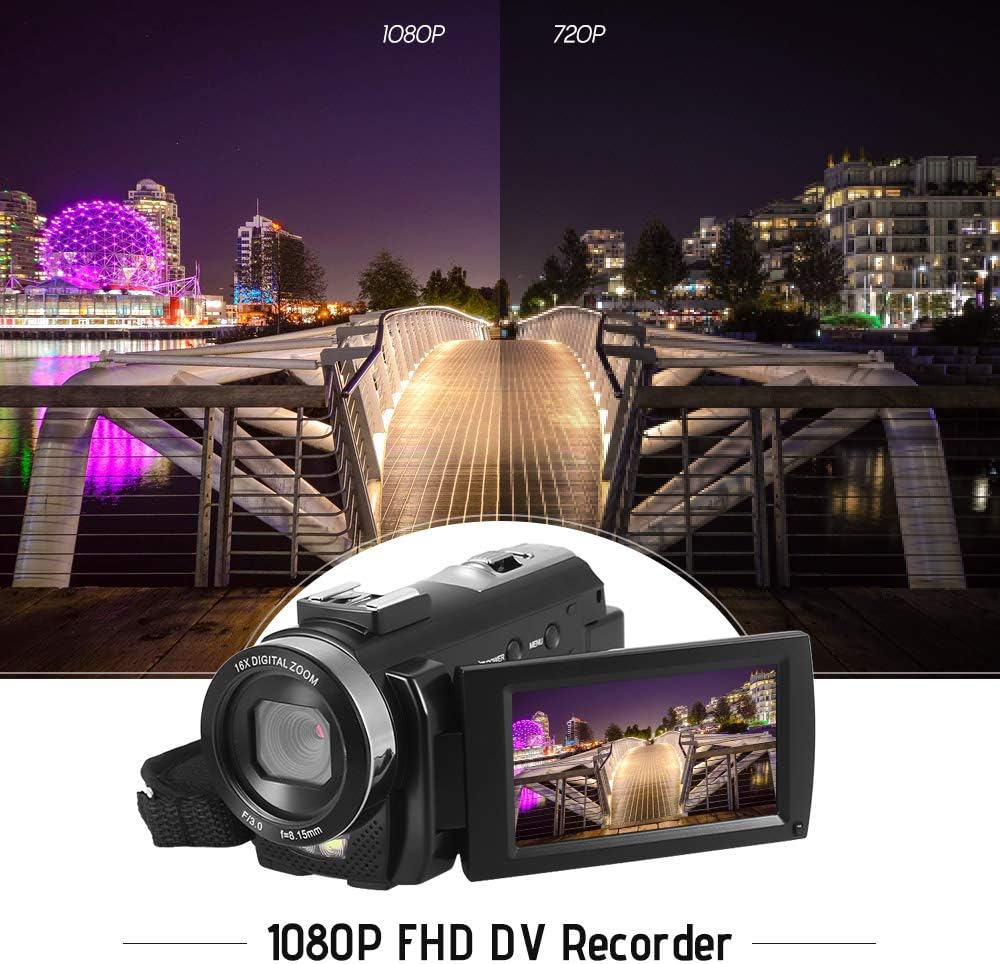
Figure 5.1: The camera is capable of recording in 1080p Full HD and 720p HD resolutions.
5.3. Fotografavimas
- Ensure the camera is in photo mode. If not, press the Režimas mygtuką, kad perjungtumėte.
- Kadruokite kadrą naudodami LCD ekraną.
- Paspauskite Nuotrauka mygtuką, kad užfiksuotumėte vaizdą.
5.4. Skaitmeninio priartinimo naudojimas
- Naudokite W (plataus kampo) ir T (teleobjektyvas) lever to adjust the 16X digital zoom.

Figure 5.2: The camera's 16X digital zoom allows for closer views of subjects.
5.5. Meniu nustatymai
- Paspauskite Meniu mygtuką, kad pasiektumėte nustatymus.
- Use the navigation buttons to scroll through options such as:
- Baltos spalvos balansas: Automatinis, dienos šviesa, debesuota, fluorescencinis, volframas.
- Scenos režimas: Auto, Night, Portrait, Landscape, Backlight, Sport, Party, Beach, High Sensitivity.
- Fotografavimo režimas: Single, Continuous.
- Poveikis: Adjust ±3.0EV.
- Laikmatis: Off, 2s, 5s, 10s.
- Automatinis išjungimas: Off, 1min, 3min, 5min.
- Kalba: English, German, French, Spanish, Italian, Turkish, Russian, Portuguese, Dutch, Simplified Chinese, Traditional Chinese, Japanese, Polish.
- Kitos funkcijos: Face Detection, Smile Capture, Beauty Face, Anti-Shake.
- Paspauskite OK or Įrašyti/Sustabdyti mygtuką, kad patvirtintumėte pasirinkimus.
- Paspauskite Meniu mygtuką dar kartą, kad išeitumėte.
5.6. Prijungimas prie televizoriaus
- Use the provided AV cable to connect the camera's AV output to your television's AV input.
- Select the correct AV input channel on your TV to view camera content.
6. Priežiūra
6.1. Kameros valymas
- Kameros korpusą valykite minkštu, sausu skudurėliu.
- Objektyvui ir LCD ekranui valyti naudokite specializuotą objektyvo valymo šluostę ir tirpalą. Venkite stiprių cheminių medžiagų.
6.2. Sandėliavimas
- Fotoaparatą laikykite vėsioje, sausoje vietoje, toliau nuo tiesioginių saulės spindulių ir ekstremalių temperatūrų.
- Išimkite bateriją, jei fotoaparato nenaudosite ilgesnį laiką.
7. Problemų sprendimas
| Problema | Galima priežastis | Sprendimas |
|---|---|---|
| Kamera neįsijungia. | Baterija išsikrovusi arba netinkamai įdėta. | Charge the battery fully. Ensure the battery is inserted with correct polarity and the insulator tab is removed. |
| Negalima įrašyti vaizdo ar fotografuoti. | Atminties kortelė pilna, neįdėta arba sugadinta. | Įdėkite atminties kortelę. Ištrinkite nereikalingus files or format the card (this will erase all data). Replace the card if corrupted. |
| Prasta vaizdo / vaizdo kokybė. | Insufficient lighting, dirty lens, or incorrect settings. | Ensure adequate lighting. Use the LED fill light if necessary. Clean the lens. Adjust white balance and scene mode settings. |
| Kamera užstringa arba nereaguoja. | Programinės įrangos gedimas arba senka baterija. | Remove and reinsert the battery to reset the camera. Ensure the battery is charged. |
8. Specifikacijos
| Funkcija | Specifikacija |
|---|---|
| Prekės ženklas | Andoer |
| Modelis | HDV-201LM |
| Vaizdo jutiklis | 5 megapikselių CMOS jutiklis |
| Vaizdo raiška | 1920x1080P (FHD 30fps), 1280x720 (HD 30fps), 640x480 (VGA 30fps), 320x240 (VGA 30fps) |
| Vaizdo įrašo formatas | AVI |
| Vaizdo raiška | 24MP (Interpolated), 20MP (Interpolated), 16MP (Interpolated), 12MP (Interpolated), 10MP (Interpolated), 7M Wide (Interpolated), 5MP, 3MP, 2M Wide, VGA |
| Vaizdo formatas | JPG |
| Skaitmeninis priartinimas | 16X |
| Objektyvas | ff (F/3.0 f=8.15mm) |
| Maksimali diafragma | 8.15 F |
| LCD ekranas | 3.0-inch TFT-LCD (16:9), 270-degree rotation |
| Sandėliavimas | SD kortelė (iki 32 GB, rekomenduojama 10 klasė) |
| Ryšys | USB 2.0, AV Output (NTSC/PAL) |
| Maitinimo šaltinis | 1 x 3.7 V 800 mAh įkraunama baterija |
| Nuotolinio valdymo pulto baterija | 1 x 3V CR2025 Battery |
| Operacinės sistemos palaikymas | Windows XP / Vista / 7/8/10 |
| Ypatingos savybės | Anti-shake, Face Detection, Smile Capture, Beauty Face, Self-Timer, LED Fill Light, Hot Shoe Mount |
| Matmenys | 13.5 x 5.5 x 6.5 cm (5.3 x 2.2 x 2.6 colio) |
| Svoris | 273 g (9.6 uncijos) su baterija |
| Spalva | Juoda |
9. Garantija ir palaikymas
Dėl garantijos informacijos ir techninės pagalbos žr. kartu su pirkiniu pateiktus dokumentus arba susisiekite su pardavėju. Išsaugokite pirkimo įrodymą, jei prireiktų pateikti garantijos pretenziją.
Ask a question about this manual
Ask about setup, troubleshooting, compatibility, parts, safety, or missing instructions. Manuals+ will review the question and use this page’s manual context to help answer it.