
1. Įvadas
The WAVLINK 8-Port Fast Ethernet Switch is designed to expand your network connectivity with ease. It features 8 RJ45 ports supporting 10/100 Mbps auto-negotiation and Auto-MDI/MDIX, eliminating the need for crossover cables. This plug-and-play device is ideal for extending network connections in various environments, from home offices to conference rooms, providing a reliable and efficient solution for your networking needs. It incorporates Green IT technology for energy saving.
2. Pakuotės turinys
Patikrinkite, ar jūsų pakuotėje yra šie elementai:
- WAVLINK 8-Port 10/100 Mbps Fast Ethernet Switch (Model RC-N081M2-EU)
- Maitinimo adapteris
- Vartotojo vadovas
3. Produkto ypatybės
- 8 RJ45 10/100 Mbps ports with auto-negotiation and Auto-MDI/MDIX.
- Green IT technology for up to 75% energy savings.
- IEEE802.3x flow control ensures reliable data transfer.
- Durable ABS plastic housing for desktop mounting.
- Plug and Play: No configuration or software required.
- Layer 2 switch functions including IGMP Snooping, Port Mirroring, and Spanning Tree.
4. Aparatūra baigtaview
The WAVLINK Fast Ethernet Switch features a compact design with essential ports and indicators for easy monitoring and connectivity.
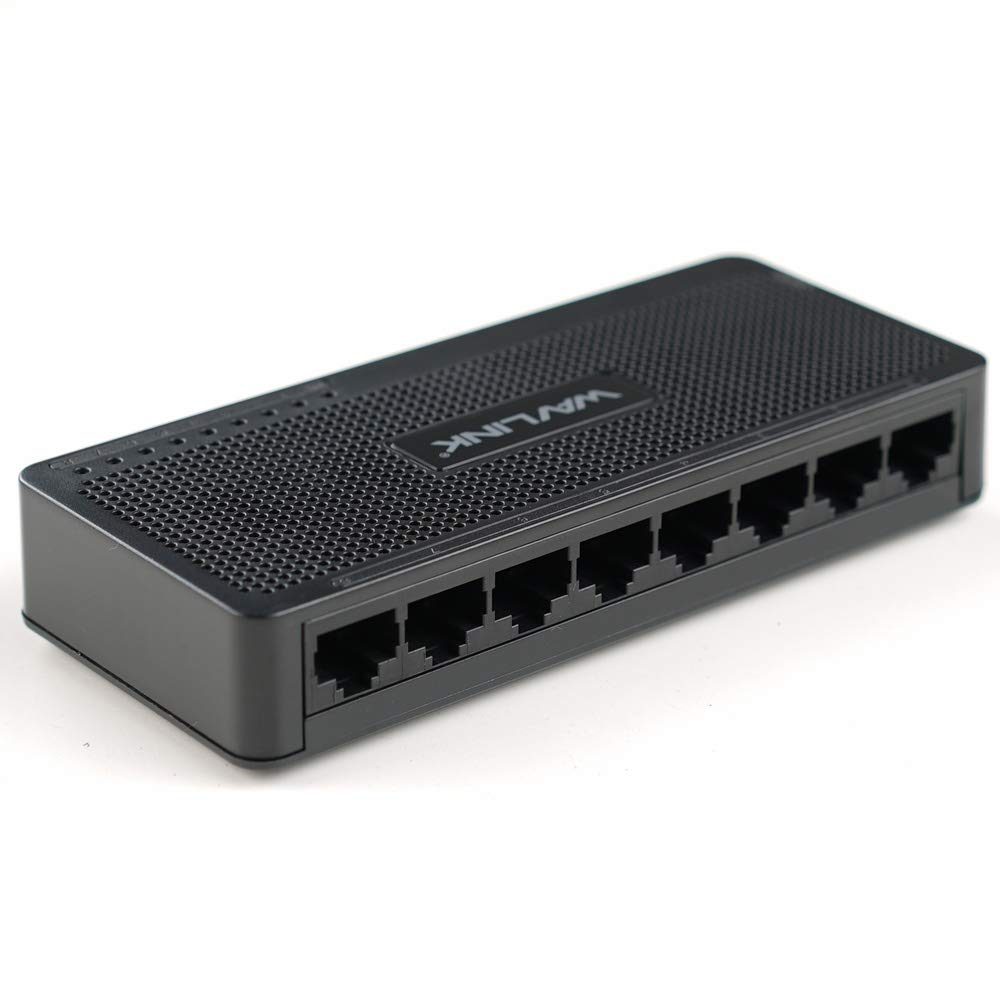
4.1 paveikslas: viršuje view of the WAVLINK 8-Port Fast Ethernet Switch, showing the brand logo and ventilation holes.
Priekinis skydelis
The front panel includes the 8 RJ45 Ethernet ports and LED indicators for status monitoring.

4.2 pav.: priekis view of the switch, displaying the eight RJ45 Ethernet ports.
- RJ45 prievadai (1–8): Connect your network devices (computers, printers, gaming consoles, etc.) using standard Ethernet cables.
- LED indikatoriai: Each port has an associated LED that indicates connection status and activity.
Galinis skydelis
Galiniame skydelyje paprastai yra maitinimo įvesties prievadas.

4.3 pav.: šonas view of the switch, illustrating its compact dimensions (13cm x 5.5cm x 2.1cm) and the power input port.
- Maitinimo įvestis: Prijunkite pridedamą maitinimo adapterį čia.
5. Sąrankos vadovas
The WAVLINK Fast Ethernet Switch is designed for simple plug-and-play installation. No complex configuration is required.
5.1 Jungiklio prijungimas
- Vieta: Choose a stable, flat surface for the switch, such as a desktop. Ensure adequate ventilation around the device.
- Prijunkite maitinimą: Plug the provided power adapter into the switch's power input port, then plug the other end into a standard electrical outlet. The power LED on the switch should illuminate.
- Prijungimas prie maršrutizatoriaus / modemo: Use an Ethernet cable to connect one of the switch's RJ45 ports to a LAN port on your router or modem.
- Prijunkite tinklo įrenginius: Connect your computers, printers, network-attached storage (NAS), gaming consoles, or other network devices to the remaining RJ45 ports on the switch using Ethernet cables.

Figure 5.1: Connection diagram illustrating how the switch integrates into a network, connecting to a router and multiple end devices like computers, printers, and gaming consoles.

Figure 5.2: Visual representation of the plug-and-play setup, showing Ethernet cables ready for connection to the switch's ports.
Once all connections are made, the switch will automatically detect and configure the connected devices. The corresponding port LEDs will light up to indicate an active connection.
6. Jungiklio valdymas
The WAVLINK Fast Ethernet Switch operates automatically once powered on and connected. It functions as a central connection point for your wired network devices.
- Duomenų perdavimas: The switch intelligently forwards data packets between connected devices at 10/100 Mbps speeds.
- Automatinis MDI/MDIX: This feature automatically detects the type of Ethernet cable (straight-through or crossover) and adjusts accordingly, simplifying connections.
- LED indikatoriai:
- Tvirtai žalia: Indicates a stable link connection.
- Mirksi žaliai: Rodo duomenų aktyvumą prievade.
- Išjungta: No device connected or device is powered off.

Figure 6.1: The Ethernet switch acting as a splitter, providing additional wired connections for multiple devices such as laptops, gaming consoles, and printers.
7. Priežiūra
To ensure optimal performance and longevity of your WAVLINK Fast Ethernet Switch, follow these simple maintenance guidelines:
- Laikyti švarų: Regularly wipe the exterior of the switch with a soft, dry cloth. Avoid using liquid cleaners or aerosols.
- Vėdinimas: Įsitikinkite, kad ventiliacijos angos nėra užblokuotos, kad išvengtumėte perkaitimo.
- Saugus išjungimas: If you need to power off the device, disconnect the power adapter from the electrical outlet.
- Aplinkos sąlygos: Operate the switch within the recommended temperature range of 0°C to 40°C (32°F to 104°F). Avoid extreme humidity.
8. Problemų sprendimas
If you encounter issues with your WAVLINK Fast Ethernet Switch, refer to the following common problems and solutions:
8.1 Nėra galios
- Įsitikinkite, kad maitinimo adapteris yra tvirtai prijungtas tiek prie jungiklio, tiek prie veikiančio elektros lizdo.
- Patikrinkite, ar maitinimo lizdas veikia, prijungdami prie jo kitą įrenginį.
8.2 No Link/Activity LED
- Patikrinkite, ar Ethernet kabelis yra tvirtai prijungtas prie komutatoriaus prievado ir tinklo įrenginio.
- Išbandykite kitą Ethernet kabelį, kad atmestumėte gedimo galimybę.
- Įsitikinkite, kad prijungtas tinklo įrenginys yra įjungtas ir veikia tinkamai.
- Pabandykite prijungti įrenginį prie kito jungiklio prievado.
8.3 Mažas tinklo greitis
- Ensure all connected devices and cables support 10/100 Mbps speeds.
- Patikrinkite, ar prijungtuose įrenginiuose nėra per didelio tinklo srauto arba neveikia daug pralaidumo reikalaujančios programos.
- Verify that your router/modem is providing adequate internet speed.
9. Specifikacijos
| Funkcija | Aprašymas |
|---|---|
| Prekės ženklas | WAVLINK |
| Modelio numeris | RC-N081M2-EU |
| Prievadų skaičius | 8 |
| Prievado tipas | RJ45 |
| Duomenų perdavimo sparta | 10/100 Mbps (greitasis eternetas) |
| Automatinės derybos | Palaikoma |
| Automatinis MDI/MDIX | Palaikoma |
| Srauto valdymas | IEEE802.3x |
| Būsto medžiaga | ABS plastikas |
| Montavimas | Darbalaukis |
| Darbinė temperatūra | 0°C ~ 40°C (32°F ~ 104°F) |
| Matmenys (apytiksliai) | 13 cm x 5.5 cm x 2.1 cm (5.1 x 2.2 x 0.8 colio) |
10. Sistemos reikalavimai
The WAVLINK Fast Ethernet Switch is compatible with any operating system that supports standard Ethernet connectivity. No specific drivers are required for the switch itself.
- Microsoft Windows (10/8/2012/7/2008/Vista/2003/XP/2000/Me/NT/98/95/3.11)
- macOS
- NetWare
- UNIX
- Linux
11. Garantija ir palaikymas
„WAVLINK“ produktai sukurti patikimumui ir našumui užtikrinti. Informacijos apie garantiją ir techninę pagalbą ieškokite prie gaminio pridėtoje garantijos kortelėje arba apsilankykite oficialioje „WAVLINK“ svetainėje. websvetainę. Išsaugokite pirkimo čekį garantiniams reikalavimams.
For further assistance, you may contact WAVLINK customer support through their official channels.