
1. Įvadas
This user manual provides detailed instructions for the installation, operation, and maintenance of your BAFANG C965 LCD Display. This display is designed for use with Bafang Mid Drive motors that utilize the UART communication protocol. Please read this manual thoroughly before using the product to ensure safe and correct operation.
The BAFANG C965 LCD Display offers essential information for your electric bicycle, including speed, battery level, assistance level (PAS), and trip data, enhancing your riding experience.
2. Saugos informacija
- Always ensure the display is securely mounted and all cables are properly connected before riding.
- Do not attempt to open or modify the display unit. This may void the warranty and cause damage.
- Keep the display screen clean and free from obstructions to ensure clear visibility of information.
- Avoid exposing the display to extreme temperatures or direct sunlight for prolonged periods.
- In case of malfunction, refer to the troubleshooting section or contact Bafang support.
3. Pakuotės turinys
Patikrinkite, ar pakuotėje yra visi reikalingi daiktai:
- BAFANG C965 LCD Display Unit
- Vairo tvirtinimo laikiklis
- Control Button Unit
- Vartotojo vadovas (šis dokumentas)
4. Sąranka ir diegimas
Follow these steps to install your BAFANG C965 LCD Display:
- Ekrano montavimas: Attach the handlebar mounting bracket to your bicycle's handlebar. The bracket is compatible with handlebar diameters of 22.2mm, 25.4mm, and 31.8mm. Secure the C965 display unit into the bracket.
- Prijungimo kabeliai: Connect the 5-pin female connector from the display unit to the corresponding male connector on your Bafang Mid Drive motor system. Ensure the connection is firm and secure.
- Mounting Control Buttons: Position the external control button unit on your handlebar within easy reach. Connect its cable to the display unit.

Figure 1: Bafang C965 LCD display unit with cables and mounting bracket.
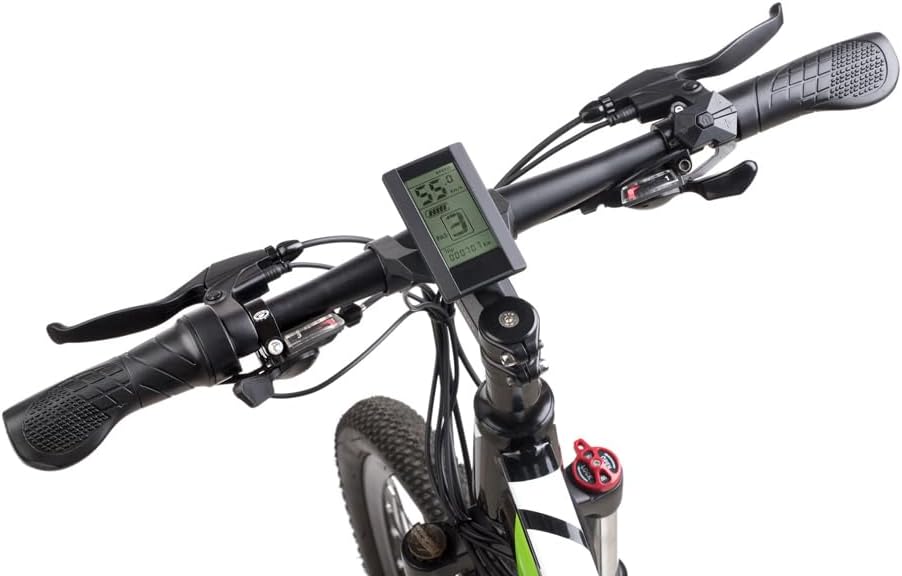
Figure 2: Bafang C965 LCD display mounted on an e-bike handlebar.
5. Naudojimo instrukcijos
Once installed, operate your BAFANG C965 LCD Display as follows:
- Maitinimo įjungimas/išjungimas: Press and hold the power button on the external control unit to turn the display on or off.
- PAS lygio reguliavimas: Use the '+' and '-' buttons on the control unit to increase or decrease the Pedal Assist System (PAS) level.
- Informacinis ekranas: The display cycles through various information screens. Use the 'M' (Mode) button to switch between different data views such as trip distance, total distance, average speed, max speed, and time.
- Priekinių žibintų valdymas: If your e-bike system supports it, a dedicated button or a long press of a specific button (refer to your motor's manual) may control the headlights.

Figure 3: Bafang C965 LCD display showing active riding data.
6. Display Functions and Indicators
The C965 display provides various indicators and data points:
- Greičio ekranas: Shows current speed, average speed (AVG), and maximum speed (MAX).
- Baterijos indikatorius: Rodo likusį akumuliatoriaus įkrovos lygį.
- PAS lygis: Indicates the current pedal assist level (0-9 or 0-3, depending on configuration).
- Mileage Indicator: Shows trip distance and total odometer reading.
- Maitinimo indikatorius: Displays real-time motor power output.
- Laikas: Current time or trip duration.
- Brake Indicator: Šviečia, kai nuspaudžiami stabdžiai.
- Klaidos indikatorius: Displays error codes if a system fault occurs.
- Headlight Power On: Indicates when the e-bike's headlights are active.

Figure 4: Bafang C965 LCD display icons and basic specifications.
7. Priežiūra
To ensure the longevity and optimal performance of your C965 display:
- Valymas: Nuvalykite ekraną ir korpusą minkšta,amp audinys. Nenaudokite abrazyvinių valiklių ar tirpiklių.
- Atsparumas vandeniui: The display has an IP65 waterproof rating, meaning it is protected against dust and low-pressure water jets. Avoid submerging the unit in water.
- Temperatūra: Operate the display within its specified temperature range of -20°C to 60°C.
- Kabelio apžiūra: Periodically check all cables and connectors for signs of wear or damage.
8. Problemų sprendimas
If you encounter issues with your BAFANG C965 LCD Display, consider the following:
- Ekranas neįsijungia:
- Įsitikinkite, kad el. dviračio akumuliatorius yra įkrautas ir tinkamai prijungtas.
- Check all cable connections between the display, control unit, and motor for looseness or damage.
- Patikrinkite, ar maitinimo mygtukas paspaustas teisingai.
- Neteisingi greičio / atstumo rodmenys:
- Patikrinkite greičio jutiklį ir magnetą ant rato, ar jie tinkamai suderinti ir švarūs.
- Ensure the wheel circumference setting in the display's advanced settings (if accessible) is correct.
- Rodomi klaidų kodai:
- Refer to your Bafang motor's specific error code list for detailed explanations and solutions. Common issues include motor, controller, or sensor faults.
- Often, turning the system off and on again can clear temporary errors.
- Mygtukai nereaguoja:
- Check the connection of the external control button unit to the display.
- Ensure buttons are not physically stuck.
If problems persist after attempting these steps, contact Bafang customer support or your authorized dealer for assistance.
9. Specifikacijos
| Funkcija | Specifikacija |
|---|---|
| Modelio numeris | C965 |
| Ekrano tipas | LCD |
| Ryšio technologija | Laidinis |
| Jutiklio tipas | Speed sensor, Voltage jutiklis |
| Montavimo tipas | Vairo laikiklis |
| Žmogaus sąsajos įvestis | Mygtukai |
| Atsparumo vandeniui įvertinimas | IP65 |
| Max Speed Limit | 70 km/val |
| Baterijos tiekimas ttage | 36V/48V |
| Darbinė temperatūra | -20°C iki 60°C |
| Suderinamas vairo skersmuo | 22.2mm / 25.4mm / 31.8mm |
| Jungties tipas | 5 kaiščių moteriška |
| Pakuotės matmenys | 9.65 x 9.4 x 9.4 cm |
| Pakuotės svoris | 159 gramų |
| UPC / GTIN | 779296258319 |
10. Garantija ir palaikymas
BAFANG products are typically covered by a manufacturer's warranty against defects in materials and workmanship. The specific terms and duration of the warranty may vary by region and retailer. Please retain your proof of purchase for any warranty claims.
For technical support, warranty inquiries, or spare parts, please contact your original retailer or visit the official BAFANG websvetainė, kurioje pateikiama klientų aptarnavimo kontaktinė informacija.