
1. Įvadas
This manual provides essential information for the safe and effective operation and maintenance of your Airthereal APH230C Floor Air Purifier. Please read all instructions carefully before use and retain this manual for future reference.
The Airthereal APH230C is designed to improve indoor air quality by filtering airborne particles such as allergens, pollen, dust, smoke, and pet dander, utilizing a True HEPA filtration system.
2. Saugos instrukcijos
Kad sumažintumėte gaisro, elektros smūgio ar sužalojimo riziką, visada laikykitės pagrindinių saugos priemonių:
- Prieš pradėdami naudoti prietaisą, perskaitykite visas instrukcijas.
- Nenaudokite ventiliatoriaus, kurio laidas ar kištukas pažeistas. Išmeskite ventiliatorių arba grąžinkite jį į įgaliotą techninės priežiūros įstaigą patikrinti ir (arba) taisyti.
- Netieskite laido po kilimu. Neuždenkite laido kilimėliais, bėgiais ar panašiomis dangomis. Laidą laikykite toliau nuo eismo zonos ir ten, kur jis neužkliūtų.
- Use this appliance only for its intended use as described in this manual. Any other use not recommended by the manufacturer may cause fire, electric shock, or injury to persons.
- Always unplug the appliance when not in use, when moving it from place to place, or before cleaning.
- Nenaudokite prietaiso, kai yra sprogių ir (arba) degių garų.
- Do not place any part of the appliance near an open flame, cooking or other heating appliance.
- Nenaudokite prietaiso su pažeistu laidu ar kištuku, taip pat po to, kai prietaisas veikia netinkamai, buvo numestas ar kaip nors pažeistas.
- Venkite kontakto su judančiomis dalimis.
- Nemerkite prietaiso į vandenį ar kitus skysčius.
- Šis prietaisas nėra skirtas naudoti asmenims (įskaitant vaikus), kurių fizinės, jutimo ar psichikos negalios arba neturintys patirties ir žinių, nebent už jų saugumą atsakingas asmuo juos prižiūrėtų arba instruktuotų, kaip naudoti prietaisą.
- Vaikus reikia prižiūrėti, kad jie nežaistų su prietaisu.
3. Pakuotės turinys
- 1 x Airthereal APH230C Air Purifier Unit
- 1 x True HEPA 3-in-1 Filtration Filter (pre-installed)
- 1 x Vartotojo vadovas

4. Produktas baigtasview
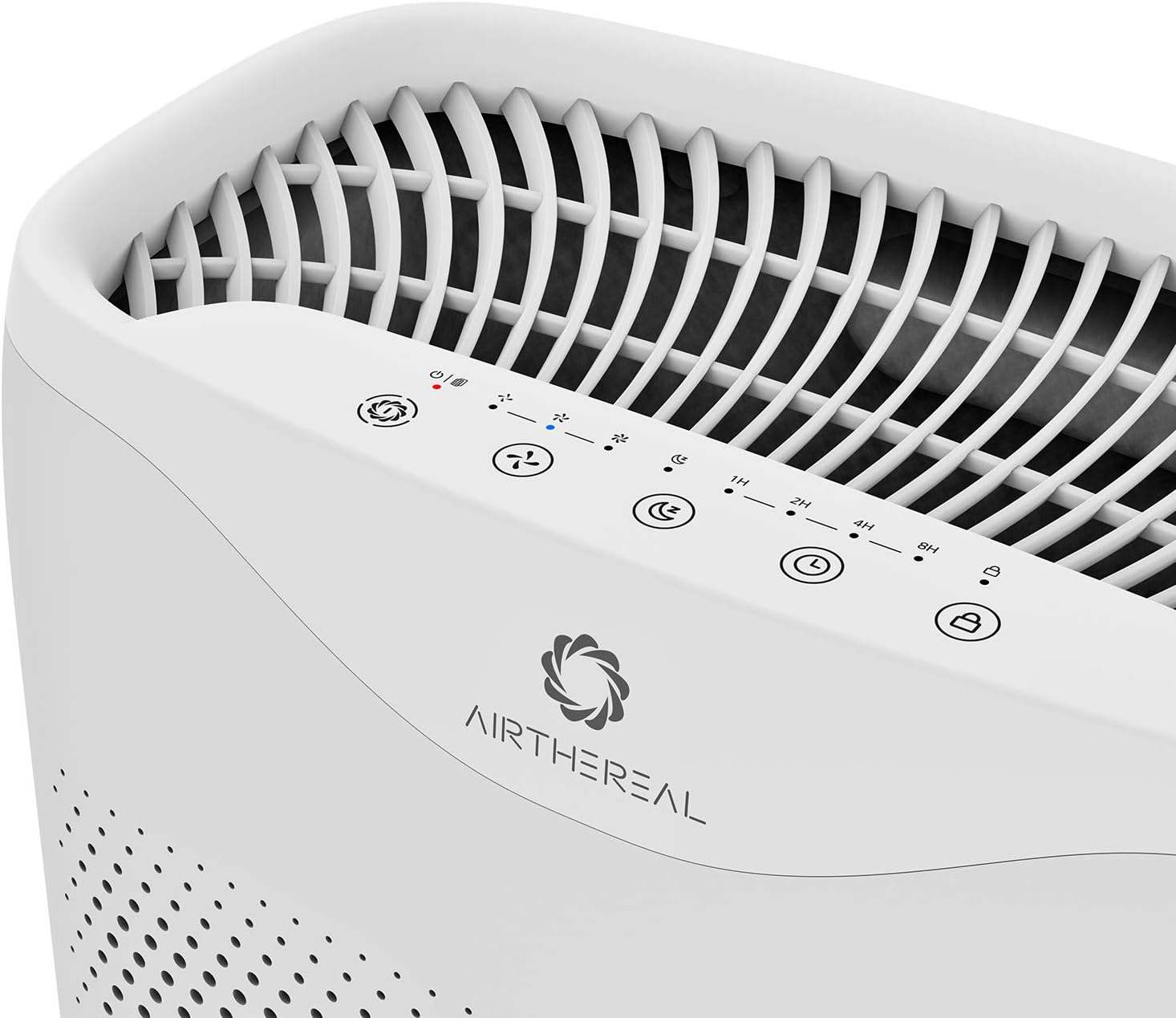
The Airthereal APH230C features a sleek design with intuitive controls and efficient air intake. Key components include the main unit, control panel, air intake vents, and the multi-layer filter.

5. Sąranka
- Išpakuokite įrenginį: Atsargiai išimkite oro valytuvą iš pakuotės.
- Nuimkite filtro pakuotę: Open the front cover of the air purifier. The filter is pre-installed but wrapped in plastic for protection. Remove the plastic packaging from the filter before use.
- Įdiegti filtrą: Place the filter back into the unit, ensuring it is seated correctly. Close the front cover securely.
- Vieta: Place the air purifier on a firm, level surface. Ensure there is at least 6 inches (15 cm) of space around all sides of the unit for optimal airflow.
- Maitinimo jungtis: Prijunkite maitinimo laidą į standartinį elektros lizdą.
6. Naudojimo instrukcijos
Valdymo skydelis yra įrenginio viršuje.
- Maitinimo mygtukas (⏻): Paspauskite norėdami įjungti arba išjungti įrenginį.
- Fan Speed Button (🌪): Cycle through fan speeds: Low (1), Medium (2), High (3).
- Sleep Mode Button (🌛): Activates sleep mode, which dims display lights and sets the fan to its lowest, quietest setting (24 decibels).
- Laikmačio mygtukas (⏱): Set the operating time for 2, 4, or 8 hours. The unit will automatically turn off after the set time.
- Auto Mode Button (A): The purifier will automatically adjust the fan speed based on the detected air quality.
- UV Light Button (UV): Activates or deactivates the UV-C light for enhanced sterilization.
- Child Lock Button (🔒): Press and hold for 3 seconds to activate/deactivate the child lock, preventing accidental changes to settings.

7. Priežiūra
Reguliarus valytuvo valymas užtikrina optimalų veikimą ir pailgina jo tarnavimo laiką.
Filtro keitimas
The "On/Off" button will light up and flash when it's time to replace the filter. It is recommended to replace the filter every six months for optimal performance, though this may vary based on usage and air quality.
- Išjunkite ir atjunkite: Turn off the air purifier and unplug it from the power outlet.
- Nuimkite priekinį dangtelį: Gently pull the front cover to detach it from the unit.
- Pašalinti seną filtrą: Pull the tab on the old filter to remove it from the unit.
- Įdiekite naują filtrą: Unwrap the new filter and insert it into the unit, ensuring the pull tab faces outwards.
- Replace Front Cover: Align the front cover and push it back into place until it clicks securely.
- Iš naujo nustatyti filtro indikatorių: Plug in the unit and turn it on. Press and hold the "On/Off" button for 5 seconds until the light stops flashing, indicating the filter timer has been reset.
Įrenginio valymas
- Nuvalykite įrenginio išorę minkštu, sausu skudurėliu.
- Nenaudokite abrazyvinių valiklių ar tirpiklių.
- The pre-filter layer of the 3-in-1 filter can be gently vacuumed to remove large dust particles between replacements.
8. Problemų sprendimas
| Problema | Galima priežastis | Sprendimas |
|---|---|---|
| Įrenginys neįsijungia. | Neįjungta; maitinimas išjungtastage; front cover not closed properly. | Ensure power cord is securely plugged in; check power outlet; ensure front cover is fully closed. |
| Oro srautas silpnas. | Filter is dirty or clogged; air intake/outlet blocked. | Replace filter; ensure no obstructions around air intake/outlet. |
| Neįprastas triukšmas. | Filtras netinkamai sumontuotas; įrenginio viduje yra pašalinis objektas. | Reinstall filter correctly; check for and remove any foreign objects (unplug first). |
| Filtro indikatoriaus lemputė dega ir po pakeitimo. | Filtro laikmatis nebuvo nustatytas iš naujo. | Press and hold the "On/Off" button for 5 seconds to reset the filter timer. |
9. Specifikacijos
- Modelis: APH230C
- Prekinis ženklas: ORO
- Gaminio matmenys: 7.5 "D x 13" P x 20" A
- Prekės svoris: 10 svaro
- Maitinimo šaltinis: Su laidu elektra
- Spalva: Baltas
- CADR: 135 CFM (230 m³/val.)
- Aprėpties sritis: Up to 600 ft² (55 m²) in 30 minutes, 315 ft² (30m²) in 14 minutes.
- Triukšmo lygis (miego režimas): < 24 dB
- Filtro tipas: Tikras HEPA 3-Stage Filtravimas

10. Garantija ir palaikymas
Airthereal products come with a standard manufacturer's warranty. For detailed warranty information, product support, or to purchase replacement filters, please visit the official Airthereal websvetainėje arba susisiekite su klientų aptarnavimo tarnyba.
Websvetainė: www.airthereal.com
Klientų aptarnavimas: Žiūrėkite savo produkto pakuotę arba oficialų websvetainė, kurioje rasite kontaktinius duomenis.