
1. Įvadas ir pabaigaview
Thank you for choosing the Comix S3508D Desktop Micro-Cut Paper Shredder. This manual provides essential information for the safe and efficient operation, maintenance, and troubleshooting of your new shredder. Please read it thoroughly before use and retain it for future reference.
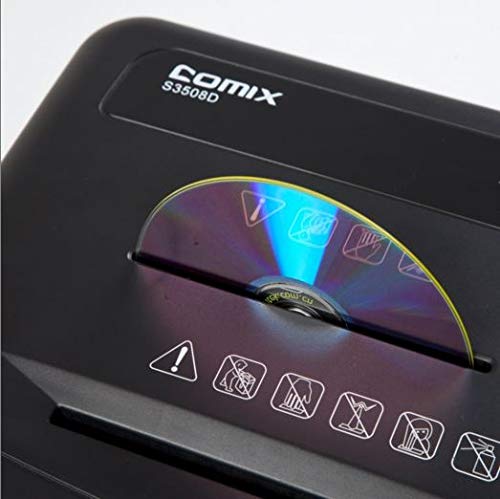
The Comix S3508D is designed for personal and home office use, offering secure destruction of sensitive documents, CDs/DVDs, and credit cards with its micro-cut technology. Key features include:
- Continuous shredding for up to 30 minutes.
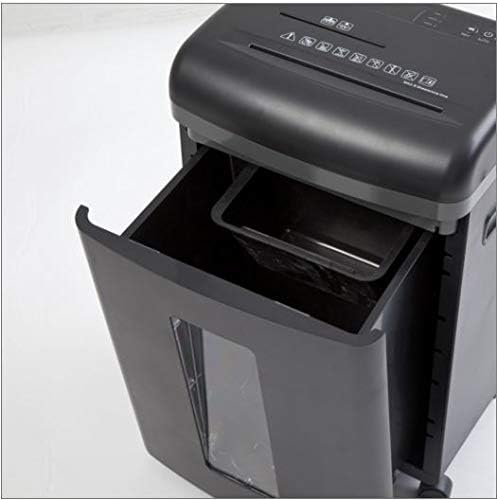
- Separate waste bin design for CD/DVD fragments, allowing for easy waste separation.
- Energy-saving technology that automatically shuts off the device after 30 minutes of inactivity.
2. Svarbios saugos instrukcijos
Kad sumažintumėte sužalojimo ar sugadinimo riziką, laikykitės šių saugos priemonių:
- Laikyti vaikams ir naminiams gyvūnėliams nepasiekiamoje vietoje. The shredder has sharp blades and moving parts.
- Avoid loose clothing, jewelry, and long hair near the paper entry slot.
- Do not insert fingers or hands į popieriaus įvesties angą.
- Do not spray any flammable products onto the shredder or use it near flammable materials.
- Unplug the shredder before moving, cleaning, or emptying the waste bin.
- Do not shred metal objects, wet paper, or adhesive labels as this can damage the blades.
- Operate the shredder on a flat, stable surface.
- Do not overload the shredder. Refer to the maximum sheet capacity in the specifications.
- Do not open the shredder housing. Viduje nėra dalių, kurias galėtų prižiūrėti naudotojas.
3. Gaminio komponentai
Familiarize yourself with the main parts of your Comix S3508D shredder:
- Shredder Head: Contains the cutting mechanism and control panel.
- Popieriaus įvedimo anga: For inserting documents.
- CD/DVD Entry Slot: A separate slot for optical media.
- Valdymo jungiklis: For selecting ON/OFF, Auto, Forward, and Reverse modes.
- Šiukšlių dėžė: Collects shredded paper and media.
- CD/DVD Waste Compartment: A smaller, separate compartment within the main bin for shredded optical media.
- Ratukai: Ratukai lengvam judėjimui.
4. Sąranka
- Išpakuoti: Atsargiai išimkite smulkintuvą iš pakuotės. Išsaugokite pakuotę būsimam transportavimui ar saugojimui.
- Padėtis: Place the shredder on a level and stable surface. Ensure there is enough space around the unit for proper ventilation and access to the power outlet.
- Prijunkite maitinimą: Prijunkite maitinimo laidą į standartinį elektros lizdą.
- Check Bin: Įsitikinkite, kad šiukšliadėžė tinkamai įdėta į smulkintuvo korpusą. Smulkintuvas neveiks, jei šiukšliadėžė nebus tinkamai įdėta.
5. Naudojimo instrukcijos
Valdymo jungiklio funkcijos:
- IŠJUNGTA: Smulkintuvas yra išjungtas.
- AUTOMATINIS: The shredder is in standby mode. It will automatically start when paper is inserted and stop when shredding is complete. This is the recommended setting for normal operation.
- PIRMYN: Manually runs the shredder forward. Use this for continuous shredding if needed, but be mindful of the duty cycle.
- GRĮŽTI: Manually runs the shredder in reverse. Use this to clear paper jams.
Dokumentų naikinimas:
- Nustatykite valdymo jungiklį į AUTO.
- Insert up to 8 sheets of A4 (70gsm) paper straight into the paper entry slot. The shredder will automatically start and stop.
- Neviršykite maksimalaus lapų kiekio, kad išvengtumėte įstrigimo ir pažeidimų.
Shredding CDs/DVDs and Credit Cards:
- Nustatykite valdymo jungiklį į AUTO.
- Insert one CD/DVD or credit card at a time into the dedicated CD/DVD entry slot.
- The shredded media will fall into the separate CD/DVD waste compartment within the main bin.
Darbo ciklas:
The Comix S3508D is designed for a continuous run time of 30 minutes ON, followed by a 40 minutės IŠJUNGTA cool-down period. Exceeding the duty cycle may cause the shredder to overheat and activate its thermal protection, temporarily shutting down the unit. Allow it to cool down before resuming operation.
6. Priežiūra
Šiukšlių dėžės ištuštinimas:
- Always set the control switch to IŠJUNGTA and unplug the shredder before emptying the bin.
- Ištraukite šiukšliadėžę iš smulkintuvo priekio.
- Dispose of the shredded waste. Remember to empty the separate CD/DVD compartment as well.
- Slide the waste bin back into place until it clicks securely.
Shredder Oiling:
Regular oiling is recommended to maintain optimal performance and extend the life of your shredder, especially after emptying the waste bin 2-3 times or after heavy use. Use shredder oil (vegetable oil is not recommended).
- Nustatykite valdymo jungiklį į IŠJUNGTA.
- Ant popieriaus įvedimo angos užtepkite ploną smulkintuvo alyvos sluoksnį.
- Nustatykite valdymo jungiklį į PIRMYN for 2-3 seconds to distribute the oil, then switch back to IŠJUNGTA.
Valymas:
Smulkintuvo išorę nuvalykite minkštu, sausu skudurėliu. Nenaudokite abrazyvinių valiklių ar tirpiklių.
7. Problemų sprendimas
| Problema | Galima priežastis | Sprendimas |
|---|---|---|
| Smulkintuvas neveikia. | 1. Maitinimo laidas neįjungtas.
2. Waste bin not properly inserted. 3. Perkaitimas. |
1. Ensure power cord is securely plugged into an outlet.
2. Push the waste bin firmly into place. 3. Allow the shredder to cool down for 40 minutes. |
| Popieriaus strigtis. | 1. Too much paper inserted.
2. Paper inserted incorrectly. |
1. Set switch to ATvirkščiai to clear paper. Remove excess paper.
2. If jam persists, unplug, carefully remove paper, then plug in and try ATvirkščiai vėl. |
| Shredder runs continuously in AUTO mode. | Sensor is blocked or dirty. | Unplug the shredder and clean the paper entry sensor (usually a small clear window) with a soft cloth. |
8. Specifikacijos
| Funkcija | Detalė |
|---|---|
| Prekės ženklas | Komiksas |
| Modelis | S3508D |
| Smulkinimo tipas | Mikro kirpimas |
| Smulkinimo dydis | 2 x 12 mm |
| Standard Sheet Capacity (70gsm) | 8 XNUMX lapų |
| CD/DVD/Card Capacity | 1 vienu metu |
| Įvesties plotis | 220 mm |
| Smulkinimo greitis | 2.3 meters/minute |
| Darbo ciklas | 30 minutes įjungta / 40 minučių išjungta |
| Ypatinga funkcija | Energijos taupymo režimas |
| Prekės svoris | 2.2 svaro |
| ASIN | B083XFNHQH |
9. Garantija ir palaikymas
Comix products are manufactured to high-quality standards. For warranty information, please refer to the warranty card included with your purchase or contact your retailer. For technical support or service inquiries, please contact Comix customer service through the contact information provided on the official Comix websvetainėje arba pirkimo dokumentuose.