
1. Įvadas
Thank you for choosing the SUNSHINE P-1503T Analog Power Supply. This manual provides essential information for the safe and efficient operation, setup, maintenance, and troubleshooting of your device. Please read this manual thoroughly before using the product and keep it for future reference.
The SUNSHINE P-1503T is a versatile 15-volt, 3-amp analog power supply designed primarily for mobile phone maintenance. It features touch-sensitive controls and includes two USB ports for convenient mobile testing and charging.
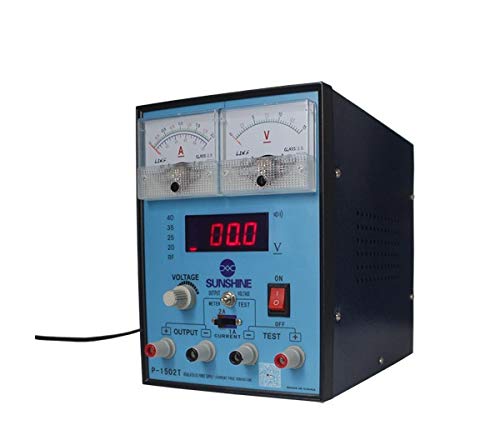
1 pav.: priekis view of the SUNSHINE P-1503T Analog Power Supply. This image shows the device's display, control knobs, and output terminals, including the two USB ports.
2. Saugos informacija
ĮSPĖJIMAS: Nesilaikant šių saugos nurodymų, gali kilti elektros smūgis, gaisras arba sunkūs sužalojimai.
- Visada junkite maitinimo šaltinį prie įžeminto elektros lizdo.
- Nenaudokite įrenginio šlapioje arba damp sąlygas.
- Užtikrinkite tinkamą vėdinimą, kad išvengtumėte perkaitimo. Neužblokuokite ventiliacijos angų.
- Neatidarykite casinMaitinimo šaltinio g. Viduje nėra dalių, kurias galėtų aptarnauti vartotojas. Visus techninės priežiūros darbus patikėkite kvalifikuotiems darbuotojams.
- Kai įrenginys įjungtas, venkite liesti išvesties gnybtų.
- Disconnect the power cord from the outlet before cleaning or if the device will not be used for an extended period.
- Naudokite tik nurodytą įėjimo garsumątage (15 Volts) as indicated on the device.
3. Sąranka
3.1 Išpakavimas
- Atsargiai išimkite maitinimo šaltinį iš pakuotės.
- Inspect the device for any signs of damage during transit. If damaged, do not use and contact your supplier.
- Ensure all accessories are present (e.g., power cord, test leads if included).
3.2 Prijungimas prie elektros tinklo
- Place the power supply on a stable, level surface with adequate ventilation.
- Connect the provided power cord to the power input socket on the rear of the device.
- Kitą maitinimo laido galą prijunkite prie tinkamo įžeminto elektros lizdo.
4. Naudojimo instrukcijos
4.1 Įjungimas / išjungimas
- To power on the device, press the power switch located on the front panel. The display will illuminate.
- To power off, press the power switch again.
4.2 Adjusting Output
The P-1503T is an analog power supply, typically meaning voltage and current are set via rotary knobs.
- Naudokite ttage Reguliavimo rankenėlė norint nustatyti norimą išėjimo garsumątage. Monitor the voltage ekranas.
- Naudokite Srovės reguliavimo rankenėlė to set the desired current limit. Monitor the current display.
- The device emits a sound upon touch, indicating interaction with its controls.
4.3 USB prievadų naudojimas
The power supply features two USB ports on the front panel:
- USB Port 1 (Mobile Testing): Connect a mobile device here for diagnostic purposes. This port is designed to provide stable power for testing mobile phone circuits.
- USB Port 2 (Mobile Charging): Connect a mobile device here for charging. This port delivers power suitable for recharging mobile phone batteries.
Note: Always ensure the output voltage and current settings are appropriate for the device being connected to prevent damage.
5. Priežiūra
5.1 Valymas
- Ensure the power supply is turned off and disconnected from the main power outlet before cleaning.
- Prietaiso išorę nuvalykite minkšta, sausa šluoste.
- Do not use liquid cleaners, aerosols, or solvents, as these may damage the casing arba vidiniai komponentai.
- Laikykite ventiliacijos angas švarias nuo dulkių ir šiukšlių.
5.2 Saugykla
Kai nenaudojate, maitinimo šaltinį laikykite vėsioje, sausoje vietoje, toliau nuo tiesioginių saulės spindulių ir ekstremalių temperatūrų.
6. Problemų sprendimas
| Problema | Galima priežastis | Sprendimas |
|---|---|---|
| Įrenginys neįsijungia. |
|
|
| Nėra išėjimo tūriotage/dabartinis. |
|
|
| USB ports not working. |
|
|
7. Specifikacijos
| Funkcija | Detalė |
|---|---|
| Prekės ženklas | SAULĖS |
| Modelis | P-1503T |
| Suderinami įrenginiai | Mobilusis Telefonas |
| Jungties tipas | ATX |
| Formos faktorius | ATX |
| Aušinimo būdas | Oras |
| Maksimalus įvesties tūristage | 15 voltų |
| Minimalus įvesties tūristage | 15 voltų |
| Gamintojas | SAULĖS |
| System Bus Connector Type | Jungtis 2 |
| Maitinimo šaltinis | Išorinis |
| ASIN | B0847QS2FX |
8. Garantija ir palaikymas
This product is covered by a standard manufacturer's warranty. Please refer to the warranty card included with your purchase for specific terms and conditions. For technical support, service, or warranty claims, please contact your retailer or the manufacturer directly.
For the latest information and support, please visit the official SUNSHINE websvetainę (jei yra).